Have you ever stared at your Philadelphia water bill wondering about the easiest way to pay it? I’ve been there too, and let me tell ya, figuring out the Philadelphia Water Revenue Bureau payment system doesn’t have to be a headache!
As a Philly resident for years I’ve tried every payment method possible and discovered some real time-savers. Today I’m sharing everything I’ve learned about the Philadelphia water bill payment process to make your life easier.
What is the Philadelphia Water Revenue Bureau?
The Water Revenue Bureau (WRB) is the city department responsible for collecting payments for water and sewer services in Philadelphia. They handle everything from billing to customer service for Philadelphia residents and businesses.
Their main job includes
- Sending water bills to Philadelphia properties
- Processing payments through various methods
- Managing water customer accounts
- Providing assistance programs for those who struggle with payments
- Handling billing disputes and inquiries
Your Philadelphia Water Bill Payment Options
Let me break down all the ways you can pay your Philly water bill. Trust me, there’s definitely an option that’ll work for your lifestyle!
1. Pay Online Through MyPhillyWaterBill
This is my personal favorite method. The online portal at MyPhillyWaterBill offers convenience and several payment options:
- eCheck payments – Completely FREE! Just like writing a check but online
- AutoPay – Set up automatic monthly payments (my personal time-saver)
- Credit/debit card payments – Convenience fee applies ($2.95 for residential accounts)
- Paperless billing – Save trees and never miss a bill
To get started, you’ll need:
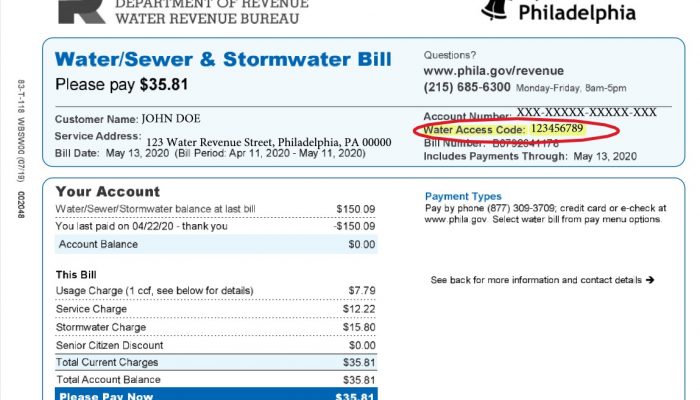
- Your nine-digit Water Access Code (found on your bill)
- Your ZIP code
- Banking information if paying by eCheck
2. Pay by Phone
Not a fan of websites? No problem! You have two phone options
- Call (215) 685-6300 to pay with eCheck. eCheck is always FREE of processing charges. Banking account and routing numbers required to pay with eCheck – it’s like writing a check.
- Pay through an interactive voice system by calling (877) 309-3709 for credit/debit card payments.
When I’m in a rush, I find the phone system pretty straightforward, but keep your Water Access Code handy!
3. Pay by Mail
Sometimes old-school is the way to go! Simply:
- Detach the return portion of your bill
- Include your check or money order made payable to: “Water Revenue Bureau”
- Mail to:
Water Revenue BureauP.O. Box 41496Philadelphia, PA 19101-1496
Just remember to send it about a week before the due date so it arrives on time!
4. Pay in Person
If you prefer face-to-face transactions or need to pay with cash, visit one of these authorized payment centers:
Center City
- Municipal Services Building
- 1401 JFK Blvd., Concourse Level
- Hours: Monday through Friday, 8:30 a.m. – 5 p.m.
- Accepts all payment types including cash
Northeast Philadelphia
- 7522 Castor Ave.
- Hours: Monday through Friday 8:30 a.m. – 5 p.m.
- No cash payments accepted here
North Philadelphia
- 2761 N 22nd St.
- Hours: Monday through Friday 8:30 a.m. – 5 p.m.
- No cash payments accepted here
Understanding Fees When Paying Your Water Bill
Nobody likes surprise fees! Here’s a breakdown of what to expect:
Online and Phone Payment Fees
- Automatic bank payments: FREE
- eCheck payments: FREE
- Debit/credit card (residential): $2.95
- Debit/credit card (commercial): $15.95
In-Person Payment Fees
- Debit card: $3.45
- Credit card: 2.10% or $1.50 minimum
- Note: VISA debit is not accepted for in-person payments (weird, right?), but you can use it online
Other Fees to Watch Out For
- Returned checks: $20 (ugh, those hurt!)
- Late fees: 5% initially, plus 0.5% for each month your charges remain unpaid
What You Need to Know About Your Water Account
Creating a MyPhillyWaterBill Account
I strongly recommend setting up an online account. Here’s why:
- View bills from the last 13 months
- Set up AutoPay and never worry about due dates
- Enroll in paperless billing
- Monitor your water usage
- Receive important account notifications
To register for an account, visit secure8.i-doxs.net/CityOfPhiladelphiaWRB/SignIn.aspx and click “Register here.”
How Payments Are Applied
This is important if you’re making partial payments! When you don’t specify how to apply your payment, the system distributes it in this order:
- Oldest debts first
- Sundry invoices (like bad check fees)
- Penalties and interest
- Stormwater charges
- Water and sewer service charges
- Payment agreements
- Repair charges
- HELP Loans
If you use MyPhillyWaterBill, you can actually choose how to allocate your payment, which is super helpful if you’re trying to pay off specific charges.
Help With Paying Your Water Bill
We all go through tough times, and the City of Philadelphia gets that. If you’re struggling to pay your water bill, don’t ignore it – there are several assistance programs available:
Payment Agreements
Can’t pay the full amount? You can set up a payment plan by:
- Contacting the Water Revenue Bureau at (215) 685-6300
- Visiting one of the payment centers in person
- Setting up a plan through your MyPhillyWaterBill account
Senior Citizen Discount
If you’re 65 or older and the primary name on the water bill, you may qualify for a 25% discount on your water charges. This is a huge help for folks on fixed incomes!
Customer Assistance Programs
Philadelphia offers several programs for low-income residents:
- Tiered Assistance Program (TAP)
- Water Bill Assistance Fund
- Payment agreements with reduced interest
I’ve seen these programs help friends and family who were struggling, so don’t hesitate to ask about them!
Disputing a Water Bill
Received a bill that seems way off? It happens! Here’s what to do:
- Check for obvious leaks in your home
- Compare with your typical water usage
- Contact the Water Revenue Bureau at (215) 685-6300
- Request an investigation of your meter or billing
The sooner you dispute an incorrect bill, the better. Don’t wait until you’re facing a potential shut-off notice.
Water Shutoff Information
Nobody wants to think about it, but it’s important to know the rules:
- Water service can be shut off for non-payment
- Shutoffs typically don’t happen in winter months
- You’ll receive multiple notices before a shutoff occurs
- To restore service after a shutoff, you’ll need to pay a portion of your balance plus restoration fees
The best way to avoid shutoffs is to communicate with the Water Revenue Bureau if you’re having trouble paying. They’d rather work with you than cut your service!
Frequently Asked Questions
How can I check my current water bill balance?
You can check your balance through:
- MyPhillyWaterBill website
- Calling (215) 685-6300
- Visiting a payment center in person
What if I need a copy of an old water bill?
You can access bills from the past 13 months through MyPhillyWaterBill. For older bills, contact the Water Revenue Bureau at (215) 685-6300.
How do I update my mailing address for my water bill?
You can update your address through:
- Your MyPhillyWaterBill account
- Calling (215) 685-6300
- Visiting a payment center with proper ID
When are water bills typically due?
Water bills in Philadelphia are generally due 30 days from the issue date shown on your bill.
Can I make payments toward my bill before I receive it?
Yes! You can make advance payments through any payment method. These credits will be applied to your next bill.
Contact the Water Revenue Bureau
Need more help with your Philly water bill? Here’s how to reach them:
By Phone:
- (215) 685-6300
- Hours: Monday through Friday, 8:00 a.m. to 5:00 p.m.
By Email:
By Mail:
Water Revenue BureauP.O. Box 41496Philadelphia, PA 19101-1496My Final Tips for Hassle-Free Water Bill Payments
After years of paying my Philly water bills, here’s what I’ve learned:
-
Set up AutoPay if possible – This has saved me from late fees countless times.
-
Check your usage regularly – Sudden spikes could indicate leaks that waste water and money.
-
Keep your Water Access Code handy – You’ll need it for almost all payment methods.
-
Sign up for paperless billing – You’ll get email reminders and help the environment.
-
Don’t ignore problems – If you can’t pay or notice billing issues, contact WRB immediately. They’re actually pretty helpful!
Paying your water bill doesn’t have to be complicated. With so many payment options available, you can choose what works best for your situation. And remember, if you’re having trouble making payments, reach out for assistance – that’s what those programs are there for!
Translate It looks like your device language is set to . Would you like to translate this page?
Pay for a City-issued bill, fee, or ticket online.
Jump to:
Pay your City taxes using the Philadelphia Tax Center. You don’t need a username and password to pay your taxes.
Pay the fee online using the Philadelphia Tax Center. You don’t need a username and password to pay, but you will need your bill notice. Learn how to pay the commercial trash fee.
Street closure and event permits
Use eCLIPSE to apply and pay for permits issued by the Department of Licenses & Inspections.
