Are you tired of forgetting to pay your Columbus utility bills? Do you hate standing in long lines just to make a payment? I’ve been there too, and it’s frustrating! That’s why I’ve put together this comprehensive guide to help fellow Columbus residents navigate the various bill payment options available in our city.
As someone who’s lived in Columbus for years I’ve tried pretty much every payment method available. Trust me when I say that understanding your options can save you time, money and those annoying late fees we all dread!
Columbus Utility Bill Payment Options at a Glance
Before diving into the details, here’s a quick overview of the main ways you can pay your Columbus utility bills:
- Online payments through multiple portals
- Auto-draft enrollment for hassle-free payments
- One-time payments without account creation
- In-person payments at various locations
- Payment by mail
- Phone payments
Let’s explore each of these options in detail so you can choose what works best for you!
Online Payment Portals for Columbus Utilities
Columbus offers several online portals for paying your utility bills These include
1. Columbus Portal (Powered by Level One)
This is the main portal found at schedulepayment.com/Columbus, where you can:
- Make one-time payments without logging in
- Create an account to manage your bills
- Enroll in auto-draft for automatic payments
- Go paperless with electronic billing
- View payment history
- Access your Consumer Confidence Report
The Columbus Portal is user-friendly and lets you handle most of your utility bill management tasks in one place.
2. CCU Bill Pay
The Columbus City Utilities also offers its own payment system at columbusutilities.org. With CCU Bill Pay, you can:
- Create an online account with your 5-digit account number
- Sign up for eBill to receive invoices via email
- Set up AutoPay for recurring payments
- Make quick payments without creating an account
- Access payment history
Setting up a CCU Bill Pay account is pretty straightforward:
- Visit CCU Bill Pay
- Click “Sign in or sign up”
- Select “Register” at the bottom of the sign-in box
- Enter your email and create a password
- Activate your account through the confirmation email
- Login and add your account using your 5-digit account number
If you’re like me and hate creating yet another online account, you can use the Quick Pay feature to pay without registration.
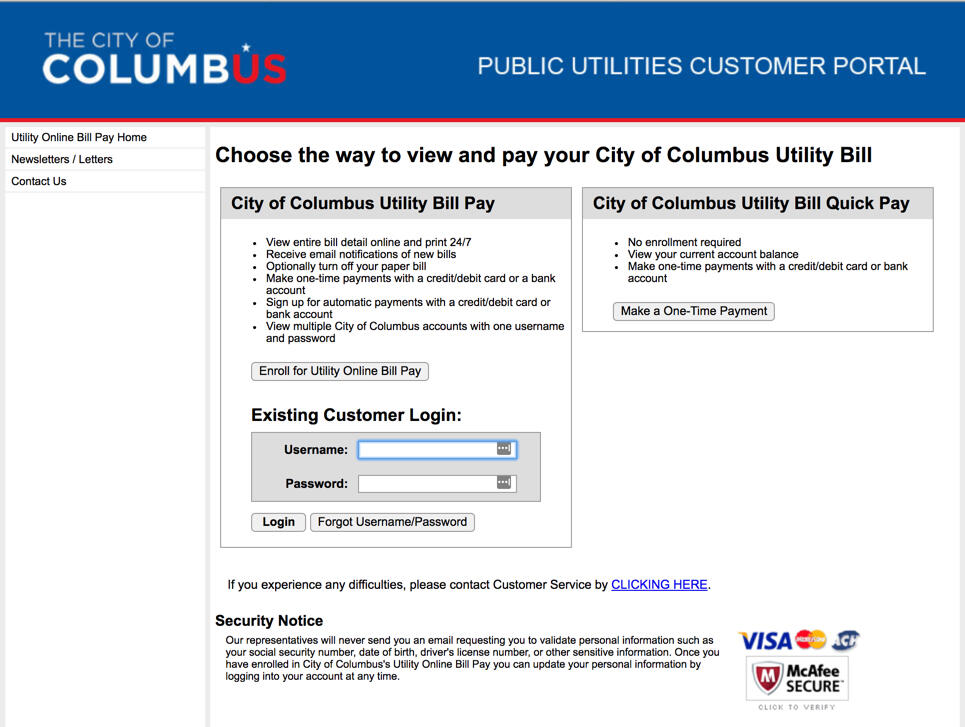
3. Public Utilities Customer Portal
The City of Columbus also maintains a Public Utilities Customer Portal where you can manage your water, sewer, and power bills. This portal offers:
- Online payments via eCheck or credit card
- Auto-pay enrollment
- Paperless eBill signup
- Access to bill copies and payment history
- Customer newsletters
Auto-Draft: The “Set It and Forget It” Option
If you’re forgetful like me (I once forgot to pay my water bill for three months—oops!), enrolling in auto-draft might be your best bet. Here’s how it works:
- Visit the Columbus Portal at schedulepayment.com/Columbus
- Click on “Enroll Now” under “Go paperless and Enroll in Auto Draft”
- Create an account or log in to your existing account
- Set up your payment method (bank account or credit card)
- Choose your payment schedule
With auto-draft, your bills get paid automatically on their due dates. No more late fees or service interruptions! Plus, you can go paperless and help the environment while you’re at it.
One-Time Payments: No Account Needed
Sometimes you just want to make a single payment without the hassle of creating an account. Columbus utilities offers this option through:
- The “Pay Now” button on the Columbus Portal
- The “Quick Pay” feature on CCU Bill Pay
- The Public Utilities Customer Portal one-time payment option
For these payments, you’ll usually need:
- Your account number (found on your bill)
- Payment information (credit card or bank account)
- The amount you want to pay
In-Person Payment Locations
For those who prefer paying in person (or who need to make a last-minute payment before disconnection—we’ve all been there!), Columbus offers several physical payment locations:
Main Walk-in Payment Office
- Address: 111 N. Front Street, Columbus, Ohio 43215
- Hours: Weekdays, 7:30 am – 4:30 pm
- Parking: Free short-term parking available across Long Street
- After-hours: Drop box available
Retail Payment Locations
Several retailers accept Columbus utility bill payments, including:
- Western Union
- Kroger
- Meijer
- Giant Eagle
- Walgreens
Keep in mind that these contracted vendor locations usually charge a convenience fee. You can find the nearest location by visiting Western Union’s website or calling 1-800-325-6000.
Reducing Your Bills and Getting Financial Assistance
Let’s be real—utility bills can get expensive, especially during extreme weather! Luckily, Columbus offers several programs to help reduce your bills:
Assistance Programs
- Columbus Bill Assistance Program
- Low Income and Senior Discount Program
- Water Payment Arrangement
- Power Payment Arrangement
If you’re struggling to pay your bills, don’t ignore them (I learned this the hard way). Instead, contact customer service at 614-645-8276 to discuss your options.
Understanding Your Columbus Utility Bill
Have you ever stared at your utility bill wondering what all those charges mean? I sure have! The City of Columbus has redesigned their bills to be more customer-friendly, with:
- A quick account summary at the top
- A tear-off payment stub at the bottom
- Detailed breakdown of all charges
- Meter readings
- Usage history section with a bar graph
If you want to see what the bill looks like before you get one, you can view a Sample Bill on the city’s website.
Calculating Your Bills
Wondering how much your next bill might be? Columbus offers interactive tools to estimate your charges:
- Calculate Your Power Bill (interactive worksheet)
- Calculate Your Water Bill (interactive worksheet)
- Step-by-step instructions for manual calculations
These tools can be super helpful for budgeting or checking if your bill is accurate. I once found a billing error that saved me $67 by comparing my actual bill to the calculated amount!
Important Contact Information
If you have questions or need help with your utility bills, here’s who to contact:
Customer Service
- Phone: 614-645-8276
- Hours: Weekdays, 7:00 am – 6:00 pm
- Email: [email protected]
CCU Contact Information
- Main Office: (812) 372-8861
- Automated Payment Line: (812) 668-8109
- Address: 1111 McClure Road, Columbus, IN 47201
- Hours: Monday-Friday, Lobby: 7:00am – 4:00pm, Drive-Up: 7:00am – 5:00pm
Tips for Seamless Bill Payment Experience
Based on my own experiences (and occasional mishaps), here are some tips to make your Columbus utility bill payment experience smoother:
-
Set up account reminders: Even if you don’t use auto-pay, calendar alerts can help you remember due dates.
-
Keep your account number handy: Store your 5-digit account number somewhere accessible—you’ll need it for most payment methods.
-
Check for fees: Different payment methods may have different fees. For example, credit card payments often come with a convenience fee.
-
Report problems promptly: If you notice an issue with your bill or service, contact customer service right away.
-
Consider paperless billing: Not only is it better for the environment, but you’ll also receive your bills faster.
-
Save payment confirmations: I always take screenshots of my online payment confirmations—they’ve saved me a few times when payments didn’t process correctly.
-
Check for unpaid sewer charges: Columbus has a special tool to identify delinquent charges for water and sewer services on specific properties.
-
Use tenant billing agreements when necessary: If you’re a property owner with tenants, you can arrange for them to receive and pay the bills directly (though you’ll still ultimately be responsible).
Additional Resources
Beyond just paying your bills, Columbus offers several other useful resources:
- Consumer Confidence Report: Details about your drinking water quality
- Reducing Exposure to Lead in Water: Important health information
- Water Conservation Tips: Ways to reduce your water usage and bills
- Summer Sewer Allowance: Potential discounts during summer months
- Cross Connection and Backflow Prevention: Information to keep your water safe
Final Thoughts
Managing utility bills isn’t the most exciting part of life in Columbus, but it’s definitely important! With the various payment options available, there’s bound to be one that fits your lifestyle and preferences.
I personally switched to auto-pay and paperless billing last year, and it’s been a game-changer. No more last-minute panics about forgotten bills or searching through stacks of paper to find my account number!
Whatever method you choose, the key is finding what works for you and sticking with it. And remember—if you ever have trouble paying your bills, reach out for assistance. Columbus has programs designed to help residents during difficult times.
Have questions about Columbus bill pay options I didn’t cover? Drop them in the comments below, and I’ll do my best to find answers!
This article was last updated on October 13, 2025, to reflect the most current information about Columbus utility bill payment options. Information and procedures may change, so always verify details with the official Columbus utility websites or by calling customer service.
Sign in to pay
{[{ displayName }]} Sign Out
 You can pay online without signing in using your credit card, debit card, PayPal, Venmo or Amazon Pay. Our payment processing vendor, Paymentus, will charge a convenience fee of $2.00 per transaction.
We offer a variety of payment options to make paying your utility bill safe, secure, and convenient.

Columbus suspends in-person bill payments during coronavirus crisis
0
