Are you tired of forgetting to pay your Holy Cross Energy bill or dealing with the hassle of writing checks? I’ve been a member for years and finally took time to explore all their payment options Turns out, they’ve got way more convenient ways to pay than I realized! Whether you prefer automatic payments, online options, or even paying with cash at your local store, Holy Cross Energy has made it super easy to manage your electricity bill.
Auto-Pay Options: Set It and Forget It
One of the easiest ways to pay your Holy Cross Energy bill is through their Auto-Pay services There’s two main options here
Auto-Pay with Checking Account
This has been my go-to method for the past year and honestly it’s been a game-changer! Here’s why I love it
- Your bill gets paid automatically each month from your bank account
- No worries about expired credit cards or changing numbers
- Holy Cross Energy will give you a one-time $5.00 bill credit just for signing up!
- It’s totally hassle-free once set up
Auto-Pay with Credit Card
If you prefer using credit cards (maybe to rack up those reward points?), this option works great too:
- Automatically pays your monthly bill using your credit or debit card
- Simple setup through their system
To get started with either Auto-Pay option, you’ll need to follow their Auto Pay Instructions through the SmartHub system or by contacting their member services.
Online Payment Options: Quick and Convenient
If you’re not ready for automatic payments but still want the convenience of paying online, Holy Cross has you covered:
SmartHub Payment
This is their full-featured account management portal where you can:
- Pay online using checking account or credit card
- View your electric usage history (by day or month!)
- Set up notifications for bills and outages
- Download statements and manage your account
To access it, just visit SmartHub Login and create an account if you haven’t already.
Online Pay-Now
Sometimes I forget my SmartHub password, so I’m grateful they offer this no-registration-required option:
- Super easy and secure
- No need to log in or remember passwords
- All you need is your account number and last name (or business name)
- Access through the “Pay Now” button on their website
Phone Payment: Perfect for Last-Minute Bills
Running late on your payment? Holy Cross Energy offers 24/7 phone payment services:
- Call their automated line: 970.945.6566
- Make a payment any time, day or night
- Option to set up automatic payments during the call
- Requires a minimum payment of $5.00
Traditional Payment Methods
For those who prefer more traditional methods, Holy Cross Energy still accepts:
Mail Payments
You can mail a check or money order to:
Holy Cross EnergyPO Box 2150Glenwood Springs, CO 81602In-Person Payments
Their offices welcome in-person visits during these hours:
- Glenwood Springs office: Monday – Thursday, 8:00 a.m. to 4:30 p.m.
- Avon office: Monday & Tuesday, 8:00 a.m. to 4:30 p.m.
- Gypsum location: Payment dropbox only (no in-person service)
Cash Payment Options at Local Retailers
This was news to me! If you prefer paying with cash, you’ve got options:
Vanilla Direct
- Available at many local stores including Dollar General, Family Dollar, 7-11, Kum&Go, Walmart & Walgreens
- Just scan the Vanilla Direct barcode to pay with cash
- Note: retailers charge a $1.50 service fee
Western Union Quick Collect
- Available at City Market, Walgreens, Walmart & Safeway
- Provides proof of payment in minutes (great for last-minute payments!)
- Just provide your phone number, “HOLY CROSS ELECTRIC” as the company name, and your account number
- Also has a $1.50 service charge
Pre-Pay: A Flexible Alternative
Holy Cross Energy also offers a Pre-Pay program that works differently from traditional billing:
- Pay when you want, in the amount you want
- No security deposit required
- No collection fees or monthly bills
- Daily monitoring of your electric usage
- Call 970-945-5491 for more info
SmartHub: The All-in-One Solution
I’ve found that SmartHub really is the hub of all things related to your Holy Cross Energy account. Through this tool, you can:
- Make payments online & signup for auto pay
- Go paperless, store payment info, and download statements
- View your electricity usage reports by day or month
- Set up notifications for bills and outages
- Communicate directly with Member Advocates
The app is free and available for both iOS and Android devices, making it easy to manage your account from anywhere.
Tips for Special Situations
Extended Absences
If your going to be away for a while (lucky you!), Holy Cross Energy offers several options:
- Temporary address changes for billing statements
- Pre-payment arrangements
- Online payment registration so you can pay from anywhere
Seasonal Service
For those with seasonal properties or services (like irrigation pumps or remote cabins), be aware that disconnecting to avoid monthly minimum charges might not save money in the long run. If you disconnect and later reconnect, you’ll be billed for:
- All applicable charges that would have been applied during the disconnection period
- The reconnection fee
Going Paperless: Save Trees and Time
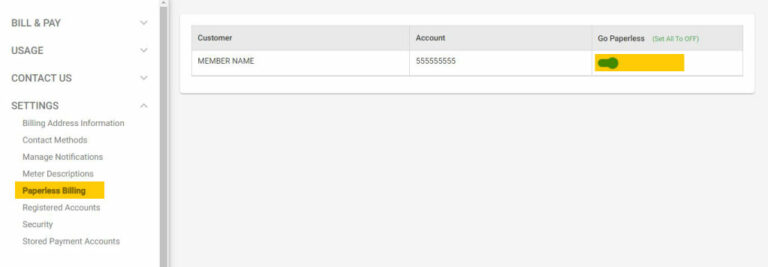
One thing I started doing last year was switching to paperless billing. It’s super easy to set up through SmartHub:
- Click on “Paperless Billing” under the Settings tab
- Toggle the switch to “Go Paperless”
Not only do you get your bill faster, but you’re also helping save trees!
Customer Support When You Need It
If you ever get stuck or have questions about your bill or payment options, Holy Cross Energy’s member care team is ready to help:
- Phone: 970.945.5491 (Monday – Thursday, 7:00 a.m. – 5:30 p.m.)
- Email: [email protected]
- Pay-by-Phone available 24/7: 970.945.6566
Final Thoughts
After exploring all these options, I’ve found that setting up Auto-Pay with my checking account has been the most stress-free approach for my Holy Cross Energy bills. That $5 credit was a nice bonus too! But what works for me might not be ideal for everyone.
The great thing about Holy Cross Energy is that they truly understand different members have different needs. Whether you’re tech-savvy and want everything digital or prefer more traditional methods of payment, they’ve got you covered.
Remember that Holy Cross Energy will never call demanding immediate payment or force you to pay in any specific way. Stay alert for potential scams, and if you’re ever in doubt about a communication you receive, contact their member services directly.
What’s your preferred way to pay your electric bill? Have you tried any of these Holy Cross Energy payment methods? I’d love to hear about your experiences!
Lighting the Way Forward

We’re proud to offer a variety of energy efficiency and smart electrification rebates to help our members invest in high-efficiency equipment for your home or business.
- June 28 — Touch a Truck — Glenwood Springs
- July 16 — Basalt Summer Concert Series — Basalt
- August 9 — MarbleFest — Marble
- September 12 — CORE Green Expo — Aspen
- September 16 — Brats & Kilowatts — Vail

Holy Cross Energy – Bill Redesign
FAQ
What payment methods does Holy Cross Health accept?
Holy Cross Health has enhanced our billing systems to offer you an easy and secure method of paying your bills, including online and by mail. We accept Visa, Mastercard, Discover and American Express. For your convenience, all patient bills can be paid through our new patient portal, MyChart.
How do I contact Holy Cross energy?
Call us today at 970.945.5491 or Email us at [email protected] Our member care representatives are ready to help with any questions you may have. Holy Cross Energy provides safe, reliable, affordable and sustainable energy and services that improve the quality of life for our members and their communities.
How do I pay my Holy Cross account?
Use our Quick Pay webpage here: Pay Now. You will need your Holy Cross Account Number, Last Name or Business Name, and payment method. How do I report a problem using SmartHub or the website? You can email us your question by completing the form on the Contact Us page or call our Member Service Representatives at (970) 945-5491.
How do I report an outage to Holy Cross energy?
After you have logged into your account you can select the “Report an Outage” link located under “Quick Links” on the right side of your home screen. This will bring you to the “Outages” page that will inform you if Holy Cross Energy is already aware of an outage at your location.
