Are you tired of forgetting to pay your Meijer credit card bill? Do you sometimes find yourself scrambling at the last minute to avoid those pesky late fees? Well, I’ve been there too, and lemme tell you – there’s a better way! Today, we’re gonna dive into everything you need to know about Meijer bill pay options, so you can keep your finances on track without the stress.
What is the Meijer Credit Card?
Before we jump into payment methods let’s quick talk about what exactly the Meijer credit card is. Meijer offers two main credit card options
- Meijer Credit Card – Can only be used for purchases at Meijer stores
- Meijer Mastercard – Can be used anywhere Mastercard is accepted
Both cards are issued through Citibank, which handles all account management and bill payment processing. When you sign up, you might even qualify for special promotions like 15% off your first purchase – not too shabby!
Ways to Pay Your Meijer Credit Card Bill
There are several convenient methods to pay your Meijer credit card bill. I’ve tried all these methods myself at some point, and each has its pros and cons depending on your situation.
1. Online Payments
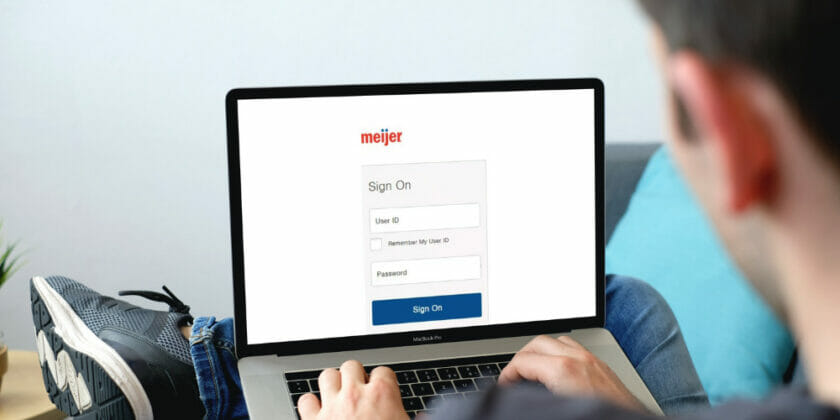
The most popular (and honestly, easiest) way to pay your Meijer bill is through the online portal. Here’s how to do it:
For Registered Users:
- Visit the official Citi Retail Services website for Meijer at https://citiretailservices.citibankonline.com/RSauth/signon?pageName=signon&siteId=PLCN_MEIJER&langId=en_US
- Enter your User ID and Password
- Click the “Sign On” button
- Navigate to the payments section
- Follow the prompts to make your payment
If you prefer to use your fingerprint or face recognition to sign in (which I totally recommend for security), you can select the “Continue” option when prompted.
For One-Time Payments (No Sign-On Required):
Don’t have an account or don’t wanna log in? No worries! You can still make a one-time payment:
- Visit the same website
- Look for “One-time payment” or “Pay your bill without signing on”
- Click on “Make a Payment”
- You’ll need to provide some basic account info to verify your identity
- Follow the prompts to complete your payment
2. Phone Payments
If you’re old school like my dad or just prefer talking to a real person, phone payments are available 24/7:
- Regular Customer Service: 1-877-816-9401
- Technical Assistance: 1-877-256-9997
- International Callers: 1-208-822-2189
- TTY Users: Use 711 or other Relay Service
I’ve used the phone payment option a couple times when my internet was down, and it’s pretty straightforward – just have your card info ready!
3. Mail Payments
If you prefer to send a check or money order the old-fashioned way, Meijer provides two mailing addresses:
Regular Mail:
Meijer Credit Card Payments
PO Box 70609
Philadelphia, PA 19176-0609
Overnight/Express Delivery:
Attn: Consumer Payment Dept.
400 White Clay Center Drive
Newark, DE 19711
When mailing payments, make sure to:
- Include your account number on your check
- Allow 5-7 business days for processing
- Send it well before the due date (I learned this the hard way once!)
Setting Up Your Online Account
If you haven’t yet created an online account to manage your Meijer credit card, you’re missing out on some seriously helpful features! Here’s how to get started:
- Visit the Meijer credit card sign-on page
- Click on “Set Up Your Account” or “Get Started”
- You’ll need your card number and some personal info to verify your identity
- Create a User ID and password
- Set up security questions and preferences
Once your account is set up, you can:
- View your current balance
- See transaction history
- Make payments
- Set up auto-pay (which has saved me from late fees sooo many times!)
- Update personal information
- Download statements
Benefits of Managing Your Meijer Bill Online
Honestly, the online portal has made managing my Meijer card way easier. Here are some advantages I’ve found:
- 24/7 Access: Check your account anytime, anywhere
- Paperless Statements: Better for the environment and less clutter
- Payment Reminders: Get notified when your bill is due
- Auto-Pay Options: Never miss a payment again
- Immediate Confirmation: Get instant confirmation when you make a payment
- Transaction Monitoring: Easily spot any suspicious activity
Tips for Timely Meijer Bill Payments
After forgetting my payment date a few times (oops!), I’ve developed some systems that help me stay on top of things:
- Set Calendar Reminders: Mark your due date on your phone or calendar
- Enroll in Auto-Pay: Set it and forget it (just make sure you have enough $$ in your account)
- Pay More Than Minimum: If you can, this helps reduce interest charges
- Make Payments Early: Don’t wait until the last minute
- Check Your Spam Folder: Sometimes important notices end up there
- Update Contact Info: Make sure Meijer/Citi has your current phone and email
What to Do If You’re Facing Financial Hardship
Life happens, and sometimes paying bills gets tough. If you’re having trouble making your Meijer credit card payments, Citi does offer assistance options:
- Contact Customer Service: Call the number on the back of your card to discuss options
- Payment Arrangements: They may offer alternative payment plans
- Hardship Programs: During special circumstances (like the federal government shutdown mentioned on the website), additional help may be available
It’s always better to reach out proactively than to miss payments without communication. Trust me, they appreciate the heads-up!
Common Issues and Troubleshooting
Even with the best systems, sometimes things go wrong. Here are solutions to some common Meijer bill pay problems I’ve encountered:
Forgotten User ID or Password
- On the sign-on page, click “Forgot User ID or Password”
- Follow the verification steps to recover your information
- If you still have trouble, call Technical Assistance at 1-877-256-9997
Payment Not Showing Up
If you’ve made a payment but it’s not reflecting on your account:
- Online payments typically post within 1-2 business days
- Mail payments can take up to 7 business days to process
- Keep your confirmation number handy if you need to follow up
Website Technical Issues
If the website isn’t working properly:
- Try clearing your browser cache and cookies
- Use a different browser or device
- Call Technical Assistance if problems persist
Understanding Your Billing Cycle
One thing that confused me when I first got my Meijer card was understanding exactly when payments were due. Here’s a quick breakdown of how the billing cycle typically works:
- Statement Closing Date: The last day of your billing cycle
- Payment Due Date: Usually 21-25 days after your statement closing date
- Grace Period: The time between statement closing and payment due date when no interest is charged on new purchases (if you paid your previous balance in full)
Knowing these dates helps you plan your payments and avoid unnecessary interest charges!
Language Options for Meijer Bill Pay
I noticed the Meijer credit card website also offers Spanish language options, which is great for Spanish speakers or bilingual households. You can update your language preference on the website, and your site content will appear in Spanish the next time you log in. For account statements and communications in Spanish, you’ll need to visit the Profile page after logging in.
Security Tips for Online Bill Pay
When managing financial accounts online, security is super important. Here are some tips I follow to keep my info safe:
- Use Strong Passwords: Mix letters, numbers, and symbols
- Enable Multi-Factor Authentication: Use fingerprint or face recognition when available
- Avoid Public Wi-Fi: Don’t access financial accounts on unsecured networks
- Log Out After Each Session: Don’t just close the browser
- Check for HTTPS: Make sure the website URL starts with “https://” and has a lock icon
- Monitor Your Account: Regularly review transactions for any suspicious activity
Final Thoughts
Managing your Meijer credit card payments doesn’t have to be a headache. With multiple payment options and a user-friendly online portal, it’s easier than ever to stay on top of your bill.
I’ve found that setting up online account access and automatic payments has been the most convenient option for me. It removes the stress of remembering due dates and helps avoid those nasty late fees.
Whether you prefer the convenience of online payments, the personal touch of phone payments, or the traditional approach of mailing a check, Meijer and Citibank offer flexible options to fit your lifestyle.
So take a few minutes today to set up your preferred payment method – your future self will thank you when you avoid those late fees and keep your credit score in good shape!
Do you have any questions or tips about managing Meijer credit card payments? What payment method works best for you? I’d love to hear about your experiences in the comments below!
Make a payment using an outside financial institution.
You can make a payment on your Meijer Credit Union loan from an outside financial institution on our Payment Portal.
If have a mortgage serviced by Meijer Credit Union you can make your payments through online banking or through our Payment Portal. To make a MCU mortgage payment using an outside financial institution, please use the Payment Portal. The Payment Portal will let you set up a payment using an ACH (free) or a Debit/Credit card ($15 processing fee).
Meijer MPerks Explained
FAQ
Does Meijer automatically pay credit card bills?
Meijer offers an automatic payment service that pays your credit card bill each month automatically from your bank account. This way, you’ll never have to worry about forgetting to make a payment or being late. With automatic payments, your Meijer credit card bill will be paid.
How do I Manage my Meijer credit card account?
Sign on and manage your Meijer Credit Card account. Don’t have an account? today to get $10 off your first purchase and start earning rewards on card purchases. Log in 24/7 to manage your Meijer Mastercard account. Log in to your Meijer Mastercard account to make payments, track activity and more.
How do I apply for a Meijer credit card?
The easiest way to apply for the Meijer Credit Card is online, and you can get to the online application by clicking the “Learn More” button on WalletHub or by going directly to Citibank’s website. Alternatively, you can apply in store.
How can I pay my Meijer bill?
- Online: Log in to your online account and find the payment button.
- By phone: Call 1-877-816-9401 and enter your card information when prompted, then press N/A.
- By mail: Send a check or money order (but not cash) to. Meijer Mastercard Payments. PO Box 9001006.
How do I activate my Meijer debit card?
There will be a sticker on the front of your new debit card that will give you the number, 833-455-3254 to call to activate your new Visa Debit Card.
Does Meijer have a credit card?
How do I close my Meijer credit card?
To discontinue participation in this program at any time, call (800) 991-8708.
