Alright, car owners! Let’s face it – nobody likes missing car payments or dealing with late fees. If you’ve got a auto loan with Santander Consumer USA, you probably wanna know the best way to manage your monthly payments without the headache. That’s why I’m diving deep into everything you need to know about Santander auto bill pay options today.
As someone who’s been helping folks navigate auto financing for years, I can tell ya that setting up automatic payments can save you tons of stress and maybe even improve your credit score! So let’s jump right in and explore how to make your Santander auto loan payments as painless as possible.
What is Santander Consumer USA?
Before we dive into the bill pay options, let’s take a quick sec to understand who we’re dealing with. Santander Consumer USA is a major auto finance company that provides loans for new and used vehicles They service millions of auto loans across the United States, and if you’re reading this, you probably have one with them!
Santander offers various financial products, but their auto loans are definitely their bread and butter They work with dealerships nationwide and also offer direct financing options Whether you bought your car new or used, Santander might be the company holding your loan.
Online Account Management with MyAccount
The easiest way to manage your Santander auto loan is through their online portal called “MyAccount.” This platform gives you 24/7 access to your account information and bill pay options. Here’s what you can do with it:
- View your account summary and balance
- Check payment history
- Make one-time payments
- Set up automatic payments
- Update your contact information
- Access important documents
To access MyAccount you’ll need to visit https //myaccount.santanderconsumerusa.com/ and sign in with your username/email and password. If you haven’t created an account yet you’ll need to sign up for online access.
Santander Auto Bill Pay Options
Now let’s get to the good stuff – how to actually pay your bill! Santander offers several methods to make payments on your auto loan. I’ll cover each one so you can decide which works best for you.
1. Automatic Payments (AutoPay)
This is my personal favorite and the one I recommend to most people. With AutoPay, your payment is automatically withdrawn from your checking account on a scheduled date each month. Here’s why it’s awesome:
- Never miss a payment due date
- No need to remember to pay manually each month
- Might qualify for interest rate discounts
- Reduces risk of late fees
- Can improve your credit score through consistent on-time payments
To set up AutoPay through MyAccount:
- Log in to your account
- Navigate to the payment section
- Select “Set Up Automatic Payments”
- Enter your banking information
- Choose your preferred payment date
- Confirm and submit
Just remember that you need sufficient funds in your account on the withdrawal date to avoid overdraft fees from your bank!
2. One-Time Online Payments
If you prefer more control over when payments go through, you can make one-time payments online:
- Sign in to MyAccount
- Select “Make a Payment”
- Enter the payment amount
- Provide your bank account information
- Choose a payment date
- Submit your payment
This method is great if your income is irregular or if you like to manually review each payment before it goes through.
3. Pay by Phone
If you’re not comfortable with online banking or need to make a last-minute payment, Santander allows you to pay by phone:
- Call Santander Customer Service at 888-222-4227
- Follow the automated prompts or speak with a representative
- Have your account number and banking information ready
Phone payments can be processed quickly, which is useful if you’re approaching your due date. Just be aware that some phone payment methods might include a convenience fee.
4. Pay by Mail
For those who prefer the traditional route, you can still mail in your payments:
- Write a check payable to Santander Consumer USA
- Include your account number on the check
- Mail it to the address provided on your monthly statement
Remember to mail your payment at least 5-7 business days before the due date to ensure it arrives on time!
5. Pay via Mobile App
Santander also offers a mobile app that lets you manage your account and make payments on the go:
- Download the Santander app from your app store
- Log in using your MyAccount credentials
- Select the payment option
- Enter payment details
- Confirm and submit
The app provides pretty much the same functionality as the website but in a more mobile-friendly format.
Tips for Managing Your Santander Auto Loan
Now that we’ve covered the basics of how to pay, here are some tips to help you manage your Santander auto loan effectively:
Set Up Payment Reminders
Even if you don’t use AutoPay, set up calendar reminders on your phone or computer to alert you a few days before your payment is due. This gives you time to ensure funds are available in your account.
Know Your Due Date
Your payment due date is typically the same each month, but it’s important to know exactly when it is. Mark it on your calendar or set recurring reminders.
Pay More Than the Minimum When Possible
If your budget allows, paying even a little extra toward your principal can help you pay off your loan faster and save money on interest in the long run. Just make sure to specify that the extra amount should go toward the principal!
Keep Your Contact Info Updated
Make sure Santander has your current phone number, email, and mailing address. This ensures you receive important notices about your account.
Check Your Account Regularly
Log in to MyAccount at least once a month to verify that your payments are being processed correctly and to review your remaining balance.
Handling Payment Difficulties
Life happens, and sometimes financial challenges arise that make it difficult to keep up with payments. If you’re struggling to make your Santander auto loan payments, here’s what to do:
Contact Santander Immediately
Don’t wait until you miss a payment. Call Santander at 888-222-4227 as soon as you know you might have trouble making your payment. They might be able to work with you on a solution.
Ask About Hardship Programs
Santander sometimes offers hardship programs for customers facing temporary financial difficulties. These might include:
- Payment extensions
- Modified payment plans
- Deferment options
Know the Consequences of Missed Payments
Missing payments can result in:
- Late fees (typically $15-$25)
- Negative credit reporting
- Potential repossession if payments are missed for an extended period
It’s always better to communicate with Santander than to ignore the problem!
Security Considerations
When making online payments or setting up AutoPay, security is super important. Here are some tips to keep your information safe:
- Use a strong, unique password for your MyAccount
- Enable two-factor authentication if available
- Never share your login credentials
- Be cautious of phishing emails claiming to be from Santander
- Always verify you’re on the official Santander website (https://myaccount.santanderconsumerusa.com/)
- Regularly monitor your account for unauthorized activity
Common Questions About Santander Auto Bill Pay
Will I be notified when my automatic payment is processed?
Yes, Santander typically sends an email confirmation when your automatic payment is processed. You can also see the transaction in your account activity.
Can I change my payment date?
Yes, you can usually change your payment date through MyAccount or by calling customer service. Just be aware that changes might take a billing cycle to go into effect.
Is there a fee for using Santander’s bill pay services?
Most standard payment methods are free, but expedited payments or certain payment methods (like paying by phone with a representative) might incur a convenience fee.
What if I need to stop an automatic payment?
You can cancel or pause AutoPay through your online account or by calling customer service. Just make sure to do this at least 3 business days before the scheduled payment date.
Can I make partial payments?
Santander generally expects full monthly payments. If you can only make a partial payment, contact their customer service to discuss your options.
Conclusion
Managing your Santander auto loan payments doesn’t have to be complicated. With the various bill pay options available, you can choose the method that best fits your financial habits and lifestyle.
I personally recommend setting up AutoPay if your income is steady. It’s a “set it and forget it” approach that ensures you never miss a payment. But whichever method you choose, staying on top of your payments will help you maintain good credit and eventually achieve the satisfaction of making that final payment on your auto loan!
Remember, Santander’s customer service is available to help if you have questions about your account or payment options. You can reach them at 888-222-4227 Monday through Friday from 7 a.m. to 9 p.m. CT and Saturday from 7 a.m. to 5 p.m. CT.
Additional Resources
For more information about auto financing and loans, check out these helpful resources:
- Santander’s official website: https://myaccount.santanderconsumerusa.com/
- The Consumer Financial Protection Bureau: https://www.consumerfinance.gov/
- Annual Free Credit Report: https://www.annualcreditreport.com/
Keeping your auto loan in good standing is just one part of your overall financial health. Stay tuned for more articles on managing your finances effectively!

Auto Pay
Auto Pay is fast, easy and FREE.
Sign up for Auto Pay and your monthly payments will be automatically deducted from your personal checking or savings account and credited to your account on the payment due date. Please note, your account must not be past due on payments to be eligible for the Auto Pay program.
Once your Auto Pay enrollment has been accepted, your account will be updated to reflect Auto Pay participation in approximately five to seven business days. Auto Pay enrollment will remain in effect until canceled. Refer to your authorization enrollment disclosures for all instances in which Auto Pay may be canceled.
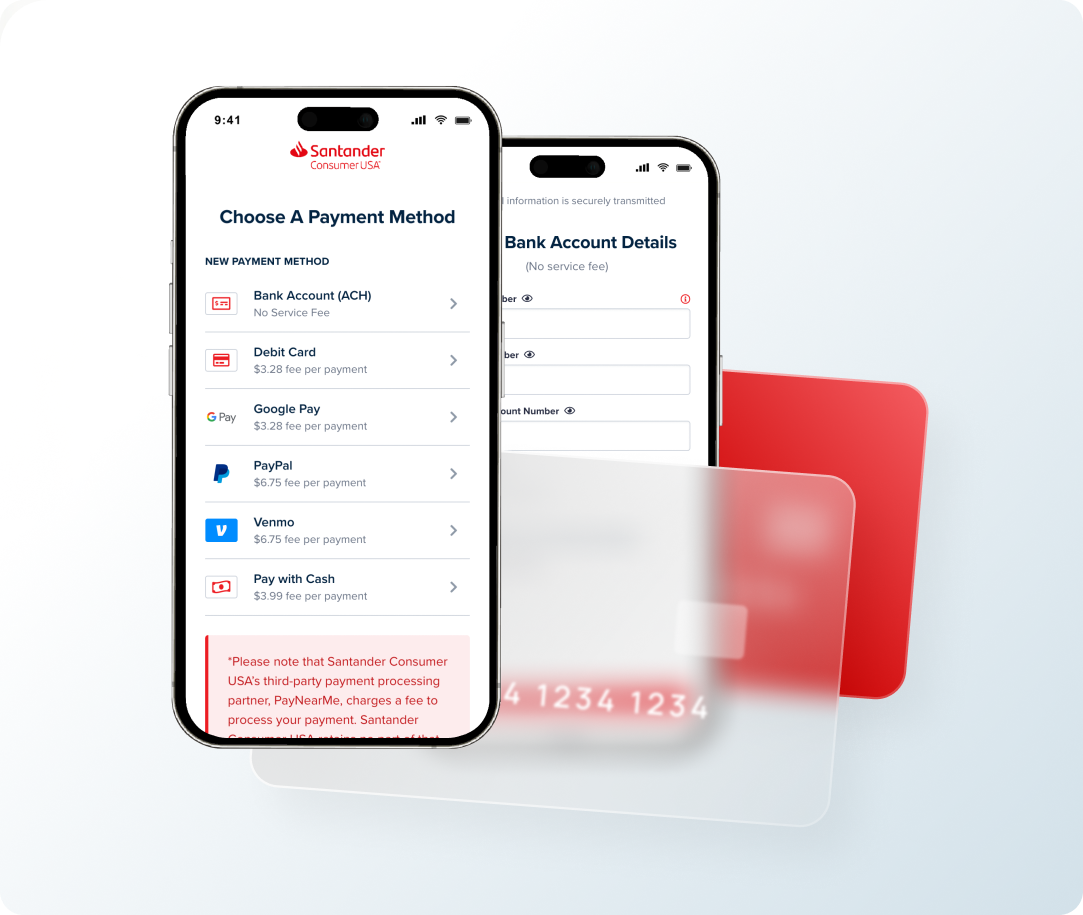
Pay Online
Log in to MyAccount to use one of these payment options.
Make a free one-time ACH payment Enter your checking or savings bank account information and complete the payment details.
Pay by debit card Add debit card information then complete your payment details to make a same-day payment.A fee of $3.28 will apply to payments made using a debit card.*
Use Apple Pay, Google Pay, PayPal and Venmo Select your preferred option and follow the easy steps to make your payment. A fee of $3.28 will apply to debit payments by Apple Pay and Google Pay, and a fee of $6.75 will apply to payments by PayPal and Venmo.*
*Please note that Santander Consumer USA’s third-party payment processing partners charge a fee to process your payment. Santander Consumer USA retains no part of these fees.
