Are you tired of standing in long queues or struggling with complicated payment portals just to pay your mobile bill? If you’re a Jio postpaid customer, the good news is that making your payments has never been easier! In this comprehensive guide, I’ll walk you through everything you need to know about Reliance mobile bill pay options making sure you never miss a payment deadline again.
What is Jio Postpaid Bill Payment?
Jio, a part of Reliance Industries, has revolutionized the Indian telecom market with its affordable plans and excellent services. Their postpaid bill payment system is designed to be super-fast and super easy. With just a few clicks, you can clear your dues without any hassle.
The process is straightforward
- Enter your Jio postpaid number
- Follow simple on-screen instructions
- Enter the due amount
- Complete the payment process
Not sure about your bill amount? No worries! You can also view your bill summary before making the payment, ensuring you know exactly what you’re paying for.
Why Choose Jio Postpaid Plans?
Jio claims to provide “India’s best mobile postpaid plans” with unmatched benefits at affordable prices. Here’s what makes their postpaid plans stand out:
- Unlimited calling: Stay connected with your loved ones without worrying about call charges
- High-speed data: No daily limits to restrict your internet usage
- Complimentary OTT app subscriptions: Enjoy premium content without paying extra
- Access to Jio apps: Get free access to JioTV, JioCinema, JioNews and many more
If you’re still using prepaid services, maybe it’s time to explore these postpaid plans! You can check out their popular postpaid plans on their official website.
Step-by-Step Guide to Pay Your Jio Postpaid Bill Online
Let’s break down the process of paying your Jio postpaid bill online:
Step 1: Visit the Official Jio Website
Head over to Jio’s official bill payment page. This ensures you’re on the secure, legitimate platform for making payments.
Step 2: Enter Your Jio Number
Input your 10-digit Jio postpaid number in the designated field.
Step 3: View Bill Details
The system will fetch your bill details, including the amount due and the billing period. Take a moment to review this information to ensure everything is correct.
Step 4: Choose Payment Method
Jio offers various payment options:
- Credit Card
- Debit Card
- Net Banking
- UPI
- Digital Wallets
Select your preferred payment method.
Step 5: Complete the Transaction
Enter the required details for your chosen payment method and confirm the transaction. You might need to complete additional verification steps depending on your bank’s requirements.
Step 6: Save the Receipt
Once the payment is successful, you’ll receive a confirmation. I always recommend saving or downloading the receipt for future reference.
Benefits of Using Online Bill Payment for Your Jio Postpaid Connection
Why should you opt for online bill payment instead of traditional methods? Here are some compelling reasons:
-
24/7 Accessibility: Pay your bills anytime, anywhere – even at 2 AM in your pajamas!
-
Time-Saving: No more standing in queues or visiting physical stores. The entire process takes less than 5 minutes.
-
Paperless Transactions: Contribute to environmental conservation by eliminating paper bills and receipts.
-
Payment History: Easily track your previous payments for better financial management.
-
Instant Confirmation: Receive immediate confirmation of your payment.
-
Secure Transactions: Advanced encryption keeps your financial information safe.
-
Reminder Services: Set up alerts to never miss a payment deadline again.
-
Reward Points: Many payment platforms offer reward points or cashback for bill payments.
Common Issues and Troubleshooting Tips
Even with the best systems, you might occasionally face some hiccups. Here’s how to address common issues:
Payment Failed but Amount Debited
This is probably the most frustrating situation! If your payment fails but the amount is debited from your account, don’t panic. Usually, the amount is automatically refunded within 5-7 working days. If not, you can contact Jio customer care with your transaction details.
Website Not Loading Properly
Try clearing your browser cache or using a different browser. Sometimes, switching from mobile data to Wi-Fi (or vice versa) can also help.
Unable to View Bill Details
If the system isn’t showing your bill details, verify that you’ve entered the correct mobile number. If the problem persists, wait for a few hours and try again, as this could be due to system maintenance.
Payment Success but No Confirmation
If you’ve completed the payment but haven’t received confirmation, check your email and SMS. You can also verify the payment status in your bank statement or payment app history.
Alternative Ways to Pay Your Jio Postpaid Bill
While online payment through the official website is convenient, Jio offers several alternative payment methods:
MyJio App
Download the MyJio app on your smartphone for an even more streamlined payment experience. The app offers a user-friendly interface and additional features like plan management and usage tracking.
Automated Payment Options
Set up auto-debit or standing instructions with your bank to ensure your bill is paid automatically every month. This is perfect for those of us who tend to forget payment dates!
Third-Party Payment Apps
Apps like Paytm, PhonePe, Google Pay, and Amazon Pay also support Jio bill payments. These platforms sometimes offer exclusive cashback or discount offers too!
Physical Payment Channels
If you prefer traditional methods, you can visit Jio Stores, Reliance Digital stores, or partner outlets to pay your bill in person.
Maximizing Value with Jio Postpaid Plans
Now that you know how to pay your bills efficiently, let’s explore how to get the most value from your Jio postpaid plan:
Regular Plan Review
We often sign up for plans and forget about them for years. Make it a habit to review your plan every 3-6 months to ensure it still aligns with your usage patterns.
Family Plans
If multiple family members use Jio services, consider their family plans that offer better value through shared benefits.
Add-On Services
Explore add-on packs for specific needs like international calling or additional data rather than upgrading your entire plan.
Seasonal Offers
Jio frequently introduces seasonal offers and discounts. Keep an eye on their website or app to take advantage of these limited-time deals.
Don’t Confuse Different “Reliance” Companies
It’s important to note that there are several different companies with “Reliance” in their name, and they offer completely different services:
-
Jio (by Reliance Industries): The telecom service we’ve been discussing, offering mobile services in India.
-
Reliance, Inc.: A leading metal solutions provider in the United States, unrelated to telecom services.
-
Reliance Home Comfort: A Canadian company specializing in home services like HVAC, plumbing, and water heaters.
When searching for information about paying your mobile bill, make sure you’re looking at content related to Jio’s services, not these other Reliance companies!
My Personal Experience with Jio Postpaid Bill Payment
I’ve been a Jio postpaid customer for over 2 years now, and I gotta say, their bill payment system has made my life much easier. Before Jio, I would often forget to recharge my prepaid connection, leading to those awkward moments when my phone suddenly stopped working during important calls!
With Jio’s postpaid service and their streamlined payment process, I’ve set up auto-debit, and I never have to worry about my connection getting disconnected. Plus, the detailed bill summary helps me track my usage patterns and adjust my plan accordingly.
The days of standing in long queues to pay your mobile bill are long gone. With Jio’s user-friendly payment options, managing your postpaid connection has never been easier. Whether you choose the official website, the MyJio app, or third-party payment platforms, the process is designed to save your time and effort.
Remember, the key to hassle-free bill payments is choosing the method that works best for your lifestyle and setting up reminders to avoid late payment charges. And if you haven’t already, exploring Jio’s postpaid plans might be worth your while, given the amazing benefits they offer!
Have you tried paying your Jio bill online? What was your experience like? Do you have any tips or tricks to share with fellow readers? Drop your thoughts in the comments below!
Disclaimer: This article is based on information available as of October 2025. Service offerings, payment methods, and procedures may change over time. Always check the official Jio website for the most up-to-date information.
Make life easier with AutoPay
Forget about due dates. Your bill can be paid automatically every month via bank draft or credit card.
Manage your budget with Average Monthly Billing
Even out seasonal highs and lows with a more predictable monthly electricity bill.
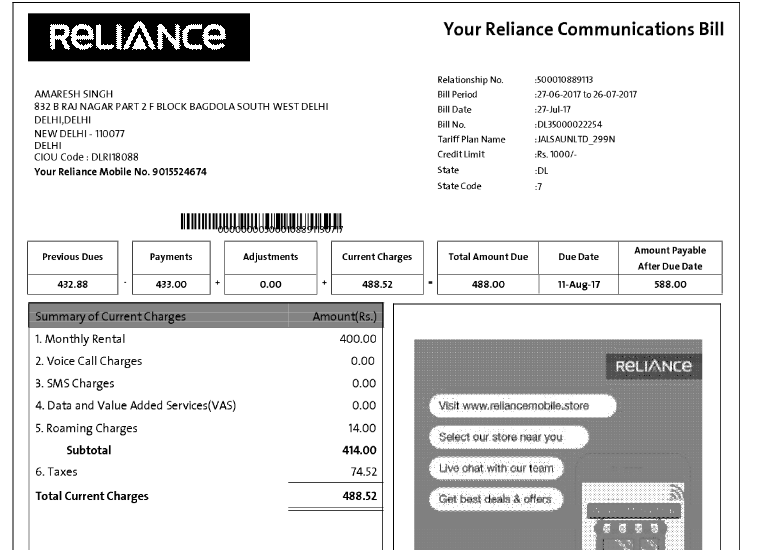
Understanding Jio Postpaid Mobile Bill – Reliance Jio.
FAQ
How to pay a Reliance bill online?
- Log in to your myReliance account.
- Click View Bill.
- Under Pay this bill, select a Payment Account to pay with. You can also Create a Payment Account using your Bank Account or Credit Card.
How to pay mobile bill online?
- Enter your postpaid mobile number.
- Select your mobile operator.
- Enter the amount.
- Pick bill payment promo code of your choice and get a cashback & other offers.
- Choose the payment method of your preference.
- You are done with it!
How to pay an inactive Jio postpaid bill online?
How can I pay for my Jio postpaid number after the service is barred or suspended? Jio provides you with various options to pay your bills via Jio.com and the MyJio app. You can make payment using debit/credit cards and net banking. You can also visit the nearest Jio store and make cash payments against your bill.
How do I download Jio fiber payment receipt?
Go to MyJio app’s home page. Click on Menu on the bottom right corner and select ‘Bill & Statement’ Click on ‘View Details’ to view the latest Bill. To download click on ‘Download’
