Ever stared at an Evergreen bill wondering how to pay it? You’re definitely not alone! As someone who’s dealt with various utility payments over the years, I’ve learned that understanding your payment options can save you time, stress, and even late fees.
In this guide, I’ll walk you through everything you need to know about Evergreen bill pay, including online payment methods, account login instructions, and alternative payment options for various Evergreen services.
Which Evergreen Service Do You Use?
Before diving into payment methods, it’s important to identify which Evergreen service you’re using. There are several companies with “Evergreen” in their name, each with different payment systems
- Evergreen Disposal of Maryland – Waste management services in Maryland
- Evergreen Waste Services – Waste management in other regions
- EvergreenHealth – Healthcare services in Kirkland & Monroe, WA
Let’s explore how to pay bills for each of these services
Paying Your Evergreen Disposal of Maryland Bill
If you’re a customer of Evergreen Disposal of Maryland, here’s how you can pay your bill online:
Online Payment Instructions
- Visit their official website at www.evergreendisposal.com/contact/pay-online.html
- Locate the “Account Lookup/Online Bill Pay” section
- Login credentials:
- Username: Your account number
- Password: Last 4 digits of your phone number on file
Additional Information
- Customer Service: 240-468-6677
- Email: [email protected]
- Office Hours: Monday – Friday, 8:30 AM – 4:30 PM
- Mailing Address: PO Box 2866, Ashburn, VA 20146
For Maryland customers, it’s worth noting that despite the Columbus Day holiday on Monday, October 13th, 2025, their office will remain open and services will run as normal with no interruptions.
Paying Your Evergreen Waste Services Bill
If you’re using Evergreen Waste Services, the payment process is slightly different:
Online Payment Instructions
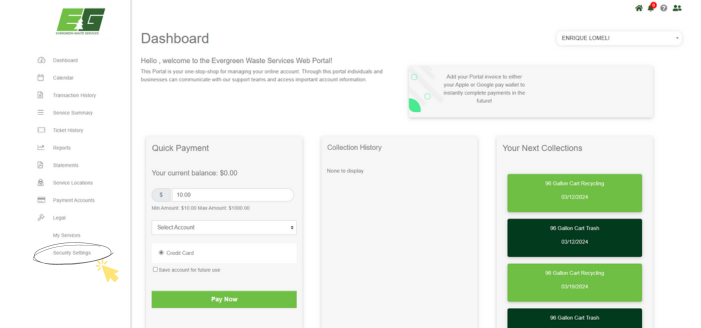
- Visit evergreenws.com and click the “Pay Bill” button
- Click on the “click here” button
- Login credentials:
- Username:
- If your account number starts with “AC,” remove the “AC” and enter the remaining numbers
- If it doesn’t start with “AC,” enter your full account number
- Password: Last 4 digits of the phone number on file
- Username:
Setting Up Autopay
I personally recommend setting up autopay – it’s saved me from forgetting payment deadlines multiple times! Here’s how:
- Log into your account at evergreenws.com
- Select “Pay by Debit or Credit Card”
- Input payment amount (or 0.00 if you’re just setting up autopay)
- Input credit card information
- Check the box labeled “Check here to sign up for autopay”
Changing Your Password
For security, it’s good to change the default password:
- Log into your account
- Select “Change Password”
- Add your new password (should be 4-8 digits)
- Press “Change”
Additional Information
- Customer Service: 302-635-7055
- Payment Processing Time: Up to two business days
Paying Your EvergreenHealth Medical Bill
For EvergreenHealth patients in Kirkland & Monroe, WA, here are your bill payment options:
Payment Methods
- Pay Online: Use MyChart Pay as Guest
- Pay by Phone: Call 425-577-7119 or toll-free 855-480-7451
- Pay by Mail: Send payment to:
EvergreenHealthPO Box 102940Pasadena, CA 91189-2940
Accepted Payment Methods
- Checks
- Visa
- MasterCard
- American Express
- Discover
Laboratory Services Billing
EvergreenHealth Laboratory Services has a separate billing system:
- View and pay your bill through their dedicated portal
- For questions, call 855-425-1786
- You can also send messages through MyChart
Additional Information
- Customer Service Hours: Monday – Friday, 8 AM – 5 PM
- Contact Numbers: 425-577-7119 or toll-free 855-480-7451
Tips for Hassle-Free Evergreen Bill Pay
After years of managing utility bills, I’ve picked up some helpful tips:
1. Set Up Account Alerts
Most Evergreen services allow you to set up email or text notifications for:
- New bills
- Payment confirmations
- Due date reminders
2. Keep Your Contact Info Updated
Make sure your phone number and email are current to:
- Receive important notifications
- Maintain access to your online account
- Ensure your password reset works when needed
3. Mark Payment Due Dates on Your Calendar
I’ve found that adding bill due dates to my phone calendar with reminders has saved me from late fees multiple times!
4. Save Payment Confirmations
Always save your confirmation numbers when paying online. You can:
- Take screenshots
- Print confirmation pages
- Save email receipts
5. Check for Discounts or Programs
Some Evergreen services offer:
- Autopay discounts
- Paperless billing incentives
- Senior or military discounts
Common Evergreen Bill Pay Questions
What if I forgot my account number?
For most Evergreen services, you can:
- Check a previous bill
- Call customer service
- Look for an email with your account information
How long does it take for payments to process?
- Online payments: Typically 1-2 business days
- Phone payments: Usually process immediately
- Mail payments: Allow 5-7 business days for processing
Can I make a partial payment?
This depends on the specific Evergreen service:
- Most waste management services require full payment
- EvergreenHealth may allow partial payments or payment plans
What if my payment is late?
If you’ve missed a payment:
- Make the payment as soon as possible
- Contact customer service to discuss late fees
- Ask about payment arrangements if needed
The Benefits of Online Bill Pay
I switched to online payments for all my utilities last year, and honestly, it’s been a game-changer. Here’s why:
- Convenience: Pay anytime, anywhere
- Time-saving: No need to write checks or buy stamps
- Record-keeping: Digital receipts are automatically saved
- Environmental impact: Reduces paper waste
- Security: Modern encryption keeps your information safe
Payment Options Comparison
| Payment Method | Processing Time | Convenience | Record-Keeping |
|---|---|---|---|
| Online | 1-2 days | Excellent | Automatic |
| Phone | Immediate | Good | Manual |
| 5-7 days | Basic | Manual | |
| Autopay | Automatic | Best | Automatic |
Final Thoughts on Managing Your Evergreen Bills
Managing utility bills doesn’t have to be complicated. With the right approach and understanding of your options, staying on top of your Evergreen bill payments can become a simple part of your routine.
I’ve personally found that setting up online accounts and automatic payments has eliminated the stress of remembering due dates and hunting down stamps. Plus, having digital records of all transactions makes budgeting and tax preparation much easier.
Whether you prefer the convenience of online payments or the traditional method of mailing checks, the most important thing is finding a system that works for you and sticking with it.
By taking advantage of the various payment options Evergreen services offer, you can ensure your services continue uninterrupted while avoiding unnecessary late fees and payment complications.
Do you have other questions about paying your Evergreen bills? Feel free to contact your specific Evergreen service provider directly using the contact information provided above. They’re there to help make the payment process as smooth as possible for all customers!
Remember – everyone forgets a bill sometimes. The key is having a system in place that works for your lifestyle and budget. Happy bill paying!
Pay by mailp.o. box 7158 kalispell MT 59904
Pay Your Bill on the MyAccount Portal
Conveniently make a bill payment using the wide range of user-friendly features offered by MyAccount.
- Set up and manage automatic payments
- View statement history
- View payment history
- Manage billing notifications and preferences
.jpg)
Prefer a different payment method? Evergreen Disposal offers a variety of other payment methods for your convenience.
