Are you sick of stressing about utility bills each month? Maybe you’ve found yourself scrambling to make a payment before the due date, or perhaps you’ve been hit with late fees because that paper bill got lost in the mail If you’re a College Station Utilities customer or Colorado Springs Utilities user, I’ve got good news for you – there are now more ways than ever to pay your utility bills easily and conveniently!
In this guide I’ll walk you through everything you need to know about CS Utilities bill pay options whether you’re dealing with College Station Utilities (CSU in Texas) or Colorado Springs Utilities (also abbreviated as CSU, but in Colorado). Both utility companies offer modern, flexible payment options that can make your life easier.
College Station Utilities: Payment Options at Your Fingertips
College Station Utilities provides electric, water, and wastewater services to residents and businesses in College Station, Texas They’ve modernized their payment systems to make paying bills more convenient than ever
Online Payment Portal
The easiest way to pay your College Station utility bill is through their online customer portal. Here’s how it works:
- Visit CSU.cstx.gov
- Create an account (even if you’re an existing customer, you’ll need to sign up with their upgraded platform)
- Complete the registration with your name and email
- Confirm via the verification link sent to your email
- Log in to your newly created account
- Navigate to the enrollment tab
- Enter your 10-digit account number (found on your latest bill)
- Add your primary phone number and complete the process
Once enrolled, you’ll have full access to view your bills, make payments, and manage your account.
Auto Pay: Never Miss a Payment Again
If you’re like me and sometimes forget due dates, Auto Pay is a lifesaver! With College Station Utilities, setting up automatic payments is simple:
- Click on the “Pay My Bill / View Account” button on their website
- Create a login by clicking “Register Now” if you don’t have one
- Add your utility account(s)
- Enroll in Auto Pay
Once enrolled, your bills will be automatically paid on the due date. No more late fees or disconnection notices!
Additional Payment Methods
College Station Utilities offers several other ways to pay your bill:
- By Phone: Using the city’s automatic voice payment system
- In Person: Visit 310 Krenek Tap Road in College Station
- By Mail: Send payment to P.O. Box 10230, College Station, TX 77842
⚠️ Important Note: College Station Utilities only uses Paymentus Corp for online bill payments. Don’t use any other third-party applications that claim to process utility payments, as the city won’t receive your payment and you could still face disconnection!
Colorado Springs Utilities: Flexible Payment Options
If you’re a Colorado Springs resident, your “CSU” stands for Colorado Springs Utilities, which also offers numerous convenient payment methods.
Online Payment with Credit/Debit Card
Colorado Springs Utilities partners with KUBRA EZ-PAY to process online payments. Here’s how to pay online:
- Log in to KUBRA EZ-PAY
- Provide your account number and ZIP code
- Enter your payment amount
- Sign in or continue as guest
- Input your card information
- Submit your payment
They accept a wide range of payment methods including Apple Pay, Google Pay, Visa, MasterCard, Discover, American Express, Diners Club, and debit cards. Just be aware of transaction fees: $1.85 for residential customers and $5.85 for commercial customers, with a $5,000 limit per 26-day rolling period.
AutoPay
Similar to College Station, Colorado Springs Utilities offers AutoPay that automatically deducts payments from your bank account on the due date. To sign up:
- Register or log in to My Account
- Click “enroll” under the AutoPay icon
- Provide your bank information
- Review and submit your enrollment
When your bill shows “Automatic Bank Transfer is scheduled to occur on the due date,” your enrollment is complete.
Unique Payment Options
Colorado Springs offers some particularly helpful options:
Pick My Payment Date
This fantastic option lets you choose a payment due date that works best for your budget:
- Choose any date between the 1st and 28th of the month
- Perfect for those on fixed incomes or anyone managing a tight budget
- Available to both residential and commercial customers
- Limited to one change per year
Budget Billing
Budget Billing keeps your payments consistent throughout the year, which is great for managing household expenses:
- Your monthly payment is based on your average bill over the past 12 months
- Every 90 days, your usage is reviewed and payments adjusted if needed
- You’ll receive notification one month before any changes to your payment amount
- Available to residential customers and business customers on the E1C electric rate
Managing Your Bills Like a Pro
Whether you’re dealing with College Station or Colorado Springs utilities, both offer great tools to manage your bills more effectively.
College Station’s Budget Billing
If you want predictable monthly payments, College Station’s Budget Billing program calculates your average bill based on the previous 12 months of usage. This means you’ll pay the same amount each month, making budgeting easier.
To sign up for Budget Billing with College Station Utilities, download and complete their Budget Billing form from their website.
Text Notifications
College Station Utilities offers a text message notification system called TextPower that sends alerts about outages. You’re automatically enrolled if your cell phone is your primary account number, but you can also enroll by texting “CSU” to 979-599-7917.
Colorado Springs’ Account Notifications
Colorado Springs Utilities offers customizable notifications:
- Water use notifications: Get alerts when your water use reaches 50% of Tier I and 50% of Tier II of their Tiered Water Rate
- Billing notifications: Receive alerts five days before your bill is due and when your bill has been paid
- eBilling notifications: Get email or text alerts when your bill is ready to view online
To manage these notifications, log in to My Account and click “Notifications” under the “Quick Links” section.
What If I Need Help Paying My Bill?
Both utilities understand that sometimes customers face financial challenges.
College Station Utilities Assistance
If you need financial assistance with your College Station utility bills, you can call 2-1-1 or visit 211Texas.org for help finding resources.
Colorado Springs Utilities Assistance
Colorado Springs Utilities offers several customer assistance programs. If you’re having trouble paying your bill, they can help with:
- Payment Plans: Make arrangements online in My Account or call (719) 448-4800
- Payment Extensions: If you just need a little more time before your next paycheck
- Payment Arrangements: For long-term solutions to catch up on bills
Special Billing Options for Multiple Accounts
If you manage multiple properties or businesses, both utilities offer solutions.
Colorado Springs’ Consolidated and Summary Billing
Colorado Springs Utilities offers two particularly helpful options:
- Consolidated Billing: Receives all your separate bills in one envelope with a single due date
- Summary Billing: Combines all accounts into a single account with one bill, one due date, and one payment
These options can significantly simplify account management for property owners or businesses with multiple locations.
My Experience with CS Utilities Bill Pay
I’ve been using online bill pay with my local utility company for about two years now, and it’s been a game-changer. Before switching to automatic payments, I was constantly worried about missing due dates – especially when traveling. Now, I don’t even think about it!
The budget billing option has been particularly helpful during extreme seasons. Instead of getting shocked by a huge electric bill during the hottest summer months or coldest winter days, I know exactly what to expect each month.
Tips for Smooth Utility Bill Payments
Based on my experience and research into both College Station and Colorado Springs utilities, here are some tips to make bill paying easier:
- Set up autopay: This is the simplest way to ensure you never miss a payment
- Use budget billing: Great for consistent budgeting throughout the year
- Check for leaks regularly: Unexpected increases in water bills often indicate leaks
- Sign up for text/email alerts: Get notified about due dates, outages, and high usage
- Keep your contact info updated: Make sure the utility company can reach you if there’s an issue
- Check your usage history: Understanding your patterns can help you identify opportunities to save
Whether you’re dealing with College Station Utilities in Texas or Colorado Springs Utilities in Colorado, there are more convenient ways than ever to pay and manage your utility bills. From online payments to autopay, budget billing to text alerts, these modern options can save you time, prevent late fees, and make budgeting easier.
The days of writing checks and mailing them in (and hoping they arrive on time!) are over if you want them to be. Both utilities have embraced technology to make customers’ lives easier.
So what are you waiting for? Log in to your utility account today and explore the bill pay options available to you. Your future self will thank you when you’re no longer stressing about due dates or hunting for stamps!
Have you tried any of these bill pay methods? Which one works best for your lifestyle? I’d love to hear your experiences in the comments below!
Utility Billing System Update: Important Information
Our Utility Customer Portal is available for you to view bills and usage, make payments, and other changes to your utility account. We can be reached by telephone at 979-764-3535 Mon.-Fri. from 8 a.m.– 5 p.m. For in-person assistance, you can visit our Utility Customer Service Lobby at 310 Krenek Tap Road, College Station Mon.–Fri. from 8 a.m.– 5 p.m.
Follow the step-by-step guide below to facilitate your use of the portal:
- Upgraded Utility Billing Software – Existing Customer Guide
- Visit Our Website: Go to CSU.cstx.gov.
- Create an Account: Even if you are an existing customer, you must sign up for a new account on our upgraded platform. Click on the sign-up option.
- Complete Registration: Fill in the required registration information, including your name, email and set a password.
- Confirmation Email: Wait for the confirmation email. It will be sent to the email address you provided during sign-up. Click on the verification link in the email to confirm your sign-up.
- Log In: Once confirmed, log in to your newly created account.
- Navigate to Enrollment tab: Click on the “enrollment” tab at the top.
- Enter Account Number: Input your new 10-digit account number. (You can find this on your latest bill or in a recent text from UCS.)
- Add Phone Number: Click Next, add a primary phone number associated with the account, and hit Complete.
- Access the Portal: Congratulations! You now have full access to the upgraded portal.
- Visit Our Website: Go to CSU.cstx.gov.
- Create an Account: Click on the sign-up option.
- Complete Registration: Fill in the required registration information, including your name, email and set a password.
- Confirmation Email: Wait for the confirmation email. It will be sent to the email address you provided during sign-up. Click on the verification link in the email to confirm your sign-up.
- Log In: Once confirmed, log in to your newly created account.
- Navigate to Move in: Complete the form for move-in services. You will receive a reference number.
- Access the Portal: Once completed, click the enrollment button and you will have full access to the portal.
- Visit Our Website: Go to CSU.cstx.gov.
- Create an Account: Click on the sign-up option.
- Complete Registration: Fill in the required registration information, including your name, email and set a password.
- Confirmation Email: Wait for the confirmation email. It will be sent to the email address you provided during sign-up. Click on the verification link in the email to confirm your sign-up.
- Log In: Once confirmed, log in to your newly created account.
- Navigate to Move in: Complete the form for move-in services. You will receive a reference number.
- Access the Portal: Once completed, click the enrollment button and you will have full access to the portal.
Your new account number will show in the first bill. If you would like to have customer portal access before then follow these steps:
New to College Station? New Customer Connect Services Guide
Moving? Existing Customer Move Services Guide
Colorado Springs Utilities promotes programs to provide assistance for paying bills
FAQ
Does College Station utilities offer a bill payment system?
College Station Utilities (CSU) offers a convenient online bill payment system for customers to easily pay their electric, water, wastewater and other city utility bills. The CSU online portal provides a simple way to view statements, check usage, and make secure payments 24/7.
Will CSU’s new customer service portal make online utility payments easier?
Video: CSU’s new customer service portal will make online utility payments easier In this episode of “What’s Up, College Station?” Marketing Coordinator Grace Hallowell and Utilities Services Manager Jennifer Smith discuss the new customer service portal and how it will enhance the user’s online experience and make bill-paying easier.
Why should I pay my CSU bills online?
Paying CSU bills through the online portal offers many benefits like: Online payments make utility bill management a breeze! Follow these tips when setting up CSU online bill pay: With a few quick clicks, CSU customers can securely pay their utility bills online 24/7. Start streamlining your bill management today!
What is the CSU online portal?
The CSU online portal provides a simple way to view statements, check usage, and make secure payments 24/7. This article will cover the CSU payment options, steps for paying online, key benefits, and tips for managing your utility account.
What services does CSU provide?
We provide electric, water and wastewater services, and manage a 24-hour dispatch for residential and commercial customers in College Station. Report power outages, water line breaks, wastewater spills and backups, and other electric, water or wastewater problems to 855.528.4278. Please have your CSU account number ready when you call.
How can I make a one-time utility payment with a credit/debit card?
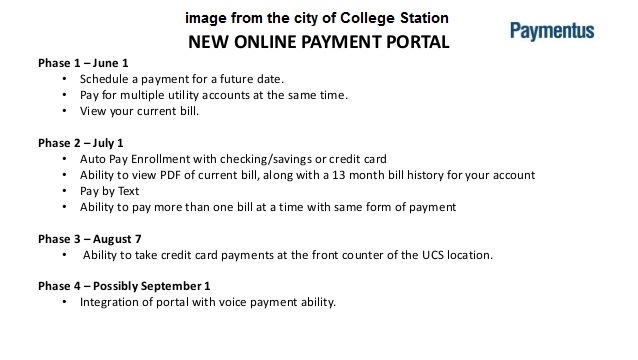
This means you can now make one-time utility payments with a credit/debit card as well as: Schedule a payment for a future date. Pay for multiple utility accounts at the same time. Have the ability to store credit card information for faster payment processing. Receive an emailed receipt of payment. View your current bill.
How do I pay utilities on Conservice?
Mail and Bank Payments: If you prefer to pay via check, money order, or with your bank’s bill-pay service, please send those to Conservice at PO Box 1530 Hemet, CA 92546. Quick Pay: If you’ve opted into ebill (bill emailed to you), you have the option to pay via Quick Pay directly from your ebill.
How do I pay utilities in Colorado Springs?
Call (719) 448-4800 or (800) 238-5434 to pay over the phone.
How to pay college station utilities?
Our Utility Customer Portal is available for you to view bills and usage, make payments, and other changes to your utility account. We can be reached by telephone at 979-764-3535 Mon.-Fri. from 8 a.m.– 5 p.m.
What is the grace period for Colorado Springs utilities?
If you need help paying your bill, we offer flexible payment options, assistance programs and a 16-day grace period. We do not charge late fees.
