PayPal allows you to make payments using a variety of methods including: balance with PayPal, a bank account, PayPal Credit, debit or credit cards, and rewards balance.
This page does not address unauthorized transactions. For information on your protection against unauthorized transactions, please see the Error Resolution section of the PayPal User Agreement.
Some sellers allow you to store PayPal as the way you pay when making purchases on their site, so you can check out faster. Often, this entails creating an agreement with the seller that permits them to request that we charge your PayPal account each time you make a purchase.
When you first set up an automatic payment agreement or store PayPal as a payment method with a seller, you may have the option to set up a preferred payment method for such agreement. You can review, set, or change a preferred payment method for an automatic payment agreement in your account settings on paypal.com or in the PayPal app. See here for a tutorial.
Your preferred payment method for an automatic payment agreement will be used for transactions with that seller. If you have available balance with PayPal, that balance may be used before your preferred payment method, depending on your applicable automatic payment agreement with the seller.
If you have not set a preferred payment method for an automatic payment agreement, or if your preferred payment method for an automatic payment agreement is unavailable (for example, due to fraud risk or because it is expired), you’ve authorized PayPal to charge the backup payment method in the following order, if applicable: 1. Balance Account or PayPal Debit Card (which allows you to access your Balance Account), or balance in your business account (if we’ve been able to verify the required identifying information you provide to us); 2. Bank account (when PayPal pays the recipient before we receive the funds from your bank); 3. PayPal co-branded credit card; 4. Debit card; 5. Credit card; and 6. E-check (when PayPal pays the recipient before we receive the funds from your bank). However, if a bank account is used as the payment method for a transaction and funding fails (for example, as a result of insufficient funds), PayPal may attempt another payment method as a backup notwithstanding the order specified above (typically a credit card, if applicable). To help minimize disruptions in your automatic payments, we may update your payment method information associated with such automatic payments.
Certain one-time online transactions may require that a backup payment method be used in the event that your selected or preferred payment method is unavailable. In those instances, the backup method may be displayed to you on your transaction review page, before you complete the transaction. If PayPal determines currency conversion is necessary for a transaction that also requires a backup payment method, you may not be able to separately choose whether PayPal or your card issuer performs the currency conversion on your backup payment method.
Hey there, fellow PayPal users! I’ve been using PayPal for years now, and one question I see pop up a lot in forums and comment sections is whether you can pay your PayPal bill with a credit card. The short answer? YES, you absolutely can! But there’s some important details you should know about, so let’s dive into this topic together.
What Payment Methods Does PayPal Accept?
Before we get into the specifics of paying your PayPal bill with a credit card, it’s helpful to understand what payment methods PayPal supports in general. According to PayPal’s official information, your PayPal Wallet can include
- Balance with PayPal (money already in your account)
- Bank accounts
- Credit and Debit Cards
- PayPal Credit
- Rewards balance
This variety gives us flexibility in how we manage our PayPal transactions and bills
Paying Your PayPal Bill with a Credit Card: The Basics
If you’ve got a PayPal bill that needs paying (whether it’s from PayPal Credit or another PayPal service), using a credit card is definitely an option. Here’s the simple breakdown:
- You can add multiple credit cards to your PayPal account
- These cards can be used to fund payments when your PayPal balance isn’t sufficient
- You can designate a specific credit card as your preferred payment method
When you have a PayPal bill due, the system will use your preferred payment method if your PayPal balance doesn’t cover the amount owed
Setting Up Your Credit Card as a Payment Method
To pay your PayPal bills with a credit card, you’ll first need to make sure your card is added to your account. Here’s how:
- Log in to your PayPal account
- Navigate to “Wallet” or “Payment Methods”
- Select “Add a card”
- Enter your credit card details
- Follow the verification steps if required
Once your card is added, you might want to set it as your preferred payment method. This can be done in your account preferences on www.paypal.com or in the PayPal app.
The Order of Payment Methods (When You Don’t Choose)
Something interesting I’ve noticed from PayPal’s documentation is that they have a specific order for using backup payment methods. If you haven’t specified a preferred method (or if your preferred method is unavailable), PayPal will charge payment methods in this order:
- PayPal Balance Account or PayPal Debit Card
- Bank account
- PayPal co-branded credit card
- Debit card
- Credit card
- E-check
So even if you don’t explicitly choose to pay with your credit card, it might still be used as a backup payment method if other methods fail.
The Advantages of Paying Your PayPal Bill with a Credit Card
I’ve found several benefits to using a credit card for PayPal bills:
- Earn rewards points – Many credit cards offer cashback or points
- Additional purchase protection – Some cards offer extended warranties or fraud protection
- Build credit history – Regular payments can positively impact your credit score
- Flexibility in payment timing – You can pay your credit card bill when it suits your cash flow
Potential Downsides to Consider
I gotta be honest with you – it’s not all sunshine and rainbows. There are a few things to watch out for:
- Possible fees – Some credit card issuers might treat PayPal payments as cash advances, which typically incur higher interest rates and fees
- Interest charges – If you don’t pay your credit card bill in full, you’ll accrue interest
- Risk of debt cycling – Using credit to pay credit can create a dangerous debt spiral if not managed carefully
Special Considerations for PayPal Credit
If you’re specifically looking to pay a PayPal Credit bill with another credit card, there are some additional things to know:
PayPal Credit functions like a digital credit line tied to your PayPal account. When it comes time to make a payment on your PayPal Credit balance, you can use any of the payment methods in your PayPal wallet – including another credit card!
To do this:
- Log in to your PayPal account
- Go to PayPal Credit
- Select “Make a Payment”
- Choose your credit card as the payment method
- Enter the payment amount and confirm
Setting Up Automatic Payments
If you’re like me and sometimes forget to pay bills on time (oops!), setting up automatic payments might be a good option. PayPal allows you to set up automatic payments for your PayPal bills, and you can choose your credit card as the payment method for these.
According to PayPal’s documentation:
“When you first set up an automatic payment agreement or store PayPal as a payment method with a seller, you may have the option to set up a preferred payment method for such agreement. You can review, set, or change a preferred payment method for an automatic payment agreement in your account settings on paypal.com or in the PayPal app.”
What Happens When Things Go Wrong
Sometimes payments don’t go as planned. If your credit card payment to PayPal fails, a few things might happen:
- PayPal may try an alternative payment method
- You might receive a notification about the failed payment
- You’ll need to manually make a payment to avoid late fees or penalties
It’s important to note that if a bank account is used as the payment method for a transaction and funding fails (for example, due to insufficient funds), PayPal may attempt another payment method as a backup – typically a credit card if one is available.
A Real-World Example
Let me share a personal experience: Last year, I had a PayPal Credit bill due, but my bank account was running low before payday. I didn’t want to miss the payment and get hit with late fees, so I used my Visa credit card that I’d previously added to my PayPal wallet to make the payment. The process was smooth, the payment posted immediately, and I was able to pay off that credit card when my paycheck came in a few days later.
Payment Methods for Different Transaction Types
PayPal allows you to set different preferred payment methods depending on the type of transaction:
- Online transactions – You can set a preferred payment method specifically for online purchases
- In-store transactions – A different preferred method can be set for in-person payments
- Automatic payment agreements – Each agreement can have its own preferred payment method
This flexibility lets you strategically use your credit card where it makes the most sense for your financial situation.
Tips for Managing Multiple Payment Methods in PayPal
Here are some tips I’ve learned from managing multiple payment methods in my PayPal account:
- Review your preferred payment methods regularly – Make sure they’re still active and appropriate for your needs
- Check for expired cards – PayPal will notify you, but it’s good to stay on top of expiration dates
- Monitor transactions closely – Make sure the right payment method is being used for each transaction
- Update card information promptly – If your card gets reissued with a new number, update it in PayPal right away
The Bottom Line
So, can you pay your PayPal bill with a credit card? Absolutely yes! It’s a straightforward process that offers flexibility and potential rewards benefits. Just be mindful of the potential fees and interest that might apply, and avoid creating a cycle of debt by using one credit line to pay another.
PayPal’s system is designed to be flexible with multiple payment options, and using a credit card to pay your PayPal bills is just one of many ways to manage your payments effectively.
Frequently Asked Questions
Can I use multiple credit cards with my PayPal account?
Yes! You can add multiple credit cards to your PayPal wallet and choose which one to use for specific transactions.
Will I be charged a fee for paying my PayPal bill with a credit card?
PayPal doesn’t charge a fee, but your credit card issuer might treat it as a cash advance, which could incur fees. Check with your credit card provider.
Can I pay someone else’s PayPal bill with my credit card?
Yes, if you’re sending money to Friends and Family, but be aware that fees may apply depending on your payment method.
What happens if my credit card payment to PayPal fails?
PayPal will typically attempt to use an alternative payment method from your account or notify you that the payment failed.
Is it safe to store my credit card information in PayPal?
PayPal uses encryption and security measures to protect your financial information. That said, always practice good account security by using strong passwords and enabling two-factor authentication.
Happy PayPal-ing!
Selecting a preferred payment method
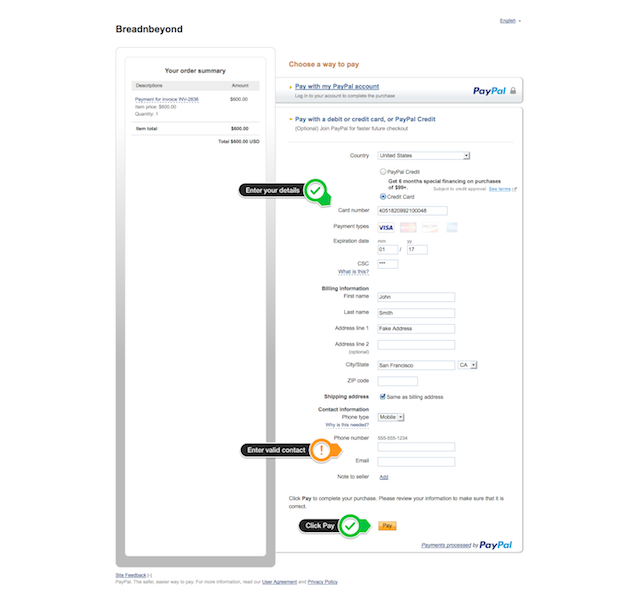
You can choose any of the payment methods in your PayPal account as your preferred payment method. You can select a preferred payment method in your account preferences on www.paypal.com or in the PayPal app, or when checking out with PayPal online. There may be times when your preferred payment method cannot be used, for example, if you select a credit card that is expired.
You can set separate preferred payment methods for online transactions, in-store transactions, and each of your automatic payment agreements, as described above.
If you have chosen a preferred payment method, it will be shown as the primary method of payment.
If you have not chosen a preferred payment method, you can always choose the payment method to be used for the specific transaction.
The availability of certain payment methods may be limited based on that particular seller or the third-party website you are using to complete the transaction.
If you have not chosen a preferred payment method for online transactions, when you choose a credit card (other than PayPal Credit), debit card, bank account or balance with PayPal during a one-time online purchase, you are also providing your express consent to make that your preferred payment method for future one-time online purchases.
If you have not selected a preferred payment method, or your preferred payment method is unavailable, we will show you your available payment methods. You can also click on the “Manage” link to see all of your available payment methods, or add a new one, and select a payment method during the transaction.
