Last updated October 2025
Paying bills is never fun, but the City of Elyria has made it way easier with their online payment system I’ve been an Elyria resident for years, and I remember the old days of mailing checks or driving downtown to City Hall Now, I just handle everything from my couch while watching Netflix!
If you’re looking to pay your Elyria utilities bill online, this guide will walk you through every step of the process. I’ll cover everything from creating an account to linking multiple accounts if you own several properties in Elyria.
What is the Elyria Utilities Department?
The Utilities Department in Elyria handles water, sewer, and other essential services for residents. All these services come together on a single utility bill that you receive regularly The department operates out of City Hall at 131 Court Street, Elyria, Ohio 44035, and their phone number is 440-326-1400 if you need direct assistance
Benefits of Paying Your Utility Bill Online
Before jumping into the “how,” let’s talk about the “why.” Here are some great reasons to use Elyria’s online payment system:
- Convenience: Pay anytime, day or night, without leaving home
- Account history access: Review past payments and usage patterns
- Consumption graphs: See how your water or energy usage changes over time
- Email billing: Sign up to receive bills electronically
- Multiple account management: Link several accounts under one user profile
- No more stamps or checks: Save money on postage and check fees
- No more late fees: Schedule payments in advance
Getting Started with Online Payments
Step 1: Creating Your User Profile
The first time you access the eSuite system on the City of Elyria’s website, you’ll need to create a user profile. Here’s how:
- Visit the City of Elyria’s Utilities Department Online Payments page
- Click on “Pay My Utility Bill”
- Look for “Create a User Profile” option
- Fill in your personal information
- Create a username and password (use something you’ll remember!)
- Verify your email address
I personally found this step pretty straightforward, though I did have to check my spam folder for the verification email.
Step 2: Linking Your Utility Account
Once you’ve created your profile, you’ll need to link it to your utility account:
- Log in with your new credentials
- Enter your utility account number (found on your paper bill)
- You may need to provide additional verification info
- Confirm the account details match your information
Step 3: Making a Payment
Now for the actual payment process:
- Log in to your account
- Select the account you want to pay (if you have multiple)
- Enter the payment amount (system will show amount due)
- Select payment method (Visa, MasterCard, or Discover)
- Enter your card information
- Agree to the terms and conditions
- Submit payment
- Print or save your confirmation
Pro tip: I always take a screenshot of my confirmation page just in case there’s ever a question about my payment. Better safe than sorry!
Managing Multiple Accounts
If you own more than one property in Elyria or manage utility payments for family members, you can link multiple accounts to a single user profile. This is super helpful for landlords or people helping elderly parents with their bills.
To link additional accounts:
- Log in to your existing eUtilities user profile
- Look for “link additional accounts” option
- Enter the account information for each additional account
- Verify ownership/authorization for each account
Payment Methods Accepted
The City of Elyria’s online payment system currently accepts:
- Visa
- MasterCard
- Discover
Unfortunately, American Express isn’t currently accepted. I wish they’d add PayPal or Apple Pay someday, but the current options work fine for most people.
Security Considerations
Some folks worry about online payments, but Elyria’s system uses secure encryption to protect your information. Your credit/debit card details are processed through a secure site, and the city doesn’t store your full card number in their system.
Still, it’s always good practice to:
- Use a strong, unique password
- Don’t share your login info with others
- Check your statements regularly
- Log out when finished, especially on shared computers
Troubleshooting Common Issues
Forgot Your Password?
Don’t panic! We’ve all been there. Just:
- Click the “Forgot Password” link on the login page
- Enter your email address
- Check your email for reset instructions
- Create a new password
Payment Didn’t Go Through?
If your payment fails:
- Check your card information was entered correctly
- Verify your card hasn’t expired
- Ensure you have sufficient funds available
- Try a different card if possible
- Contact your bank if the card should be working
- Call the Utilities Department at 440-326-1400 if problems persist
Can’t Link Your Account?
This usually happens when:
- The account number was entered incorrectly
- The name on your online profile doesn’t match utility records
- There’s an outstanding verification issue
Contact the Utilities Department directly to resolve these issues. They’re open Monday through Friday, 8 AM to 4 PM.
Alternative Payment Methods
While online payment is convenient, Elyria offers other ways to pay your utility bill:
- In Person: Visit City Hall at 131 Court Street during business hours (Monday-Friday, 8 AM-4 PM)
- Mail: Send check or money order to City of Elyria Utilities, 131 Court Street, Elyria, OH 44035
- Drop Box: Use the secure drop box located outside City Hall (available 24/7)
- Phone: Call the Utilities Department at 440-326-1400 to make a payment
Setting Up Auto-Pay
I personally love the auto-pay feature. Once it’s set up, I never have to worry about forgetting a payment. Here’s how to set it up:
- Log in to your eUtilities account
- Look for “Auto-Pay” or “Recurring Payments” option
- Select the account(s) for auto-pay
- Choose your payment method
- Select whether to pay the full balance or a set amount
- Choose the payment date (typically due date or a few days before)
- Confirm your settings
With auto-pay, the system will automatically charge your card on the schedule you’ve selected. Just make sure to update your card info if it changes or expires!
Understanding Your Utility Bill
Online payments are easier when you understand what you’re paying for. Elyria utility bills typically include:
- Water charges: Based on your water consumption
- Sewer charges: Usually calculated based on water usage
- Other municipal services: May include trash collection depending on your area
- Previous balance: Any unpaid amount from prior bills
- Late fees: If applicable
- Total due: The amount you need to pay
The online system allows you to view consumption graphs, which can help you identify unusual usage patterns or potential leaks. I once noticed my water usage doubled one month, which helped me catch a leaky toilet before it got worse!
Staying Connected with the City of Elyria
While paying your bill, take a moment to explore other online resources the city offers:
- Events calendar: Stay informed about community happenings
- Announcements: Important updates from the city
- Press releases: Official news and information
- Forms & permits: Access necessary paperwork online
The city also maintains social media accounts on Facebook, X (formerly Twitter), and Instagram, which are great ways to stay informed about service interruptions, payment system updates, or other important news.
Final Thoughts
The Elyria online utility payment system isn’t perfect (what government system is?), but it’s a huge improvement over the old ways. I’ve been using it for years with very few problems, and those few issues were quickly resolved by the helpful staff at the Utilities Department.
If you haven’t tried paying your Elyria utilities bill online yet, give it a shot! The initial setup takes a few minutes, but the convenience is worth it. And if you get stuck, remember the Utilities Department is just a phone call away at 440-326-1400.
Frequently Asked Questions
Q: Is there a fee for paying online?
A: Currently, the City of Elyria doesn’t charge additional fees for online payments, which is awesome compared to some other cities!
Q: When is my payment posted to my account?
A: Online payments are typically processed within 1-2 business days, though they often show up sooner.
Q: Can I schedule future payments?
A: Yes! The system allows you to schedule payments in advance, which is great for budgeting or if you’re going on vacation.
Q: What if I need to dispute a charge on my bill?
A: Contact the Utilities Department directly at 440-326-1400 to discuss any billing concerns.
Q: Is paperless billing available?
A: Yes, you can sign up to receive your bills by email instead of paper mail. This option is available in your account settings.
Q: Can I pay partial amounts on my bill?
A: Yes, the system allows you to enter any payment amount, though you’ll want to pay at least the minimum due to avoid late fees.
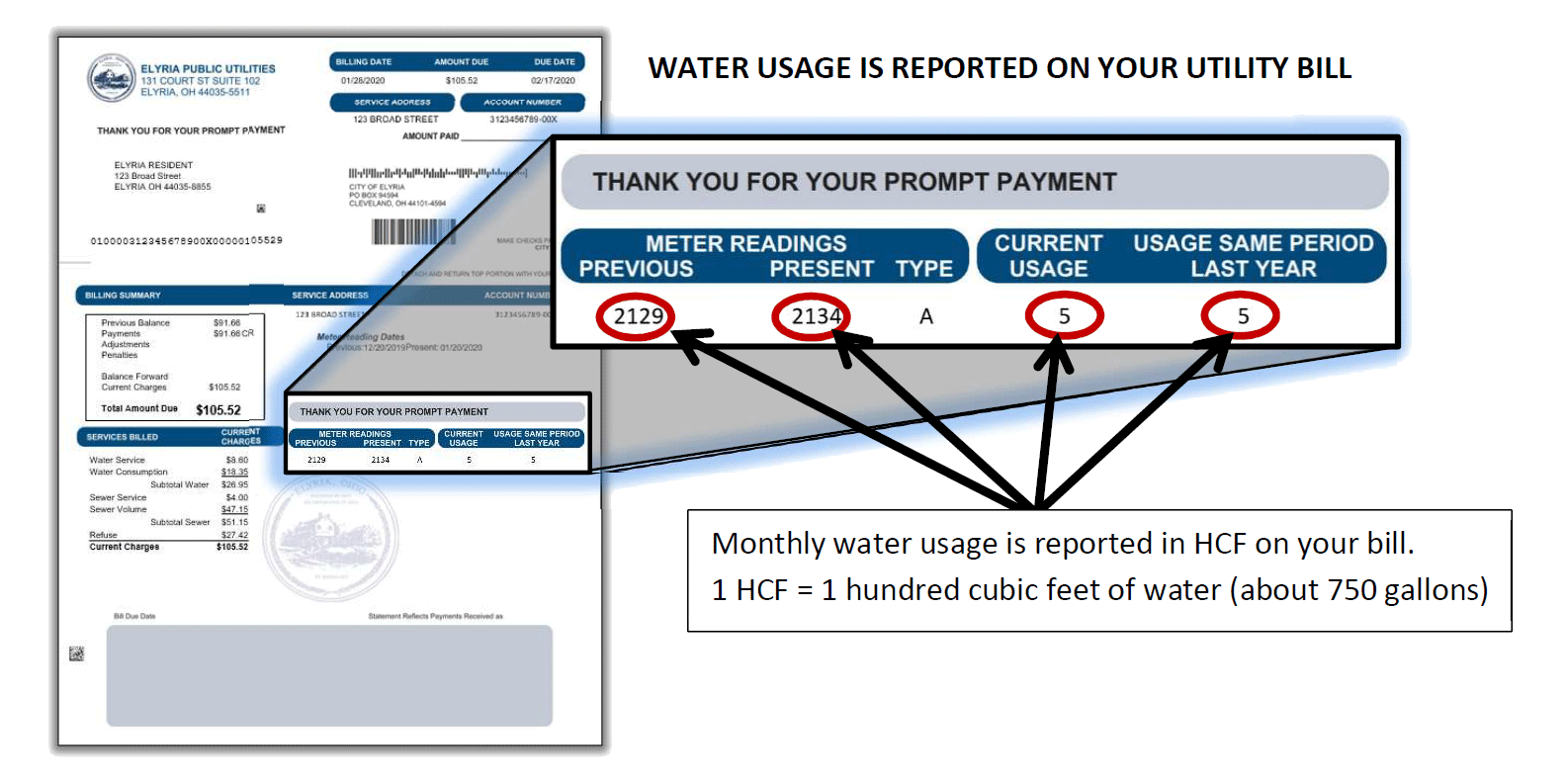
How do I read my bill?
Guidance is provided here: How to Read Your Bill
I need help paying my water bill. What do I do?
Residents at least thirty (30) days behind with a disconnection notice may be eligible for utility and/or rental payment assistance through a partnership with the Lorain County Salvation Army. Elyria Utility customers are encouraged to apply at ucanapply.org, or by calling 440-323-2026.
The Lorain County Community Action Agency has a low income household water assitance program. For more information see the flyers below.
The City of Elyria has many resources in place to help residents. You can contact us in the utilities department for suggestions, contact your church, the Salvation Army, or United Way of Lorain County. Their resources can be reached by dialing: 2-1-1
