Are you tired of the monthly hassle of figuring out how to pay your Southwest electric bill? You’re not alone! I’ve been there too, struggling to remember due dates and payment methods. Whether you’re a customer of Southwest Electric Cooperative (SWEC), Southwest Tennessee Electric Membership Corporation (STEMC), or Southwestern Electric Power Company (SWEPCO), I’ve got you covered with this comprehensive guide to make your bill payment experience smooth and stress-free.
Quick Payment Options at a Glance
Before diving into details here’s a quick look at your main payment options
| Company | Online Payment | Phone Payment | In-Person |
|---|---|---|---|
| SWEC | Member Login/Quick Pay | 800-262-0326 | Four office locations |
| STEMC | Member Portal/FlexPay | 866-539-6185 | Visit local offices |
| SWEPCO | Online account or Guest Pay | Pay-by-phone (fees apply) | Payment centers network |
Now let’s explore your options in more detail!
Southwest Electric Cooperative (SWEC) Bill Payment Options
SWEC provides several convenient ways to pay your electric bill, making it easy to choose what works best for your lifestyle.
Online Payment Options
If you prefer handling your bills from the comfort of your couch (I know I do!), SWEC offers two main online payment methods:
-
Member Login – Create an account through the SWEC website and log in to pay your bill. This gives you access to your account history and other features.
-
Quick Pay – If you don’t want to create an account SWEC offers a Quick Pay option where you can make a payment without logging in. Super convenient when you’re in a hurry!
To access these options, visit the SWEC website at https://www.swec.org/ and look for the “Pay Your Bill/Login” or “Quick Pay” options prominently displayed on their homepage.
Phone Payment
Need to pay your bill but don’t have internet access? No worries! You can call SWEC’s customer service at 800-262-0326 during their office hours (Monday through Friday 8 00 am to 5 00 pm) to make a payment over the phone.
In-Person Payment Options
Sometimes there’s nothing like handling your business face-to-face. SWEC has four office locations where you can pay your bill in person:
- Bolivar Office: 1023 S Springfield Ave, Bolivar, MO 65613
- Preston Office: 18002 US Hwy 65, Preston, MO 65732 (417-722-4491)
- J7 Office: 6179 N State Hwy 7, Roach, MO 65787 (573-347-2760)
- Bluegrass Office: 3905 E Farm Rd 94, Springfield, MO 65803 (417-833-5525)
Mailing Address
If you prefer to mail your payment (old school, but reliable!), you can send it to:
PO Box 150
Bolivar, MO 65613
Southwest Tennessee Electric Membership Corporation (STEMC) Bill Payment Options
STEMC also offers multiple convenient ways to pay your electric bill.
Online Payment Options
STEMC’s website makes it easy to pay your bill with these online options:
-
Pay Online (Member Portal) – Access your account through the Member Portal to make payments, view your usage history, and manage your account.
-
FlexPay/My Usage – A pay-as-you-go option that allows you to add funds to your account when convenient for you.
-
Paperless Billing – Go green and receive your bills electronically instead of paper bills.
To access these options, visit STEMC’s Quick Pay page at https://www.stemc.com/my-quick-pay/.
Phone Payment
For STEMC customers who prefer to pay by phone, you can call their dedicated payment line at 866-539-6185. This service is available 24/7, making it super convenient regardless of your schedule.
Southwestern Electric Power Company (SWEPCO) Bill Payment Options
SWEPCO provides a variety of payment options to suit different preferences and needs.
Online Payment Options
SWEPCO offers these online payment methods:
-
Account Login – Log in to your account using your User ID and Password to make payments securely.
-
Pay as a Guest – Don’t have an online account? No problem! You can make a one-time payment as a guest, though fees may apply.
-
AutoPay – Set up automatic payments to be drawn from your checking account on the due date. SWEPCO will send you a message when your payment has been processed.
-
Paperless Billing – Receive your bills electronically via email instead of paper bills.
To access these options, visit SWEPCO’s payment page at https://www.swepco.com/account/bills/pay/.
Phone Payment
SWEPCO customers can pay by phone by calling 1-888-216-3523. This service allows for immediate payments, though fees may apply.
In-Person Payment
SWEPCO has arranged with a network of merchants to accept in-person payments. You can find a payment center near you through their website.
Understanding Your Bill and Payment Programs
Payment Assistance Programs
All three companies offer payment assistance programs for customers experiencing financial difficulties. These programs can help you keep your power on during challenging times.
- SWEC offers Assistance Resources
- STEMC provides Payment Arrangements
- SWEPCO has several Payment Assistance Programs, including Neighbor to Neighbor
Budget Billing Options
If you want to make your electric bills more predictable throughout the year, consider these options:
- SWEC offers Budget Billing
- SWEPCO provides Average Monthly Payments (AMP)
These programs spread your annual electric costs evenly across 12 months, helping you avoid surprisingly high bills during extreme weather months.
Tips for Seamless Bill Payment
After years of dealing with utility bills, I’ve learned a few tricks that might help you too:
-
Set up reminders – Mark your calendar or set phone reminders for bill due dates.
-
Consider AutoPay – It’s a real lifesaver! I used to forget my due dates all the time, but AutoPay ensures I never miss a payment.
-
Keep contact info updated – Make sure your phone number and email address are current so you can receive important notifications about your account.
-
Monitor your usage – All three companies offer tools to track your energy usage, which can help you manage your consumption and reduce your bills.
-
Save payment confirmations – Always save your payment confirmation numbers or receipts, just in case there’s ever a discrepancy.
What to Do If You’re Having Trouble Paying Your Bill
We all go through tough financial patches sometimes. If you’re struggling to pay your electric bill, don’t wait until your service is at risk of disconnection. Here’s what you can do:
-
Contact customer service immediately – Explain your situation and ask about:
- Payment extensions
- Payment arrangements
- Bill assistance programs
- Budget billing options
-
Look into energy efficiency programs – All three companies offer energy efficiency rebates and audits that could help lower your bill in the long run.
-
Check for community assistance programs – Many local organizations provide utility bill assistance.
Why I Recommend Online Bill Pay
As someone who juggling work, family, and a million other responsibilities, I’ve found that online bill pay is a game-changer for my Southwest electric bill. Here’s why I love it:
- 24/7 access – Pay anytime, not just during business hours
- Instant confirmation – No wondering if your payment was received
- Account history – Easily track your payment history and usage patterns
- No stamps needed – Save money on postage and envelopes
- Environmentally friendly – Especially with paperless billing options
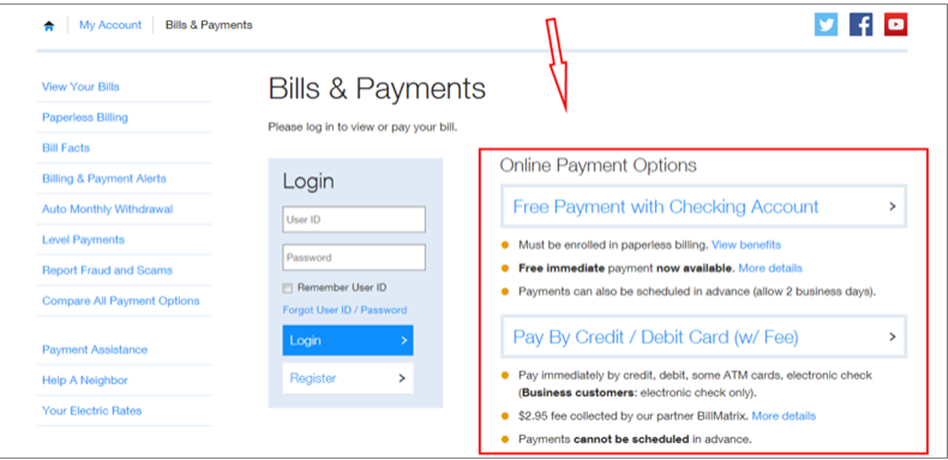
Plus, with SWEC, payment is free when you pay online with a checking account and you’re enrolled in Paperless Billing. That’s a win-win!
FAQs About Southwest Electric Bill Pay
What information do I need to pay my bill online?
To pay your bill online, you’ll typically need:
- Your account number
- Your name as it appears on the bill
- A valid payment method (credit/debit card or checking account information)
Is there a fee for paying my bill online?
- SWEPCO: Free when paying with a checking account and enrolled in Paperless Billing; fees may apply for guest payments
- SWEC: Free through their member portal
- STEMC: Check their website for current fee information
What if I forget my online account username or password?
All three companies provide “Forgot Username” and “Forgot Password” links on their login pages. You can use these to recover your account information securely.
Can I set up recurring payments?
Yes! All three companies offer automatic payment options:
- SWEPCO: AutoPay
- SWEC: Through their member portal
- STEMC: Through their member portal
What if I think there’s an error on my bill?
Contact customer service immediately to discuss any discrepancies. Have your account information and any relevant payment confirmations ready.
Conclusion
Paying your Southwest electric bill doesn’t have to be a headache! With multiple payment options available through SWEC, STEMC, and SWEPCO, you can choose the method that best fits your lifestyle and preferences.
I personally recommend setting up online payments and enrolling in AutoPay for the most hassle-free experience. It’s saved me from late fees more times than I can count!
Remember, if you’re ever having trouble making your payment, reach out to your electric company sooner rather than later. They have programs designed to help, and most would rather work with you than disconnect your service.
MY PAYMENT OPTIONS
Members have many payment options available.
