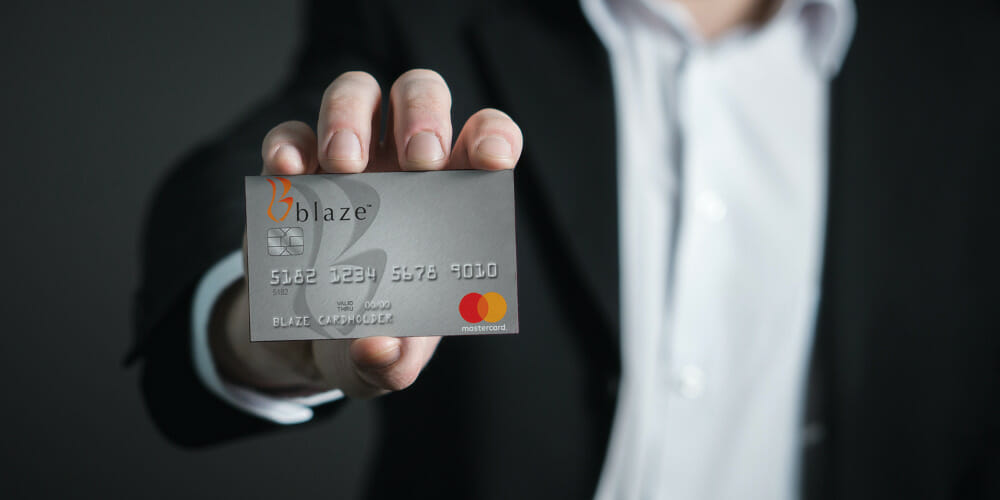
Do you own a Blaze Mastercard? Tired of figuring out how to pay your monthly bills? I totally get it! As someone who’s been using the Blaze credit card for years, I wanna share everything I know about managing your Blaze credit card bill payments the easy way
Quick Ways to Pay Your Blaze Credit Card Bill
Before diving into all the details here are the main methods you can use to pay your Blaze credit card bill
- Online payments through the official portal at blazecc.com/cardmemberservices
- Phone payments via customer service
- Mail-in payments using the address on your statement
- Automatic payments setup through your account
Understanding Your Blaze Credit Card
The Blaze Mastercard is issued by First Savings Bank under a license from Mastercard International Inc. It’s designed to help users manage their finances while building credit history. But to make the most of this card you gotta stay on top of your payments.
Online Bill Pay: The Most Convenient Option
The easiest way to pay your Blaze credit card bill is through their online portal. Here’s how to do it:
- Visit the official website at blazecc.com/cardmemberservices
- Log in with your username and password
- Navigate to the payments section
- Enter your payment amount and banking information
- Submit your payment
If your a first-time user, you’ll need to register for an account. Look for the “Register New User” option on the login page to set up your online access.
Forgot Your Login Credentials?
We all forget our passwords sometimes! If you can’t remember your username or password, don’t worry. On the login page, there’s a “Forgot Username/Password” link. Click on it and follow the instructions to recover your account access.
Setting Up Automatic Payments
If your like me and tend to forget due dates, automatic payments are a life-saver! Once your logged into your account, you can set up recurring payments that will automatically deduct the minimum payment, full balance, or a custom amount from your bank account each month.
This feature helps you to:
- Never miss a payment
- Avoid late fees
- Maintain a good credit score
- Save time each month
Phone Payment Option
Sometimes websites can be confusing or you might experience technical issues. In such cases, you can always pay your Blaze credit card bill over the phone. The customer service representatives are usually pretty helpful and can guide you through the process.
To make a phone payment, have ready:
- Your Blaze credit card number
- Your bank account and routing numbers
- The payment amount you wish to make
Mail-In Payments
For those who prefer traditional methods, you can still send your payments by mail. Here’s what to do:
- Write a check payable to Blaze Credit Card
- Include your account number on the check
- Send it to the address listed on your monthly statement
- Mail it at least 5-7 business days before the due date to ensure it arrives on time
Important Things to Remember About Bill Pay
When managing your Blaze credit card payments, keep these things in mind:
- Payment processing times: Online and phone payments generally post within 1-2 business days
- Due dates: Your payment is due by 5 PM on the due date listed on your statement
- Minimum payments: Always pay at least the minimum amount to avoid penalties
- Late fees: Missing payments can result in late fees and negative impacts on your credit score
Troubleshooting Common Issues
Browser Compatibility
The Blaze credit card website requires Javascript to function properly. If your experiencing issues, make sure:
- Your browser has Javascript enabled
- You’re using the latest version of Firefox, Microsoft Edge, Google Chrome, or Apple Safari
- All security updates are installed on your device
- If using a mobile device, ensure the operating system and browser are current
Payment Not Showing Up?
Sometimes payments take time to process. If you’ve made a payment and it’s not reflecting in your account:
- Wait 1-2 business days for online payments
- Check that you entered your account information correctly
- Verify that sufficient funds are available in your payment account
- Contact customer service if the issue persists
Building Good Credit Habits with Your Blaze Card
Your Blaze credit card isn’t just a payment tool—it’s a credit-building opportunity. Here’s how to use bill pay to improve your credit:
- Pay on time: Consistent, on-time payments are the #1 factor in building good credit
- Pay more than minimum: Whenever possible, pay more than just the minimum due
- Monitor your balance: Keep your credit utilization below 30% of your credit limit
- Check statements regularly: Review your monthly statements for any errors or suspicious activity
Additional Resources Available to Cardholders
The Blaze credit card website offers several helpful resources for cardholders:
- Help & FAQ: Answers to common questions about your account
- Contact Us: Ways to reach customer service for personalized assistance
- Privacy Policy: Information about how your data is handled
- Terms & Conditions: Details about your cardholder agreement
- Online Security Measures: How Blaze protects your financial information
My Personal Experience with Blaze Credit Card Bill Pay
I’ve been using the Blaze card for about three years now, and I’ve found that setting up automatic payments has been the best decision I ever made. Before that, I would sometimes forget to make payments on time, which resulted in unnecessary fees and stress.
Now, I have the peace of mind knowing that at least my minimum payment will always be covered. I still log in regularly to make additional payments when I can, which has helped me reduce my overall debt faster.
Tips for Managing Your Blaze Credit Card Effectively
- Set calendar reminders: Even with automatic payments, it’s good to have reminders about when your bill is due
- Check your account weekly: Regular monitoring helps catch any unauthorized charges
- Update contact info: Make sure your email and phone number are current to receive important notifications
- Download statements: Keep digital copies of your statements for tax purposes and personal records
Comparing Payment Methods
Here’s a quick comparison of the different ways to pay your Blaze credit card bill:
| Payment Method | Processing Time | Convenience | Record Keeping |
|---|---|---|---|
| Online | 1-2 business days | High | Digital receipt |
| Phone | 1-2 business days | Medium | Confirmation # |
| 5-7 business days | Low | Check record | |
| Automatic | On schedule | Highest | Digital record |
When to Contact Customer Service
While the online portal handles most payment needs, there are times when you should contact customer service directly:
- Payment issues or errors
- Account access problems
- Questions about fees or interest
- Reporting a lost or stolen card
- Disputing a transaction
Staying Secure When Making Payments
When paying your Blaze credit card bill online, security should be a priority:
- Use a secure, private internet connection (avoid public Wi-Fi)
- Verify the website URL is correct (blazecc.com/cardmemberservices)
- Never share your login credentials with others
- Log out completely after completing your transaction
- Regularly update your password
Final Thoughts on Blaze Credit Card Bill Pay
Managing your Blaze credit card bill doesn’t have to be complicated. With the various payment options available, you can choose what works best for your lifestyle and financial habits.
I personally recommend setting up an online account if you haven’t already. The convenience of being able to make payments, check your balance, and review transactions from anywhere makes managing your credit card much easier.
Remember that consistent, on-time payments are crucial not just for avoiding fees but also for building and maintaining good credit. Your payment history with your Blaze card contributes to your overall credit profile, which affects future lending opportunities.
By understanding all your payment options and establishing good habits, you can use your Blaze credit card as an effective financial tool rather than a source of stress or financial strain.
Whether your a new cardholder or have been using the Blaze card for years, I hope these tips help you manage your payments more effectively. And remember—if you ever have questions or concerns about your account or payments, don’t hesitate to use the contact resources available on the Blaze website.
What bill payment method works best for you? Whatever you choose, staying consistent and organized will help you make the most of your Blaze credit card experience.
Consumer Loan FAQs Additional Categories: Showing 9 Results Frequently Asked Questions: Manage More Filters:
To obtain the verbal payoff amount on your loan, please contact us by phone at 651.215.3500 or stop into your nearest Blaze branch.
You may make your final payment at any Blaze branch or mail a check made out to Blaze Credit Union with “payoff” and your loan number or VIN written in the memo line of the check to make a regular or overnight payment:
Regular Payment
Blaze Credit Union PO Box 130670 Roseville, MN 55113
Overnight Payment
Blaze Credit Union 2025 Larpenteur Ave W Falcon Heights, MN 55113
Please make sure Blaze has your current address on file so your certificate of title or lien release is sent to the correct address.
Dealerships Please Note: If you are in the Blaze dealership network, please reference our contact info in your application submission platform.
Please complete the Payoff Statement Request form.
Please fax a payoff request to 651.647.0582 and include the following information:
- Full name of primary borrower.
- Loan account number.
- Vehicle Identification Number (VIN).
- Payoff good-through date.
- Fax number or email you would like the payoff statement sent.
- Signed third-party borrower authorization form.
Please contact the Blaze Consumer Loan Servicing team directly at 651.215.3500 and choose option 3, then option 2, and finally option 1.
Guaranteed Asset Protection/Auto Deductible Reimbursement (GAP/ADR)
Please contact the Blaze Consumer Loan Servicing team directly at 651.215.3500 and choose option 3, then option 2, and finally option 1.
Is Blaze Credit Union’s $30,000 Credit Card REALLY Better Than Navy Federal?
FAQ
How do I pay my credit card bill online?
- Visit your credit card issuers third party payment page.
- Enter your credit card type and card number.
- Enter the important personal contact information like mobile number and email ID.
- Enter the amount that you are going to pay.
What is the phone number for Blaze credit card payments?
Report it immediately by calling us at 866-205-8311. What if I want to dispute a charge on my statement? After logging into your account, go to the Transaction History tab above, locate the charge, click on the Description and select ‘Dispute Transaction’.
How do I lock my Blaze credit card?
- Log into Blaze Digital Banking.
- From the Account Services menu, select Manage Cards.
- Select your card.
- Select the green Unlocked icon in the bottom left of your card to lock it.
- Select Lost or Stolen from the menu and follow the prompts.
How to check credit score on Blaze?
Log into Blaze Digital Banking and use the Show Full Report button to access the credit score tool. Then select the Credit Report option under “Credit Score & Report” to review all your accounts, payments, and more.
