Hey there, fellow Scarlet Knights! If you’re like me, dealing with university finances probably isn’t your idea of a fun Friday night. But guess what? Understanding how to navigate Rutgers bill pay system is super important for keeping your academic journey smooth and stress-free. As someone who’s been through the confusing maze of student accounting myself, I wanted to create this comprehensive guide to help you manage your financial responsibilities at Rutgers University with confidence.
Whether you’re a freshman just getting started or a seasoned senior, this guide will walk you through everything you need to know about accessing, understanding, and paying your Rutgers term bill Trust me, it’s not as scary as it seems!
Getting Started: Accessing Your Rutgers Student Account
Before you can pay anything, you gotta be able to see what you owe, right? Rutgers provides several login options to access your student account:
Login Options for Regular Rutgers Students
The Student Accounting, Billing, and Cashier Services website (https://finservices.rutgers.edu/otb/) offers multiple ways to access your account:
- NetID Login – This is probably the most common way students log in
- RUID Login – Your 9-digit Rutgers University ID number
- Note: This option is required if you want to set up Electronic Refund direct deposits
If you’ve forgotten your RUID, don’t panic! There’s an RUID Lookup tool available for Rutgers students right on the login page
Special Login Options
Depending on your status, you might need to use a different login method:
- RBHS Student Account Login – For Rutgers Biomedical and Health Sciences students
- Visiting students with valid RUID and PAC can use the RUID Login
- Authorized User Account Login – For parents or others you’ve given permission to access your bill
Understanding Your Financial Agreement with Rutgers
Here’s something super important that many students overlook! When you register for classes at Rutgers, you’re actually entering into a legally binding contract to pay all tuition and fees I didn’t realize this my freshman year and it caught me by surprise
By registering, you agree to:
- Pay all tuition and fees assessed to your student account
- Cover any additional costs related to your enrollment
- Pay collection costs if your balance remains unpaid (including attorney’s fees and litigation costs)
And listen up – even if your financial aid gets reduced or your charges increase AFTER you’ve received a refund check, you’re still responsible for paying the outstanding balance. This happened to a friend of mine and it was a real hassle to sort out!
The New Electronic Direct Deposit Feature for Refunds
Good news, everyone! Rutgers has introduced a new service that allows students to receive refund checks via direct deposit to their bank accounts. This is way more convenient than waiting for paper checks in the mail (which, let’s be honest, sometimes mysteriously disappear).
To set up direct deposit:
- You must use the NetID login option (not RUID)
- Navigate to the refund section of your student account
- Follow the prompts to enter your banking information
I set this up last semester and my refund arrived in my account three days faster than my roommate’s paper check. Totally worth the five minutes it took to set up!
Important Privacy Information: FERPA and Your Student Account
Your student account information isn’t just accessible to anyone – it’s protected under FERPA (Family Educational Rights and Privacy Act). This means that your financial records are considered part of your educational records and are kept private.
If you want your parents or someone else to be able to view or pay your bill, you’ll need to provide written consent. Rutgers makes this pretty easy through the “Create Authorized User Account” option on the main login page.
I learned this the hard way when my mom tried to call about my bill and couldn’t get any information. Save yourself the headache and set up authorized users early if needed!
Step-by-Step Guide to Paying Your Rutgers Bill
Now for the part you’re really here for – actually paying your term bill! Here’s my tried-and-true process:
1. Log in to your student account
Use your NetID or RUID at https://finservices.rutgers.edu/otb/
2. Review your charges carefully
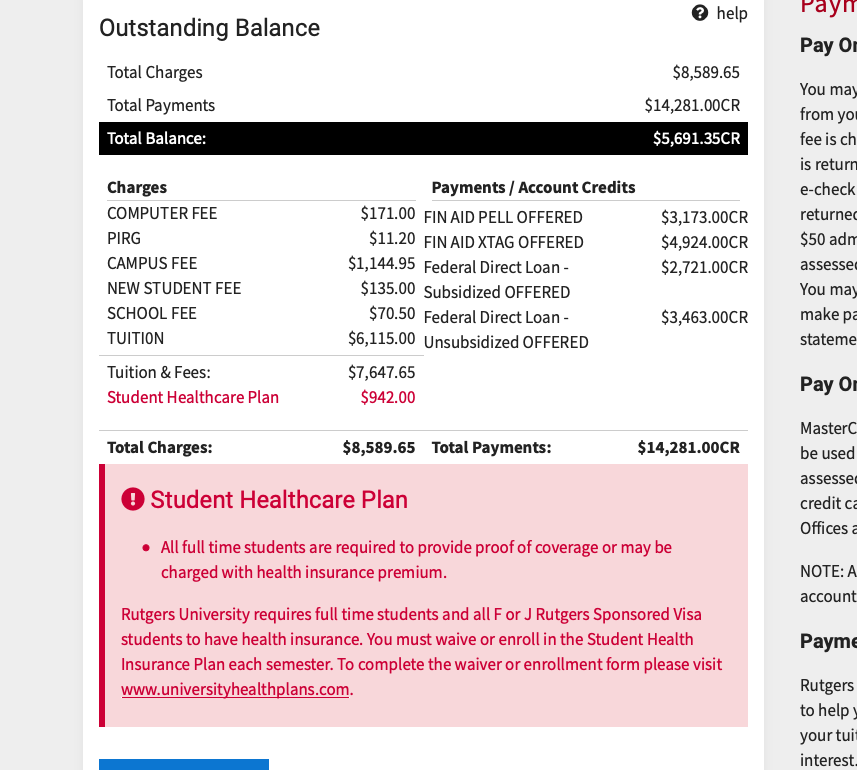
Before paying anything, make sure you understand what each charge is for. Your term bill typically includes:
- Tuition (varies by school and program)
- Mandatory fees (computer fees, campus fees, etc.)
- Housing charges (if living on campus)
- Meal plan costs (if applicable)
- Course-specific fees (lab fees, etc.)
3. Check for financial aid credits
If you’re receiving financial aid, scholarships, or loans, these should appear as credits on your bill. Make sure all expected aid is showing up correctly.
4. Calculate your remaining balance
Your term bill will show your total balance due after all charges and credits are applied.
5. Choose your payment method
Rutgers accepts several payment methods:
- Electronic check (ACH) – directly from your bank account
- Credit card (with a convenience fee)
- International wire transfers
- In-person payments at cashier offices
6. Complete your payment
Follow the prompts to submit your payment. Always save your confirmation number – I’ve needed mine more than once when there was confusion about my payment!
7. Verify payment went through
Check your account again after 24-48 hours to confirm the payment was properly applied.
Payment Deadlines and Avoiding Late Fees
Missing payment deadlines at Rutgers can result in late fees, registration holds, and other unpleasant consequences. Trust me, I missed a deadline once and had to pay an extra $125 – not fun!
Term bill due dates generally fall around:
- Fall Semester: Early to mid-August
- Spring Semester: Early January
- Summer Sessions: Varies by session
The exact dates change yearly, so always check the current academic calendar or your term bill for specific deadlines.
Pro tip: Set calendar reminders at least a week before the deadline so you have plenty of time to resolve any issues!
Payment Plan Options for Budget-Friendly Billing
If paying the entire bill at once is overwhelming (and let’s be real, it often is!), Rutgers offers payment plan options that allow you to spread your payments over the semester.
The typical payment plan:
- Divides your bill into manageable installments
- Requires an enrollment fee (usually around $50)
- Has specific due dates for each installment
I’ve used the payment plan for three semesters now, and while there is that enrollment fee, the peace of mind from not having to pay everything upfront is totally worth it.
What To Do If You’re Having Financial Difficulties
College is expensive, and sometimes financial hardships come up unexpectedly. If you’re struggling to pay your term bill, don’t just ignore it (big mistake I made sophomore year!). Here are some better options:
- Contact the Student Accounting office directly for guidance
- Speak with Financial Aid about emergency assistance options
- Look into additional loan opportunities
- Check for payment extension possibilities
- Research emergency scholarship funds
Remember, the worst thing you can do is nothing! Rutgers staff are generally helpful if you reach out proactively.
Common Bill Pay Issues and How to Solve Them
Even with the best planning, problems can sometimes arise. Here are some common issues and their solutions:
Payment didn’t process correctly
Solution: Keep your confirmation number and contact Student Accounting with this information.
Financial aid is delayed
Solution: You may need to request a temporary deferment until aid arrives.
Charges appearing that you don’t recognize
Solution: Contact both Student Accounting and the department that might have issued the charge.
Need to make a partial payment
Solution: Either enroll in the payment plan or contact Student Accounting for options.
Login problems
Solution: Contact the Office of Information Technology Help Desk for assistance.
Contact Information for When You Need Help
Everyone needs help sometimes! Here’s who to contact when issues arise:
- Student Accounting Questions: Contact the Student Accounting office directly
- Technical Issues with the Website: Office of Information Technology Help Desk
- Financial Aid Questions: Financial Aid office
- Banking/Refund Problems: Student Accounting office
Final Thoughts: Staying On Top of Your Financial Responsibilities
Managing your Rutgers bill might not be the most exciting part of college life, but it’s definitely one of the most important. By understanding the system, setting up authorized users if needed, utilizing direct deposit for refunds, and keeping track of payment deadlines, you can avoid unnecessary stress and focus on what really matters – your education and college experience.
I’ve learned that being proactive about financial matters makes everything else at Rutgers run more smoothly. Set reminders for important dates, keep records of all payments, and don’t hesitate to ask questions when something doesn’t make sense.
Remember, we’re all in this together – even the most organized students sometimes have questions about their term bills. The good news is that Rutgers has resources available to help you navigate the process successfully.
Go RU!
GradGuard Tuition Protection Plan
Rutgers University offers GradGuard Tuition Protection Plan for you and your family. Tuition insurance provides peace of mind by reimbursing tuition costs if you should happen to withdraw at any time during the semester for covered reasons such as serious illness or injury, chronic illness and mental health conditions. Students can now enroll in GradGuard Tuition Insurance Plans in Nelnet QuickPay! Click here for enrollment instructions.
The deadline to enroll in GradGuard is the day before classes begin each semester. Learn more at GradGuard.com/Tuition/Rutgers.
The insurance agreement is between you and GradGuard. To learn more, you and your family can reach out GradGuard at 877.794.6603 and/or visit the GradGuard website.
Rutgers University Tuition Payment Plans (RUTPP)
Rutgers University partners with Nelnet Campus Commerce to allow you to pay your tuition and fees over time, in an interest free plan, that automatically deducts the amount from your bank account via e-check payment, credit card or debit card.
Enrolling early affords you more payments to pay your plan balance. As you approach the start of the term, some payment options might not be available.
Sign up for RU Direct Deposit for the fastest, safest, and most convenient way to receive your refunds issued by Rutgers, The State University of New Jersey. Signing up is fast, free, easy, and secure!
Using RU Direct Deposit, once your bank has credited your account electronically, the funds are available to you for your immediate use.
Please note: RU Direct Deposit is currently not available for summer or winter session(s).
Still need help? Contact us, if you have questions or issues accessing your account.
Rutgers Summer Session Registration Tutorial 5: Pay Your Online Term Bill
FAQ
How much does Rutgers University tuition payment plan cost?
There is a $50.00 enrollment fee to join the plan. This fee is non-refundable and due at the time of enrollment. By joining the Rutgers University Tuition Payment Plan (RUTPP) students are able to pay annual term bill charges in convenient monthly payments.
How can I access my term bill at Rutgers?
To access your term bill at Rutgers, visiting students with a valid RUID and PAC should use RUID Login. For assistance, please contact Student Accounting.
Does Rutgers mail term bills to my home address?
Rutgers no longer mails term bills to your home address. Use the Student Accounting website to access accounts and determine when bills are due. Students can view semester charges based on registration and financial credits applied to an individual’s account. Each semester students must confirm attendance at the University by paying the term bill.
Does Rutgers University offer tuition insurance?
Rutgers University offers GradGuard Tuition Protection Plan for you and your family. Tuition insurance provides peace of mind by reimbursing tuition costs if you should happen to withdraw at any time during the semester for covered reasons such as serious illness or injury, chronic illness and mental health conditions.
How do I pay my term bill?
This article applies to Camden, Newark, New Brunswick and RBHS – please refer to the specific information for your campus. Term bill payments are accepted in the form of electronic check (e-check), credit card (online only), money order, or paper check. Payments can be made online or through the mail. Payments are NOT accepted via phone.
How can I report accessibility issues at Rutgers?
Rutgers is an equal access/equal opportunity institution. Individuals with disabilities can report accessibility issues by sending suggestions, comments, or complaints to: [email protected] or by completing the Report Accessibility Barrier or Provide Feedback Form.
