Ever felt that mini heart attack when you realize you forgot to pay a bill? We’ve all been there As someone who’s used Navy Federal Credit Union (NFCU) bill pay services for years, I wanna share the ins and outs of this convenient system that’s literally saved me hundreds in late fees.
What Exactly is NFCU Bill Pay?
NFCU bill pay is a free service offered by Navy Federal Credit Union that lets members pay virtually any bill online. Instead of writing checks, licking stamps, or driving around town, you can handle all your payments in one place – either through the website or mobile app.
The service connects directly to your NFCU accounts, making it super easy to schedule one-time or recurring payments to anyone from your electric company to your babysitter
Why Navy Federal Members Love This Service
There’s a reason why thousands of Navy Federal members use the bill pay service religiously. Here’s what makes it stand out:
- Totally Free: Unlike some banks that charge for online bill pay, NFCU offers this service at zero cost to members
- Super Flexible: Pay anyone, anytime – companies, individuals, even that friend who spotted you lunch money
- Set It & Forget It: Schedule recurring payments so bills are paid automatically
- Payment Options: Choose between electronic payments (faster) or paper checks (for payees who don’t accept electronic transfers)
- Payment Tracking: See exactly where your money’s going with detailed payment history
- Reminders: Never miss a due date with optional alerts
- Mobile Access: Pay bills on the go with the NFCU mobile app
Getting Started with NFCU Bill Pay
Setting up bill pay is pretty straightforward but there are a few steps you’ll need to follow
1. Log In to Online Banking
First things first – you need to log into your Navy Federal account. If you’re using a new device or browser, you might see a message like:
We don’t recognize the browser you’re using to access Navy Federal’s Bill Pay Service from Navy Federal Credit Union.
Don’t worry! This is just a security feature. You can either:
- Update your browser using one of the recommended options (Google Chrome, Edge, Firefox, or Safari)
- Click “Access Navy Federal’s Bill Pay Service with My Current Browser” to continue
2. Enroll in Bill Pay
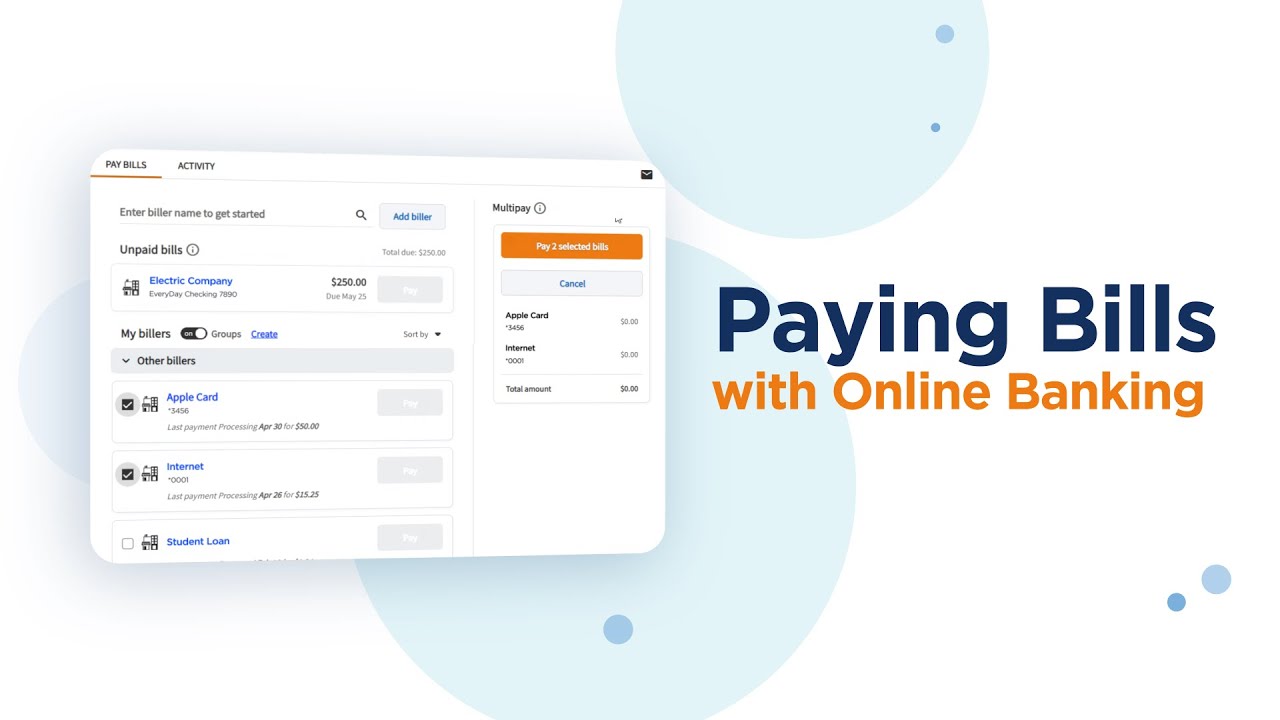
If it’s your first time using the service, look for the “Bill Pay” option after logging in. You’ll need to:
- Select which NFCU account you want to use for bill payments
- Agree to the terms and conditions
- Verify your identity (may include additional security steps)
3. Add Your Payees
Before you can start paying bills, you’ll need to add the people and companies you want to pay. For each payee, you’ll typically need:
- Name of the person or company
- Their mailing address
- Your account number with them
- Their phone number (sometimes optional)
Pro tip: Have a recent bill handy when adding payees to make sure all the info is correct!
4. Schedule Your Payments
Once your payees are added, you’re ready to schedule payments. You have several options:
One-Time Payments:
- Select the payee
- Enter the payment amount
- Choose the payment date
- Select which account to pay from
- Confirm and submit
Recurring Payments:
- Select the payee
- Enter the payment amount
- Choose frequency (weekly, monthly, etc.)
- Select start and optional end dates
- Confirm and submit
Important Timing Considerations
One thing many people don’t realize about NFCU bill pay is that timing matters a lot! Here’s what you need to know:
- Electronic Payments: Usually process within 1-2 business days
- Paper Checks: Can take 5-7 business days to reach the payee
- Processing Days: NFCU processes payments Monday-Friday (excluding holidays)
CRITICAL TIP: Always schedule your payments at least 5 business days before the due date to avoid late fees! I learned this the hard way when I once scheduled a mortgage payment just 2 days before it was due and ended up with a $50 late fee. Ouch!
Navigating Browser Compatibility Issues
Sometimes you might run into browser compatibility issues when accessing NFCU bill pay. If you see a message about an “Unknown Browser,” you have a few options:
-
Upgrade Your Browser: NFCU recommends using:
- Google Chrome
- Microsoft Edge
- Firefox
- Safari
-
Continue with Current Browser: You can click “Access Navy Federal’s Bill Pay Service with My Current Browser” if you prefer not to change browsers.
-
Opt Out of Reminders: Check “Do not display this page again” if you don’t want to see the browser warning message in the future.
Common Challenges & Solutions
Even the best systems have their quirks. Here’s how to handle some common issues with NFCU bill pay:
Payment Failed or Returned
If a payment fails, NFCU will usually notify you by email. This might happen because:
- Insufficient funds in your account
- Incorrect payee information
- Technical issues
Solution: Double-check your account balance and payee information, then reschedule the payment.
Can’t Add a Payee
Sometimes the system won’t accept a new payee. This could be due to:
- Missing required information
- Formatting issues with the address
- The payee might be restricted
Solution: Call NFCU customer service at 1-888-842-6328 for assistance.
Payment Sent But Not Received
This is frustrating but happens occasionally. Possible reasons:
- Payment is still in transit (especially paper checks)
- Payee applied payment to wrong account
- Processing delays
Solution: Check payment status in your bill pay history. If it shows “completed” but the payee hasn’t received it, contact both NFCU and the payee to resolve.
Advanced Features Worth Using
Once you’re comfortable with the basic functions, explore these power-user features:
eBills
For many major companies, you can set up eBills to have your bills delivered directly to your NFCU bill pay service. This means:
- No more paper bills
- Due dates and amounts automatically updated
- Option to set up automatic payments based on the eBill amount
Payment Categories
Stay organized by categorizing your payments (utilities, subscription services, loans, etc.). This makes it easier to:
- Track spending by category
- Identify areas where you might be overspending
- Simplify tax preparation
Multiple Funding Accounts
You can set up different NFCU accounts to pay different bills. For example:
- Use your checking account for regular monthly bills
- Use a joint account for shared household expenses
- Use a special account for business expenses
Security Features to Know About
Navy Federal takes security seriously, which is why they’ve implemented several layers of protection:
- Multi-factor authentication: Verifies your identity beyond just a password
- Browser recognition: Flags when you’re using a new device or browser
- Encryption: Secures all transactions
- Automatic timeouts: Logs you out after periods of inactivity
These features might occasionally seem inconvenient (like when you get the “Unknown Browser” message), but they’re actually protecting your financial information.
My Personal Experience with NFCU Bill Pay
I’ve been using Navy Federal bill pay for over 5 years now, and it’s completely changed how I manage my finances. Before, I was constantly stressed about remembering due dates and finding time to pay bills. Now? It’s all automated.
Last year, while I was deployed overseas, I didn’t have to worry about a single bill back home. Everything from my mortgage to my Netflix subscription was handled automatically through recurring payments.
But it hasn’t always been smooth sailing. I once forgot to update my credit card payment after getting a new card number, which resulted in a missed payment. The lesson? Always double-check your autopayments when account details change.
Comparing NFCU Bill Pay to Other Options
How does Navy Federal’s bill pay service stack up against alternatives? Here’s my honest assessment:
| Feature | NFCU Bill Pay | Bank of America | PayPal | Physical Checks |
|---|---|---|---|---|
| Cost | Free | Free for most accounts | Free for personal payments | Cost of checks + stamps |
| Payment Speed | 1-7 days | 1-3 days | Instant to 1-3 days | 3-10 days |
| Payee Options | Anyone | Anyone | Limited to PayPal users/merchants | Anyone |
| Automation | Yes | Yes | Limited | No |
| Mobile Access | Yes | Yes | Yes | No |
| Payment Tracking | Yes | Yes | Yes | Limited |
Frequently Asked Questions About NFCU Bill Pay
Q: Is there a limit to how many bills I can pay?
A: Nope! Pay as many bills as you need to.
Q: Can I stop a payment after I’ve scheduled it?
A: Yes, but only if it hasn’t been processed yet. Electronic payments can be canceled up to 7:00 PM ET the day before the scheduled payment date.
Q: What happens if I don’t have enough money in my account when a payment processes?
A: The payment will likely be rejected, and you might incur an NSF (non-sufficient funds) fee from NFCU.
Q: Can I use bill pay from outside the United States?
A: Yes! As long as you have internet access and can log into your NFCU account, you can use bill pay from anywhere.
Q: Are there any fees for using NFCU bill pay?
A: The service itself is free, but there may be fees for expedited payments or if a payment is returned due to insufficient funds.
Tips from a Long-Time User
After years of using this service, I’ve picked up some tricks that might help you too:
- Schedule payments 5-7 days in advance to avoid any processing delays
- Set up calendar reminders to review your scheduled payments monthly
- Keep payee information updated – especially when you get a new account number
- Use the memo field for reference numbers or notes about what the payment is for
- Check your scheduled payments before payday to ensure sufficient funds
Recent Updates to NFCU Bill Pay
Navy Federal regularly updates their bill pay service. Some recent improvements include:
- Enhanced mobile interface for easier payments on the go
- Improved payee recognition system
- More detailed payment confirmation notices
- Additional security features to protect your account
- Updated browser compatibility (as mentioned in the browser info page)
Final Thoughts: Is NFCU Bill Pay Worth Using?
In a word: absolutely. The time and money you’ll save by centralizing your bill payments is enormous. No more late fees, no more searching for stamps, no more trying to remember which bills are due when.
While there’s a small learning curve at the beginning, the long-term benefits make it well worth the initial setup time. And with Navy Federal’s solid customer service, help is always available if you run into issues.
So if your bills are currently scattered across different websites, payment methods, and due dates, do yourself a favor and consolidate everything with NFCU bill pay. Your future self will thank you when bill payment becomes something you barely have to think about!
Have you tried NFCU bill pay? What’s been your experience? We’d love to hear your thoughts and tips in the comments below!
Transfer and Payment Pro Tips
- You can use Transfers to pay off your Navy Federal loans using an account at another financial institution. Learn more by visiting our Auto Loan FAQs.
- Payday can be the perfect time to move extra money to your savings account. Set up your recurring, automatic transfers to occur on the days you get paid, and saving can quickly feel effortless.
Pay Monthly Bills or Make Monthly Savings Deposits
See how easy it is to make your monthly loan payment with our mobile app* or online, plus discover tools you can use to make it even simpler.
-
Set Up Automatic Payments
Have peace of mind that you wont miss your payment each month.
-
Receive Notifications
Set up notifications to know exactly when your monthly payment is due.
-
Make Savings Easy
Grow your savings with regular, automatic deposits each month.
