Are you tired of struggling to figure out how to pay your Hyundai Motor Finance bill? Well, you’re definitely not alone! Many Hyundai owners face the same frustrations when trying to navigate the HMFUSA payment system. I’ve put together this complete guide to help you breeze through the process and get your payment done without the usual headaches.
What is HMFUSA?
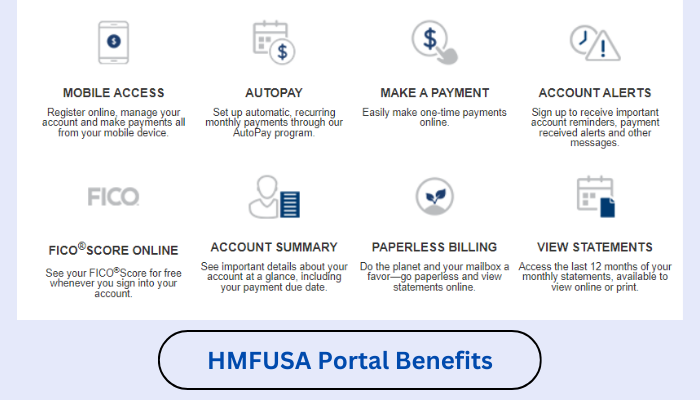
Hyundai Motor Finance (HMF) is the financial services arm of Hyundai that provides loans and lease options for Hyundai vehicles Their online portal, HMFUSA.com, allows customers to manage their accounts, view statements, and most importantly, pay their bills
How to Access Your HMFUSA Account
Before you can pay your bill you’ll need to access your account. Here’s how
- Visit the official website at HMFUSA.com
- Look for the “Login” button at the top right corner of the website
- Enter your username and password in the appropriate fields
- Click the “Login” button to access your dashboard
If you don’t have an account yet. you’ll need to register
- Click on “Register Now” on the login page
- Follow the prompts to create your account using your personal information and account details
Different Ways to Pay Your HMFUSA Bill
Hyundai Motor Finance offers several convenient methods to pay your bill:
1. Online Payment Through the Website
This is the most popular method and here’s how to do it:
- Log into your account at HMFUSA.com
- Navigate to the “Pay Bill” option on your dashboard
- Select the payment amount (minimum payment, statement balance, or custom amount)
- Enter your banking information or select a saved payment method
- Confirm the payment details and submit
2. Through the HMFUSA Mobile App
If you prefer using your phone:
- Download the HMFUSA mobile app (be careful as users report there are many similar-looking apps)
- Log in using the same credentials as the website
- Tap on the “Bills” tab
- Select “Pay Bill” option
- Enter payment details and confirm
3. Set Up AutoPay
Never miss a payment again with automatic payments:
- Log into your HMFUSA account
- Navigate to the “Auto Pay” section
- Enter your payment information
- Choose your preferred payment schedule (monthly is standard)
- Set the payment amount (minimum due or statement balance)
- Confirm and activate
4. By Phone
If online methods aren’t working:
- Call the automated system at 1-800-523-4030
- Follow the prompts to make a payment using your account information
5. By Mail
The old-school but reliable method:
- Send a check or money order to the address provided on your statement
- Include your account number on the payment
- Allow 5-7 business days for processing
Common HMFUSA Bill Pay Issues (And Solutions!)
Based on customer feedback in the provided content, here are the most frequent problems and how to solve them:
Website Access Problems
Many users report difficulty accessing the site. If you see “Page not available” or the site freezes:
- Try accessing through HMFUSA.org instead of HMFUSA.com
- Clear your browser’s cache and cookies
- Try a different browser or device
- Access during off-peak hours when server load may be lower
As one frustrated customer noted: “I could NOT get online to pay on HMFUSA.com, it keeps saying ‘Page not available,’ or freezes. I finally accessed my account via HMFUSA.org.”
Login Difficulties
If you can’t log in:
- Double-check your username and password
- Use the “Forgot Password” link if needed
- If your email has changed, contact customer service
One customer complained: “I didn’t have to sign in every month. Now I don’t know username or password. I need this now to make payment.”
Payment Verification Issues
Some users find the two-step verification process frustrating:
“Who in the world is going to try and hack the system to make my car payment?? Take that mess off there and let it be a straight login, no two-step verification crap.”
Solution: While you can’t bypass security measures, having your phone ready for verification codes can streamline the process.
High Call Volume When Calling for Help
If you need to call customer service, be prepared for potential waiting times:
“I tried via phone a number of times but it was ‘high call volume!!!’ This is not fair.”
Try calling during early morning hours or late evenings when call volumes may be lower.
Tips for Hassle-Free Bill Payments
-
Set calendar reminders a few days before your payment due date
-
Save your payment information in your account for quicker transactions
-
Consider setting up AutoPay to eliminate monthly login hassles
-
Keep your contact information updated to receive important notifications
-
Take screenshots of successful payments as proof until they appear on your statement
-
Check your spam folder for HMFUSA communications if you’re not seeing them
FAQs About HMFUSA Bill Pay
How do I find my account number?
Your account number can be found on:
- Your monthly statement
- Your original loan or lease agreement
- By contacting customer service at 1-888-556-4362
What if my payment is due today?
Same-day payments can be made online or by phone, but be aware of cutoff times (usually 5 PM Eastern Time) for the payment to be credited the same day.
Is there a fee for making payments?
This depends on your payment method:
- ACH payments (direct from checking/savings) are typically free
- Debit/credit card payments might incur a convenience fee
- Expedited payments may have additional charges
What happens if my payment is late?
Late payments may result in:
- Late fees (typically around $15-$25)
- Potential negative impact on your credit score
- Accumulation of additional interest
How do I get proof of payment?
After completing your payment:
- Save or print the confirmation page
- Note the confirmation number
- Check your email for a payment receipt
- Verify the payment appears in your account history after processing
Customer Experiences with HMFUSA Bill Pay
The user comments on HMFUSA.org reveal some common frustrations:
“Every month when I want to make a payment it is a nightmare. Why can’t you simplify the process?” – Joseph A.
“Why do you make it so difficult to locate the login prompts? Don’t you want people to pay their bills? Get rid of all of the advertising and mis-direction prompts.” – R.A.B.
“It’s horrible trying to make a payment..one point it will let you sign on the next you can’t even get to your account. Yall need to fix this problem.” – Mrs. Bowser
Final Thoughts
While HMFUSA’s bill pay system has room for improvement based on customer feedback, understanding the various payment options and potential pitfalls can help make your experience smoother. Setting up AutoPay seems to be the most reliable method to avoid monthly login frustrations.
Remember that payments typically take 1-3 business days to process, so don’t panic if your account balance doesn’t update immediately. If you continue to experience issues, contacting customer service directly is your best bet for personalized assistance.
Have you had experiences with HMFUSA bill pay? What methods have worked best for you? We’d love to hear your thoughts and tips in the comments below!
Note: This website is not officially associated with Hyundai Motor Finance. The information provided is for educational purposes only.
How do you reset your password?
If you have forgotten your password or would like to reset it, please follow the steps below:
- Go to the HMFusa.com login page.
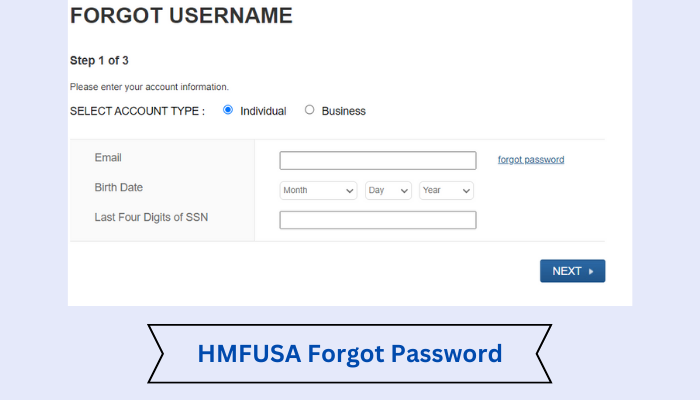
- Click on the “Forgot your password?” link.
- Enter your email address in the field provided and click “Submit”.
- You will receive an email from HMFusa with instructions on how to reset your password.
How to access HMFusa Login?
To access HMFusa Login, visit the website and enter your Username and Password in the appropriate fields.
- Once you have entered your credentials, click on the “Login” button to be taken to your account dashboard.
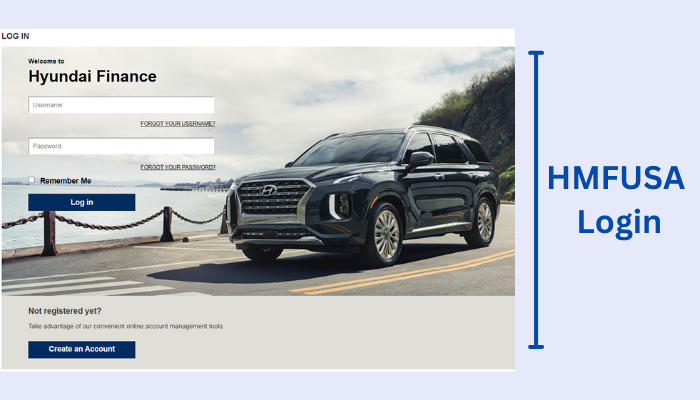
- From here, you can manage your account settings, view your account balance and transactions, and more.
- If you have any trouble logging in or accessing your account, please get in touch with customer support for assistance.
