Are you tired of standing in long queues just to pay your electricity bill? Well I’ve been there too! Today I’m gonna share everything you need to know about WBSEDCL bill payment – the easy, convenient way that’ll save you tons of time and headaches.
What is WBSEDCL?
Before diving into the payment process, let’s quickly understand what WBSEDCL is. The West Bengal State Electricity Distribution Company Limited (WBSEDCL) is the main electricity provider in West Bengal, India. They serve millions of consumers across the state, providing electricity to homes, businesses, and industries.
Why Pay Your WBSEDCL Bill Online?
Trust me, once you go online you’ll never want to go back to the old ways! Here’s why
- Save Time: No more standing in long queues
- 24/7 Access: Pay anytime, even at 3 AM in your pajamas!
- Instant Confirmation: Get payment receipts right away
- Track History: Easy access to previous payment records
- Avoid Late Fees: Set reminders and pay on time
How to Pay WBSEDCL Bill Online
Let me walk you through the entire process step by step, It’s actually super easy once you get the hang of it!
Method 1: Official WBSEDCL Portal
The most direct way to pay your bill is through the official WBSEDCL website:
- Visit the official portal at https://portal.wbsedcl.in/onlinepay/OnlineBillPay.jsp
- Look for the “Pay Your Bill” or “Online Bill Payment” option
- Enter your Consumer Number/Customer ID (find this on your electricity bill)
- The system will display your bill details including the amount due
- Select your preferred payment method (credit card, debit card, net banking, UPI, etc.)
- Complete the payment process
- Save or download the payment receipt for future reference
Method 2: Mobile Apps
If your like me and prefer doing everything on your phone, you can download these apps:
- WBSEDCL App: The official app from WBSEDCL
- Payment Aggregator Apps: Apps like Paytm, PhonePe, Google Pay, etc.
Using the WBSEDCL App:
- Download the app from Google Play Store or Apple App Store
- Register using your mobile number and email
- Add your consumer number
- Select “Pay Bill” option
- Choose payment method
- Complete the payment
- Save receipt
What Information Do You Need for WBSEDCL Bill Payment?
Before you start the payment process, make sure you have these details handy:
- Consumer Number/Customer ID: This is your unique identification number
- Registered Mobile Number: For OTP verification
- Valid Payment Method: Credit/debit card, net banking details, UPI ID, etc.
Payment Methods Accepted for WBSEDCL Bill
WBSEDCL offers various payment options to suit different preferences:
| Payment Method | Processing Time | Convenience Fee |
|---|---|---|
| Credit Card | Instant | Minimal |
| Debit Card | Instant | Minimal |
| Net Banking | Instant | Usually None |
| UPI | Instant | None |
| Wallet (Paytm) | Instant | None |
Troubleshooting Common WBSEDCL Bill Payment Issues
Sometimes things don’t go as planned. Here are some common issues and how to fix them:
Payment Failed but Money Deducted
This happens to me all the time! Don’t panic if your payment fails but money gets deducted from your account. Here’s what to do:
- Wait for 24-48 hours as the amount is usually automatically refunded
- Check your transaction history in your bank account/payment method
- If not refunded, note down the transaction ID
- Contact WBSEDCL customer care with transaction details
Consumer Number Not Recognized
If the system doesn’t recognize your consumer number:
- Double-check for typing errors
- Ensure you’re entering the complete number
- Verify if your account is active
- Contact customer support if the issue persists
Benefits of Regular and Timely WBSEDCL Bill Payments
Paying your bills on time isn’t just about avoiding late fees. There’s more to it:
- Avoid Disconnection: WBSEDCL may disconnect your power supply for non-payment
- No Late Payment Charges: Save money by avoiding penalties
- Good Payment History: Helps when applying for new connections
- Peace of Mind: No more worrying about missed deadlines
WBSEDCL Bill Payment FAQs
How can I check my WBSEDCL bill amount online?
You can check your bill amount by visiting the WBSEDCL portal and entering your consumer number. The system will display your current bill details.
What is the last date for WBSEDCL bill payment?
The due date is usually mentioned on your bill. Generally, you get 15-20 days from the bill generation date to make the payment without incurring late fees.
Can I pay someone else’s WBSEDCL bill?
Absolutely! You just need their consumer number. This is great for helping elderly parents or relatives who aren’t tech-savvy.
Is there any discount for online payment of WBSEDCL bills?
While WBSEDCL doesn’t offer direct discounts, many payment platforms like Paytm, PhonePe, etc. occasionally run cashback offers on utility bill payments.
What happens if I miss the due date?
If you miss the due date, late payment charges will be added to your next bill. In extreme cases of prolonged non-payment, your electricity connection might be disconnected.
Advanced Tips for WBSEDCL Bill Management
After years of managing my own bills, I’ve discovered some tricks that might help you too:
Set Up Auto-Pay
Most payment platforms allow you to set up automatic payments for your electricity bills. This ensures you never miss a due date even if your busy or traveling.
Check for Billing Errors
Always review your bill for any unusual charges or sudden increases in consumption. If something seems off, contact WBSEDCL customer support immediately.
Keep Digital Copies of Receipts
Create a dedicated folder on your computer or cloud storage for WBSEDCL payment receipts. This will be handy during disputes or for tax purposes.
Understanding Your WBSEDCL Bill
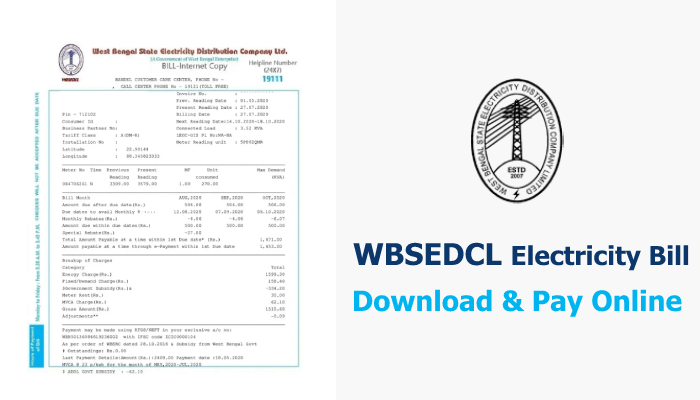
Sometimes, understanding your electricity bill can be confusing. Here’s a breakdown of what those numbers and terms mean:
- Fixed Charges: Based on your sanctioned load
- Energy Charges: Based on your consumption in units (kWh)
- Fuel Surcharge: Additional charge that varies based on fuel costs
- Electricity Duty: Tax levied by the state government
- Meter Rent: Applicable if the meter is provided by WBSEDCL
Going Green with E-Bills
WBSEDCL offers an e-billing service where your bill is sent directly to your registered email address. Benefits include:
- Environmentally friendly (saves paper)
- Instant delivery
- Can’t be lost or damaged
- Easily shareable and storable
- Access from anywhere
To register for e-billing, visit the WBSEDCL website and update your profile preferences.
Recent Updates in WBSEDCL Bill Payment System
WBSEDCL has been continuously improving their payment system. Some recent updates include:
- Enhanced security features for online transactions
- Integration with more UPI platforms
- Improved user interface for easier navigation
- SMS alerts for bill generation and payment confirmation
- Introduction of chatbots for instant customer support
Conclusion
Paying your WBSEDCL bill online is a simple process that saves time, effort, and sometimes even money! With multiple payment options available, you can choose what works best for you. Remember to keep your consumer number handy and always save the payment receipt.
Customer Support Information
For any issues related to bill payment or general inquiries, you can contact WBSEDCL customer support:
- Toll-Free Number: 1912
- Email: [email protected]
- Website: https://portal.wbsedcl.in
Have you tried paying your WBSEDCL bill online? What was your experience like? Share in the comments below!
Payment modes available for WBSEDCL Electricity Bill Payment
- CESC Limited (Calcutta Electric Supply Corporation)
- IPCL (India Power Corporation Limited)
WBSEDCL Electricity Bill Payment FAQs
- Log in to ICICI Bank Internet Banking or iMobile app.
- Navigate to the ‘Pay Bills’/ ‘Bill Payment and Recharge’ menu and select Electricity from the available options.
- Enter your 10-digit consumer number along with the registered mobile number and click on Fetch.
- The details of your electricity bill along with the amount to be paid, will appear on the screen.
- Proceed to payment.
