Ever found yourself scrambling at the last minute to pay your OptiLink bill? We’ve all been there! As someone who’s managed utilities for years, I know how frustrating it can be when you’re busy and suddenly realize your internet bill is due tomorrow The good news is that Dalton Utilities offers plenty of convenient options for paying your OptiLink bill in 2025
In this guide, I’ll walk you through all the payment methods available to OptiLink customers. Whether you’re tech-savvy or prefer traditional payment methods, there’s definitely an option that fits your lifestyle!
Why Choosing the Right Payment Method Matters
Before diving into the specifics, let’s talk about why having multiple payment options is important. Different payment methods offer:
- Convenience based on your schedule
- Various levels of automation
- Options that fit your financial management style
- Ways to avoid late fees
As a busy professional myself I’ve tried most of these methods and can share some personal insights on each one.
Method 1: Bank Draft – Set It and Forget It
Bank draft is perfect for those of us who hate worrying about due dates. Here’s how it works
With OptiLink’s Bank Draft plan, your payment is automatically drafted from your:
- Checking account
- Debit card
- Credit card
The best part? You’ll still receive an itemized bill each month, so you can review your charges before the payment goes through. If something looks wrong, you have until the “net due” date to call customer service at 706-278-1313 and resolve any issues.
I personally use this method because I travel frequently, and it’s one less thing to worry about when I’m on the road.
Method 2: Online Payment – Quick and Easy
For those who prefer having control over exactly when payments go out, online payments are the way to go.
Simply visit www.dutil.com and pay with your:
- Debit card
- Credit card
The website is available 24/7, so you can make payments whenever it’s convenient for you – even at 2AM in your pajamas (no judgment here, we’ve all done it!).
Method 3: Payment Kiosks – Cash Friendly Options
Need to pay with cash? OptiLink has you covered with three convenient kiosk locations:
-
Dalton Utilities Business Office – Located in the drive-thru lanes at 1200 V.D. Parrott Jr. Pkwy, Dalton
- Open Monday – Friday from 6 a.m.- 9 p.m.
-
Loa Bakery – 737 Riverbend Road, Dalton
- Open Monday – Saturday from 8 a.m. – 9 p.m.
- Sunday from 8 a.m. – 9 p.m.
-
La Providencia – 1300 Underwood Street, Dalton
- Open Monday – Saturday from 8 a.m. – 9 p.m.
- Sunday from 8 a.m. – 8 p.m.
Important kiosk tips:
- Bring cash or credit card (no coins accepted)
- No change will be given (any overage gets credited to your account)
- The kiosk can scan your bill, but bring your account number if you don’t have your bill
- Payments post to your account same-day
- Choose English or Spanish at any location
I’ve used the kiosk at Loa Bakery several times when I was already there picking up breakfast. Super convenient to knock out two errands at once!
Method 4: Pay By Phone – No Computer Needed
If you’re not tech-savvy or just prefer speaking with someone, paying by phone is a great option.
Call (706) 529-0001 and select:
- Option 1 for Utilities
- Option 2 for OptiLink
You can pay using:
- Credit card
- Electronic check
- Debit card
The best news? Phone payments no longer apply a convenience fee! This is great for when I’m on the go and realize my bill is due.
Method 5: Online Banking – Use Your Existing Bank
Many of us already use online banking for other bills, so why not add OptiLink to the list?
Important note: Each bank requires payment to be scheduled a specific number of days before the due date. Check with your bank about their processing timeframes to avoid late payments.
This method works well if you already have most of your bills set up through your bank and want to keep everything in one place.
Method 6: Mail – The Traditional Approach
For those who prefer the traditional route, you can always mail your payment.
Simply include:
- Your check for payment
- Your bill stub
- Mail in the envelope provided
Send to:
OptiLinkP.O. Box 745091Atlanta, GA 30374-5091Note: There’s a different address for Dalton Utilities payments (P.O. Box 745147, Atlanta, GA 30374-5147), so make sure you’re using the correct address for OptiLink.
My grandma still uses this method and has never missed a payment in 15 years!
Method 7: Drop Box – Quick Drop-Off
If you’re in the Dalton area and want to drop off your payment in person, the Drop Box is a convenient option.
Location: 1200 V.D. Parrott Jr. Parkway in Dalton
Hours: Monday through Friday from 6:00 a.m. until 9:00 p.m.
Remember:
- Include your account bill stub with payment
- Don’t put coins in the Drop Box
- Payment envelopes are available on-site
This is handy when I’m running errands in that area and want to make sure my payment is received quickly.
Method 8: Pay By Text – The Modern Approach
For the tech-savvy crowd, Pay by Text offers ultimate convenience.
How it works:
- Receive text notifications about your bill
- Reply with a text message to pay
- Payment is processed using your default payment method
To sign up for Pay By Text, call customer service at 706-278-1313.
This is my new favorite way to pay! I get a text, reply “PAY,” and boom – bill paid while I’m waiting in line for coffee.
Comparing OptiLink Payment Methods
Let’s break down the pros and cons of each method:
| Payment Method | Pros | Cons | Best For |
|---|---|---|---|
| Bank Draft | Automatic, never miss a payment | Less control over timing | Busy people who forget due dates |
| Online Payment | 24/7 access, immediate | Requires internet access | Those who prefer digital methods |
| Payment Kiosks | Can use cash, same-day posting | Limited locations & hours | Cash payers or those who prefer in-person |
| Pay By Phone | No internet needed, no fees | Must call during business hours | Less tech-savvy customers |
| Online Banking | Consolidate with other bills | Depends on bank’s processing time | Those who use online banking for everything |
| Traditional, familiar | Slowest method, requires postage | Traditional customers | |
| Drop Box | No postage needed, direct delivery | Limited hours, must drive there | Local customers who are often in Dalton |
| Pay By Text | Fastest, most convenient | Requires cell phone and setup | Tech-savvy customers always on the go |
What to Do If You’re Late on Your OptiLink Bill
We all forget sometimes! If you’ve received a cut-off notice:
- Make a payment immediately using any of the methods above
- Call the office at 706-278-1313 to verify they received your payment
- This verification is essential to avoid service interruption
One time I completely forgot about my bill while on vacation and had to use the Pay by Phone option from my hotel room. A quick call to customer service confirmed my payment was received, and my service remained active!
My Personal Recommendation
After trying all these payment methods over the years, I’ve found that Bank Draft or Pay by Text offer the best combination of convenience and reliability. Both ensure I never miss a payment, even during my busiest weeks.
However, the “best” method depends entirely on your preferences and habits. Some people prefer the physical act of paying bills as a way to stay connected to their finances, while others want bills to be as invisible as possible.
Final Thoughts on OptiLink Bill Pay
OptiLink and Dalton Utilities have really made it easy to pay your bills in whatever way works best for you. With eight different payment options, there’s really no excuse for late payments anymore!
Remember that customer service is always available at 706-278-1313 if you have questions about any of these payment methods or need help setting up a new way to pay.
Stay connected!

Pricing & Plan Information
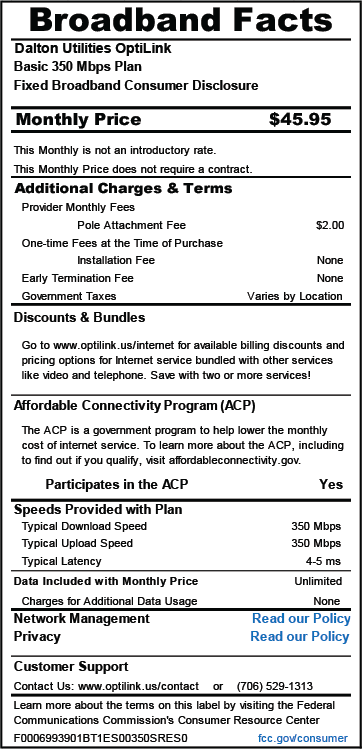
$40.95/month 2+ Service
$45.95/month 1 Service
350 Mbps Download & Upload Speeds 5 Email Addresses Plus pole attachment $2.00
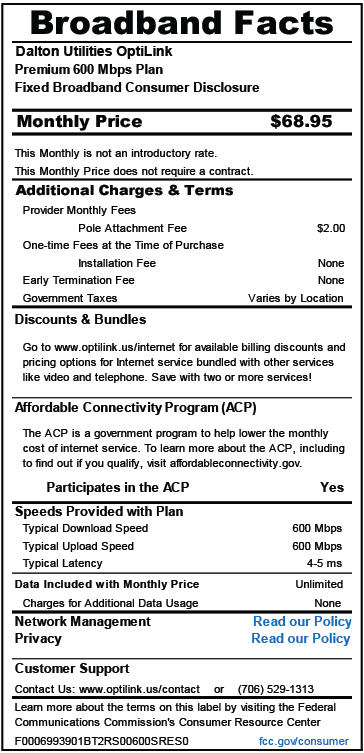
$63.95/month 2+ Service
$68.95/month 1 Service
600 Mbps Download & Upload Speeds 5 Email Addresses Plus pole attachment $2.00
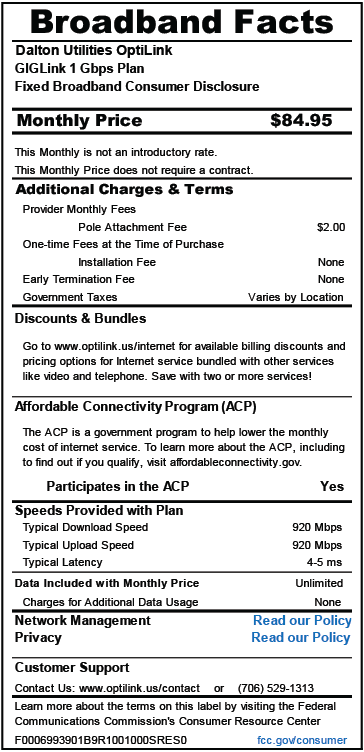
$79.95/month 2+ Service
$84.95/month 1 Service 1000 Mbps Download & Upload Speeds 5 Email Addresses Plus pole attachment $2.00
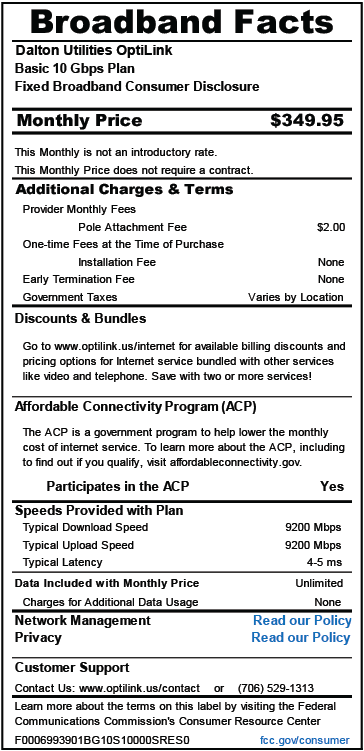
$349.95/month 1 Service
9000 Mbps Download & Upload Speeds 5 Email Addresses Plus pole attachment $2.00
- In-Home Support (To Fix Non-OptiLink Problems) – $65.00 per hour
- 10 Additional Email Accounts * $10.00 per month
- Static IP Address – $6.95 per month
- Wire Maintenance – $4.95 per month
Click Here To Get Low-Cost, High-Speed Internet For Your Household!
$47.95/month 2+ Service
$52.95/month 1 Service
350 Mbps Download & Upload Speeds 5 Email Addresses Plus pole attachment $2.00
$76.95/month 2+ Service
$81.95/month 1 Service
600 Mbps Download & Upload Speeds 5 Email Addresses Plus pole attachment $2.00
One Gigabit and Faster
Please call for Pricing and Options 706-278-1313
1,000 Mbps Download & Upload Speeds
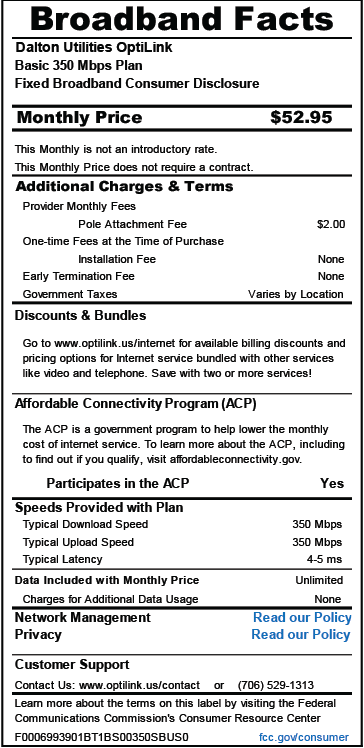
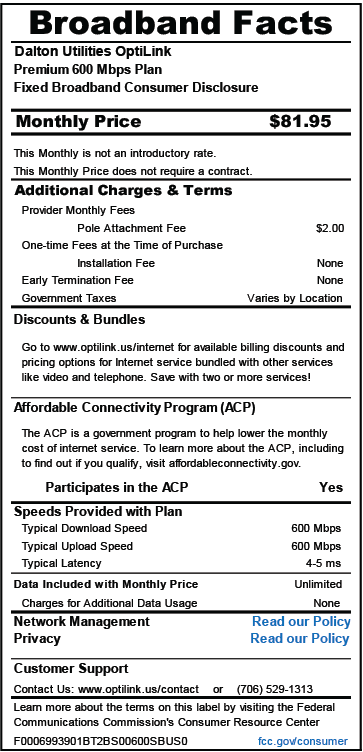
On-Premise Support (To Fix Non-OptiLink Problems) – $95.00 per hour
10 Additional Email Accounts – $10.00 per month
Static IP Address – $6.95 per month
What do I need before OptiLink can install my Internet service? In the vast majority of cases, you will need a wireless router in order to use OptiLink’s Internet service. You may purchase a new router of your choosing or use an existing one (if applicable). Many customers prefer to avoid the hassle and purchase wireless equipment directly from us.
The wireless signal strength around the home is the customer’s responsibility. This is why we recommend a wireless mesh system for larger homes as a single router may not provide sufficient coverage. OptiLink will help to optimize your wireless signal but there are limitations based on the age and type of equipment you intend to use. Ask us about our professionally installed mesh solution!
What should I expect on the day of installation? OptiLink will install a device called an ONT (Optical Network Termination) on the side of the home. We will also install an UPS (Uninterruptible Power Supply) inside the home to provide power to our ONT. The UPS must be plugged into a power outlet at all times.
OptiLink delivers Internet access via a standard 10/100/1000 wired Ethernet connection from our ONT. Our Ethernet connection will plug into the WAN port of your router. We can use the existing name and password of your wireless network if you are changing providers or creating a new one. The OptiLink technician will then connect your devices to your Wi-Fi and ensure the service is performing as expected.
Faster Speed for a Great Price
OptiLink is the best choice for internet service in Dalton, GA. As our community’s leading internet provider, we strive to keep homes and businesses online with high-speed connectivity. Our fiber to the home is what makes our internet stand out among other providers — its Fiber from our doorstep to yours!
Make Utility Bill Payments the Easy Way with Payce Digital!
FAQ
How do I pay my Optilink Bill?
The date on which payment is due for this bill applies only to current charges. It does not extend the time available to pay prior balances. OptiLink offers online payments, please visit us @ www.optilink.us. OptiLink offers phone payments, please call 706-529-0001. distance calls or Pay Per View movies. installed in your home.
How do I pay Optilink & Dalton Utilities online?
Online Payment 3. Payment Kiosks We have payment kiosks in three locations that take both Dalton Utilities and OptiLink payments. Customers may pay with cash or a credit card. Please do not use coins for payment. No change will be dispensed, and any overage will be credited to your account.
Is there a payment option for Optilink?
There is an option to select any payment amount. OptiLink is more than an internet provider: we connect the Dalton, GA, community members with the services needed to thrive in an ever-evolving, technologically-driven world. We serve Whitfield County as well as sections of Murray county.
How much does Optilink cost?
OptiLink offers bandwidth speeds of 350 Mbps, 600 Mbps, 1 GIG, and 10 GIG to commercial and residential customers. With OptiLink, home lines begin at only $19.95/mo and $23.95/mo for commercial customers. Cut the cord and keep the channels and programming you want. VIDlink provides a level of streaming you’ll love! Faster Speeds. Better Service.
How much does Optilink cost in Dalton Ga?
OptiLink is proud to be the top phone and internet company serving Dalton, GA. To request service, complete the form below. OptiLink offers bandwidth speeds of 350 Mbps, 600 Mbps, 1 GIG, and 10 GIG to commercial and residential customers. With OptiLink, home lines begin at only $19.95/mo and $23.95/mo for commercial customers.
Does Optilink charge a surcharge?
Public Service Commission. Effective November 1, 2022, OptiLink will calculated as 3.75% of intrastate retail revenues. The rate of the surcharge is and is subject to change as determined by the Public Service Commission. ABC, Fox, etc.). These local broadcast transmission fees are charged to obtain the 1992).
How do I pay a bill with my phone?
Pay a bill
On your mobile device, open the Google Pay app . Tap Pay Bills. Type in the name of a biller. Make payment.
Where can I pay my Dalton utilities bill?
- Located outside Dalton Utilities business office in the drive-thru lanes at 1200 V.D. Parrott Jr. …
- Located inside Loa Bakery at 737 Riverbend Road, Dalton. …
- Located inside La Providencia at 1300 Underwood Street, Dalton. …
- Pay By Phone* …
- Online Banking. …
- Mail. …
- Drop Box. …
- Pay By Text.
Can I pay my bill online?
Pay through your biller
Many service providers let you pay bills through their website. This bill payment process will require you to sign in to each of your biller’s accounts individually to make payments. You will be required to enter your bank account information to each of your accounts for each biller.
How does Doxo Bill Pay work?
But with doxo’s Private Pay Wallet, users can pay any bill without ever sharing their bank or card information with their billers. A single, secure wallet makes it easy to make payments on any device, using a bank account, credit card, debit card, or Apple Pay.
