Save time AND money with a My Stream Account! Easily and securely manage your account in one convenient place and view invoices, payment history, enroll in AutoPay and more.
Plus, you can make a positive impact on the environment and save precious natural resources with Paperless Billing!
Don’t have a My Stream Account? You could be saving time and money with convenient features like AutoPay, Paperless Billing and other online payment options!
Don’t have a My Stream Account? You could be saving time and money with convenient features like AutoPay, Paperless Billing and other online payment options!
Keep track of your monthly balance without chasing down multiple bills! Stream partners with your utility to include all of your monthly charges on a single bill. All you need to do is pay your full balance to your utility, and they will work with Stream to ensure the portion of your payment meant for Stream is accounted for.
Choose the utility specific to your residence from the list to learn more about the ways you can easily pay your energy bill.
Keep track of your monthly balance without chasing down multiple bills! Stream partners with your utility to include all of your monthly charges on a single bill. All you need to do is pay your full balance to your utility, and they will work with Stream to ensure the portion of your payment meant for Stream is accounted for.
Choose the utility specific to your residence from the list to learn more about the ways you can easily pay your energy bill.
Keep track of your monthly balance without chasing down multiple bills! Stream partners with your utility to include all of your monthly charges on a single bill. All you need to do is pay your full balance to your utility, and they will work with Stream to ensure the portion of your payment meant for Stream is accounted for.
Choose the utility specific to your residence from the list to learn more about the ways you can easily pay your energy bill.
Keep track of your monthly balance without chasing down multiple bills! Stream partners with your utility to include all of your monthly charges on a single bill. All you need to do is pay your full balance to your utility, and they will work with Stream to ensure the portion of your payment meant for Stream is accounted for.
Choose the utility specific to your residence from the list to learn more about the ways you can easily pay your energy bill.
Keep track of your monthly balance without chasing down multiple bills! Stream partners with your utility to include all of your monthly charges on a single bill. All you need to do is pay your full balance to your utility, and they will work with Stream to ensure the portion of your payment meant for Stream is accounted for.
Choose the utility specific to your residence from the list to learn more about the ways you can easily pay your energy bill.
Keep track of your monthly balance without chasing down multiple bills! Stream partners with your utility to include all of your monthly charges on a single bill. All you need to do is pay your full balance to your utility, and they will work with Stream to ensure the portion of your payment meant for Stream is accounted for.
Choose the utility specific to your residence from the list to learn more about the ways you can easily pay your energy bill.
Keep track of your monthly balance without chasing down multiple bills! Stream partners with your utility to include all of your monthly charges on a single bill. All you need to do is pay your full balance to your utility, and they will work with Stream to ensure the portion of your payment meant for Stream is accounted for.
Choose the utility specific to your residence from the list to learn more about the ways you can easily pay your energy bill.
Keep track of your monthly balance without chasing down multiple bills! Stream partners with your utility to include all of your monthly charges on a single bill. All you need to do is pay your full balance to your utility, and they will work with Stream to ensure the portion of your payment meant for Stream is accounted for.
Choose the utility specific to your residence from the list to learn more about the ways you can easily pay your energy bill.
Have you ever been rushing out the door only to remember that your gas bill is due today? I’ve been there! As a New Jersey resident who’s used NJNG for years, I’ve learned that their online bill pay system is a total game-changer. Today, I’m gonna share everything you need to know about NJNG online bill pay – from setting up your payment to troubleshooting common issues
Why Pay Your NJNG Bill Online?
Before diving into the how-to, let’s talk about why online bill payment is worth your time:
- Convenience – Pay anytime, anywhere (even at 2AM in your pajamas!)
- Time-saving – No more writing checks or visiting payment centers
- Payment tracking – Digital receipts make record-keeping super easy
- Multiple payment options – Use checking, savings, credit cards, or even newer methods like PayPal
- Reminder settings – Never miss a due date again
When I first started using NJNG’s online payment system, I was surprised by how quick it actually was. What used to take me 15 minutes of paperwork now takes less than 3 minutes on my phone!
Accessing NJNG’s Online Bill Pay System
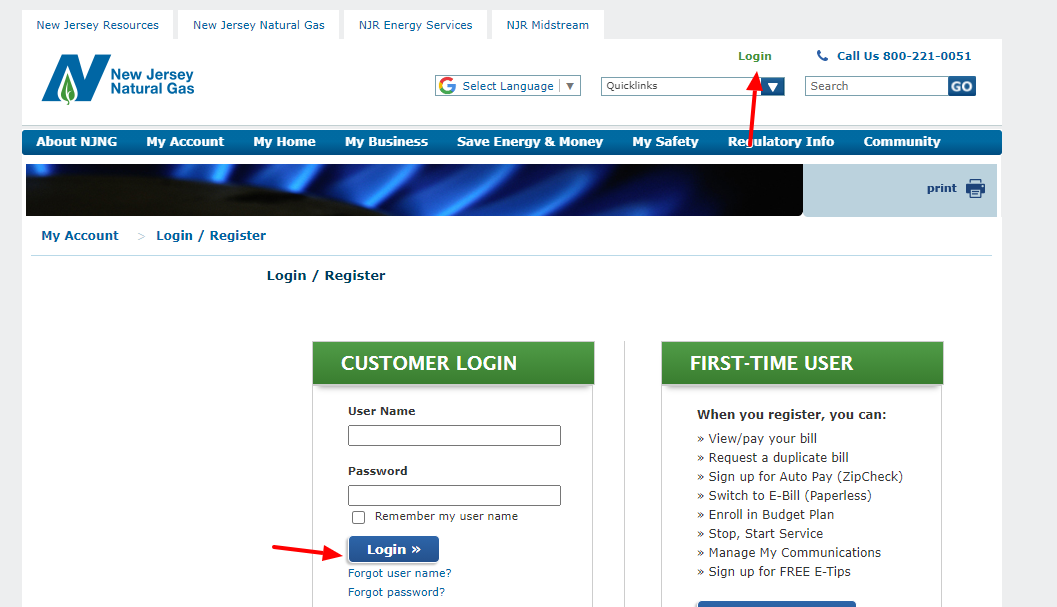
To get started, you’ll need to visit the official NJNG online payment portal at https //myaccountnjng.com/Portal/One-TimePaymentaspx.
This portal allows you to make one-time payments without even creating an account! However, for more features, you might want to consider registering for a full NJNG online account.
Payment Methods Accepted by NJNG
One thing I really appreciate about NJNG’s online system is the variety of payment options. According to their website you can pay using
- Checking accounts
- Savings accounts
- MasterCard
- Visa
- Discover
- American Express
- Debit Cards
- PayPal
- Google Pay
- Apple Pay
- Venmo
This flexibility means you can choose whatever method works best for your financial situation each month.
Step-by-Step Guide to Paying Your NJNG Bill Online
Let me walk you through the exact process of making a payment:
Step 1: Verify Your Account
- Enter your billing account number (this should be on your paper bill)
- Provide your mailing ZIP code
- You’ll see a checkbox to “Remember Me” if you plan to use the same device again
- Click “Next” to proceed
If you’re like me and always forgetting numbers, the “Remember Me” feature is super helpful for future payments!
Step 2: Enter Payment Details
After verifying your account, you’ll need to:
- Select your payment method (credit/debit card, checking account, etc.)
- Enter the required details for your chosen payment method
- Specify the payment amount
- Choose the payment date
Pro tip: When entering banking information, double-check your routing and account numbers. The system will ask you to verify these numbers by entering them twice to prevent errors.
Step 3: Review and Confirm
The final step is to:
- Review all your payment details carefully
- Confirm everything is correct
- Submit your payment
- Save or print the confirmation for your records
Once submitted, you’ll receive a confirmation that will also be sent to your provided email address. I always take a screenshot just to be extra safe!
Common Issues and Troubleshooting
Even the best systems sometimes have hiccups. Here are solutions to common problems you might encounter:
Account Verification Issues
If the system says “Zip Code does not match our record” or “Sorry the Account information provided does not match our records”:
- Double-check your account number for typos
- Verify the ZIP code you’re entering matches your billing address (not service address)
- Make sure you’re entering the primary contact number associated with your account
Payment Processing Errors
If you see messages about payment declining or processing issues:
- Check that your credit card isn’t expired
- Ensure your bank account has sufficient funds
- Verify that you haven’t entered an amount greater than the maximum allowed
- Note that payment amounts must be at least $1
Browser Problems
For optimal performance:
- Enable JavaScript in your browser
- Use the site in portrait mode on mobile devices
- Try a different browser if you’re experiencing persistent issues
Setting Up Recurring Payments
If you’re tired of making manual payments every month (I know I was!), you can set up recurring payments through your NJNG account. This autopay feature ensures you’ll never miss a payment deadline again.
When setting up recurring payments, you’ll see a message saying “Note your account is enrolled in Recurring/Auto Pay” when you try to make a one-time payment in the future. This is just a reminder that you already have automatic payments arranged.
Important Contact Information
If you run into any issues that you can’t resolve online, NJNG has several ways to get help:
- Customer Service Phone: 800-221-0051
- Email: [email protected]
- Gas Leak Emergency Line: 800-GAS-LEAK (800-427-5325)
I had to call their customer service once when my payment wasn’t showing up in my account history, and they were actually super helpful in tracking it down.
Safety and Security Considerations
NJNG takes your financial security seriously. Here are some security features of their online payment system:
- Secure encryption for all transactions
- Password requirements that include uppercase letters, lowercase letters, numbers, and special characters
- Captcha verification to prevent automated attacks
- Privacy policies that limit the use of your information to payment processing only
Tips for Efficient Bill Management
After using this system for years, I’ve developed some strategies that might help you too:
- Set calendar reminders a few days before your bill is due
- Keep a record of all confirmation numbers
- Check your email for payment confirmations and save them
- Review your usage history to spot unusual patterns
- Consider budget billing if your gas usage varies significantly by season
Special Payment Situations
Cash-Only Customers
If you see a message indicating “As a Cash only customer this Account is not eligible for Online Payments,” you’ll need to visit one of NJNG’s physical payment locations. This typically applies to customers with certain account restrictions.
Recent Payments
The system will alert you if you’ve recently made a payment with a message like “We have received a payment for [amount] within the last [time period]. Do you want to continue?” This prevents accidental duplicate payments.
No Current Balance Due
If you try to make a payment when no bill is due, you’ll see a notification saying “There is no bill due for this period.” You can still proceed with a payment if you wish to pay in advance.
Mobile Experience
NJNG’s payment portal is designed to work on mobile devices, but with some limitations:
- The site works best in portrait mode
- Some features might be condensed on smaller screens
- All payment options are still available on mobile
I usually use my phone to pay my bill while waiting in line somewhere – super convenient!
FAQs About NJNG Online Bill Pay
Is there a fee for paying online?
No, NJNG doesn’t charge any additional fees for using their online payment system, regardless of which payment method you choose.
How long does it take for payments to process?
Generally, payments made before 6:00 PM ET on business days are processed the same day. Payments made after that time or on weekends/holidays will be processed on the next business day.
Can I schedule payments in advance?
Yes! You can schedule your payment for a future date, which is handy if your bill is due right before payday.
What if I accidentally submit a duplicate payment?
The system will usually warn you if you’ve recently made a payment. If you do end up with a duplicate payment, contact NJNG customer service to request a refund or credit to your account.
Is my payment information stored securely?
NJNG uses industry-standard security measures to protect your payment information. If you check “Remember Me,” some information will be stored securely for convenience, but you can disable this feature if preferred.
Conclusion
Paying your NJNG bill online is definitely one of the easiest ways to handle your utility payments. Whether you’re making a one-time payment or setting up recurring payments, the process is straightforward and secure.
I used to dread paying bills each month, but now it’s literally just a couple of clicks, and I’m done! No more stamps, no more envelopes, no more trips to the post office. Just simple, convenient bill payment from wherever I happen to be.
Have you tried NJNG’s online bill pay system yet? What’s been your experience? I’d love to hear about it in the comments below!
Remember, if you’re ever in doubt about your NJNG account or notice a gas leak, don’t hesitate to call their customer service at 800-221-0051 or their emergency line at 800-GAS-LEAK (800-427-5325).
Stay warm and bill-stress-free, New Jersey!
Make a One-time Payment Online
No time to login? Make a one time payment. Make a Payment
Stream P.O. Box 650261 Dallas, TX 75265-0261
Stream provides a self-addressed envelope with your bill to return your payment. Avoid late fees by mailing your payment at least three business days before the due date specified.
Using your credit or debit card, you may make a payment by calling 888-685-POWER (7693).
Payments made over the phone will post the same day.
Stop by one of these convenient locations to make a payment in person:
Don’t have a My Stream Account? You could be saving time and money with convenient features like AutoPay, Paperless Billing and other online payment options!
Create your free account below.
Forgot your Username or Password?
