Hey there, Corsicana residents! Are you tired of stressing over your water bill payments? Trust me, I’ve been there. Remembering due dates, finding the right payment method, and avoiding those pesky late fees can be a real headache. That’s why I’ve put together this super detailed guide to help you navigate the Corsicana water bill pay system with ease.
Whether you’re new to the city or just looking for more convenient ways to pay your utility bills I’ve got you covered with all the information you need about payment options billing details, and how to avoid those annoying late penalties. The City of Corsicana offers several ways to pay your water bill, and I’m here to break it all down for you in simple terms.
Understanding Your Corsicana Utility Bill
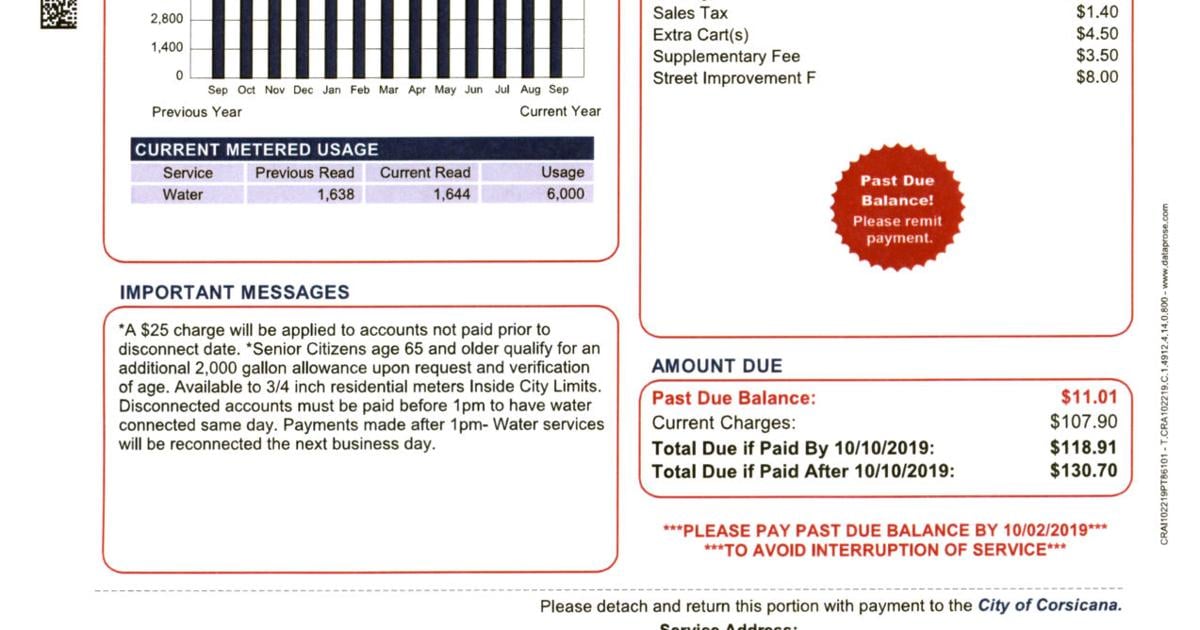
Before we dive into payment methods, let’s clarify what your utility bill actually includes. When you receive your bill from the City of Corsicana, it’s not just for water. It actually covers:
- Water service
- Wastewater (sewer) service
- Refuse collection (garbage and recycling)
These rates are set by the Corsicana City Council and are included in the City’s Chapter 13 Fee Schedule. If you’re curious about specific rate details, you can check out the full schedule on the city’s website.
6 Easy Ways to Pay Your Corsicana Water Bill
The City of Corsicana understands that different people prefer different payment methods so they’ve made multiple options available. Let’s explore each one
1. Pay by Mail
This is the traditional way of paying bills that many people still prefer Your monthly utility bill comes with a return envelope that you can use to mail your payment to
Utility Billing Office200 N 12th St.Corsicana, TX 75110Pro tip: Don’t staple your check to the remittance stub, and please don’t mail cash! This is just asking for trouble.
2. Pay in Person
If you prefer the face-to-face approach or have questions about your bill, you can make walk-in payments at the Utility Billing Office. It’s located at the north end of the Corsicana Government Center.
They accept multiple forms of payment:
- Cash
- Check
- Money order
- Credit/debit cards (Visa, MasterCard, Discover, and American Express)
- Various ATM cards
And here’s something convenient I really appreciate – they have a drive-through window available during normal business hours! This is perfect for when you’re in a hurry or don’t want to park and go inside.
3. Night Drop Box
Running late and can’t make it during office hours? No problem! There’s a night drop box located west of the drive-through window for after-hour payments.
Warning: Please don’t leave cash in the night drop box. It’s just not secure enough, and nobody wants to lose their hard-earned money.
4. Online Bill Pay
For us digital folks, this is probably the most convenient option. The City’s online bill payment service is secure and lets you pay your utility bill from the comfort of your home or office. You can access this service through the Municipal Online Payments portal at:
https://www.municipalonlinepayments.com/corsicanatx/utilities
The online portal offers several helpful features:
- Quick pay (no login required, just need your account number)
- Account management
- Multi-bill payment options
- E-billing enrollment
5. Automatic Bank Draft
If you’re like me and sometimes forget due dates, automatic payments might be your best friend. The City offers automatic bank drafting from either a checking or savings account.
To set this up, you’ll need to complete the Automatic Bank Draft Authorization Form and return it to the Utility Billing Office or email it to [email protected].
6. Quick Pay Option
For those one-time payments when you don’t want to create an account, the Quick Pay option is available through the municipal online payments portal. You’ll just need your account number to complete the transaction.
Business Hours and Contact Information
It’s always helpful to know when and how you can reach the Utility Billing Office if you have questions or concerns. Here’s the important info:
- Office Hours: Monday through Friday, 8am to 5pm
- Phone Number: 903-654-4825
- Email: [email protected]
- Physical Address: 200 N 12th St, Corsicana, TX 75110
Avoiding Late Penalties: What You Need to Know
Nobody likes late fees, right? The City of Corsicana has specific policies regarding late payments that you should be aware of:
- Accounts with a past due balance are subject to late penalties
- If you don’t pay a past due balance within three weeks of the due date, you may face service interruption (water shut-off)
- Additional charges apply when service is interrupted
- Getting your water turned back on will require paying both the past due amount and additional reconnection fees
Setting Up New Service or Transferring Existing Service
Are you new to Corsicana or moving within the city? You can initiate your service connection through the “Connect service” option on the municipal online payments portal. This streamlined process makes it easy to get your utilities set up at your new location.
If you’re already a customer and just moving to a new address within the city, you’ll want to contact the Utility Billing Office to arrange a transfer of service.
Frequently Asked Questions About Corsicana Water Bills
How can I check my account balance?
You have several options:
- Call the Utility Billing Office at 903-654-4825
- Visit the office in person
- Create an online account to view your balance and payment history
What if I think there’s a mistake on my bill?
If you suspect an error on your bill, contact the Utility Billing Office immediately. They can review your account, check for unusual water usage patterns, and help determine if there might be a leak or billing issue.
Can I pay multiple utility bills at once?
Yes! If you create an account on the municipal online payments portal, you can manage multiple accounts and make payments on several bills in one transaction.
What forms of payment are accepted online?
The online payment system accepts major credit and debit cards. There might be a small convenience fee for using these payment methods.
How do I sign up for paperless billing?
To sign up for e-billing, create an account on the municipal online payments portal and select the paperless billing option in your account settings.
Tips for Managing Your Corsicana Water Bill
Monitor Your Usage
Unexpected high bills are often the result of leaks or increased water usage. Here are some ways to keep track:
- Check for running toilets or dripping faucets regularly
- Consider installing water-efficient fixtures
- Be mindful of outdoor watering, especially during summer months
Set Up Payment Reminders
If you opt not to use automatic payments, consider:
- Setting calendar reminders on your phone
- Creating recurring bill payment reminders in your banking app
- Making note of due dates on a household calendar
Budget for Seasonal Changes
Water usage typically increases during summer months due to:
- Lawn and garden watering
- Swimming pool filling and maintenance
- More frequent laundry and showers
Plan ahead for these seasonal increases to avoid payment surprises!
What To Do If You’re Struggling to Pay Your Bill
We all go through tough times. If you’re having difficulty paying your water bill, don’t wait until your service is at risk of disconnection. The City of Corsicana may be able to work with you on payment arrangements.
Contact the Utility Billing Office as soon as possible to discuss your situation. They might be able to offer:
- Payment plans
- Extended due dates
- Information about assistance programs
The Environmental Impact of Digital Bill Pay
One thing I really appreciate about online payment options is their positive environmental impact. By choosing paperless billing and electronic payments, we collectively:
- Reduce paper waste
- Decrease carbon emissions from mail transport
- Save trees and water used in paper production
Plus, it’s just more convenient to have everything stored digitally!
My Personal Experience with Corsicana Water Bill Pay
When I first moved to Corsicana, I was a bit overwhelmed with setting up all my utilities. But I found the online system to be super user-friendly, and the staff at the Utility Billing Office were incredibly helpful when I had questions.
I personally prefer the automatic bank draft option because it ensures I never miss a payment (my memory isn’t the greatest, lol). The peace of mind is totally worth it, and I haven’t had to worry about late fees or service interruptions.
Conclusion: Simplifying Your Utility Payment Process
Paying your Corsicana water bill doesn’t have to be complicated or stressful. With multiple payment options available, you can choose what works best for your lifestyle and preferences.
To recap your options:
- Mail in your payment
- Pay in person at the Utility Billing Office
- Use the night drop box
- Pay online through the municipal portal
- Set up automatic bank drafts
- Use the Quick Pay feature for one-time payments
Remember, staying on top of your utility payments helps you avoid those nasty late fees and potential service interruptions. And if you ever have questions or concerns about your bill, don’t hesitate to reach out to the friendly folks at the Utility Billing Office.
Have you tried any of these payment methods? Which one works best for you? I’d love to hear about your experiences in the comments below!
Until next time, stay hydrated and bill-savvy, Corsicana!
Automatic Bank Draft
The worry-free way to pay your water bill. With this service, the amount of your monthly bill is automatically deducted from your bank account and credited to your utility account. A bill is still mailed to you monthly saying “Paid by ACH Draft do not Pay”. There is no set-up fee or charge associated with this method of payment. To set up Automated Bank Draft, simply download and fill out the ACH Authorization Form located in the Forms Page and drop it off or mail it to our office, along with a voided check.
Lakeshore Utility Company now offers online bill pay for debit or credit cards. Simply click on the “Online Bill Pay” button and you will be directed to a secure site to pay your bill. There will be a $2.50 convenience fee for payments up to $80 or a 3% convenience fee if the amount is over $80. This fee will be charged to the customer for each credit/debit card payment processed. Online payments are not processed until 2:00 p.m. each business day. Lakeshore Utility does not collect any money for these fees.
You can now call (903) 437-4042 to pay your bill through an automated bill payment system. Make sure you have your account number and amount due when calling this automated number. There will be a $2.50 convenience fee for payments up to $80 or a 3% convenience fee if the amount is over $80. This fee will be charged to the customer for each credit/debit card payment processed. Payments made by phone are not processed until 2:00 p.m. each business day. Lakeshore Utility does not collect any money for these fees.
If paying by check or money order through the mail, please send all payments with your payment coupon. To avoid late fees, please mail your payment at least five-seven business days before the due date specified on your bill.
Lakeshore Utility 106 E. Corsicana St. Athens, TX 75751
You may pay your bill in person at our office address. We accept cash, check, or money orders. To avoid longer wait times, please note that Mondays, Fridays and the first day after a holiday are normally very busy.
