Are you struggling to figure out how to pay your magicJack bill? Don’t worry, I’ve got you covered! As someone who’s been using magicJack for years, I understand how confusing it can be to navigate the renewal process. In this comprehensive guide, I’ll walk you through everything you need to know about paying your magicJack bill, renewing your service, and making sure your phone keeps working without interruption.
What is MagicJack and How Does Billing Work?
Before diving into payment methods, let’s understand what magicJack is MagicJack is a VoIP (Voice over Internet Protocol) device that allows you to make unlimited local and long-distance calls within the US and Canada for a fraction of traditional phone service costs.
The billing for magicJack works on a subscription basis. When you first purchase the device, it typically comes with one year of service included. After that, you need to renew your service to continue making and receiving calls.
MagicJack offers different subscription options
- One-way service (magicIN or magicOUT)
- Two-way service (both magicIN and magicOUT)
One-Way vs. Two-Way Service Subscriptions
MagicJack gives you flexibility with different types of subscriptions
MagicIN (Receiving calls only)
- Receive unlimited incoming calls
- Use features like call screening, call blocking, call forwarding
- Cannot make outbound calls (including 911)
- No caller ID capability
- Cannot purchase international credits
MagicOUT (Making calls only)
- Make unlimited outbound calls
- Access to 911 emergency services
- Caller ID capability
- Can purchase international credits
- No access to call screening, blocking, forwarding, or voicemail features
Two-Way Service
- Full functionality with both incoming and outgoing calls
- Access to all features (call screening, blocking, forwarding, voicemail, etc.)
- Can purchase international credits for international calls
It’s worth noting that one-way subscriptions (magicIN/magicOUT) are only available with auto-renewal and cannot be switched between types until your subscription renewal period.
How to Pay Your MagicJack Bill (Service Renewal)
Now, let’s get to what you came for – how to pay your magicJack bill! There are several ways to renew your service:
Method 1: Standard Renewal Through Your Account
This is the traditional method that gives you full control over your renewal:
- Login to your account at my.magicJack.com
- Select the “Account” tab at the top of your screen
- Find the device you want to renew
- Click on “Add Months” or “Click to Reactivate” link under “Device Status”
- Choose your preferred plan and click “Add to Cart”
- Enter or select your credit card/debit card information
- Decide if you want to enable auto-renewal (optional)
- Scroll through and accept the subscriber agreement
- Verify all information and select “Complete Order”
Your service renewal should be immediately reflected. If it isn’t, try unplugging and re-plugging your device.
Method 2: Rapid Renew (The Quick Way)
MagicJack introduced a faster way to renew called “Rapid Renew” which doesn’t require logging in:
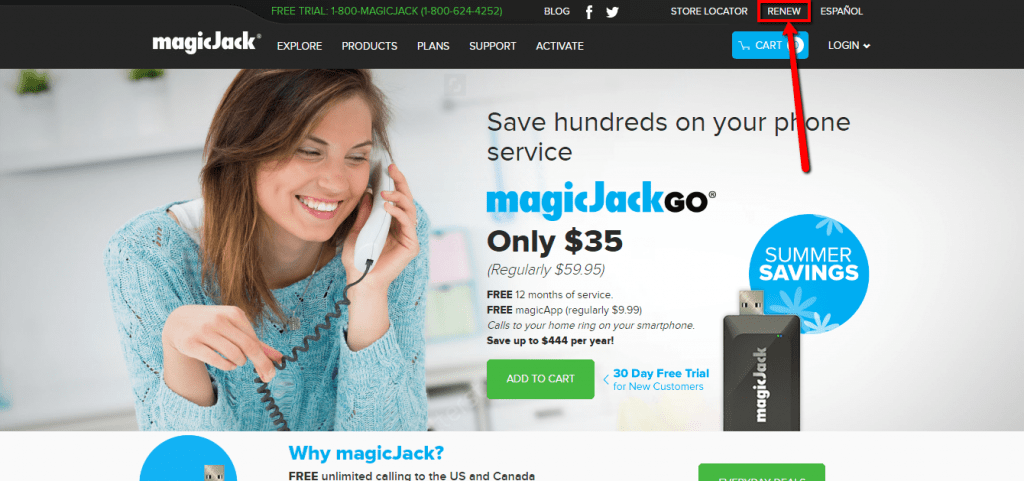
- Go to www.magicJack.com and select Login
- Look for the Rapid Renew option on the login page
- Enter your magicJack phone number and click Submit
- A single-use link will be sent to your primary email address (valid for one hour)
- Follow the instructions in the email
- Choose your renewal plan and click “CONTINUE TO BILLING”
- Double-check your phone number, email, and renewal date
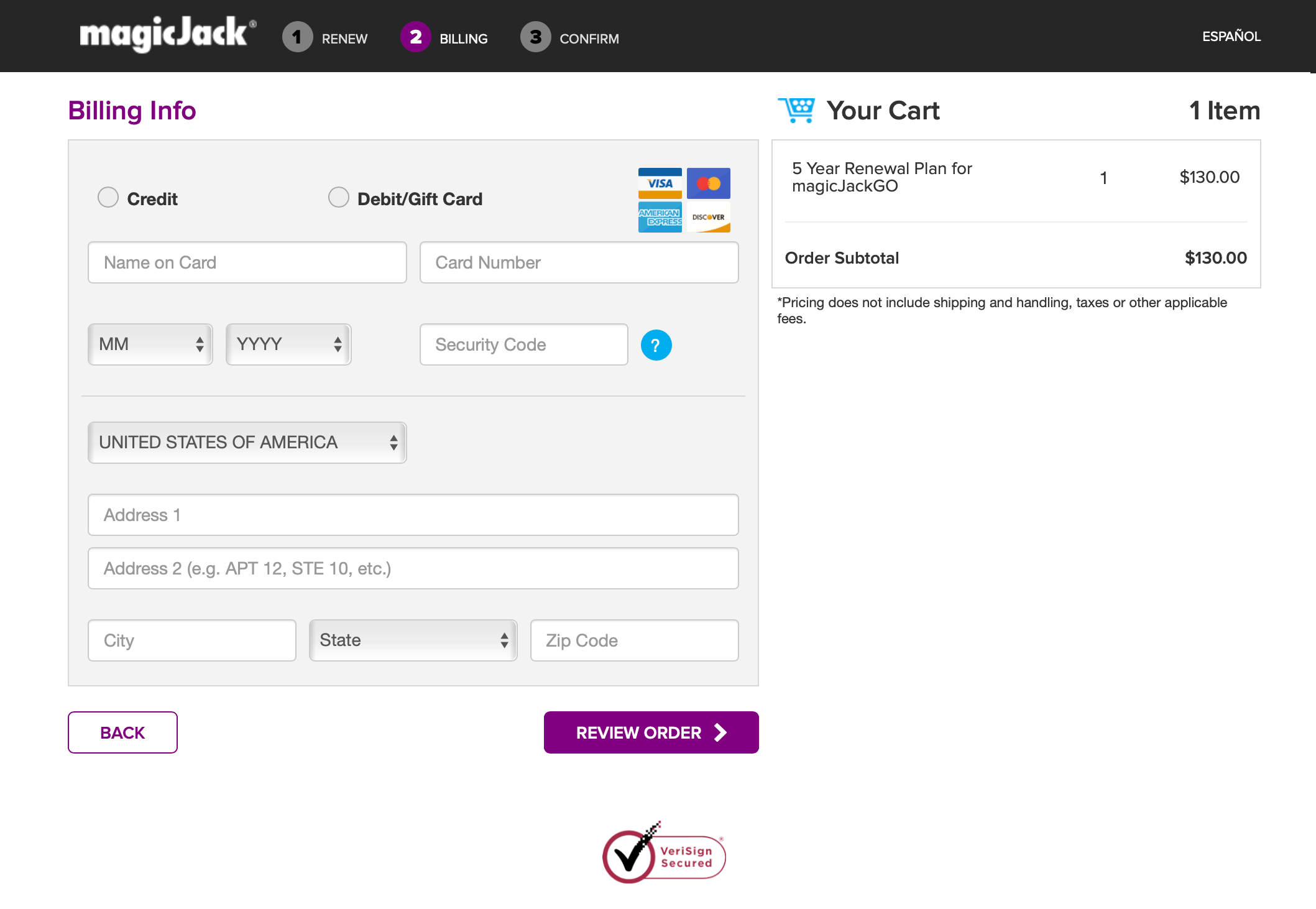
- Enter your credit/debit card details and click “REVIEW ORDER”
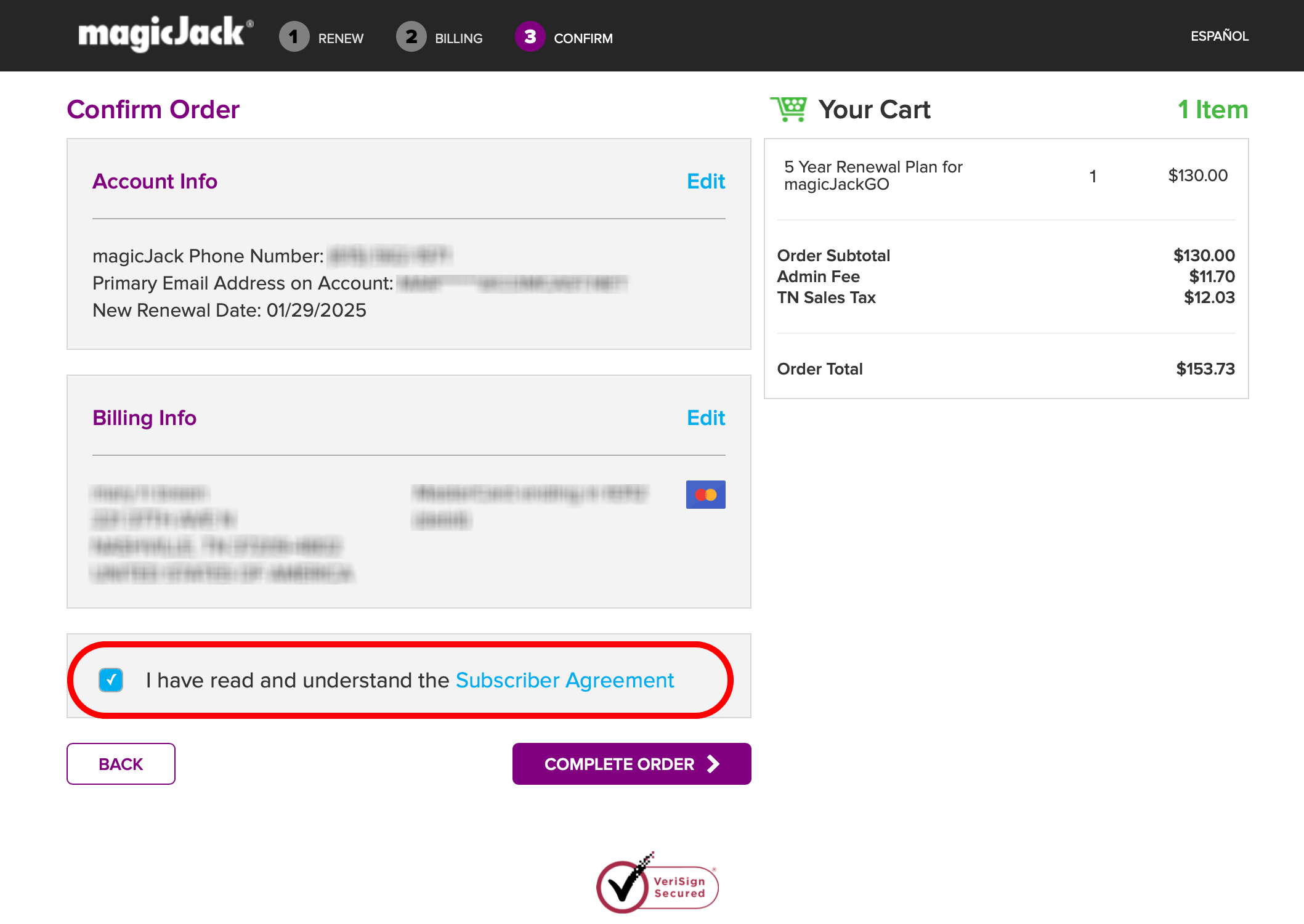
- Confirm selections, review the subscriber agreement, and click “COMPLETE ORDER”
Important note: If you have a premium phone number (Canadian or vanity number), you’ll need to login to your regular account to renew those separately.
Renewing Premium Phone Numbers
If you have a premium phone number, you’ll need to pay an additional annual fee to keep it. These include:
- Vanity numbers (specifically requested combinations): $10 per year + taxes & fees
- Custom numbers (chosen from available list): $3 per year + taxes & fees
- Canadian numbers (all Canadian numbers are premium): $10 per year + taxes & fees
To renew a premium number:
- Login to my.magicJack.com
- Look for the banner notification alerting you about number renewal
- Under the “magicJack Devices” section, find the “Number Status” column
- Click “Add a Year” link for your expired number
- Complete the checkout process
Remember, premium number subscriptions may not align with your device service renewal dates, so you might need to renew them separately.
Setting Up Auto-Renewal (Never Miss a Payment)
If you’re like me and hate remembering renewal dates, auto-renewal is a lifesaver! Here’s how to set it up:
- Login to my.magicJack.com
- Hover over the ‘Account’ tab
- Click on ‘AutoRenew’
- Toggle the Auto Renew button to ‘ON’ for desired subscriptions
- Ensure you have a valid credit card on file
With auto-renewal, magicJack will automatically charge your card when your subscription ends. You’ll receive an email 30 days before renewal as a reminder, showing the current renewal rate.
To disable auto-renewal, follow the same steps but toggle the button to ‘OFF’. For one-way service subscriptions, you’ll need to call Customer Care at 1-844-866-2442 (US/Canada) or 1-561-594-2500 (outside US/Canada).
Understanding Taxes and Fees
When paying your magicJack bill, you might notice additional charges beyond the base subscription price. Here’s what these extra fees are about:
- Sales and applicable taxes: Assessed on orders for taxable items (devices, renewals, phone number fees, etc.)
- Universal Service Fund (USF) fee: Applied to prepaid calling credit purchases
- Emergency (E911) service invoice: Sent upon registration and annually
- Administrative fee: A 9% fee on every purchase covering operating obligations, infrastructure and support costs
What If I Miss a Payment?
If you miss a renewal payment, your magicJack service will eventually be disconnected. However, you have a grace period to reactivate:
- Login to my.magicJack.com
- Locate the deactivated device under the “Account” tab
- Click on “Click to Reactivate”
- Complete the renewal process
If your device has been inactive for too long, you may need to purchase a new device or replacement.
Accepted Payment Methods
MagicJack accepts the following payment methods:
- VISA
- MasterCard
- American Express
- Discover
They do NOT accept cash, checks, PayPal, or electronic funds transfers (EFT).
Common Billing Problems and Solutions
Issue: “My renewal didn’t take effect”
Solution: Try unplugging your device and plugging it back in. If that doesn’t work, contact customer service.
Issue: “I’m being charged for a number that should be free”
Solution: Contact 877-846-5066 to have them check the number. They’ll fix errors within 2 business days.
Issue: “I want to cancel my subscription”
Solution: MagicJack doesn’t offer refunds for unused subscriptions, but you can disable auto-renewal to prevent future charges.
Issue: “I can’t remember my login details”
Solution: Use the “Forgot Password” option on the login page or contact customer support for assistance.
Upgrading Your One-Way Service to Two-Way
If you started with a one-way service (either magicIN or magicOUT) but now want full functionality, you can upgrade:
- Call the Sales team at 1-800-magicJack
- Pay a one-time Change Service Fee of $10.00 USD (plus applicable taxes & fees)
- Your service will be upgraded immediately
My Personal Experience and Tips
I’ve been using magicJack for over 7 years now, and I’ve found that setting up auto-renewal has been the most convenient option for me. I no longer have to worry about my service being disconnected because I forgot to renew.
Here are some personal tips I’ve learned:
-
Mark your calendar: Even with auto-renewal, I like to mark my renewal date on my calendar as a backup reminder.
-
Keep your credit card updated: If your card expires or changes, update it in your account immediately to avoid payment failures.
-
Check for promotions: Occasionally, magicJack offers discounts on multi-year renewals, which can save you money.
-
Renew early: You don’t have to wait until the last minute to renew – you can add time to your subscription at any point.
-
Consider longer plans: The longer the plan, the lower the monthly cost typically is.
Paying your magicJack bill doesn’t have to be complicated. Whether you prefer the traditional renewal process, the quick Rapid Renew method, or the hands-off auto-renewal option, there’s a solution that works for your needs.
Remember that magicJack offers great value compared to traditional phone services, and staying on top of your renewals ensures you’ll continue to enjoy unlimited calling without interruption.
Have you tried any of these methods for paying your magicJack bill? Which one works best for you? I’d love to hear about your experiences in the comments below!
Disclaimer: Prices and features mentioned in this article are accurate as of November 2025. For the most up-to-date information, please visit the official magicJack website or contact their customer service.
Service & Phone Number Renewal
You can renew service on any currently active, or recently deactivated device on your account via the Rapid Renewal process or by completing the following steps:
-
- Login to your account at my.magicJack.com
- Select the âAccountâ tab at the top of your screen
- Locate the device name you wish to renew and select the âAdd Monthsâ or âClick to Reactivateâ link located under the âDevice Statusâ
- Choose your plan and click âAdd to Cartâ
- Choose your shipping and billing address
- Enter or select the credit card/debit card
- Select if you would like to enable the auto-renewal feature for this line
- Enter Agree to the subscriber agreement, you will need to scroll to the bottom of the agreement before you can accept it
- Verify all of the information and select âComplete Orderâ
Your service renewal should be immediately reflected; if it is not, please unplug and re-plug in your device.
Rapid Renew allows you to renew your device service subscription without logging into your account.
To renew using this new quick and easy wizard, follow these steps:
- Go to www.magicJack.com, select Login. On this page you will see an option to start Rapid Renew
- Enter your magicJack phone number and click RENEW NOW

- Choose the renewal plan then click CONTINUE TO BILLING. NOTE: Review your phone number, primary email address and renewal date information!
- Enter your credit/debid card card details then click REVIEW ORDER
- Confirm your selections
- Review the magicJack Subscriber Agreement, select the checkbox then click COMPLETE ORDER
AS A REMINDER: if you have a premium phone number, such as a Canadian phone number or vanity number, you will need to login to your magicJack account to renew that phone number separately.
What is a premium phone number?
Any number that requires an annual fee is considered a premium number. These include the following:
- Vanity:Â A specifically-requested combination of numbers
- Custom:Â Chosen from a list of available numbers
- Canadian:Â All Canadian numbers are considered premium
How much do premium phone numbers cost?
Premium numbers vary in price depending on the option selected. Current prices are listed below:
- Vanity numbers:Â $10 per year (+ applicable taxes & fees)
- Custom numbers:Â $3 per year (+ applicable taxes & fees)
- Canadian numbers:Â $10 per year (+ applicable taxes & fees)
How can I renew my premium number?
Premium number subscription does not always run concurrent to your device service subscription. As such, the renewal period for your premium number and phone service may fall on different dates.
To renew a premium number:
- Login to the my.magicJack.com portal
- At the top of the screen, a banner notification will alert you that your phone number requires renewal
- Underneath the magicJack Devices section of the page, locate the Number Status column. Click the Add a Year link associated with your expired phone number. Your 1 year number renewal will automatically be added to your cart.
- Complete the checkout process. Your renewal will be immediately applied to your account.
Auto-Renew is a service that will automatically renew your selected subscription(s) at the end of their subscription term using an active credit card on file. You will receive email notification 30 days prior to the subscription renewal as a reminder of the date of the renewal and providing the current rate for the renewal. You will receive a confirmation email once the renewal has been successfully processed.
This service requires an active valid credit card on file at the time of the renewal. If the payment method fails, the service will be disconnected. To opt out of auto-renew you must call Customer Care at 1-844-866-2442 within the US or Canada or 1-561-594-9925 Outside the US or Canada.
To enroll in auto-renew, login to your account at my.magicJack.com. Select the Account Tab then AutoRenew. Turn on auto renew for the subscriptions you wish to have automatically renewed each year. If you do not have an active credit card on file, you will be required to update the billing information.
DON’T PAY A PHONE BILL AGAIN! MAGIC JACK REVIEW
FAQ
How do I pay my magicJack Bill?
The simplest way to pay your MagicJack bill is to enable auto-renew. With auto-renew turned on, MagicJack will automatically charge your credit card on file to renew your service each term. Here’s how to enable auto-renew for your MagicJack service: Select the “Auto Renew” link. Toggle the auto-renew button to the “ON” position for your device.
What payment methods does magicJack accept?
MagicJack accepts the following payment methods to pay your bill: At this time, MagicJack does not accept any other payment methods like bank transfers, checks, or cash payments. Whichever payment method you use, be sure to keep it updated and active to enable automatic or manual renewals. Declined payments could disrupt your service.
Does magicJack send paper bills?
MagicJack does not send paper bills – all billing is handled through your online account. But they will notify you via email as your service term approaches expiration. You can also log into your account at any time to view your service expiration date. MagicJack recommends renewing at least 5 days before your term expires.
How do I contact magicJack customer service?
If you ever have any questions or issues related to your MagicJack bill, the customer service team is available to help: The support website at help.magicJack.com also has extensive resources if you need help managing your account or paying your bill. Don’t Get Disconnected – Keep Your Bill Paid!
Does magicJack offer a money back guarantee?
Terms of the Money Back Guarantee are available at help.magicjack.com/faq/support/billing-payment/returns-exchanges-replacements/. This magicJack 30-Day Money Back Guarantee is for magicJack Devices purchased directly from magicJack.com.
Do I have to pay a fee to use magicJack?
No, there are no additional connection, activation or start-up fees payable to magicJack. Upon registration we will send you an Emergency (E) 911 service invoice and ask you to click a link to pay. All funds collected for E911 will be remitted to the appropriate jurisdictions.
How do I find my magicJack account?
To locate magicJack Account ID, please log into magicJack account portal at https://my.magicJack.com/ and then click on Account tab and look for AccountID.
Do I have to pay the 911 for magicJack?
A: The 911 fee is determined by your state/county & not by MagicJack, so it varies. Although MagicJack will send you an e-mail with the fee amount & request payment for 911 service that money goes to your local county.
How much is magicJack renewal?
12 months+ service are included for FREE + other great features. For more info, click HERE. Renewal information for magicIN or magicOUT one-way subscriptions: After the initial 15-month term of one-way subscription ends, the subscription service will be auto-renewed to the 1-year plan for $38.
What is the downside of magicJack?
