Are you tired of scrambling to pay your Tampa Electric (TECO) bill each month? I’ve been there too! After forgetting my payment deadline twice last year (and dealing with those annoying late fees) I decided to research ALL the different ways to pay my TECO bill. This guide shares everything I’ve learned to help make your life easier!
Whether you’re looking for the quickest way to pay online, want to set up automatic payments, or prefer traditional payment methods, I’ve got you covered. Let’s dive into the most convenient ways to pay your TECO bill without the stress!
Online Payment Options: The Fastest Ways to Pay
1. Pay Through Your TECO Account
The most direct method is paying through your TECO account online
- Go to tecoaccount.com
- Click on “LOG IN” in the top right corner
- Enter your username and password
- Navigate to payment options
- Follow the prompts to complete your payment
If you’ve forgotten your login details, there’s no need to panic! The login page has handy “Forgot your username?” and “Forgot your password?” links to help you recover your account access.
Don’t have an account yet? Look for the “Register Account” option to set one up. You’ll need your TECO account number from your monthly statement and your zip code to complete registration.
2. Pay by Credit Card, Debit Card or Digital Wallet
TECO offers convenient payment through credit cards debit cards and digital wallets
- Online payments: Pay through KUBRA EZ-PAY®, TECO’s third-party payment processor
- Convenience fee: $2.75 per $1,000 transaction for residential customers
- Payment methods accepted: Credit cards, debit cards, Apple Pay, and Google Pay
To use this option:
- Visit the Pay Now By Card or Digital Wallet page
- Follow the prompts to make your payment
- Have your TECO account number ready
Pro tip: To use Apple Pay, you must be logged in with an Apple device.
3. Pay by Phone
If you prefer to speak with someone or use an automated system:
- Call 866-689-6469 to pay by phone
- Have your account number and payment information ready
- The same convenience fee ($2.75 per $1,000) applies
Avoid Convenience Fees: Bank Account Payments
If you’re like me and hate paying extra fees, consider these options:
4. Pay Directly From Your Bank Account
The best way to avoid that $2.75 convenience fee is by paying directly from your bank account:
- Log into your online TECO account
- Select the bank payment option
- Enter your bank account information
- Confirm your payment
This method is completely FREE – no additional fees!
If you don’t have an online account yet, you’ll need to register for one first using your TECO account number and zip code.
5. Set Up Auto Pay
Never forget a payment again! Auto Pay automatically withdraws your payment amount on the due date each month.
Benefits of Auto Pay:
- No convenience fees
- Never miss a payment deadline
- No need to remember to pay manually
- Avoid late fees completely
To enroll in Auto Pay:
- Log into your TECO account
- Navigate to “Enroll in Auto Pay” under Payment Options
- Link your bank account
- Choose your payment preferences
I personally switched to Auto Pay last year, and it’s been a lifesaver! No more setting calendar reminders or rushing to make payments before the deadline.
Traditional Payment Methods
Not everyone prefers digital methods. TECO offers traditional options too:
6. Pay In Person
You can pay your bill in person at authorized payment locations:
- Various local retail stores
- TECO payment centers
- Some financial institutions
Check the TECO website for a list of authorized payment locations near you. Just bring your bill or account information and payment method.
7. Pay By Mail
The classic way to pay:
- Write a check payable to Tampa Electric
- Include your payment stub from your bill
- Mail it to the address indicated on your bill
Important: Mail your payment at least 5-7 business days before the due date to ensure it arrives on time!
Using Google Pay for TECO Bill Payments
If you’re a Google Pay user, you can utilize this service to pay your TECO bill when choosing the digital wallet option:
Google Pay offers several advantages:
- Tap to pay functionality
- Secure encryption of your payment information
- Fraud protection built-in
- Simplified checkout experience
To use Google Pay for your TECO bill:
- Set up Google Pay on your device
- Add your payment cards to Google Wallet
- Select Google Pay when making a payment through TECO’s digital wallet option
Google Pay emphasizes security with transaction encryption and fraud protection, giving you extra peace of mind when paying your utility bills.
Additional Payment Options for Specific Situations
Payment Assistance Programs
If you’re struggling to pay your bill, TECO offers payment assistance options:
- Payment arrangements to spread out your balance
- Third-party notification services
- Community assistance programs
Contact TECO’s customer service at (888) 223-0800 to discuss these options.
Paperless Billing
While not a payment method itself, switching to paperless billing makes managing your payments easier:
- Receive bill notifications by email
- Access your bill anytime online
- Reduce paper waste
- Never lose a paper bill again!
To enroll in paperless billing, log into your TECO account and look for “Paperless Billing” under Billing Options.
Keeping Track of Your TECO Payments
After making a payment, it’s important to keep track of it:
- Save confirmation numbers and receipts
- Check your account for payment posting (usually within 1-2 business days)
- Review your next bill to confirm the payment was applied correctly
FAQs About Paying Your TECO Bill
Q: How long does it take for my TECO payment to process?
A: Online and phone payments usually process within 1-2 business days. Mail payments may take 5-7 business days.
Q: Can I pay my TECO bill with cash?
A: Yes, but only at authorized in-person payment locations.
Q: What if I can’t pay my entire bill?
A: Contact TECO customer service at (888) 223-0800 to discuss payment arrangements or assistance programs.
Q: Is there a way to avoid the credit card convenience fee?
A: Yes! Pay directly from your bank account through your online TECO account to avoid all convenience fees.
Q: Can I set up recurring payments?
A: Absolutely! Enroll in Auto Pay through your online account to have payments automatically withdrawn from your bank account on the due date.
Safety and Security When Paying Your TECO Bill
When making online payments, safety is a top concern. Here are some tips:
- Only use official TECO websites and payment portals
- Ensure the website is secure (look for “https://” in the URL)
- Never share your payment information via email
- Be aware of potential scams – TECO will never call demanding immediate payment via gift cards or wire transfers
Google Pay provides additional security features like transaction encryption and fraud protection if you choose that payment method.
My Personal Experience
I used to always pay my TECO bill at the last minute, sometimes even forgetting altogether! After getting hit with late fees twice in one year, I finally set up Auto Pay through my online account. Now, I never worry about missing a payment, and I save money by avoiding both late fees AND convenience fees!
The system automatically withdraws the exact amount due on my bill’s due date, and I get an email confirmation each time. I can’t believe I waited so long to set this up – it’s been a total game-changer!
Final Thoughts on Paying Your TECO Bill
Managing your TECO bill doesn’t have to be stressful! With so many convenient payment options available, you can choose what works best for your lifestyle:
- For tech-savvy folks: Online payments through your TECO account or digital wallets
- For those who hate fees: Bank account payments or Auto Pay
- For traditionalists: In-person payments or mail
- For the forgetful (like me!): Auto Pay all the way!
The most important thing is finding a method that helps you pay consistently and on time. My personal recommendation? Set up Auto Pay through your bank account – it’s free, automatic, and gives you one less thing to worry about each month!
Have you found another great way to pay your TECO bill? Share your experiences in the comments below!
Remember to check the Tampa Electric website for the most up-to-date information on payment options and policies. Stay on top of your payments and enjoy uninterrupted service from TECO!
Pay Online. Interest free.
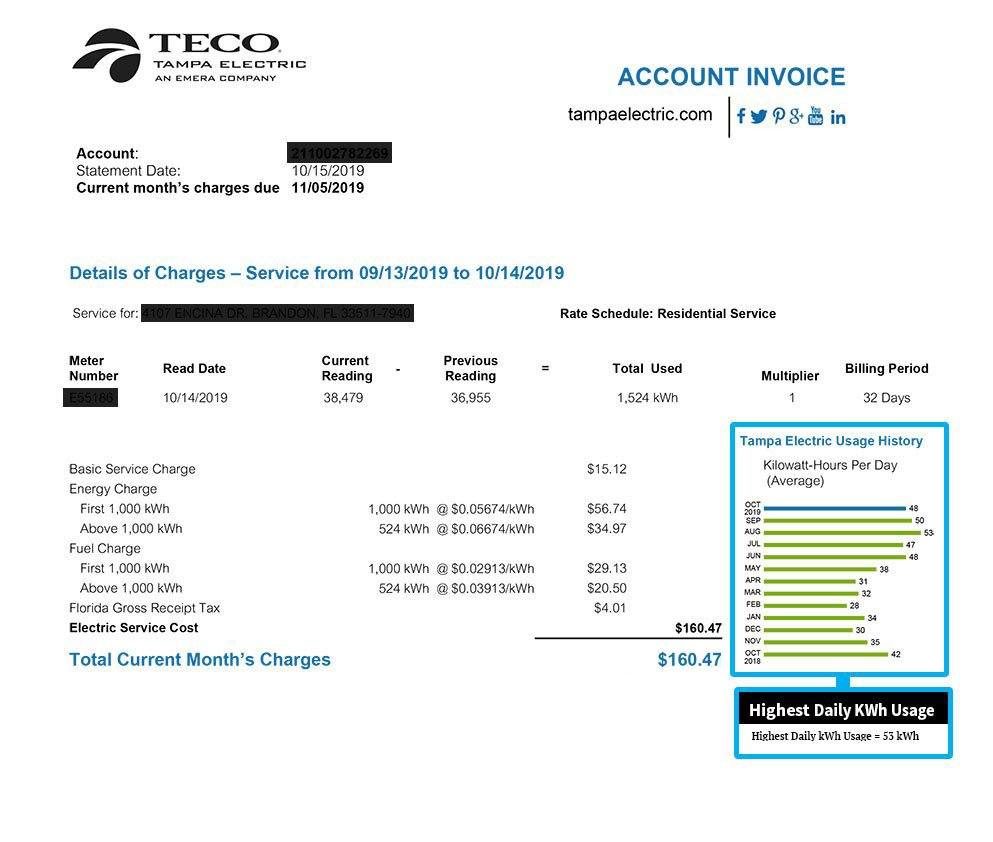
Ensure your bill looks like this to confirm payment to Tampa Electric. When paying Tampa Electric via Deferit, we verify bill legitimacy and payment details. All payments through Deferit to Tampa Electric are guaranteed. Deferit charges a monthly membership. An application fee may apply. If an application fee applies it will be presented to you prior to joining. No lock-ins. All payments are subject to a processing fee of $0.99. Deferit is not affiliated with Tampa Electric. The above is for educational purposes only.
The fastest and easiest way to pay any bill
Our payment method is easy! Simply take a photo of your bill and we pay it. Whether paid online, by ACH, or by check.
Snap a photo of your Tampa Electric bill, choose how much to pay and get instant confirmation!
