Are you tired of the hassle that comes with paying your Kaiser Permanente bills? Looking for the easiest way to make payments without headaches? You’re not alone! Many Kaiser members struggle with understanding their payment options and finding the right contact numbers for bill pay.
As someone who’s navigated the Kaiser billing system for years, I’m excited to share everything you need to know about Kaiser’s bill pay numbers and options. Kaiser Permanente offers multiple ways to manage and pay your healthcare bills, whether you’re dealing with medical services payments or monthly premium bills.
Quick Kaiser Bill Pay Numbers and Options
Before diving deeper, here’s a quick reference guide to Kaiser bill pay phone numbers and payment methods:
- General Payment Line: 1-800-218-1059 (also for advice)
- TTY for Hearing Impaired: 711
- Online Payments: https://healthy.kaiserpermanente.org/billpay
- Payment Types: Medical bills, premium bills, guest payments
- Available Options: One-time payments, payment plans, financial aid programs
Understanding Kaiser Permanente’s Bill Pay System
Kaiser Permanente divides their billing into two main categories that sometimes confuse members:
- Medical Bills: These are payments for healthcare services you’ve received
- Premium Bills: Your monthly insurance payment that keeps your coverage active
Each payment type has different methods and sometimes different contact numbers, which we’ll explain below.
Medical Bill Payments
When it comes to paying for the actual medical services you’ve received, Kaiser offers several convenient options
Online Medical Bill Payments
The easiest way to pay your Kaiser medical bills is through their online portal:
- Visit https://healthy.kaiserpermanente.org/billpay
- Sign in to your Kaiser account
- Navigate to the “Billing” section
- Select “View and pay medical bills”
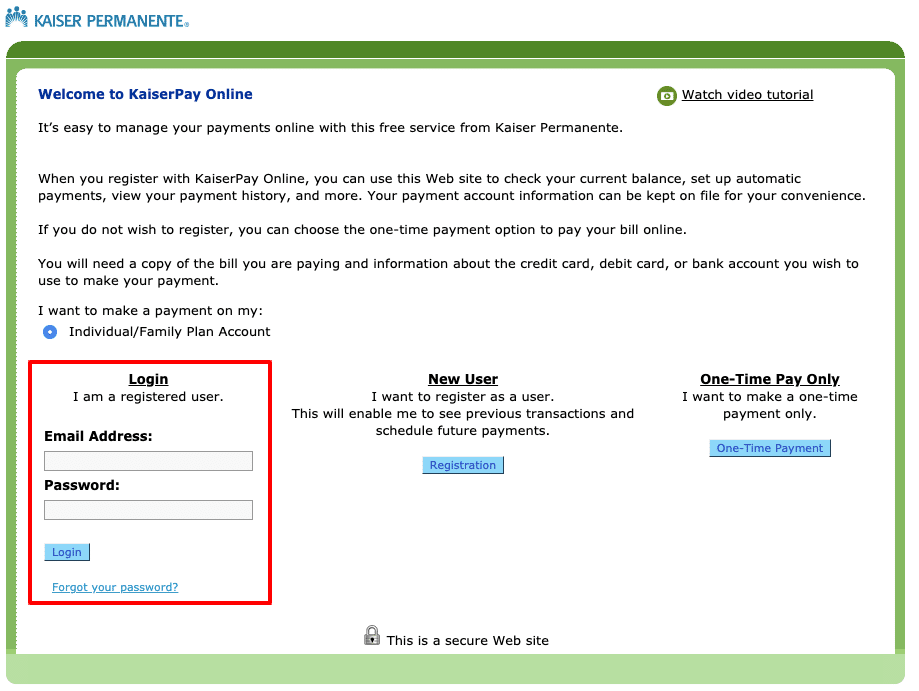
If your not the primary account holder on the Kaiser plan, don’t worry! Kaiser provides a guest payment option that lets you make payments for family members without needing full account access.
Guest Payment Option
For those making payments on behalf of someone else:
- Visit the Kaiser bill pay website
- Select “Make a guest payment” under the Medical Bills section
- Follow the prompts to complete your one-time payment
This is super helpful for family members helping elderly parents or adult children assisting with payments.
Premium Bill Payments
Your premium bills keep your insurance coverage active and have different payment procedures than medical bills. Kaiser offers specific payment options based on the type of coverage you have:
Premium Payment Options by Plan Type
Kaiser divides premium payments by plan type:
- Individual – Exchange plans: For members who purchased through healthcare.gov
- Individual plans: For members who purchased directly from Kaiser
- COBRA plans: For members with employer-sponsored healthcare coverage
- Medicare plans: For members with federal healthcare coverage
Each plan type has a specific payment process, so make sure you’re selecting the correct option when making payments.
Kaiser Bill Pay Phone Numbers and Contact Information
While online payments are convenient, sometimes you need to speak with a real person about your bill. Here’s the contact information you’ll need:
- General Advice Line: 1-800-218-1059 (Can also handle billing questions)
- TTY Line: 711
- Billing Help: Available through the Support Center on Kaiser’s website
When calling about your bill, keep your member ID handy to expedite the process. I’ve found that calling during mid-morning hours usually results in shorter wait times.
Financial Assistance Programs for Kaiser Bills
One thing I really appreciate about Kaiser is their commitment to helping members who struggle financially. If your facing difficulty paying your Kaiser bills, they offer several assistance programs:
- Payment Plans: Spread payments over time with manageable installments
- Financial Aid: Income-based assistance programs
- Social Health Programs: Additional resources for qualifying members
To access these programs, visit the “Help paying your bills” section on the Kaiser bill pay website. Don’t be embarrassed to ask for help – these programs exist specifically to support members during challenging times.
Step-by-Step Guide to Managing Your Kaiser Bills Online
Let me walk you through exactly how to manage your Kaiser bills online:
For Medical Bills:
- Visit https://healthy.kaiserpermanente.org/billpay
- Select your region (this is important as billing systems vary by region)
- Sign in to your Kaiser account
- Navigate to “Billing” in the main menu
- Select “View and pay medical bills”
- Review your current bills and payment history
- Select the bill you wish to pay
- Choose your payment method and complete the transaction
For Premium Bills:
- Visit the Kaiser bill pay website
- Select “Make premium payment” under the Premium Bill section
- Choose your coverage type (Individual-Exchange, Individual, COBRA, or Medicare)
- Follow the specific payment instructions for your plan type
- Complete your payment using your preferred method
Common Kaiser Bill Pay Problems and Solutions
In my years of dealing with Kaiser billing, I’ve encountered some common issues that members face:
Problem 1: Can’t Access Online Account
Solution: Use the “Forgot Password” feature or call 1-800-218-1059 for account recovery assistance.
Problem 2: Bill Higher Than Expected
Solution: Review your “Explanation of Benefits” (EOB) online or contact Kaiser to request a detailed breakdown of charges.
Problem 3: Need to Dispute a Charge
Solution: Call the main billing line and ask to speak with a billing representative about the specific charge in question.
Problem 4: Bill Due Before Payday
Solution: Contact Kaiser to request a due date extension or set up a payment plan.
Best Practices for Managing Kaiser Bill Payments
Over the years, I’ve developed some strategies that make dealing with Kaiser bills much easier:
- Set Up Autopay: Avoid late fees by automating your regular payments
- Keep Digital Receipts: Save confirmation numbers for all payments made
- Check Bills Promptly: Review new bills as soon as they arrive to catch any errors
- Use the Kaiser App: The mobile app provides on-the-go access to your billing information
- Maintain a Billing Calendar: Track due dates for both medical and premium bills
FAQ About Kaiser Bill Pay Numbers and Options
How can I make a payment by phone?
Call 1-800-218-1059 and follow the automated prompts for bill payment, or speak with a representative who can process your payment.
Can I pay someone else’s Kaiser bill?
Yes! Use the guest payment option on the Kaiser bill pay website. You don’t need access to their account, just some basic information about the bill.
What payment methods does Kaiser accept?
Kaiser typically accepts credit cards, debit cards, electronic checks, and bank account transfers for online and phone payments.
How do I set up automatic payments?
Log into your Kaiser account, navigate to the billing section, and look for the “Set Up Automatic Payments” option. Follow the prompts to link your preferred payment method.
What if I can’t afford my Kaiser bill?
Contact Kaiser directly to discuss financial assistance options, payment plans, or reduced payment programs. Never ignore bills – Kaiser is usually willing to work with members experiencing financial hardship.
Conclusion: Simplifying Your Kaiser Bill Payments
Managing your Kaiser Permanente bills doesn’t have to be complicated. Whether you prefer online payments, phone payments, or need financial assistance, Kaiser offers multiple options to suit your needs.
The key is knowing which payment system to use (medical vs. premium) and having the right contact information handy when you need it. With the information in this guide, you’re now equipped to handle your Kaiser bills with confidence!
Remember to check the Kaiser bill pay website regularly for any updates or new payment options, as their systems do change occasionally. And if you ever have questions that this guide doesn’t answer, don’t hesitate to call Kaiser’s helpline at 1-800-218-1059.
Have you had experiences with Kaiser’s bill pay system? What methods work best for you? We’d love to hear your thoughts in the comments!
Care Away From Home
Start your care in a new Kaiser Permanente region by creating your MRN, and easily switch between your kp.org accounts.
Explore guides, directories, and forms related to Kaiser Permanente membership and plans.
Request copies of medical records, forms, certifications, and other secure documents.
Create an account or reset your password
- How do I reset my password?
- Can teens create their own accounts?
- Why is my account locked after repeated sign-in attempts?
- Is my Kaiser Permanente health plan coverage active?
- How do I make an appointment to see a chiropractor?
- How do I use my dental benefits?
- How can I update my medication list?
- Why can’t I order a refill even though I have refills remaining?
- Why is a credit card needed if I don’t have a copayment for refills?
