Yes, you absolutely can pay your Cricket bill over the phone! As a Cricket customer myself, I’ve used their phone payment option several times when my internet was down. Cricket Wireless offers a straightforward automated phone system and live agent support to help you settle your monthly bill quickly.
Understanding Your Cricket Phone Payment Options
Cricket Wireless understands that customers have different preferences when it comes to paying bills. While many folks use the online portal or mobile app, phone payments remain popular for several reasons
- No internet connection needed
- Direct assistance from customer service
- Immediate payment confirmation
- Option to ask billing questions in real-time
Let me walk you through exactly how to pay your Cricket bill by phone what payment methods are accepted and some useful tips I’ve learned along the way.
How to Pay Your Cricket Bill Using the Automated Phone System
The easiest way to pay your Cricket bill by phone is through their automated *PAY system
- Dial **PAY (729) directly from your Cricket Wireless phone
- OR call 1-800-274-2538 from any phone
- Follow the voice prompts
- Enter your Cricket phone number when requested
- Provide your payment information as directed
The system will guide you through the entire process. It’s super convenient and available 24/7, so you can pay whenever works for you. Your payment gets applied to your account immediately, and you’ll receive a text confirmation right after.
Important Fee Information
Be aware that a $5 Customer Assistance Fee applies when paying through the automated phone system. This fee is standard for most phone payments with Cricket.
Fee Exceptions: The Automated Phone System Payment Fee doesn’t apply to payments made to accounts with a Connecticut billing address. This policy might change, so it’s always good to verify current fees.
Speaking with a Live Cricket Billing Agent
If you prefer talking to a real person or have questions about your bill, you can also pay through a live Cricket Wireless billing agent:
- Call 1-800-274-2538
- Select the option to speak with a billing representative
- Have your account number and payment info ready
- The agent will process your payment and address any questions
When I’ve called in the past, the agents have been super helpful explaining charges on my bill and offering suggestions for saving money on my plan.
Payment Methods Accepted for Phone Payments
Cricket accepts several payment types when paying by phone:
| Payment Method | Automated System | Live Agent |
|---|---|---|
| Credit Card | ✓ | ✓ |
| Debit Card | ✓ | ✓ |
| Cricket Refill Card | ✓ | ✓ |
| Service Payment Card | ✓ | ✓ |
| Gift Cards* | ✓ | ✓ |
| Reloadable Prepaid Credit Cards** | ✓ | ✓ |
| PayPal | ✗ | ✗ |
| Cash | ✗ | ✗ |
| Check | ✗ | ✗ |
| Money Order | ✗ | ✗ |
*Gift Cards can only be used for one-time payments and can’t be used for Auto Pay.
**Most reloadable prepaid debit cards with Visa, MasterCard, and American Express logos can be used.
Why Choose Phone Payments for Your Cricket Bill?
There are several good reasons why paying by phone might be your preferred option:
- No internet required – Perfect during internet outages or when traveling
- Immediate confirmation – Get instant text confirmation of your payment
- Security – Your payment information isn’t stored in their system after the transaction
- Assistance with billing issues – Live agents can address questions or concerns
- Flexible timing – The automated system is available 24/7
Setting Up Auto Pay During Your Phone Call
One cool thing I discovered is that when speaking with a Cricket billing agent, you can also set up Auto Pay for future payments. This ensures your bill gets paid automatically each month, helping you avoid:
- Late fees
- Service interruptions
- The hassle of remembering payment dates
The agent can walk you through the entire Auto Pay setup process during your call.
What If I Don’t Have My Account Information?
No worries! If you don’t have your Cricket account number handy, you can still pay by phone. Both the automated system and live agents can process your payment using just your Cricket phone number.
Your payment will automatically get applied to the account associated with that number. This has saved me more than once when I needed to make a quick payment but didn’t have my account details nearby.
Getting Payment Confirmations
Every time you pay your Cricket bill by phone, you’ll receive:
- An immediate text message confirmation
- Payment amount details
- Date and time of transaction
- A unique confirmation number
I always recommend saving these confirmations until your next billing cycle just in case there are any questions about your payment.
Troubleshooting Common Phone Payment Issues
Sometimes things don’t go as planned. Here are some common issues and how to resolve them:
Payment Not Showing Up
If your payment doesn’t appear to be processed, wait 15-20 minutes and check your account again. Sometimes there’s a slight delay in updating your balance.
System Unavailable
On rare occasions, the automated system might be down for maintenance. If this happens, try calling during off-peak hours or use the Cricket mobile app as an alternative.
Payment Declined
If your payment is declined, verify your card information and available funds. Sometimes, banks flag these payments as suspicious activity if you haven’t used this payment method before.
Other Cricket Bill Payment Methods
While this article focuses on phone payments, Cricket offers several other ways to pay your bill:
- Online – Through cricketwireless.com using Pay Bill or Quick Pay
- Mobile App – Using the myCricket App
- In-store – At any Cricket Wireless store location
- Payment Centers – Various retail locations that accept Cricket payments
Each method has its own advantages, but phone payments remain one of the most direct ways to ensure your payment is processed quickly.
Quick Pay vs. Phone Payments: What’s the Difference?
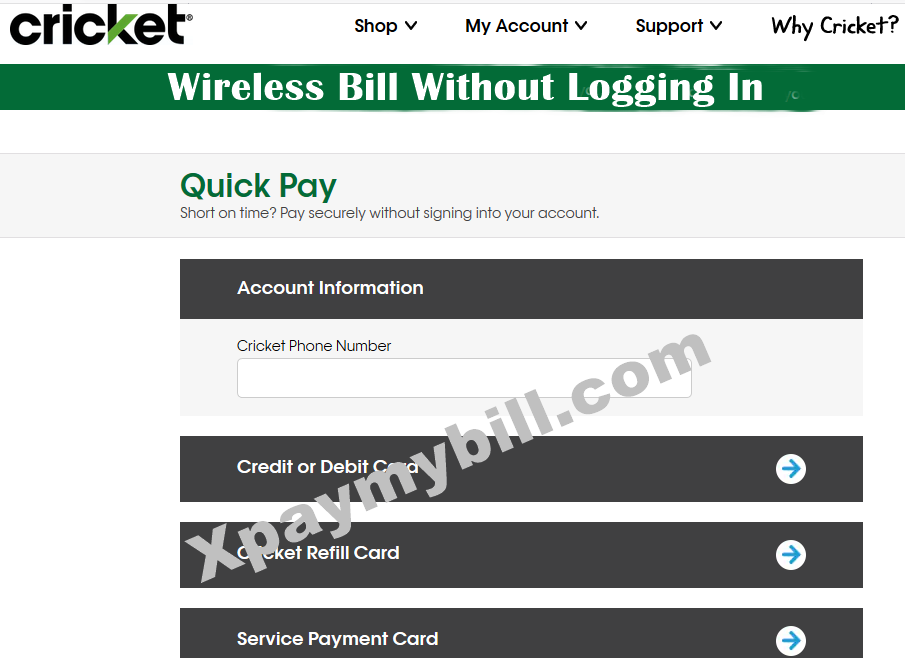
Cricket’s Quick Pay system (available online) lets you make payments without signing into your account. This is different from phone payments in a few key ways:
- Quick Pay is online-only
- Phone payments can involve live agent assistance
- Quick Pay accepts PayPal, while phone payments don’t
- Phone payments include a $5 Customer Assistance Fee
Paying Cricket Bills for Multi-Line Accounts
If your Cricket account has multiple lines, it’s important to note that payments (whether by phone or other methods) apply to the entire account, not individual lines.
When making a phone payment, your payment will cover all lines on the account. If different people on your account share payment responsibility, coordinate to ensure the full balance is paid by the due date to avoid service suspension.
My Personal Experience with Cricket Phone Payments
I’ve been a Cricket customer for years, and I’ve used their phone payment system several times. In my experience, the process is quick – usually taking less than 5 minutes from dialing to receiving my confirmation text.
The $5 fee isn’t ideal, but when I need to make a last-minute payment and can’t access the internet, it’s worth it for the peace of mind knowing my service won’t be interrupted.
Final Thoughts: Is Paying Your Cricket Bill by Phone Worth It?
Paying your Cricket bill by phone is definitely convenient, especially in situations where:
- You don’t have internet access
- You’re approaching your payment deadline
- You have questions about your bill
- You prefer speaking with a representative
The main drawback is the $5 Customer Assistance Fee, which makes this method slightly more expensive than online options. However, the reliability and immediate confirmation often make it worth the extra cost when needed.
For regular monthly payments, I’d recommend setting up Auto Pay to avoid fees altogether. But keep the phone payment option in your back pocket for those times when you need a quick, reliable way to pay your bill.
Do you have any other questions about paying your Cricket bill? Feel free to explore Cricket’s official website for more detailed information about their payment options and policies.
Things to Keep in Mind
The Service Payment Card:
- Can be used for specific amounts
- Cannot be used as a split tender payment
- Cannot be used for Auto Pay sign up, devices or accessories
- Cannot be refunded, transferred or exchanged for cash or any cash equivalent.
Cricket is not responsible for any lost, stolen, or damaged cards. Was this article helpful?
Pay for Service with a Service Payment Card
For your convenience, we offer several ways to pay with your Service Payment Card:
- Select Quick Pay from the top of cricketwireless.com.
- Enter your phone number.
- Select the blue arrow to the right of Service Payment Card.
- Enter your card information and the amount you want to pay.
- Accept the Terms and Conditions.
- Select Review Payment.
- Review your secure payment information. If you are satisfied with your payment information, select Submit Payment. Otherwise, select Edit to change your payment amount, then Submit Payment.
- To access the payment system:
- From your Cricket phone, dial *PAY (*729)
- From a landline or non-Cricket phone, call 1-800-CRICKET (274-2538)
- Follow the prompts to complete your Service Payment Card payment.
Fees may apply when you make a payment with the help of a Cricket support representative. Learn more about Crickets charges and fees.
how to go on and pay your cricket bill
FAQ
How do I pay my Cricket Wireless bill over the phone?
Cricket Wireless’s automated *PAY system makes it easy for customers to pay their bills over the phone. To use it: Call *PAY (*729) directly from your Cricket Wireless phone. Or dial 1-800-274-2538 from any other phone. Listen to the voice prompts and follow instructions to enter your Cricket phone number and payment info.
What payment methods does Cricket Wireless accept?
Cricket Wireless accepts a variety of payment methods to ensure convenience. Here are your options: Over the Phone: You can also use Cricket’s Automated Payment System by dialing *PAY (*729) from your Cricket phone or calling 1-800-274-2538. In Store: Payments can be made with cash or cards in-store. Options include:
How do I make a cricket payment?
Over the Phone: You can also use Cricket’s Automated Payment System by dialing *PAY (*729) from your Cricket phone or calling 1-800-274-2538. In Store: Payments can be made with cash or cards in-store. Options include: Note: A $5 Customer Assistance Fee applies for the automated phone system and in-store payments.
Does cricket offer automatic bill payment?
Cricket offers an automatic bill payment option that can be set up through the “Auto Bill Pay” link on the My Account page. Automatic bill payments can be deducted from a credit card, debit card or a checking account. Cricket offers a discounted rate to customers who set up an automatic payment when they sign up for an account.
How do I pay cricket if I don’t sign in?
If you prefer not to sign in, you can still pay through the Quick Pay section on the Cricket website: Go to Quick Pay and enter your phone number. Select the payment method (credit card, Cricket Refill Card, or Service Payment Card) and follow the on-screen instructions.
Do I need a phone number to register with cricket?
A Cricket phone number is required for registration. Cricket offers an automatic bill payment option that can be set up through the “Auto Bill Pay” link on the My Account page. Automatic bill payments can be deducted from a credit card, debit card or a checking account.
How do I pay my cricket phone bill by phone?
Phone – Automated Payment System [Dial *PAY (*729) from your Cricket phone] or call Cricket Support (1-800-274-2538)
How much does Cricket charge to pay over the phone?
| Transaction | Description | Fee |
|---|---|---|
| Customer Assistance Fee | Applies to service payments made in an Authorized Retail store or over the phone with Customer Support. (No fee is charged for payments made through the myCricket App, online, Quick Pay, or for customer enrolled in Auto Pay.) | $5** |
How can I pay my bill on my phone?
How long can you go without paying a Cricket bill?
Tip: A monthly billing cycle can be between 28 and 31 days, depending on the days in the month. The last day of the billing cycle is your due date and payment is due by 11:59 pm Central Time. If no payment is received by 11:59 pm Central Time on your due date, your service will be suspended.
