Are you tired of stressing over how to pay your Duke Energy bill each month? With over 7.7 million electric customers across six states, Duke Energy offers multiple convenient payment options to keep your lights on without the hassle. I’ve put together this comprehensive guide to help you navigate all the ways you can pay your Duke Energy bill in 2025.
Who is Duke Energy?
Before diving into payment methods, let’s get familiar with this energy giant:
- Headquartered in Charlotte, North Carolina
- Serves customers across North Carolina, South Carolina, Florida, Ohio, Kentucky, and Indiana
- Employs over 29,000 people
- Services approximately 7.7 million electric customers and 1.6 million natural gas customers
- Working toward net-zero carbon emissions by 2050
Now let’s explore your payment options!
Method 1: Pay Duke Energy Bill Online
The easiest way to handle your Duke Energy bill is through their website You’ll need
- Your account number (10-16 digits)
- A valid email address
- A payment method (credit/debit card or bank account)
To pay online:
- Visit Duke Energy’s website
- Sign in to your account (or register if you don’t have one)
- Select “Pay My Bill” option
- Enter your payment information
- Confirm and submit payment
Pro tip Set up autopay to never miss a due date again!
Method 2: Duke Energy Mobile App
The Duke Energy mobile app lets you manage your account on the go:
- Download from the App Store or Google Play
- Text 578-02 to receive a download link
- Login with your account credentials
- Select the payment option
- Enter your payment details
- Submit and you’re done!
The app also allows you to:
- Report outages
- View usage details
- Receive alerts
- Access billing history
Method 3: Pay by Mail
If you prefer the traditional route, you can mail your payment to:
Duke Energy
PO Box 1094
Charlotte, NC 28201-1094
When mailing your payment, always include:
- Your full account number
- Current amount due
- Return address
- Check or money order (never cash!)
Mail your payment at least 5-7 days before the due date to avoid late fees.
Method 4: Pay by Phone
Need to make a quick payment? Call Duke Energy’s automated phone system:
- Dial 800-777-9898 (available 24/7)
- Have your account number ready
- Follow the prompts to complete your payment
- Save the confirmation number for your records
There’s no need to speak with a representative, making this option available anytime day or night.
Method 5: In-Person Payments
Sometimes you just wanna pay your bill in cash or talk to a real person. Duke Energy has authorized payment locations where you can make same-day payments:
- Use the payment location finder on their website
- Search by zip code
- Bring your bill or account number
- Pay with cash, check, or money order
Popular in-person payment locations include:
- Grocery stores
- Check cashing services
- Convenience stores
Method 6: Automatic Bank Draft
Set it and forget it with automatic bank draft:
- Sign up through your online account
- Provide your banking information
- Choose your preferred payment date
- Authorize Duke Energy to withdraw payment
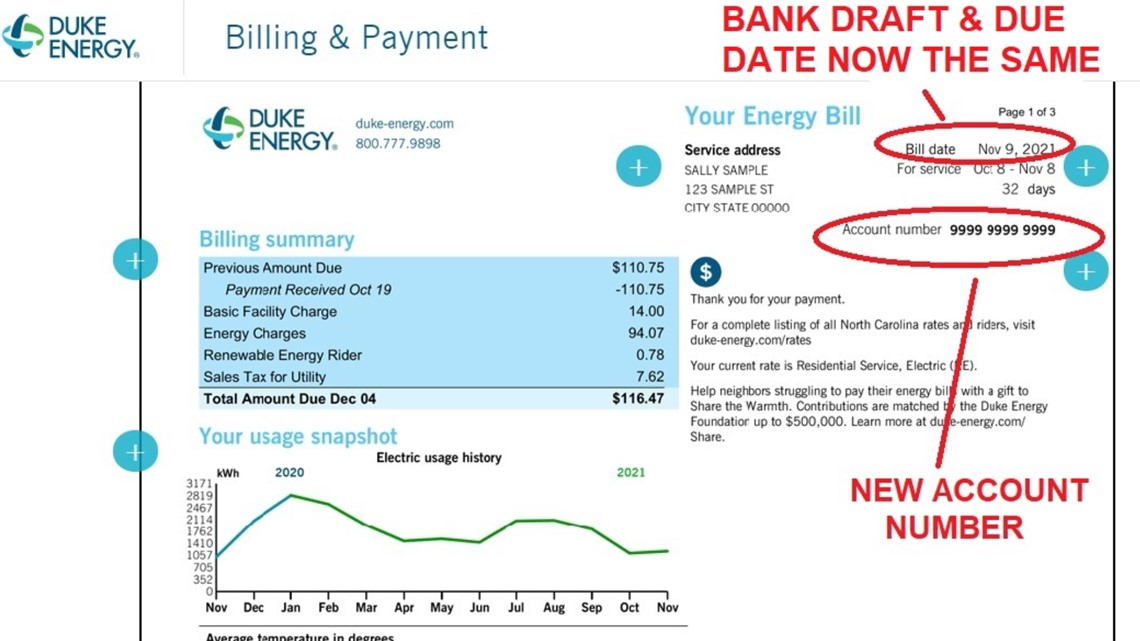
Your bill will be automatically paid on the same date each month, and you’ll still receive a statement showing the amount and date of withdrawal.
Method 7: Budget Billing Program
If you hate seasonal bill fluctuations, consider budget billing:
- Duke Energy calculates your average monthly bill
- You pay the same amount each month
- Adjustments are made annually to account for actual usage
- Helps with budgeting and avoiding seasonal payment spikes
To enroll, call customer service or sign up through your online account.
Method 8: Payment Extensions
Running late? Duke Energy offers payment extensions:
- Contact customer service before your due date
- Request an extension
- Agree to a new payment date
- Make your payment by the new deadline
Be proactive! Contacting them before your bill is late shows good faith and increases your chances of approval.
Method 9: Payment Assistance Programs
If you’re struggling financially, Duke Energy offers several assistance programs:
- Share the Light Fund: Emergency assistance for qualifying customers
- Energy Neighbor Fund: Helps low-income customers
- Weatherization Programs: Free energy-efficiency improvements
- LIHEAP: Low Income Home Energy Assistance Program
Contact Duke Energy customer service to learn about eligibility requirements.
Method 10: Third-Party Bill Payment Services
Several third-party services allow you to pay your Duke Energy bill:
- Western Union
- CheckFreePay
- MoneyGram
- Walmart Bill Pay
These services usually charge a small fee, but they provide convenient alternatives, especially if you’re paying multiple bills at once.
Common Mistakes to Avoid When Paying Your Duke Energy Bill
Don’t let these common errors trip you up:
- Forgetting your account number: This causes processing delays
- Mailing payments too late: Send at least a week before the due date
- Letting balances build up: Pay at least the minimum amount each month
- Sending cash through mail: Never safe and may not be processed correctly
- Stopping payment after mailing: Causes processing issues and potential fees
- Paying random amounts: Always pay the amount shown on your statement
What If I Can’t Pay My Bill On Time?
We’ve all been there! If you’re struggling to pay your Duke Energy bill:
- Contact them immediately: Don’t wait until after the due date
- Request an extension: Ask for more time to pay
- Inquire about payment plans: Break up your balance into manageable chunks
- Ask about assistance programs: You might qualify for help
- Look into energy efficiency programs: Lower your usage to reduce future bills
Setting Up Bill Alerts
Never miss a due date with Duke Energy alerts:
- Sign up through your online account or mobile app
- Choose email, text, or phone call notifications
- Receive reminders before your due date
- Get alerts for past due notices
- Customize notification timing to your preference
My Personal Experience With Duke Energy Bill Pay
I’ve been a Duke Energy customer for years, and I’ve found that setting up autopay through my online account is by far the most convenient option. I no longer stress about due dates, and I can still monitor my usage through the mobile app.
Last winter, when my bill was unusually high, I called their customer service and was able to set up a payment plan that spread the costs over three months. The process was surprisingly easy, and the representative was super helpful in explaining my options.
Final Thoughts
Paying your Duke Energy bill doesn’t have to be complicated. With so many payment options available, you can choose the method that works best for your lifestyle and financial situation.
Remember that staying on top of your payments helps you avoid unnecessary fees and service disruptions. If you’re ever struggling to pay, reach out to Duke Energy right away—they have programs designed to help customers through tough times.
FAQ: Duke Energy Bill Payments
Q: How do I make a payment to Duke Energy?
A: You can pay online, through the mobile app, by mail, phone, in person at authorized payment locations, or set up automatic payments.
Q: Does Duke Energy accept checks?
A: Yes, Duke Energy accepts checks. Make sure to include your account number on the payment and make checks payable to Duke Energy.
Q: How do I set up a new Duke Energy account?
A: Visit the Duke Energy website and click “Start Service” to set up a new account. You’ll need to provide personal information and details about your service location.
Q: How can I contact Duke Energy customer service?
A: Call 800-777-9898, use the chat feature on their website (available Monday-Friday, 8am-5pm ET), or sign in to your account to access additional contact options.
Q: Can I pay my Duke Energy bill with cash?
A: You can pay with cash at authorized payment locations, which you can find using the payment locator on Duke Energy’s website. Never send cash through the mail.
Pay it back in 4
Enjoy the convenience of paying us back in 4 installments, charged every two weeks. Interest-free.
Build your credit history
Each payment is reported to credit bureaus to help build credit history. A good credit score helps with better loans, credit cards and more!
$122 or $122,000? Power bill mishap from Duke Energy shocks customer
FAQ
How do I pay my Duke bill by phone?
Make a payment by phone
You can call us at 800.777. 9898 anytime and make a payment through our automated phone system.
How to pay bills?
- Organize Your Bills. …
- Check Your Due Dates. …
- Create a Calendar for Your Payments. …
- Decide How Much You Will Pay. …
- Decide What Payment Method Is Best for You. …
- Automate Payments Whenever Possible. …
- Consider Consolidating Debts. …
- Pay Online.
How do I pay for Duke?
Duke University does not accept credit or debit cards for payment of tuition & fees. Please pay by e-check – a fast and convenient method for paying your student account. If you need to pay in person, please visit our University Cashiering Office.
Can you autopay with a credit card at Duke Energy?
Pay any way you want – with our app, by phone, by mail, online at your bank site, with a credit card or at a Duke Energy bill payment center. You can even set up automatic payments. Select the date you want to pay, set a maximum amount to be drafted, and choose to get notification when payment is scheduled.
