Hey there, friend! If you’re anything like me, paying bills is right up there with getting a root canal on the list of “things I’d rather not do” The endless checks, the late fees when life gets in the way, the sheer hassle of it all—ugh, just thinking ‘bout it makes my head spin But guess what? There’s a game-changer in town, and it’s called Capital One 360 Bill Pay. This nifty lil’ tool has been my saving grace, and I’m pumped to walk ya through how it can make your financial life a breeze.
In this guide, we’re diving deep into what Capital One 360 Bill Pay is, how to set it up, why it’s a total lifesaver, and some pro tips to get the most outta it. Whether you’re a busy parent, a hustling entrepreneur, or just someone who’s sick of the bill-paying blues, stick with me—let’s turn this chore into a walk in the park.
What’s the Deal with Capital One 360 Bill Pay?
Let’s start with the basics. Capital One 360 Bill Pay is a feature tied to your Capital One 360 Checking account that lets ya pay your bills online or through their mobile app. No more digging for checkbooks or stressing over stamps. You can pay pretty much anyone in the U.S.—your landlord the electric company, even your buddy who’s still owed for last month’s pizza night—as long as you’d normally pay ‘em by check, auto debit or cash.
Here’s why it’s dope
- All in one spot: Manage everything from a single dashboard, whether you’re on your laptop or phone.
- No extra cost: Capital One doesn’t charge ya for using this service with their 360 Checking account. Sweet, right?
- Total control: Set it up once, and you can schedule payments or even automate ‘em so you never miss a due date.
It’s like having a personal assistant who’s obsessed with keeping your bills on lock. And if you’re already banking with Capital One, this is just the cherry on top of their fee-free, 24/7 accessible accounts.
Why You Should Care ‘Bout Capital One 360 Bill Pay
Before we get into the nitty-gritty of setting it up, lemme hit ya with why this matters. We’ve all been there—forgetting a bill ‘til the last second, racking up late fees, or worse, getting a nasty call from a creditor. It ain’t just about money; it’s the stress that creeps into your day. Capital One 360 Bill Pay flips that script.
Here’s the real talk on benefits:
- Save time like crazy: No more writing checks or running to the post office. A few clicks, and you’re done.
- Ditch the late fees: Set up automatic payments, and never miss a due date again. Your wallet will thank ya.
- Peace of mind, baby: Knowing your bills are handled lets ya focus on the good stuff—family, work, or just chilling with a Netflix binge.
- Go green: Less paper, less mail clutter. Mother Earth gives ya a high-five.
I’ve been using Capital One 360 Bill Pay for a hot minute now, and it’s like a weight off my shoulders. No more “did I pay that?” panic at 2 a.m. If that don’t convince ya, I dunno what will.
Setting Up Capital One 360 Bill Pay: Step-by-Step (No Sweat!)
Alright, let’s roll up our sleeves and get this party started. Setting up Capital One 360 Bill Pay is easier than making instant ramen, and I’m gonna break it down so even your tech-averse grandma could do it. Grab a coffee, sign into your account, and let’s go.
Step 1: Get Into Your Account
First things first, ya gotta sign in. Head to the Capital One website or fire up their mobile app—whichever floats your boat. If you ain’t got a Capital One 360 Checking account yet, you’ll need one to use this feature. Signing up’s a breeze, but that’s a whole ‘nother convo.
- Open your browser or app.
- Log in with your username and password. (Keep ‘em safe, fam—don’t be jotting ‘em on a sticky note.)
- Make sure you’re looking at your checking account dashboard.
Step 2: Find the Bill Pay Option
Once you’re in, look for the magic words: “Pay Bills” or “Bill Pay.” Depends on whether you’re on the website or app, but it’s usually right there in plain sight under your account options.
- Click or tap on “Pay Bills.” If ya don’t see it, poke around the menu a bit.
- You might get a quick pop-up or terms to agree to. Read ‘em (or skim, I won’t tell), then hit accept to move forward.
Quick note: You gotta have a physical address in the U.S. to set this up. If you’re abroad or got a P.O. Box situation, might wanna double-check with Capital One’s support crew.
Step 3: Add Your Payees
Now, ya can’t pay nobody ‘til you tell the system who’s getting your hard-earned cash. This is where you add a “payee”—fancy word for whoever you owe money to.
- Hit the “Add Payee” button or somethin’ similar.
- Fill in the deets: their name, account number (if ya got it), and address. Double-check this stuff—wrong info means delayed payments.
- Save it. Boom, they’re in your list now.
You can add as many as ya want—your gym membership, credit card company, even your dog walker if they take checks.
Step 4: Send a Payment
With your payee added, it’s time to shell out. This part’s stupid simple.
- Pick the payee from your list.
- Enter the amount and the date you wanna send it. You can do it right away or schedule for later.
- Confirm the payment method (should default to your 360 Checking account).
- Hit send or submit. Done and dusted.
Payments might go electronic or by check, depending on the payee. Capital One figures that out behind the scenes, so you don’t gotta sweat it.
Step 5: Automate That Sh*t
Here’s where Capital One 360 Bill Pay gets next-level. You can set up recurring payments so you ain’t gotta lift a finger every month.
- Look for options like “Set Up Recurring Payment” when you’re scheduling.
- Pick how often (monthly, bi-weekly, whatever) and for how long.
- Some payees even let ya enroll in eBills—digital statements that auto-pull the amount owed. Check if that’s an option when ya add ‘em.
I got my rent and utilities on autopilot with this. It’s like the system’s paying bills while I’m sippin’ coffee. Livin’ the dream.
Pro Tips to Master Capital One 360 Bill Pay
Now that ya got the basics, let’s level up. I’ve fiddled with this enough to pick up some tricks, and I’m spillin’ the tea so you don’t gotta learn the hard way.
- Double-check payee info: One typo in an account number, and your payment’s floatin’ in limbo. Take the extra sec to make sure it’s right.
- Set reminders anyways: Even with automation, I pop a quick note in my phone calendar for big bills. Better safe than sorry, ya know?
- Track your balance: Auto-payments are great ‘til your account’s dry. Keep an eye on your 360 Checking funds so ya don’t bounce nothin’.
- Use eBills when ya can: If a payee offers it, jump on that. No more guessin’ the amount or loggin’ into ten different websites.
- Reach out if somethin’s off: Payment didn’t go through? Payee not showin’ up? Hit up Capital One’s support. They’re pretty chill about sortin’ things out.
One time, I fat-fingered my internet bill amount—paid double by accident. A quick call to Capital One, and they helped me sort it. No fuss, no muss.
Common Hiccups (And How to Fix ‘Em)
Ain’t no system perfect, and while Capital One 360 Bill Pay is smooth as butter most days, ya might hit a snag or two. Here’s the usual suspects and how to deal.
| Issue | What’s Up? | Fix It! |
|---|---|---|
| Payment didn’t go through | Could be wrong payee info or not enough funds. | Check the details and your balance. Retry or call support. |
| Can’t add a payee | System might not recognize ‘em yet. | Make sure the address and name match their records. Still stuck? Ask Capital One for help. |
| Scheduled payment missed | Mighta set it up wrong or glitch in the matrix. | Double-check the date and settings. Redo if needed. |
| Not sure if it sent | No confirmation or ya just paranoid (like me). | Check your payment history in the app or website. It’s all logged there. |
Most of these are user error—trust me, I’ve done ‘em all. But Capital One’s got your back if ya reach out. Don’t sit there stressin’; just ask.
Why Capital One 360 Bill Pay Beats the Old School Way
If you’re still clingin’ to checks or auto-debits through random websites, lemme paint ya a picture of why Capital One 360 Bill Pay is the upgrade ya didn’t know ya needed.
- Centralized control: Instead of loggin’ into five different portals for utilities, rent, and whatever else, it’s all in one spot. Less passwords, less headache.
- No lost mail: Checks get lost, stolen, or just take forever. Digital payments (or checks sent by Capital One) cut that risk big time.
- Better tracking: Every payment’s logged in your account history. Try findin’ a record of that check you mailed three months ago—good luck!
- Flexibility: Need to push a payment a few days? Edit it in seconds. Try that with a mailed check or third-party debit.
I used to be a check-writing dinosaur ‘til I switched. Now, I ain’t goin’ back. It’s like tradin’ a flip phone for a smartphone—once ya go digital, the old way feels ancient.
Who’s Capital One 360 Bill Pay For?
Wonderin’ if this is your jam? Spoiler: It prob’ly is. Here’s who gets the most outta this tool:
- Busy bees: If your schedule’s packed, automation’s your new bestie.
- Tech lovers: Prefer apps over paper? This was made for ya.
- Forgetful folks: If due dates slip your mind, let Capital One 360 Bill Pay keep ya on track.
- Small biz owners: Pay vendors or contractors without the paperwork mess.
Only catch? Ya gotta be in the U.S. with a physical address, and ya need that 360 Checking account. If that’s you, you’re golden.
Final Thoughts: Take Back Your Time with Capital One 360 Bill Pay
Look, managing bills don’t gotta be a soul-suckin’ ordeal. With Capital One 360 Bill Pay, we’re talkin’ a straight-up shortcut to keepin’ your finances in check without losin’ your mind. From settin’ it up in a snap to automatin’ the whole dang thing, it’s built for real people with real lives. I’ve been ridin’ this wave for a while, and lemme tell ya, it’s freed up my headspace for stuff that actually matters.
So, what’s stoppin’ ya? Log into your Capital One account, poke around the Bill Pay section, and give it a whirl. Add a payee, schedule a payment, and feel that sweet relief of knowin’ it’s handled. Got questions or hit a wall? Their support team’s just a click or call away.
Drop a comment if you’ve got tips or stories ‘bout using Capital One 360 Bill Pay—I’m all ears! And if this helped ya out, share it with a pal who’s still drownin’ in bill drama. Let’s spread the love and keep the late fees at bay, fam. Catch ya on the flip side!
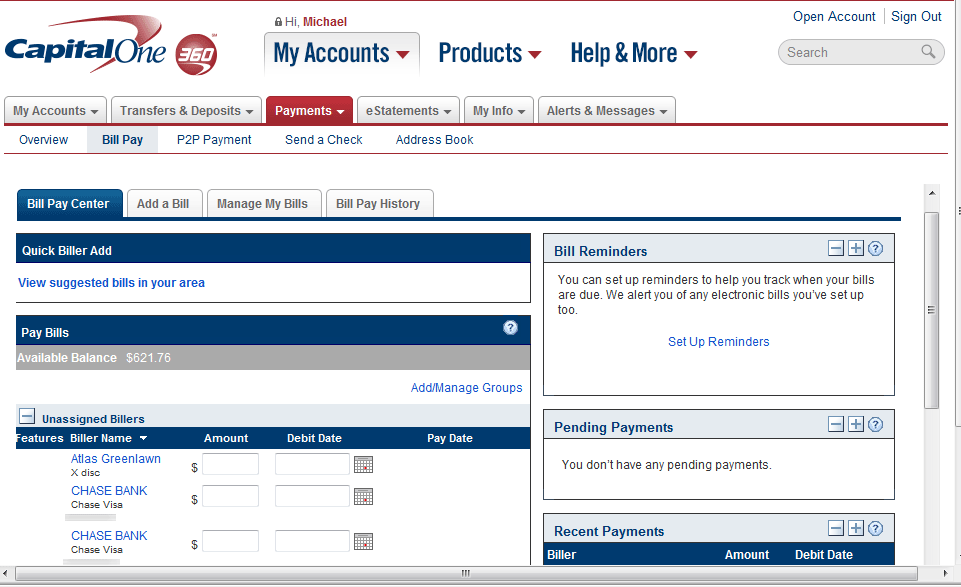
Get set up to pay and manage bills in one place.
Pay anyone in the United States that you would normally pay by check, automatic debit or cash.
âââââââTo set up online bill pay:
- Sign in to your account at capitalone.com or in the Capital One Mobile app.
- Select your checking account.
- Select âPay Billsâ or âBill Pay,â depending on the platform youâre using.
- Read and agree to the terms and conditions to use online bill pay.
Note: You must have a physical address in the U.S. to set up online bill pay.
To send a payment, youâll need to add the payee first. Sign in to your account to set up online bill pay now.
Set up a bill pay now. Sign in to your account.
How to Pay Your Utility Bill Using Capital One Bill Pay
FAQ
How do I use Capital One online bill pay?
You can use Capital One online bill pay as an alternative way to make your normal check, automatic debit or cash payments to anyone in the United States. Here’s how you set up online bill pay with Capital One: Sign in to your Capital One account. Once you’re logged in to your checking account, select the Pay Bills option.
Can you bank with a Capital One 360 checking account?
There are plenty of digital and in-person ways to bank with a Capital One 360 Checking account. What is an online checking account? 360 Checking is a free checking account that comes with everything you need and without everything you don’t.
How do I pay my Capital One credit card?
AutoPay: A convenient option to help avoid late payments, enrolling in AutoPay allows you to select your payment options for your Capital One credit card account on a recurring basis. Make or schedule a one-time payment online: Paying online is convenient and secure, and usually the fastest and easiest way to make payments.
How long does it take Capital One bill pay to deliver payments?
Capital One Bill Pay will deliver payments as quickly as possible. Making payments electronically is our first priority, typically posting within 1-2 business days. Payments that cannot be delivered to a payee electronically will be made by paper check and may take 7-10 days for delivery.
What can I do with Capital One?
Set up a plan, sit back and watch your savings grow. Track your credit score for free, plus alerts and tips. Bank your way with Capital One’s online bank accounts and mobile banking app. Set up bill pay, make deposits and manage your money anytime, almost anywhere.
How do I set up a recurring payment through Capital One?
extension Account number Sign in to Capital One. payment through Capital One online ll pay at least 4 business days before the due date. Add a com or person and enter the biller information required. To set up a recurring payment, sign in to italone.com from the web and follow the steps shown. Sign in to
Does Capital One 360 checking have Bill Pay?
Easily access your 360 Checking account to shop, pay bills, send money or grab cash. Make purchases, get cash and add your card to your digital wallet. Send and receive money between family and friends with Zelle®. Make a one-time bill payment or set up recurring automatic payments.
What is the difference between autopay and Bill Pay?
The difference is that with an automatic bill payment, the customer controls the timing and amount through their bank, while with an automatic debit payment, …Nov 7, 2024
How do you set up online Bill Pay through your checking account?
- Gather your bills, including account numbers and the addresses to where you mail the payments.
- Enter each biller’s information into your bank’s online bill pay platform, or choose them from a list provided by your bank.
- Choose when to send the payment.
- Select a recurring or one-time payment.
What is the fastest way to pay Capital One credit card payments?
