Watch the rewards add up. Youll earn the rewards of your Card when you use it to pay suppliers with Vendor Pay.2
*BILL provides Check and ACH for additional fee. Payments made with checks and ACH are not eligible to earn rewards.
Hey there, fellow business hustlers! If you’re anything like me, managing bills and paying vendors can feel like a freakin’ nightmare. Piles of invoices, chasing down approvals, and—oh lordy—those pesky manual errors that sneak in when you least expect ‘em But what if I told ya there’s a slick way to handle all that mess, save time, and even rack up some sweet rewards while you’re at it? Enter Vendor Pay by Bill.com, a tool that’s gonna flip the script on how you deal with accounts payable Stick with me, ‘cause we’re diving deep into what this bad boy is, why it’s a must-have, and how you can get started pronto.
What the Heck Is Vendor Pay by Bill.com?
Let’s break it down real simple. Vendor Pay by Bill.com is like a superhero for small business owners who are sick of the old-school, paper-based way of paying bills. It’s an online platform that automates your accounts payable process. Think of it as a one-stop shop where you can upload invoices get approvals pay your suppliers, and keep everything tidy without breaking a sweat. Whether you’re a solo entrepreneur or running a small team, this tool’s got your back.
What makes it extra cool? It’s built to work seamlessly with certain business cards lettin’ you pay vendors and earn rewards on those transactions. Plus it’s not just about card payments—you’ve got options like checks or ACH transfers if that’s your jam. The whole idea is to make paying bills less of a chore and more of a strategic move for your biz.
Why Should You Care? The Big Benefits of Vendor Pay
Now, I ain’t just hypin’ this up for no reason. Vendor Pay by Bill.com brings some serious perks to the table. Here’s why me and plenty of other business folks are lovin’ it:
- Efficiency That’ll Blow Your Mind: Say goodbye to manually entering invoice details or mailing out checks. You can upload bills in a snap, pay multiple invoices with a few clicks, and cut down on all that tedious paperwork. It’s like havin’ an extra employee who don’t take coffee breaks.
- Cash Flow Control, Baby: Using a business card through this platform lets you stretch out payments a bit, givin’ your working capital some breathin’ room. It’s a sneaky way to boost your buyin’ power while keepin’ suppliers happy.
- Rewards on the Regular: Here’s the kicker—if you pay with the right card, you earn rewards on every transaction. That’s like gettin’ paid to pay your bills! Not every payment method qualifies though, so stick to the card option for this sweet deal.
- Security That’s Tighter Than a Drum: Worried about fraud or sharin’ sensitive info? They’ve got this virtual account number thing—unique numbers for payments that expire if unused, and you can set limits on ‘em. It’s a solid way to keep your biz safe.
- Teamwork Made Easy: Got a crew? You can share invoices with your team for review or approval without passin’ around physical copies. It keeps everyone in the loop, no hassle.
I’ve seen businesses go from pullin’ their hair out over bills to actually smilin’ when it’s time to pay up. That’s the kinda change Vendor Pay brings.
How Does Vendor Pay Actually Work?
Alright, let’s get into the nitty-gritty of how this thing operates. It ain’t rocket science, I promise. Here’s the basic flow of using Vendor Pay by Bill.com to manage your payments:
- Import Your Invoices: Got a stack of bills? Upload ‘em quick—either drag-and-drop or forward ‘em via email. No more typin’ out every detail by hand.
- Share for Approval: If you’ve got a manager or partner who needs to sign off, route the invoices to ‘em right in the platform. They can review and approve without a fuss.
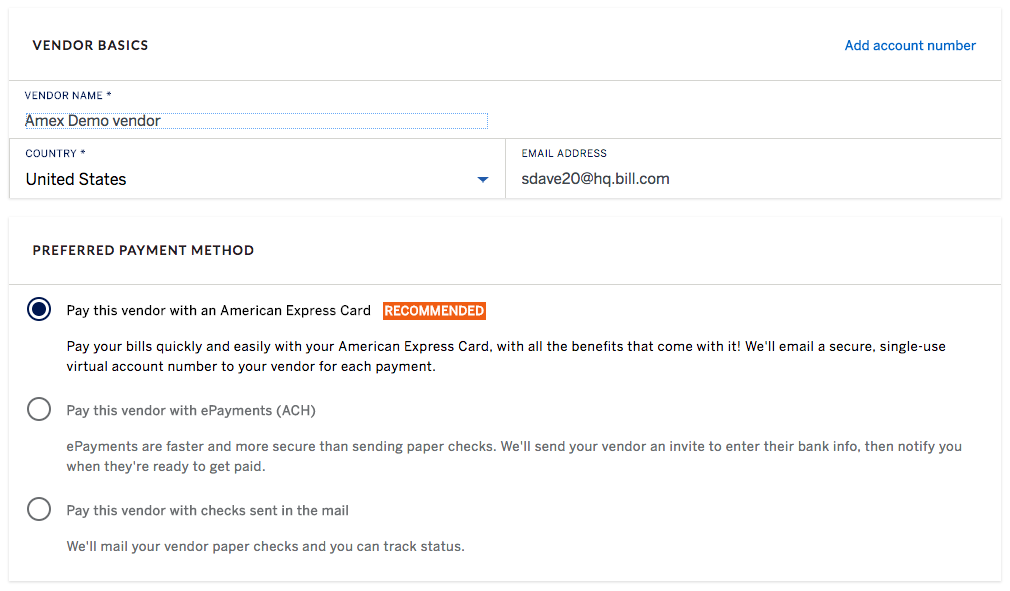
- Pay Your Way: Choose how you wanna pay—business card for rewards, or go with ACH or checks if your vendor prefers that. You’ve got flexibility here.
- Reconcile Like a Pro: Once payment’s done, use digital reports to keep your books straight. Some plans even let ya sync with accounting software to avoid double entry.
It’s a smooth process that cuts out so much of the usual back-and-forth. Plus, if you’re dealin’ with international suppliers, you can pay ‘em too, as long as they accept U.S. dollar payments. Just watch out for any foreign transaction fees that might pop up.
Payment Options: What’s on the Menu?
Vendor Pay by Bill.com ain’t a one-trick pony when it comes to payin’ your vendors. They’ve got a few methods up their sleeve, and each has its own flavor. Here’s what you can pick from:
- Business Card Payments: This is the star of the show. Pay with your card, and you’re likely earnin’ rewards on every transaction. There’s no extra fee for this option, which is a big win.
- ACH Transfers: If a vendor don’t take cards, you can send money straight from your bank via ACH. It’s electronic and fast, but there’s a small per-transaction fee, and no rewards here.
- Good Ol’ Checks: Some suppliers still want paper checks, and Vendor Pay can handle that too. They’ll mail it out for ya, though it comes with a higher transaction fee than ACH, and again, no rewards.
Quick tip from yours truly: Stick with the card option whenever you can. Not only do you skip the extra fees on transactions, but those rewards add up over time. Just make sure your suppliers are cool with card payments—most are, but it’s worth a double-check.
Plans and Pricing: What’s It Gonna Cost Ya?
Now, let’s talk moolah. Vendor Pay by Bill.com offers a few plans to fit different business needs, and I’m gonna lay ‘em out so you can pick what works for ya. Keep in mind, fees can change, but here’s the current scoop based on what I’ve dug up:
| Plan | Cost | Key Features |
|---|---|---|
| Basic | First user: Free<br>Second user: Free for 6 months, then $15/month<br>Additional users: $15/month | Manage payables/receivables, pay bills via card, invoice customers, export data for reports. |
| Advanced | $59 per user/month | All Basic features + sync with accounting software, automate approvals, customize user roles. |
| Advanced Plus | $99 per user/month + $1,500 one-time fee | Everything in Advanced + extra integration support for complex setups. |
On top of that, there are transaction fees for non-card payments:
- ACH Payments: $0.99 per transaction on Basic, $0.49 on Advanced or Plus.
- Check Payments: $1.99 per transaction on Basic, $1.49 on Advanced or Plus.
Here’s my take: If you’re a small operation just startin’ out, the Basic plan is a no-brainer—it’s free for the first user, and you can test the waters. But if you’ve got a growin’ team or need to hook it up with software like QuickBooks, shellin’ out for Advanced might save ya time in the long run. And hey, no fee for card payments on any plan, so that’s always a solid bet.
Why Virtual Account Numbers Are a Big Deal
One feature I gotta rave about is the virtual account number system. When you pay a vendor using your card through Vendor Pay, the platform creates a unique number for that transaction. Why’s that awesome? ‘Cause you ain’t sharin’ your actual business account details with anyone. These numbers can expire after 30 days if unused, and you can even set limits on the amount or how many times they’re authorized. It’s like handin’ out a temporary key that only works once—super secure.
From the vendor’s side, they just get an email with the number and some payment deets. They pop it into their system like any other card payment, and boom, done. No fuss, no risk. If security’s a big worry for ya—and it should be—this feature alone might make Vendor Pay worth a shot.
Who’s This Really For?
Let’s get real for a sec. Vendor Pay by Bill.com ain’t for everyone, but it’s a damn good fit for certain folks. Here’s who I think should jump on this:
- Small Business Owners: If you’re runnin’ a shop, freelance gig, or startup, this can save ya hours on bill management. More time to focus on makin’ bank instead of payin’ it out.
- Teams with Approval Needs: Got managers or partners who gotta sign off on payments? The sharing and approval features make that a breeze.
- Reward Chasers: If you’ve got a business card that earns points or cashback, using it through Vendor Pay means you’re maximizin’ those benefits every time you pay a supplier.
On the flip side, if you’re a huge corporation with a fancy custom system already in place, this might feel too basic. Or if your vendors flat-out refuse card payments, you’ll be stuck with ACH or checks and missin’ out on rewards. Still, for most small to mid-sized operations, it’s a tool worth checkin’ out.
Gettin’ Started: How to Sign Up
Ready to give it a whirl? Signin’ up for Vendor Pay by Bill.com is pretty straightforward, even if tech ain’t your strong suit. Here’s the step-by-step I’d follow if I was startin’ fresh:
- Hit Up the Enrollment Page: Head to the official site and fill out the quick form to get a verification email. It’s your first step, easy peasy.
- Verify Your Email: Check your inbox, click the link they send ya. Don’t let it sit there—do it right away to keep the momentum goin’.
- Set Up Your Profile: Fill in some basic info about your company on their “Tell Us More” page, then hit continue. It’s just a lil’ paperwork, nothin’ crazy.
- Link Your Payment Methods: Add your business card to pay with rewards, or hook up a bank account if you plan on usin’ ACH or checks. You’re good to go after this.
Once you’re in, start uploadin’ invoices and playin’ around with the dashboard. It don’t take long to get the hang of it, and the time you save is gonna feel like a gift from above.
Some Real-World Scenarios to Chew On
Picture this: You’re runnin’ a small catering biz, and you’ve got suppliers hittin’ you up for payments weekly—veggies, meats, packaging, the works. Normally, you’re writin’ checks or loggin’ into different bank portals, wastin’ hours. With Vendor Pay, you upload all those invoices in one go, pay ‘em with your card to snag rewards, and track it all in a neat report. Your cash flow stays steady ‘cause the card gives ya a buffer, and you’ve got more time to perfect that secret sauce recipe.
Or say you’re a freelance designer with a couple clients and vendors for printing or software subs. You ain’t got time to mess with bills. Vendor Pay lets ya automate approvals if you’ve got a biz partner, pay quick, and keep records without stressin’. It’s like havin’ a virtual accountant who don’t charge by the hour.
Tacklin’ Common Worries
I get it—tryin’ somethin’ new can feel dicey. Here’s a couple concerns I’ve heard from folks, and why they ain’t dealbreakers:
- “What if my vendor don’t take cards?” No sweat. You’ve still got ACH or check options. Yeah, there’s a small fee, and no rewards, but it’s still faster than doin’ it manually.
- “Is it worth the cost for higher plans?” If you’re on Basic, it’s free for the first user, so start there. Upgrade only if you need fancy stuff like software syncin’ or multi-user setups. Test the waters first.
- “What about security?” Them virtual numbers I mentioned? They’re your shield. Plus, you ain’t sharin’ real account info, so the risk is way low.
If you’ve got other hang-ups, give their support a shout. They’re usually pretty good at clearin’ things up.
Wrappin’ It Up: Why Vendor Pay by Bill.com Rocks
Look, managin’ bills don’t have to be a soul-suckin’ task. Vendor Pay by Bill.com is here to take that load off your shoulders, lettin’ ya automate payments, earn rewards, and keep your biz secure with them clever virtual numbers. Whether you’re payin’ with a card, ACH, or check, the platform’s got options to fit your vibe. And with plans rangin’ from free to more advanced setups, there’s somethin’ for every kinda business.
So, if you’re tired of the invoicin’ grind, why not give it a shot? Sign up, upload a bill or two, and see how it feels to actually enjoy payin’ your vendors. I’m bettin’ you’ll wonder how ya ever lived without it. Drop a comment below if you’ve got questions or wanna share how it’s workin’ for ya—we’re all in this biz game together!
First user: no monthly fee
- Manage payables and receivables all in one place
- Pay your bills from one easy interface
- Use your Business or Corporate Card to send virtual payments to vendors who accept American Express® Cards
- Invoice customers and receive electronic payments
- Import bills via email or drag-and-drop – and eliminate paper
- Export data for reporting and reconciliation
Billl.com – Paying Vendor Bills
FAQ
What is vendor pay by BILL?
Vendor Pay is specifically designed for the American Express small business customer. Vendor Pay includes the complete cloud-based BILL platform, automating the way the small business customer pays bills, sends invoices, and gets paid.
Is Bill.com a legitimate company?
Bill is BBB Accredited.
This business has committed to upholding the BBB Standards for Trust.
Does Bill.com take a percentage?
Bill.com does not take a percentage of payments made through their platform. Instead, they charge subscription fees for access to their services. The fees associated with Bill.com are: $39 per user per month for their basic plan.
Is Bill.com good for small businesses?
This feature can be particularly valuable for small and midsize businesses looking to manage cash flow more effectively. Overall, Bill.com simplifies the management of accounts receivable, helping businesses ensure timely payments, reduce errors, and maintain accurate financial records.
