Are you tired of dealing with paper bills, making phone calls, or visiting payment centers just to pay your ista energy bills? You’re not alone! Managing utility payments can be a real headache, but thankfully, ista has created convenient solutions to make this process smoother for all of us
As someone who’s been using ista services for years, I’ve experienced firsthand how their bill payment options have evolved. In this comprehensive guide, I’ll walk you through everything you need to know about ista bill pay – from online portals to payment methods and helpful tips to stay on top of your energy expenses.
What is ista and Why Do You Need to Pay Their Bills?
Before diving into payment methods, let’s clarify what ista actually is. ista is a leading global company specializing in energy management services, providing solutions for both residential properties and commercial buildings. They handle
- Heat metering and billing
- Water metering and billing
- Energy consumption monitoring
- Smart energy management solutions
If you’re receiving bills from ista, it’s likely because your property uses their metering technology to measure your energy consumption, particularly for heating and water usage.
Understanding MY ista – Your Personal Energy Portal
The main platform for managing your ista payments is called “MY ista,” which serves as your personal energy portal. This online service gives you complete control over your energy account and offers several advantages:
- 24/7 account access – no more waiting for office hours
- Easy updating of your personal details
- Real-time view of your energy consumption
- Digital access to all your bills in one place
- Convenient online payment options
As ista puts it: “With MY ista, you can effortlessly manage your energy account online, without worrying about estimated bills or cumbersome paperwork.”
How to Pay Your ista Bill Online
There are two main ways to pay your ista bill online depending on your region and preferences
1. Using MY ista Portal
This is the comprehensive solution for managing all aspects of your ista relationship:
- Log into your MY ista account
- Navigate to the billing section
- View your outstanding balances
- Select your preferred payment method
- Complete the transaction securely
The portal offers additional benefits beyond just payments, including consumption tracking and account management.
2. Using QuickPay (Middle East)
If you’re in the Middle East or just want a faster way to pay without logging in, ista offers a QuickPay option:
- Visit https://myista.ae/quickpay/account
- Enter your Account Number
- Confirm your property address
- Choose to pay either your total balance or another amount
- Get redirected to a secure payment page (processed by Network on behalf of ista Middle East)
- Complete your payment
The QuickPay option is super convenient when you just need to make a quick payment without accessing all your account features.
Payment Methods Accepted by ista
ista understands that different customers prefer different payment methods, so they offer several options:
- Direct debit – automatic payments from your bank account
- Credit/debit cards – online payments through their secure portal
- Telephone payments – for those who prefer speaking with a representative
For Middle East customers using the QuickPay system, payments are processed in AED (Arab Emirates Dirham).
Benefits of Using ista’s Online Payment Systems
Easy Account Management
One of the biggest advantages of using ista’s online payment systems is how simple they make it to manage your account. You can update your personal information anytime, ensuring that your contact details are always current.
Transparent Consumption Tracking
The MY ista portal doesn’t just let you pay bills – it shows exactly what you’re consuming and highlights areas where you might be able to save energy (and money!). This transparency helps you:
- Understand your usage patterns
- Identify potential energy waste
- Make informed decisions about energy consumption
- Potentially reduce your bills through better habits
Multiple Payment Options
Whether you prefer setting up automatic payments or handling each bill manually, ista has you covered with various payment methods:
- Direct debit for “set it and forget it” convenience
- Credit/debit card payments for those who prefer manual control
- Phone payment options for those less comfortable with online systems
Real-Time Information
With ista’s SmartPay service, you get access to real-time billing information integrated with SmartPay equipment. This means no more estimated bills or surprises – you always know exactly where you stand.
Special Features: SmartPay for Residential Management
For residential property managers or residents in buildings with SmartPay equipment, ista offers enhanced features:
- Real-time billing system that eliminates estimates
- Integrated equipment that communicates directly with billing systems
- Enhanced control over residential energy management
If you’re interested in this service, ista recommends contacting them for more information about implementing SmartPay in your residential setting.
Common Problems and Solutions with ista Bill Pay
Problem 1: Forgotten Account Number
Solution: Your account number should be on any previous bills or correspondence from ista. If you can’t find it, contact their customer support at the number provided on their website.
Problem 2: Payment Not Reflecting in Your Account
Solution: Online payments typically process within 24-48 hours. If it’s been longer, take a screenshot of your payment confirmation and contact ista support.
Problem 3: Account Showing in Credit
Solution: If your account shows you’re in credit (meaning you’ve overpaid), ista’s system will notify you that “Your account is in credit and you have no outstanding invoices to pay.” You can contact them directly to discuss options for your credit balance.
Problem 4: Technical Issues with the Portal
Solution: Like any online system, the ista portal might occasionally experience technical difficulties. If you encounter problems, try:
- Clearing your browser cache
- Using a different browser
- Waiting a few hours and trying again
- Contacting support if the issue persists
Regional Differences in ista Services
It’s worth noting that ista operates in many countries worldwide, and their services might vary slightly depending on your location. The company has presence in:
- United Kingdom
- Germany
- Austria
- France
- Switzerland
- Spain
- Poland
- Netherlands
- Czech Republic
- United Arab Emirates
- Bahrain
- Qatar
- And many more!
Each regional website may offer slightly different functionality, so be sure you’re accessing the correct site for your location. Sometimes you might be redirected with a message like “You are visiting the wrong ista website. Would you like to switch to the right ista website?”
Security Considerations When Paying Online
When making online payments through ista’s systems, your security is protected in several ways:
- Secure payment processing – ista uses reputable payment processors
- Encryption for all sensitive data
- Payment redirection notices that clearly explain where your payment information is going
- Clear policies regarding data privacy and cookies
Before making payments, you’ll see notices like: “You are about to be redirected to a secure payment page to complete your energy bill payment. Please note that the payment will be processed by Network on behalf of ista Middle East.”
Setting Up Automatic Payments
If you’re like me and prefer to “set and forget” your utility payments, setting up automatic payments with ista is a great option:
- Log into your MY ista account
- Navigate to the payment settings section
- Select the direct debit option
- Provide your banking information
- Authorize the automatic withdrawals
This ensures you never miss a payment and helps avoid any late fees or service interruptions.
Contacting ista for Payment Support
If you encounter any issues with billing or payments, ista provides several ways to get in touch:
- Phone support: +44 1223 87 49 74 (UK number – other regions will have different contact numbers)
- Online enquiry forms available on their website
- Contact us options within the MY ista portal
Their customer service team can help with billing questions, payment issues, or account management problems.
Final Thoughts: Why Online Bill Pay is the Way to Go
I’ve been paying my ista bills online for years now, and I can honestly say it’s made managing my energy expenses so much easier. No more paperwork, no more stamps, no more wondering if my payment arrived on time.
With features like consumption tracking, I’ve actually become more aware of my energy usage patterns and have made changes that reduced my bills. Plus, having all my historical billing data in one place has been super helpful for budgeting and tracking expenses over time.
Whether you choose the comprehensive MY ista portal or the quick and easy QuickPay option, managing your ista bills online is definitely the way to go. Give it a try – your future self will thank you when bill-paying becomes one of the easiest items on your to-do list!
Remember, energy management doesn’t have to be complicated. With ista’s online payment solutions, you can take control of your energy consumption and payments with just a few clicks.
Have you tried ista’s online payment systems? What has been your experience? We’d love to hear your thoughts!
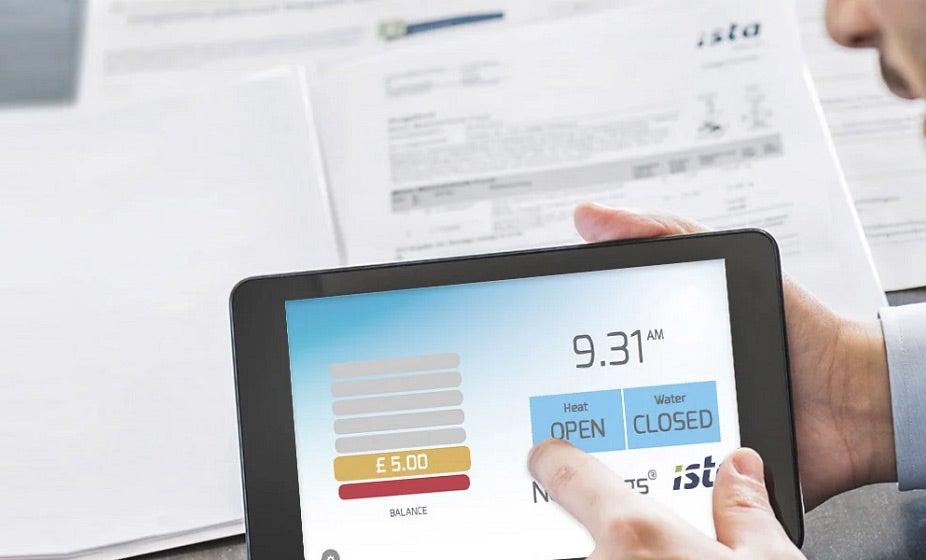
Pre-payment or Credit Modes
ista SmartPay can be remotely configured to operate in a full credit payment mode; which provides the tenant the ability to see their actual bill in real time. Our web portal allows for automatic payments when the debt hits a pre-defined level or time. This gives tenants and landlords a fully flexible approach to cooling billing and control.
Its as simple as that.
Can I Control Other Utilities?
Please call us to discuss your requirements. ista has a number of utilities that can be included in the prepayment control strategy within each apartment.
“How to Use a Remittance Coupon to Pay Bills Like a Pro! (Step-by-Step Guide)”
FAQ
What can I do with ISTA?
My ista | Access your bills, make payments and view your consumption and meter reads online. Your personal energy portal. Monitor your energy consumption, check your account and pay bills – all in one place. How can I Pay? How am I Billed? How can I Save? How do I Register? Who is ista?
How do I access my ISTA account?
To access your My ista account, login using your email address. My ista | Access your bills, make payments and view your consumption and meter reads online.
How do I pay my bill?
These include direct debit or credit/debit card, either online or over the telephone. The easiest way to pay is by direct debit or standing order as you can spread your costs over 12 months. You can choose either a fixed payment which will be calculated annually, or a variable direct debit. Pay by cheque following the instructions on your bill.
