Hey there! Ever received a medical bill from Adena Health and wondered “How the heck do I pay this thing?” Well you’re not alone! I’ve been there too, staring at those statements with all those numbers and options. That’s why I decided to create this comprehensive guide about Adena bill pay options to make your life easier.
What is Adena Health System?
Before diving into payment methods, let’s talk briefly about Adena. They’re a comprehensive healthcare system serving communities across south central and southern Ohio. With multiple hospitals, clinics, and specialty services, Adena provides care to thousands of patients – which means they also send out thousands of bills!
Why Understanding Your Adena Bill Matters
Let’s be honest – medical bills can be confusing. But understanding how to pay them efficiently can:
- Save you time
- Help avoid late fees
- Prevent bills from going to collections
- Give you peace of mind
Different Types of Adena Bills You Might Receive
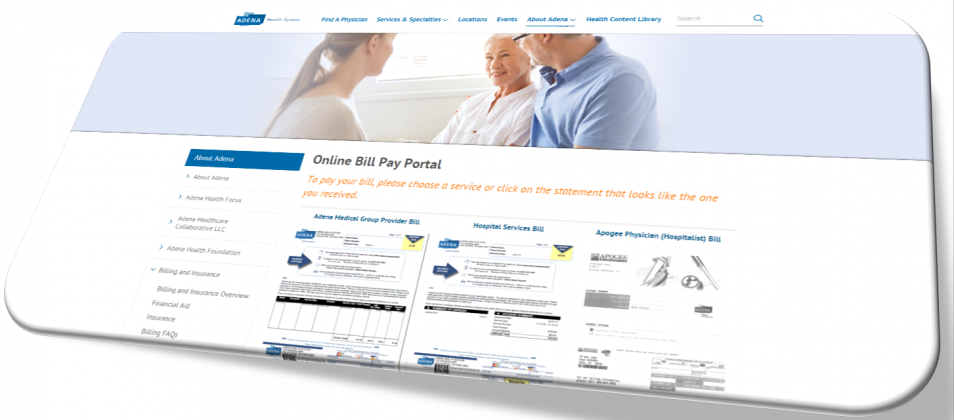
One thing that makes Adena billing unique is that you might receive different types of bills depending on the services you received. According to their website, these include
- Adena Medical Group Provider Bill
- Hospital Services Bill
- Apogee Physician (Hospitalist) Bill
- Adena Anesthesiologist Bill
- Radiologist Bill
- CORPATH Pathologist Bill
- Adena Home Infusion, DME & Respiratory Bill
- Adena Home Health & Hospice Bill
- Adena Emergency Department Physician Bill
- Adena Radiology Bill
- Adena Fayette Medical Center Bill
- Adena Fayette Medical Center Med Surg Assoc. Bill
Whew! That’s a lot of possible bills. But don’t worry – the payment process is pretty similar for all of them.
Online Payment Options for Adena Bills
Option 1: Direct Online Payment
The simplest way to pay your Adena bill is directly through their website. Here’s how:
- Visit Adena’s online bill payment page
- Locate the type of bill you received from the list
- Click “Pay Online” next to your bill type
- Follow the prompts to complete your payment
This method is quick and doesn’t require you to create an account
Option 2: MyChart
If you’re a regular Adena patient, using MyChart might be your best bet. MyChart is not just for bill payment – it’s a comprehensive portal where you can:
- View your medical records
- Schedule appointments
- Message your healthcare providers
- And yes, pay your bills!
To pay through MyChart:
- Log into your MyChart account
- Navigate to the billing section
- Select the bill you want to pay
- Choose your payment method
- Complete the transaction
Don’t have a MyChart account? No problemo! You can sign up through the Adena website or ask about it during your next visit.
Option 3: Pay as Guest
Don’t want to create a MyChart account but still want the convenience of online payment? Adena offers a “Pay as Guest” option through MyChart. Here’s how:
- Visit the Pay as Guest page
- You’ll need your Patient Number (found at the top of your statement)
- Enter the Guarantor’s last name (that’s the person responsible for the bill)
- Follow the prompts to complete your payment
This option gives you the convenience of online payment without needing to create an account.
Option 4: QuickPay Portal by athenahealth
For some Adena services, you might be directed to use the QuickPay Portal by athenahealth for your payment. This is a secure third-party system that handles payments for many healthcare providers, including some Adena services.
Phone Payment Options
Not comfortable paying online? No worries! Adena offers phone payment options too:
- For Adena Medical Group billing: Call 833-564-4729 (833-564-4PAY)
- For Adena Hospital billing: Call 855-275-7408
Their customer service representatives are available Monday through Thursday from 8 a.m. to 5:30 p.m. and Friday from 8 a.m. to 5 p.m.
In-Person Payment at Adena Facilities
If you prefer the old-school approach of paying in person (sometimes I do too!), you can visit the cashier’s office at any Adena facility. The Adena Fayette Medical Center, for example, has specific cashier hours:
- Monday and Tuesday: 9 a.m. to 12 p.m.
- Wednesday through Friday: 1 p.m. to 4 p.m.
Other locations may have different hours, so it’s best to call ahead.
Need Help Understanding Your Bill?
Let’s face it – medical bills can be super confusing! If you’re scratching your head trying to make sense of charges, Adena offers resources to help:
- Online Billing FAQ: Available on their website
- How-to Videos: They have a video guide for paying through MyChart
- PDF Guides: Step-by-step instructions for bill payment
Financial Assistance Options
What if you’re having trouble paying your Adena bill? Don’t panic! Adena offers financial assistance programs for those who qualify. On their bill payment page, there’s a “Need assistance paying your bill?” option with a “Get Help Now” button.
Financial assistance might include:
- Payment plans
- Discounts based on income
- Assistance in applying for Medicaid or other programs
Tips for Hassle-Free Adena Bill Payment
After paying quite a few Adena bills myself (kids + sports = many ER visits!), here are some tips I’ve learned:
- Keep your statements organized: File them by date or service type
- Pay attention to due dates: Late payments might incur fees
- Check your insurance coverage: Sometimes what looks like a bill is actually an “Explanation of Benefits”
- Save payment confirmations: Always get a receipt or confirmation number
- Set up automatic payments through MyChart: Never miss a payment again!
Common Questions About Adena Bill Pay
“I received multiple bills for the same visit. Is this correct?”
Yes, this is actually normal! You might receive separate bills for:
- The facility (hospital or clinic)
- The physician who treated you
- Any specialists who reviewed your case (like radiologists or pathologists)
- Special services like anesthesia
“Can I pay all my bills in one place?”
If you use MyChart, you can see and pay all your Adena bills in one place. However, some specialist bills (like Team Health for ER physicians) might need to be paid separately.
“How long do I have to pay my bill?”
Typically, Adena expects payment within 30 days of receiving your bill. However, if you need more time, contact their billing department to discuss options.
“What payment methods are accepted?”
Adena typically accepts:
- Credit cards (Visa, MasterCard, Discover, American Express)
- Debit cards
- Electronic checks (ACH payments)
- Personal checks (for mail-in payments)
- Cash (for in-person payments)
Real Talk: My Experience with Adena Bill Pay
I gotta say, as someone who’s dealt with Adena billing for years (raising active kids in their service area), their system has improved dramatically. A few years back, paying bills was a headache – confusing statements, long phone wait times, the works.
But now? The online options make things SO much easier. I personally prefer using MyChart because I can see all my family’s bills in one place. Plus, having payment history at my fingertips has saved me more than once when disputing a charge or doing tax deductions!
One time, I received what seemed like duplicate bills and was pretty annoyed. But when I called (using the number on my statement), the customer service rep explained that one was for the hospital room and one was for the physician. They were super patient and walked me through each charge. That experience taught me that when in doubt, just call and ask!
Stay On Top of Your Adena Bills
Managing medical bills isn’t anyone’s idea of fun, but staying organized can save you headaches (and money) in the long run. Here are some final thoughts:
- Check your mail regularly for Adena statements
- Keep an eye on your MyChart account for new bills
- If something doesn’t look right, don’t hesitate to call
- Consider setting calendar reminders for payment due dates
Final Thoughts
Navigating healthcare billing can feel overwhelming, but Adena has created several paths to make the process smoother. Whether you prefer clicking through online portals, speaking with someone on the phone, or handling transactions in person, there’s an option that fits your comfort level.
Remember, the billing departments are there to help! If you’re confused or concerned about your bill, reach out to them using the contact information on your statement. They can explain charges, discuss payment options, and point you toward financial assistance if needed.
Have you had experiences with Adena billing you’d like to share? Any tips or tricks I missed? Drop me a comment below – I’d love to hear from fellow patients navigating the healthcare billing maze!
Stay healthy (and financially savvy),
Your friendly neighborhood healthcare blogger
Can I pay my bills from multiple bank accounts?
Yes, although you will be required to make multiple transactions.
Who do I contact if I have questions or need help?
Please call the Customer Service number listed on your statement.
