Hey there! If you’re an Airtel broadband customer looking for ways to pay your bills without the hassle of standing in queues or making phone calls, you’ve landed at the right place! I’ve been using Airtel services for years now, and let me tell you, their online bill payment options have made my life so much easier.
In this article, I’ll walk you through everything you need to know about Airtel broadband online bill payment – from the different methods to step-by-step guides and even troubleshooting tips So let’s dive right in!
Why Pay Your Airtel Broadband Bill Online?
Before we get into the “how” let’s talk about the “why.” There are several advantages to paying your Airtel broadband bill online
- Convenience: Pay anytime, anywhere, even at 2 AM in your pajamas!
- Time-saving: No need to visit physical stores or stand in queues
- Instant confirmation: Get immediate payment receipts
- Payment history: Easy access to your past payment records
- Discounts: Sometimes Airtel offers special discounts for online payments
- Avoid late fees: Set up auto-payments to never miss a due date
Different Ways to Pay Your Airtel Broadband Bill Online
Airtel offers multiple channels for online bill payment. Here’s a breakdown of each method:
1. Airtel Website
The official Airtel website is one of the simplest ways to pay your broadband bill Here’s how
- Visit www.airtel.in/broadband-bill-pay
- Enter your Airtel broadband number or registered mobile number
- You’ll see your current bill amount displayed
- Choose your preferred payment method (credit/debit card, net banking, UPI, etc.)
- Complete the payment process
- Save the payment receipt for future reference
2. Airtel Thanks App
The Airtel Thanks App is my personal favorite method because it’s super convenient and offers additional benefits:
- Download the Airtel Thanks App from Google Play Store or Apple App Store
- Login with your Airtel number and OTP
- Navigate to the “Bill Pay” or “Payments” section
- Select your broadband account
- View bill details and click on “Pay Now”
- Choose your payment method
- Complete the transaction and receive confirmation
Pro tip: The Airtel Thanks App often has exclusive offers and cashback deals for bill payments!
3. Payment Wallets and UPI
You can also use popular digital wallets and UPI apps to pay your Airtel broadband bills:
- Paytm: Go to “Bill Payments” > “Broadband” > Select “Airtel Broadband”
- PhonePe: Navigate to “Recharge & Pay Bills” > “Broadband” > “Airtel”
- Google Pay: Tap on “Bills” > “Broadband” > “Airtel”
- Amazon Pay: Select “Bills” > “Broadband” > “Airtel”
For all these apps, you’ll need to enter your Airtel broadband account number or registered mobile number, verify the bill amount, and proceed with payment.
4. Net Banking
If you prefer using your bank’s interface:
- Log in to your bank’s net banking portal
- Look for “Bill Payments” or “Utility Bills” section
- Select “Broadband” category and then “Airtel Broadband”
- Enter your Airtel broadband number
- Verify the bill amount and complete payment
5. Auto-Pay / Standing Instructions
This is the set-it-and-forget-it option that I personally use to avoid late payments:
- Log in to the Airtel Thanks App or website
- Go to your broadband account settings
- Enable “Auto-Pay” option
- Link your credit/debit card or bank account
- Set up standing instructions to automatically pay bills on due dates
Note: With auto-pay, you can usually set a maximum limit, so don’t worry about unexpectedly high bills being automatically charged.
Step-by-Step Guide to Pay Airtel Broadband Bill via Website
Let me give you a detailed walkthrough of paying your bill through the Airtel website:
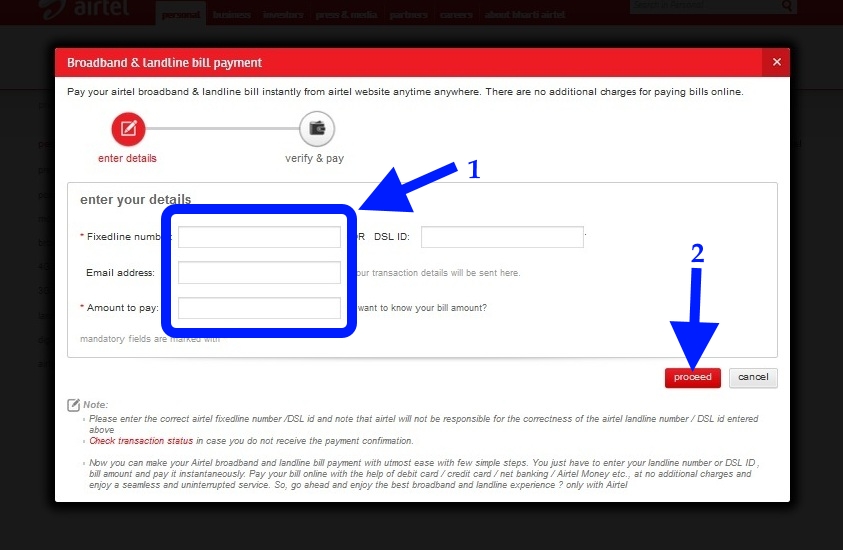
- Open your web browser and go to www.airtel.in/broadband-bill-pay
- You’ll see a page where you need to enter your Airtel broadband number or registered mobile number
- Click on “View Bill” or “Proceed”
- The system will fetch your bill details showing:
- Current bill amount
- Due date
- Previous payments
- Any outstanding amount
- Click on “Pay Now”
- Choose from available payment options:
- Credit Card
- Debit Card
- Net Banking
- UPI
- Wallet
- Enter the required payment details
- Confirm payment and wait for the confirmation screen
- Download or take a screenshot of the payment receipt
- You’ll also receive a confirmation SMS and email
Managing Multiple Airtel Connections
If you have multiple Airtel connections (like broadband and DTH), here’s how to manage them efficiently:
- Create an Airtel account that links all your services
- Use the Airtel Thanks App to view and pay bills for all services
- You can choose to pay bills individually or together
- Enable notifications to get alerts for all your connection bills
What to Do If Your Payment Fails
Sometimes technical issues can cause payment failures. If that happens:
- Check your internet connection: A stable connection is necessary for completing transactions
- Verify bank details: Ensure your card details are entered correctly
- Check account balance: Make sure you have sufficient funds
- Wait and retry: Sometimes payment gateways face temporary issues
- Try alternate payment method: If one method fails, try another
- Contact Airtel customer care: If problems persist, call 198 or 121
Setting Up Reminders for Bill Payments
To never miss a payment:
- Set calendar reminders on your phone
- Enable push notifications on the Airtel Thanks App
- Subscribe to email notifications from Airtel
- Enable SMS alerts for bill generation and due dates
Special Features and Benefits
When paying your Airtel broadband bill online, look out for these special features:
- Airtel Rewards: Earn points for timely payments that can be redeemed later
- Cashback offers: Seasonal promotions offering cashback on bill payments
- Bill discounts: Early payment sometimes gives you small discounts
- Bundle payments: Pay for multiple Airtel services together for convenience
Additional Airtel Broadband Services You Can Manage Online
Beyond just bill payments, the Airtel online portal and app allow you to:
- Upgrade your broadband plan
- Check data usage
- Raise service requests
- View payment history
- Update contact information
- Add new connections to your account
Airtel Xstream Box Integration with Broadband
If you’re also using Airtel’s Xstream Box (their Android-based set-top box), you can enjoy integrated billing and services:
- Pay for both broadband and DTH services in one go
- Enjoy special combo offers and discounts
- Manage all services through a single app
- Use the same login credentials
According to Airtel Xstream Box FAQs, the box offers features like:
- 4K viewing capability
- Android TV platform with access to 10,000+ movies and shows
- Built-in Chromecast for screen mirroring
- Google Assistant voice search
- Bluetooth remote control
- 2GB RAM and 8GB internal memory
Comparing Airtel Broadband Bill Payment Options
| Payment Method | Processing Time | Convenience Level | Receipt Available | Extra Benefits |
|---|---|---|---|---|
| Airtel Website | Instant | High | Yes | Occasional web offers |
| Airtel App | Instant | Very High | Yes | App-only discounts, rewards |
| UPI Apps | Instant | High | Yes | Cashback from UPI apps |
| Net Banking | Instant to 24hrs | Medium | Yes | Bank reward points |
| Auto-Pay | Automatic | Very High | Yes | Never miss a deadline |
Common Questions About Airtel Broadband Bill Payment
What information do I need to pay my bill online?
You’ll need either:
- Your Airtel broadband account number, or
- Your registered mobile number
Is there a convenience fee for online payments?
Nope! Airtel doesn’t charge any extra fees for paying your broadband bill online. In fact, you might even save money through digital payment offers!
How do I get a receipt for my payment?
After successful payment, a digital receipt is displayed which you can download or take a screenshot of. Additionally, a receipt is sent to your registered email address.
Can I pay my bill in advance?
Absolutely! You can pay your Airtel broadband bill even before it’s generated. This is especially useful if you’re planning to travel or might be busy during the due date.
What happens if I miss the due date?
If you miss your payment due date, Airtel may charge a late fee. In some cases, after multiple missed payments, your service might be temporarily suspended until payment is made.
My Personal Experience with Airtel Broadband Payments
I’ve been an Airtel customer for over 5 years now, and I’ve tried pretty much all payment methods. Initially, I used to visit Airtel stores to pay bills (what was I thinking?!). Then I moved to website payments, which was way more convenient.
Now, I use the Airtel Thanks App exclusively because it’s just so darn simple. I’ve set up auto-pay with a monthly limit, so my bills get paid automatically while I still maintain control over how much can be charged. The app also gives me occasional cashback offers, which is a nice little bonus!
Last month, I had an issue where my payment showed as “processing” for over 24 hours. I contacted Airtel customer support through the app, and they resolved it within a few hours. The money had been debited but not credited to my Airtel account – they fixed it without me having to make multiple calls or visits.
Final Thoughts
Paying your Airtel broadband bill online is definitely the way to go in 2025. With multiple secure and convenient options available, there’s really no reason to use offline payment methods anymore.
I recommend trying out the Airtel Thanks App if you haven’t already – it’s not just for bill payments but offers a complete management system for all your Airtel services. The rewards and occasional discounts are nice cherries on top!
Have you tried paying your Airtel broadband bill online? Which method works best for you? If you have any questions or tips to share, drop them in the comments below. I’d love to hear about your experiences!
Remember, staying connected is important, but so is paying your bills on time to avoid any service disruptions. Happy browsing!
Manage all your accounts.
These fields are required to continue.
This field is required to continue.
Oops! You have entered invalid mobile number or service ID.
The mobile number or password is incorrect, please try again.
Too many failed login attempts. Please try again after 30 minutes.
The mobile number or OTP is incorrect, please try again.
The mobile number or OTP is incorrect, please try again.
User not registered. Please register
Sorry! Your request could not be processed. Please try again later.
Sorry! Your request could not be processed. Please reload and try again later.
Sorry! You have reached the maximum limit for requesting/Validating an OTP. Please try again later.
Please enter valid password.
Please input your password
Please input your OTP.
NOTE: Login using account password is disabled temporarily, please login using OTP.
A One Time Password (OTP) was sent to the number . Didnt get it?
A One Time Password (OTP) was sent to the number . Didnt get it? RESEND OTP?
Oops! The OTP you have keyed in is invalid. Please try again.
Incorrect OTP. Please try again.
The mobile number or OTP is incorrect, please try again.
Sorry! Your request could not be processed. Please try again later.
We have sent a new One Time Password (OTP) to your mobile number
We have sent a new One Time Password (OTP) to your mobile number as well as registered email
Sorry! We are unable to send an OTP to your mobile number at this time. Please try again later.
Sorry! You have reached the maximum limit for requesting an OTP. Please try again later.
Sorry! You have reached the maximum limit for requesting an OTP. Please try again after 24 hours.
Sorry! Your request could not be processed at the moment. Please try again later. ONE TIME PASSWORD
Thank you for your patience.
We are updating your profile information, this will only take a moment.
-
Sign In
Your mobile number:
Please set your custom security question.
Select a question of your choice and answer it accordingly. When the question is asked, you will be able to proceed ahead only if you answer it correctly. Thus, anyone else will not be able to access your account. Please memorise your answer and remember the exact spelling. Do not write it down anywhere or share the same with anyone. Question
Please answer the question listed below to proceed.
You have exceeded the maximum number of attempts for the Hint Answer
Please click here to try and sign-in again. In case the problem persists please contact 121.
 dont know the answer
We noticed that you do not have answer to your security question. To protect your details from unauthorized access, we will now reset your account. You will be able to access it in 4 hours.
Would you like us to reset your account?
What is My Account and what are the advantages?
- Loren ipsum dummy text Loren ipsum dummy textLoren ipsum dummy textLoren ipsum dummy text
