Are you tired of writing checks, finding stamps, or driving to pay your propane bill? If you’re an AmeriGas customer, I’ve got good news for you! The AmeriGas online bill pay system makes managing your propane payments super easy. As someone who’s been using their service for years, I can tell you it’s a game-changer for busy folks.
In this guide I’ll walk you through everything you need to know about AmeriGas online bill pay – from setting up your account to managing recurring payments. Let’s dive in and make your propane bill payment process smooth and hassle-free!
What is MyAmeriGas Online Account?
MyAmeriGas is AmeriGas’s online portal where customers can handle all aspects of their propane service. Think of it as your personal command center for all things propane-related. When you create a MyAmeriGas online account you unlock a bunch of useful features
- Pay your bill online (one-time or automatic payments)
- Schedule propane deliveries
- Monitor your propane usage
- Check your tank level and estimated days remaining
- View your account activity and billing history
- Download invoice PDFs
- Enroll in text notifications for payment reminders
Basically, everything you used to have to call or visit for can now be done with a few clicks from your couch. Pretty neat, right?
How to Create a MyAmeriGas Online Account
Before you can pay your bills online, you’ll need to set up your account. Here’s how to do it:
- Go to MyAmeriGas.com
- Click on “Create Account” under “Create a MyAmeriGas Online Account”
- Follow the prompts to provide your personal information
- Set up your email address and password
- Verify your account
That’s it! Once your account is created, you can log in anytime to manage your propane service and pay your bills
Paying Your AmeriGas Bill Online: Step-by-Step
Now that you’ve got your account set up, let’s talk about how to actually pay your bill. AmeriGas gives you several payment options to choose from:
Making a One-Time Payment
This is perfect for those who prefer to manually pay each bill as it comes:
- Visit MyAmeriGas.com
- Log in with your email address and password
- On your Account Summary Dashboard, you’ll see your current payment amount due
- Click “Make a Payment”
- Enter your payment details (bank account or credit card)
- Confirm and submit payment
Voilà! Your payment is processed, and you’re good to go until next month.
Setting Up Automatic Payments
If you’re like me and hate the thought of forgetting to pay bills, Auto Pay is your best friend:
- Log into your MyAmeriGas account
- Navigate to billing preferences
- Select “Enroll in Auto Pay”
- Choose your payment method
- Set your preferences (payment date, etc.)
- Confirm enrollment
Once you’re enrolled, AmeriGas will automatically charge your preferred payment method when your bill is due. No more late fees or forgotten payments!
Scheduling Future Payments
Want to pay now but have the money come out later? You can do that too:
- Log into your account
- Select “Make a Payment”
- Enter payment details
- Choose “Schedule for future date”
- Select your preferred payment date
- Confirm and submit
This is super handy when you know you’ll have funds available on a specific date.
Viewing Your AmeriGas Bill Online
Sometimes you need to see exactly what you’re being charged for. Here’s how to view and save your invoices:
- Log into MyAmeriGas.com
- Navigate to “Account Activity” or “Invoice History”
- Click “View Invoice” next to the bill you want to see
- The PDF will open, which you can save or print
Alternatively, when paying your bill, you can select “Pay By Open Invoice” and click on the invoice link to view it.
Benefits of Using AmeriGas Online Bill Pay
Why should you bother setting up online bill pay? Here are some compelling reasons:
Time Savings
No more writing checks, finding stamps, or making trips to mail your payment. Everything can be done in minutes from your computer or phone.
Convenience Factor
Pay anytime, anywhere – whether it’s 2 PM or 2 AM, you can handle your bill when it works for YOUR schedule.
Better Record Keeping
All your payment history is stored in one place. Need proof you paid last February’s bill? It’s right there in your account.
Environmental Benefits
Less paper, less mail, less waste. Online billing is better for the environment.
Payment Reminders
With text notifications, you’ll never forget a payment due date again.
Troubleshooting Common Issues
Even the best systems sometimes have hiccups. Here are solutions to common problems:
Forgot Password?
No worries! On the login page at MyAmeriGas.com, simply click “Forgot password?” and follow the prompts to reset it.
Not Sure If You Have an Account?
Visit MyAmeriGas.com and select “Get Started.” The system will help you determine if you already have an account.
Can’t Access Your Invoice?
If you’re unable to view your invoice online, use the online chat feature on the AmeriGas website or contact customer support directly.
Payment Not Showing Up?
Online payments typically process within 24-48 hours. If your payment isn’t showing after this time, contact customer support.
Beyond Bill Pay: Other MyAmeriGas Features
While paying your bill online is great, your MyAmeriGas account offers so much more:
Propane Delivery Management
Order propane with a few clicks when you need it, or check on upcoming scheduled deliveries.
Usage Monitoring
Keep track of how much propane you’re using with the usage monitoring tools. See your estimated tank level and days remaining before you need a refill.
Tank Level Updates
Need to provide an updated reading of your tank? You can submit tank level updates right through your account.
Automatic Delivery Enrollment
Let AmeriGas do the work for you by enrolling in automatic delivery service. They’ll monitor your usage patterns and weather conditions to deliver propane before you run out.
Text Notification Options
Sign up for text alerts for:
- Payment reminders
- Delivery updates
- Account notifications
Is Guest Payment an Option?
Don’t have time to create an account but need to pay your bill? AmeriGas has you covered with their guest payment option:
- Visit MyAmeriGas.com
- Click “Guest Pay & Order” under “Pay or Order As a Guest”
- Follow the prompts to make a one-time payment without creating an account
This is perfect for those occasional payments when you don’t want to create a full account.
Making the Most of Your AmeriGas Online Experience
To get the maximum benefit from your online account, I recommend:
- Download the mobile app (if available) for on-the-go account management
- Set up all available notifications so you’re always in the loop
- Explore all account features beyond just bill pay
- Update your contact information regularly to ensure you get important communications
- Check your account periodically even when you don’t have a bill due, to monitor your usage
AmeriGas Online Bill Pay vs. Other Payment Methods
Let’s compare online bill pay with other ways you might pay your AmeriGas bill:
| Payment Method | Convenience | Processing Time | Record Keeping | Cost | Environmental Impact |
|---|---|---|---|---|---|
| Online Bill Pay | High | 1-2 business days | Excellent | Free | Low impact |
| Mail-in Check | Low | 5-7 business days | Manual | Cost of stamp | Higher impact |
| Phone Payment | Medium | 1-2 business days | Limited | Possible fee | Medium impact |
| In-Person | Very low | Immediate | Paper receipt | Travel costs | Higher impact |
| Auto Pay | Very high | 1-2 business days | Excellent | Free | Low impact |
As you can see, online bill pay and auto pay are clearly the winners in most categories!
Security Considerations for Online Bill Pay
I know what your thinking – is it safe? AmeriGas takes security seriously, implementing industry-standard encryption and protection measures for your personal and financial information. However, you should also take steps to protect yourself:
- Use a strong, unique password for your MyAmeriGas account
- Don’t share your login credentials with others
- Log out when you’re done using the service, especially on public computers
- Keep your contact information updated in case AmeriGas needs to alert you about account activity
Final Thoughts on AmeriGas Online Bill Pay
After using the AmeriGas online bill pay system for years, I can honestly say it’s transformed how I manage my propane service. No more last-minute rushes to pay bills before they’re due, no more wondering when my next delivery is coming, and no more guessing about my tank levels.
The system is user-friendly, efficient, and saves valuable time. Whether you’re a tech-savvy user or someone who’s just getting comfortable with online services, AmeriGas has designed their platform to be accessible and easy to navigate.
So what are you waiting for? Head over to MyAmeriGas.com, create your account, and start enjoying the convenience of managing your propane service online. Your future self will thank you when you’re relaxing instead of rushing to mail a check!
Frequently Asked Questions
Is there a fee for using AmeriGas online bill pay?
No, AmeriGas does not charge fees for using their online bill pay service.
How soon will my payment be processed?
Online payments typically process within 1-2 business days.
Can I pay with any credit card?
AmeriGas accepts major credit cards and bank accounts for online payments.
What if I need help setting up my account?
You can contact AmeriGas customer service or use their online chat feature for assistance.
Is my payment information stored securely?
Yes, AmeriGas uses industry-standard security measures to protect your payment information.
Can I schedule recurring payments?
Absolutely! The Auto Pay feature allows you to set up recurring payments so you never miss a bill.
By setting up your AmeriGas online bill pay, you’re taking a simple step that’ll save you time and hassle month after month. Trust me, once you try it, you’ll wonder how you ever managed without it!
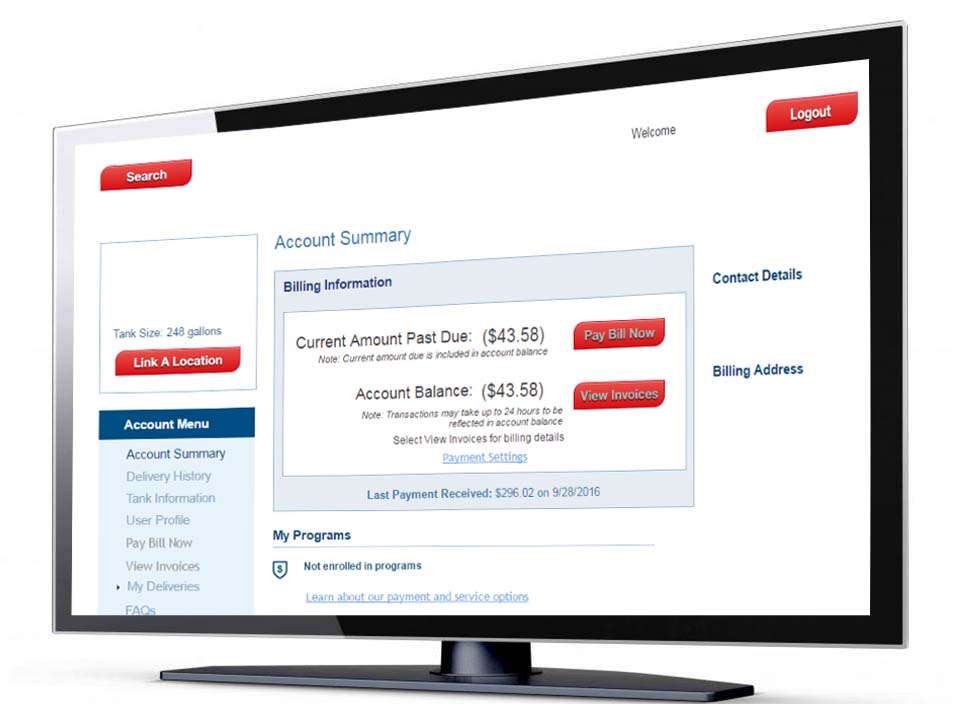
How to pay your AmeriGas bill online
To pay your bill online you will need a MyAmeriGas online account. If have not created your MyAmeriGas account, visit www.MyAmeriGas.com/Register using your account number.
- Login to your MyAmeriGas account. If you have multiple accounts linked, select the account youd like to manage.
- Select Make a Payment from the Account Summary.
- Choose how youd like to pay, Payment Due or Pay By Invoice. If you’d like to pay your payment due or make a payment on your account without a payment due, select Payment Due. If you’d like to pay specific invoices, select Pay By Invoice. Business customers will default to the Pay By Open Invoice option.
- Choose your payment date and payment method. You can select a payment method saved to your MyAmeriGas account or add a payment method. Select Next.
- Review your payment. Select Confirm Payment to submit your payment.
Your payment is complete. You will see an on screen payment confirmation and will also receive a payment confirmation email.
