Have you ever found yourself rushing to make a credit card payment before your due date and wondering if there’s a quicker way than mailing a check or waiting for an online payment to process? I’ve been there too, and that’s why I wanted to share what I’ve learned about paying your Discover card bill at Sears.
Yes, You Can Pay Your Discover Bill at Sears (With Some Limitations)
According to information directly from Discover’s website (as shared in the myFICO forum discussion), you can indeed make payments to your Discover card at Sears stores. However there are some important limitations you should be aware of
- Not all Sears locations accept Discover card payments
- Cash payments are NOT accepted for Discover bill payments at Sears
- Cashier’s checks and money orders are NOT accepted either
- Personal checks ARE accepted
This can be super convenient if you’re already shopping at Sears or if there’s a location near you and you need to make a payment quickly.
How to Pay Your Discover Bill at Sears
If you want to pay your Discover bill at a Sears store, here’s the process
- Call your local Sears store first to verify they accept Discover card payments
- Bring your personal check to make the payment
- If you don’t have your card with you, make sure to write your full Discover account number on the check
- Ask any sales associate to assist with your payment
- Keep your receipt as proof of payment
How Long Does it Take for a Sears Payment to Post?
This is where things get a bit tricky. Based on the discussion in the myFICO forum, payments made at Sears don’t post immediately. Here’s what you might expect:
- Payments made on a Friday will likely not post until Monday
- Even on business days, don’t expect same-day posting
- Most forum users suggested it would take 1-2 business days at minimum
One forum user shared their experience of making an $800 payment at Sears on a Friday at 5 01 PM Central Time, but was concerned the payment wouldn’t post until Monday. This could be problematic if you’re trying to free up credit for immediate use.
Is Paying at Sears the Fastest Option?
Honestly, no. Based on the forum discussion, there are faster ways to make your Discover payment:
- Online payments through Discover’s website often post the same day or next business day
- Phone payments directly to Discover may post faster than Sears payments
- eCheck payments from your bank account to Discover would likely be faster
One forum user mentioned that they made a payment on Discover’s website and it was credited to their account the very next day, even before it was taken out of their bank account.
When Might Paying at Sears Make Sense?
Despite not being the fastest option, there are some situations where paying your Discover bill at Sears could be useful:
- If you don’t have internet access or aren’t comfortable with online payments
- If you’re already at Sears and want to conveniently make a payment
- If you prefer in-person transactions with a receipt
- If you have enough time before your payment is due
What About the Discover-Sears Connection?
You might be wondering why you can pay your Discover bill at Sears in the first place. Historically, there was a connection – Discover Card was created by Sears in 1985 through its Dean Witter financial services unit. However, as one forum user pointed out, Sears and Discover don’t have the same direct connection today that they once did.
Despite this separation, the payment option has remained available at many Sears locations, which can be convenient for Discover cardholders.
Tips for Managing Your Discover Card Balance
The original poster in the forum was concerned about making a payment because they had slightly exceeded their credit limit. They had an $800.52 balance on a card with an $800 limit and wanted to pay $800 so they could still use the card for gas before their statement closed.
Here are some tips to avoid similar situations:
- Set up balance alerts through Discover’s website or app to notify you when you’re approaching your limit
- Consider requesting a credit limit increase if you frequently come close to your limit
- Make multiple smaller payments throughout the month rather than waiting for one large payment
- Track your spending manually or through the Discover app to avoid surprises
Alternatives to Paying at Sears
If you’re looking for other ways to pay your Discover bill, you have several options:
- Online payment through Discover’s website or mobile app
- Automatic payments that can be set up for the minimum payment, statement balance, or custom amount
- Payment by phone by calling the number on the back of your card
- Payment by mail (though this takes longer to process)
- Bank bill pay service through your checking account
My Personal Experience
I’ve been a Discover cardholder for years, and I’ve tried most payment methods at some point. While I’ve never personally paid my bill at Sears, I regularly use the online payment option through Discover’s website. I find it posts to my account within 24 hours usually, which is way faster than the 1-3 business days it seems to take when paying at Sears.
That said, I’ve been in situations where I needed to make a payment ASAP to free up credit for an unexpected expense, so I understand the appeal of in-person payment options like the Sears option.
Common Questions About Paying Discover at Sears
Can I pay with cash at Sears for my Discover bill?
No. According to Discover’s website, cash payments are not accepted at Sears stores for Discover card payments.
Do I need my physical Discover card to make a payment at Sears?
No. When paying via check, the card is not required. However, you must write your full account number on the check.
Will my payment post on the weekend if I pay at Sears on Friday?
Most likely not. Based on forum discussions, payments made on Friday typically won’t post until Monday at the earliest.
Can I make a partial payment at Sears?
Yes. You can pay any amount toward your Discover bill at Sears, just like you would with any other payment method.
Is there a fee to pay my Discover bill at Sears?
There was no mention of fees in the forum discussion or Discover’s information, suggesting there is no additional fee for this service.
Final Thoughts
Paying your Discover bill at Sears can be a convenient option in certain circumstances, but it’s not the fastest way to get your payment posted to your account. If you need immediate credit availability, you’re better off making a payment online through Discover’s website or by phone.
That said, it’s nice to have options, and the ability to pay in person at Sears could be helpful if you’re already there shopping or prefer making payments in person. Just remember to bring a check, since cash, money orders, and cashier’s checks aren’t accepted for this purpose.
The most important thing is to keep track of your balance and make payments before your due date to avoid late fees and interest charges. Whether you choose to pay online, by phone, by mail, or at Sears, making timely payments is what matters most for your credit health.
Have you ever paid your Discover bill at Sears? How was your experience? I’d love to hear about it in the comments below!
Helpful Resources
If you want to learn more about managing your Discover card, check out these resources:
- Discover’s official payment help page
- myFICO forums for advice from other credit card users
- Discover’s mobile app for easy payment management on the go
Remember, the key to successful credit card management is staying on top of your payments and keeping your utilization low. Whether you pay at Sears or online, just make sure you’re paying on time!
About This Article
Co-authored by:
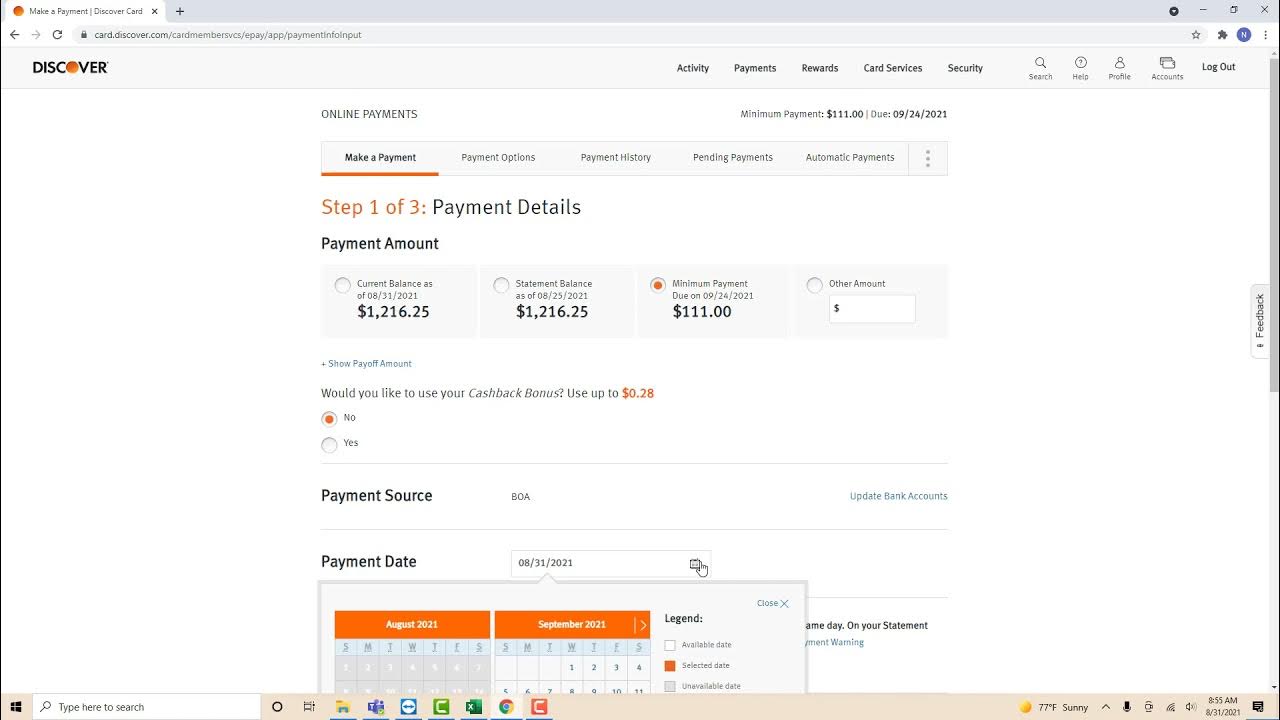
To make a Discover card payment online, first visit discovercard.com and log in with your username and password. If you don’t have an account already, click the “Register Account” option on the upper right hand side of the page to create a username and password. Once you’re logged in, click the “Make a Payment” link. Then, enter the amount you want to pay and click “Submit Payment.” Just make sure that your payment is at least as much as the minimum amount specified on your account to avoid being charged interest. To learn how to make a Discover card payment by mail, read on!
Making a Payment by Mail
- 1 Detach the payment coupon from your monthly account statement. At the top of your statement you’ll see your total balance, your required monthly minimum payment, and all recent transactions. At the bottom, you’ll find a detachable payment coupon. Tear off this portion of the statement so you can send it in along with your payment.[5]
- Remove the payment coupon carefully to avoid ripping it and losing any important info.
- 2 Fill out a check or money order with your minimum monthly payment. Provide all the necessary details of your payment, including your name, the day’s date, and the numerical and written amount that the check is worth. Write your account number on the memo line to identify what the payment is for.
- If you’re sending a payment via money order, you’ll also need to sign the front side of the form.
- Never send cash through the mail, as it could easily be intercepted and stolen by a third party.
- 3 Address your envelope to Discover’s Financial Services department. When providing the recipient information, make sure you put down the address for the main Discover billing office rather than the company headquarters or a regional office. The address for Discover’s Financial Services department is P.O. Box 6103, Carol Stream, IL 60187-6103.[6]
- This address is also conveniently listed on the top of the payment coupon, so you shouldn’t have to worry about forgetting it.
- If you accidentally mail your payment to the wrong place, there’s a chance it may not be processed before the due date.
- 4 Mail your payment 7-10 business days before it’s due. It’s called “snail mail” for a reason. If you want to be certain that your payment will be received on time, it’s a good idea to send it out at least a week before the listed due date. Otherwise, there’s no telling when it might arrive.
- Keep in mind that the mail doesn’t run on the weekends in some parts of the world. To make sure your payment will be received on time, only include business days in your 7-10 day window.
Advertisement Method
