Hey there, folks! If you’re scrambling to pay your DPL bill—sorry, I mean AES Ohio bill (yep, they’ve rebranded!)—and you ain’t got time to mess with online stuff or head out somewhere, I’ve got your back. Paying by phone is a lifesaver, and I’m gonna walk ya through it with the exact phone numbers, steps, and a few sneaky tips I’ve picked up. Whether you’re juggling a busy day or just prefer hearing a voice on the other end, this guide’s for you. Let’s dive right in and get that bill sorted, no stress!
Why Pay Your AES Ohio Bill by Phone?
Before we get to the nitty-gritty, let’s chat about why calling in to pay your bill might be your jam. I know, I know, online payments are all the rage, but sometimes you just wanna handle things quick without logging into a million accounts. Or maybe your internet’s acting up (been there!). Paying by phone is fast, direct, and you don’t need no fancy tech—just a phone and a few minutes. Plus, if you’re like me, there’s somethin’ comforting about knowing it’s done right then and there.
The Phone Numbers You Need for DPL (AES Ohio) Bill Pay
Alright, let’s cut to the chase AES Ohio, which used to be called DPL, has two different numbers depending on how you wanna pay I’ve called these myself for a buddy’s bill, and trust me, it’s straightforward once you know which one to dial. Here’s the breakdown
- Paying from a checking or savings account? Call 888-978-0827. Best part? There’s no fee for this. Nada. Zilch. You just punch in your bank details, confirm the amount, and you’re good.
- Using a credit or debit card? Dial 888-978-0828. Now, heads up—there’s a small fee of $1.95 for this option. Also, there’s a limit of $10,000 per payment, so if you owe more than that, you’ll need to split it or use another method.
Write these numbers down or save ‘em in your phone. I’ve got ‘em in my contacts under “AES Bill Pay” just in case I gotta help someone out again. When you call, have your account number ready—it’s on your bill—and follow the prompts. Easy peasy.
Step-by-Step: How to Pay Your Bill Over the Phone
I ain’t gonna leave ya hanging with just the numbers. Let’s walk through the process so you know exactly what to expect when you ring up AES Ohio. I’ve done this a couple times, and it’s pretty much the same each go-round.
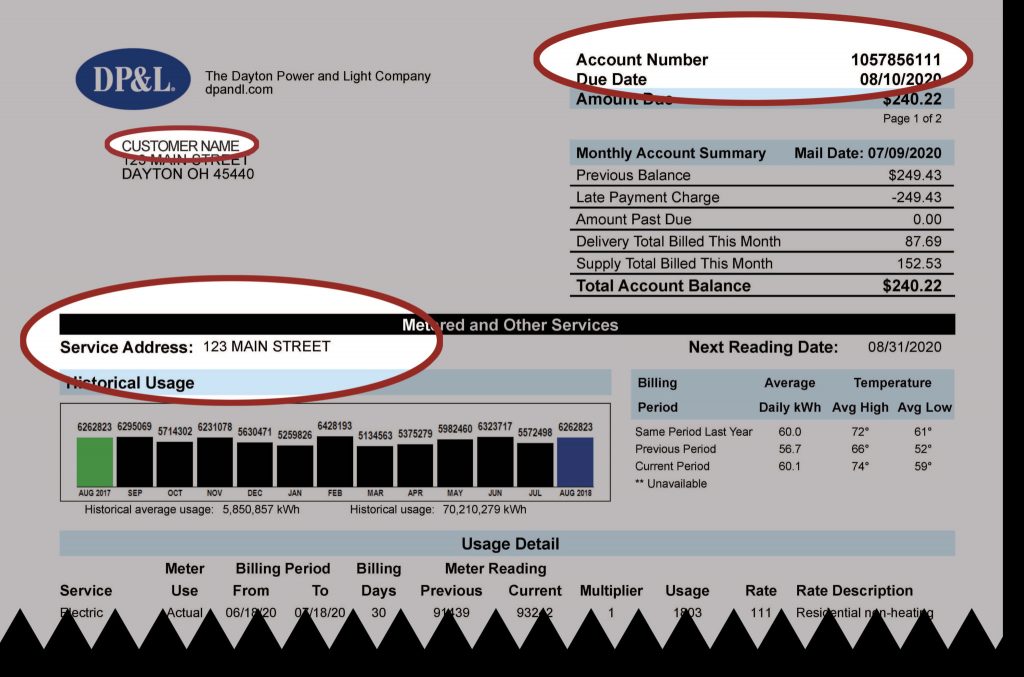
- Grab Your Bill or Account Info: Before you dial, make sure you’ve got your AES Ohio account number handy. It’s usually at the top of your bill. If you can’t find it, don’t sweat—ya might be able to use your address or phone number to pull it up, but the account number speeds things up.
- Pick the Right Number: Like I said, 888-978-0827 for bank accounts (no fee), or 888-978-0828 for cards ($1.95 fee). Don’t mix ‘em up, or you’ll be sittin’ on hold longer than needed.
- Follow the Automated Prompts: Once you’re on the line, you’ll hear a robot voice asking for stuff like your account number and payment amount. Just punch in the digits as they ask. If you’re using a card, they’ll want the card number and expiration date too.
- Confirm Everything: They’ll repeat back the amount and payment method. Listen close—make sure it’s right! I almost paid double once ‘cause I zoned out. Hit the button to confirm, and they’ll give ya a confirmation number. Write that down in case somethin’ goes wonky later.
- Hang Up and Relax: That’s it! Your payment’s processed, and you’ll get a record of it on your next bill or statement. Takes a couple days to show sometimes, so don’t panic if it ain’t instant.
If you run into trouble, like the system don’t recognize your account or somethin’, stay on the line to speak with a real person. They’re usually pretty helpful, even if you gotta wait a bit.
Fees and Limits: What You Gotta Know
Now let’s talk dollars and cents real quick. I already mentioned the fees but I wanna make sure ya got this locked in ‘cause nobody likes surprises on their bill. If you’re paying with a checking or savings account over the phone, it’s free. That’s right, no extra charge, which is why I always nudge folks to go this route if they can.
But if you’re swiping a credit or debit card, AES Ohio charges a $1.95 service fee per transaction. It ain’t much, but it adds up if you’re payin’ every month. Also, there’s that $10,000 limit per payment for card transactions. Most folks won’t hit that ceiling, but if you’re managing multiple accounts or got a big balance, keep it in mind.
Here’s a lil’ table to sum it up:
| Payment Method | Phone Number | Fee | Limit |
|---|---|---|---|
| Checking/Savings Account | 888-978-0827 | None | No limit |
| Credit/Debit Card | 888-978-0828 | $1.95 | $10,000 |
Stick with the bank account option if you wanna save that couple bucks I know $195 ain’t breakin’ the bank, but hey, that’s a coffee or somethin’!
Why I Love Phone Payments (And Why You Might Too)
Lemme tell ya a quick story. Last winter, my cousin was in a pinch—power bill due, internet down, and he was stuck at work with no way to pay online. I told him, “Man, just call AES Ohio!” We dialed up 888-978-0827 from his cell, punched in his bank info, and boom, bill paid in under five minutes. No late fees, no stress. That’s why I’m a fan of phone payments. It’s old-school, sure, but it works when you’re in a jam.
Plus, if you ain’t comfy with online stuff or worry ‘bout security, paying by phone feels safer. You’re not typin’ card numbers into some website that might get hacked. You just talk to the system (or a person if needed), and it’s handled. I’ve had friends swear they’ll never pay online again after hearin’ horror stories ‘bout data leaks. So, if that’s you, this method’s a solid pick.
Other Ways to Pay Your AES Ohio Bill (Just in Case)
Now, I know we’re focusin’ on phone payments here, but I’d be doin’ ya dirty if I didn’t at least mention the other options AES Ohio offers. Maybe phone ain’t your style, or you’re lookin’ to dodge that card fee. Here’s the quick and dirty on other ways to settle up:
- Online Payments: You can pay through the AES Ohio website or their app. It’s free if you use a bank account, but there’s that same $1.95 fee for cards. Super convenient if you’ve got internet and don’t mind loggin’ in.
- By Mail: Old-fashioned, but it works. Send a check or money order to their address in Cincinnati. Gotta plan ahead, though—takes about a week to process, so don’t wait ‘til the last minute.
- In Person: They’ve got authorized pay agents around Ohio where you can drop off cash or a check. There’s a $2 fee per payment, though, which is a tad more than the card fee on the phone. You can find a spot near ya on their site.
- Auto Pay: This one’s a game-changer if you’re forgetful like me. Set it up to pull from your bank account each month, no fees, no hassle. Takes a bit of setup, but then you’re on autopilot.
I’ll dive deeper into some of these later, ‘cause I wanna make sure we cover all the bases, but for now, just know phone payments ain’t the only game in town. They’re just my go-to for speed and ease.
Tips to Make Phone Payments Even Smoother
I’ve called AES Ohio a handful of times over the years, and I’ve picked up a couple tricks to keep things hassle-free. Lemme share ‘em with ya so you don’t gotta learn the hard way:
- Call During Off-Peak Hours: If you need to talk to a person, avoid callin’ right at 9 AM or during lunch hours. Late morning or early afternoon’s usually quieter. Less hold time means less aggravation.
- Double-Check Your Info: One time, I fat-fingered my account number and had to start over. Take a sec to read it off your bill slow and steady before punchin’ it in.
- Keep a Record: After you pay, they’ll give ya a confirmation number. Jot it down somewhere, even if it’s just a sticky note. If somethin’ don’t show up right, you’ve got proof you paid.
- Set a Reminder: If you ain’t on auto pay, mark your calendar a few days before the due date. Callin’ in takes just a few minutes, but forgettin’ ‘til the last second can cost ya late fees.
Little things like this make a big diff. Trust me, I’ve flubbed it before and had to scramble—don’t be like past me!
What If You’re Strugglin’ to Pay On Time?
Life happens, y’know? If you’re tight on cash and can’t pay your AES Ohio bill by the due date, don’t just ignore it. I’ve seen folks bury their head in the sand, and it only makes things worse with late fees or, ugh, shut-off notices. AES Ohio’s got options to help if you’re in a bind.
They offer payment extensions or agreements to spread out what you owe. You gotta reach out to ‘em, though—don’t wait for them to call you. There’s also assistance programs for homes if you’re really strugglin’. I ain’t gonna pretend I know all the ins and outs, but I’ve had a family member use one of these programs during a rough patch, and it kept the lights on. Check their website or call (yep, those same numbers) to ask about what’s available.
Customizin’ Your Billing with AES Ohio
While we’re on the topic of bills, let’s talk about makin’ ‘em easier to handle in the first place. AES Ohio’s got a few ways to tweak how you get and pay your bill. I’ve messed with a couple of these myself, and they can save ya some headaches down the road.
- Budget Billing: This evens out your payments so you ain’t hit with huge bills in winter or summer when usage spikes. You pay a set amount each month based on your average use. I tried it for a year, and it made budgetin’ way less stressful.
- Paperless Billing: Ditch the paper and get your bill by email. It’s secure, and you don’t gotta worry ‘bout losin’ it in a pile of junk mail. Plus, it’s better for the planet or whatever.
- Summary Billing: If you’ve got multiple accounts—like a house and a rental or somethin’—you can combine ‘em into one bill. One payment, less to track. Ain’t that neat?
These ain’t directly tied to payin’ by phone, but settin’ ‘em up can make the whole process smoother. And hey, if you pair auto pay with paperless, you barely gotta think about bills at all!
Common Questions ‘Bout AES Ohio Phone Payments
I figured I’d toss in some FAQs I’ve heard from friends or wondered myself when dealin’ with AES Ohio. Might save ya some head-scratchin’:
- How long does a phone payment take to process? Usually a day or two to show on your account. If it’s urgent, like your power’s about to be cut, tell ‘em when you call—they might speed it up or note it.
- Can I pay more than once a month by phone? Yup, as long as you don’t hit that $10,000 card limit per transaction. No rules against multiple calls if ya need to.
- What if I don’t have my account number? Try givin’ ‘em the address or phone tied to the account. Worst case, stay on the line for a rep to sort it out.
- Is there a way to skip the fee with a card? Nah, not over the phone. If ya want no fee, use a bank account or pay online with a bank transfer.
Got more Qs? Hit up AES Ohio directly. They’ve got folks who can break it down better than I can on some of the trickier stuff.
Wrappin’ It Up: Keep Those Numbers Handy!
So, there ya have it—everything ya need to pay your AES Ohio (aka DPL) bill by phone. To recap, dial 888-978-0827 for bank accounts with no fee, or 888-978-0828 for cards with a $1.95 fee and a $10,000 limit. It’s quick, it’s easy, and it’s saved my bacon more than once. I’ve walked ya through the steps, tossed in some tips, and even covered other payment options if phone ain’t your thing.
Bills ain’t fun, but they don’t gotta be a nightmare neither. Save those numbers, set a reminder, and handle your business before late fees sneak up. And if you’re ever stuck, remember AES Ohio’s got ways to help—extensions, assistance, all that jazz. We’ve covered a lotta ground here, from the exact how-to to customizin’ your billing setup. Keep this guide bookmarked or scribbled somewhere, ‘cause ya never know when you’ll need to dial in and get that bill paid pronto.
Got any horror stories or slick tricks for payin’ bills? Drop ‘em in the comments—I’m all ears! Let’s keep helpin’ each other out, ‘cause lord knows utility companies ain’t always makin’ it easy. Catch ya later!
How to Pay Your Bill
There are five ways to pay your DP&L bill. You can change your payment method at any time.
- Online: You can make bill payments online using your credit/debit card or your bank account.
- AutoPay: You can set up AutoPay to automate monthly bill payments from your bank account. Itâs advisable to use AutoPay with E-Bills (Paperless Billing). You can learn more here.
- In-Person: You can pay your bill in person at an authorized pay agent. You can find the list of pay agents here. Keep in mind that some of the pay agents may be temporarily unavailable due to the coronavirus pandemic (COVID-19).
- Pay by Mail: You can mail a check or money order to DP&L. Make sure that you detach your payment stubs before mailing your payment.
- Pay by Phone: You can pay your bill on the phone with your bank account or credit/debit card.
You can use KUBRA EZ-PAY to simplify the payment process.
Does DP&L Have Payment Plan Options?
DP&L has several payment plan options for different customers.
Here are four payment programs they currently offer:
- Budget Billing: You can get predictable energy bills to avoid seasonal fluctuations with Budget Billing. You receive the same average monthly bill throughout the year. The average bill depends on your historical electric usage, potential price changes, and weather forecasts. You can learn more here.
- Pay Arrangements: If youâre having trouble paying your bill, you can opt for Pay Agreements to avoid service disconnection. DP&L offers three different types of Pay Agreements. You can learn more about them here.
- Payment Assistance: If youâre getting further notices due to nonpayment, you may be eligible for Payment Assistance programs. The Income-Qualified Programs can also help with the reconnection of service. You can apply for programs such as the Percentage of Income Payment Plan Plus (PIPP Plus), Graduate PIPP Plus, Summer Crisis Program, Home Energy Assistance Program (HEAP), HEAP Winter Crisis Program, and the Home Weatherization Assistance Program (HWAP). You can learn more about each program here.
If youâre a business customer, you can apply for Summary Billing to receive one monthly bill that includes all your accounts. You can learn more here.
