Ever stared at a medical bill and felt completely confused? Yeah, me too. TRA Medical Imaging bills can be particularly tricky, especially when trying to figure out how to use ezmedinfo for bill payment. After digging through the confusing maze of medical billing, I’ve put together this guide to help you navigate the process without all the headaches.
What is ezmedinfo bill pay?
Ezmedinfo bill pay was previously a payment portal used by some medical facilities, but TRA Medical Imaging has updated their billing system. If you’re looking to pay a TRA Medical bill, you’ll now need to use their current payment portals instead of ezmedinfo.
For TRA Medical Imaging patients the payment process depends on when you received your service
For 2023 or Newer Services:
TRA Medical Imaging now uses Patient Notebook portals for online bill payment
- TRA Medical Imaging: www.patientnotebook.com/tramedical
- Diagnostic Imaging Northwest: www.patientnotebook.com/diagnosticimaging
- Carol Milgard Breast Center: www.patientnotebook.com/carolmilgard
- Union Avenue Open MRI: https://www.patientnotebook.com/unionave
For 2022 or Older Services:
For older bills, you’ll need to contact their billing service directly at (904) 539-9062
Payment Methods Available
TRA Medical Imaging currently accepts these payment methods:
- Check
- Credit Card (Visa, MasterCard, Discover)
- Debit Card
- Money Orders
How to Pay Your Bill Online
Here’s a step-by-step guide to paying your TRA Medical bill online:
- Identify which facility provided your service (TRA Medical Imaging, Diagnostic Imaging Northwest, etc.)
- Visit the appropriate Patient Notebook website listed above
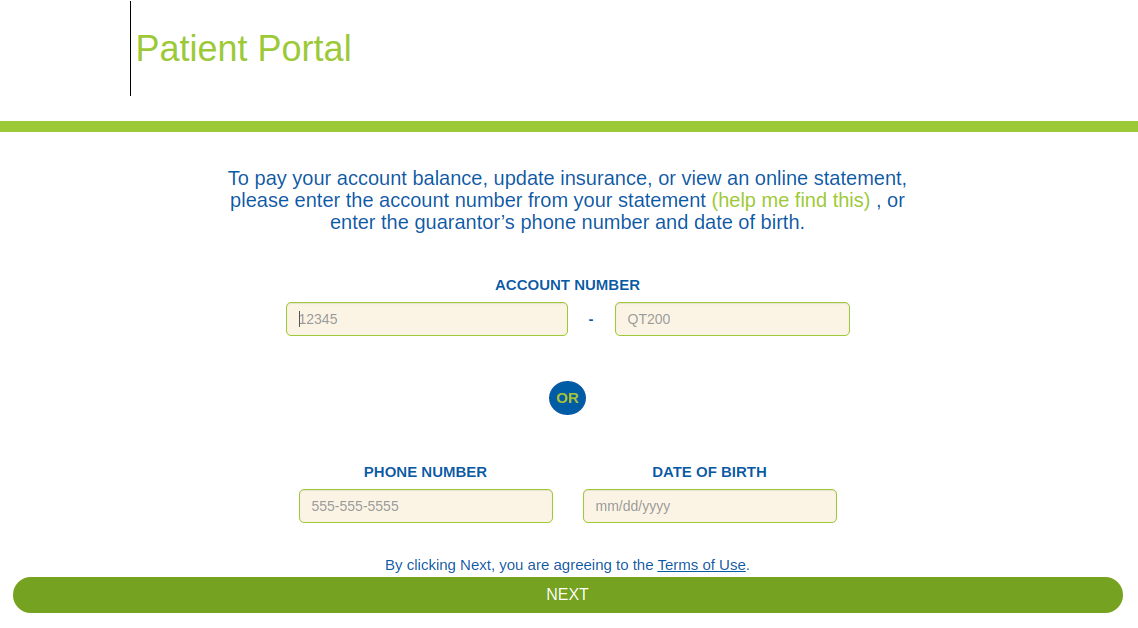
- Have your statement handy – you’ll need your account number
- Follow the prompts to make your payment
- Save or print your confirmation for your records
If you’d rather pay by phone, you can call their automated payment system at 888-350-2006, option 2. This automated service is available 24/7.
Setting Up a Payment Plan
Can’t pay the full amount right away? No worries! Many of us have been there. TRA Medical offers payment plans to help manage your medical expenses.
To set up a payment plan:
- Visit your facility’s Patient Notebook website
- OR call the number on your statement
- Have your account information ready
- Follow instructions to establish a payment schedule that works for your budget
The best part? You can set up automated payments so you don’t have to remember to pay each month.
Why Did I Receive a Bill if I Have Insurance?
This is super common and confusing! Even if you provided your insurance info, you might still get a bill for several reasons:
- Your insurance processed the claim, and the remaining balance is your responsibility (thanks, deductibles!)
- The insurance rejected the claim due to missing or incorrect information
- The insurance needs additional info from you before processing
- Your claim was denied because the insurance indicated you weren’t eligible on the service date
If you’re scratching your head about why you got a bill, call their billing service at 888-350-2006. Have your account number and insurance card ready when you call.
I’ve Never Been to TRA – Why Am I Getting Their Bill?
This happens a lot and is super confusing! TRA Medical Imaging provides radiology services for many hospitals in the area, including:
- MultiCare Health System
- CHI Franciscan Health
- Highline Medical Center
If you had any imaging exam at one of these facilities, you’ll receive a separate bill from TRA for the radiologist’s professional services, even though you never directly visited a TRA facility. Tricky, right?
Financial Assistance Options
If you’re struggling financially, TRA Medical Imaging offers financial assistance. You can find their application under the “For Patients” tab on their website, in the Financial Assistance section.
What’s really cool is that TRA partners with many local hospitals to match financial assistance. If you’ve already been approved for assistance at a partner hospital, contact them at (855) 271-2416 to see if they can extend similar help for your radiology bill.
Avoiding Collections
Nobody wants their account to go to collections! If you receive an automated “pre-collection” call, it means you haven’t responded to previous communications about your outstanding balance.
If this happens:
- Don’t panic! This is just a warning that action is needed
- Contact the billing service right away
- Explore payment plans or financial assistance options
- Make sure your insurance was properly billed
If your account has unfortunately already gone to collections, you’ll need to contact Dynamic Collectors directly at (800) 464-3457.
Finding CPT Codes for Insurance
When checking with your insurance about coverage, they might ask for CPT codes (procedure codes). You can call TRA at (855) 271-2416, and they can provide you with these codes. This is super helpful when trying to estimate your out-of-pocket costs!
Self-Pay Patients
If you don’t have insurance, TRA offers discounts for self-pay patients. Contact them at (855) 271-2416 to speak with a financial counselor about their procedure pricing and available discounts.
Common Questions About TRA Medical Imaging Bill Payment
Does TRA Accept My Insurance?
TRA is contracted with most insurance providers in Washington. For a complete list of in-network insurance payers, visit their website and click on “Contracted Insurance Plans.”
How Much Will My Exam Cost?
The best way to find out is to contact your insurance company directly. Even though TRA may be in-network, your individual plan coverage will determine your actual costs.
Can TRA Honor My Hospital’s Financial Assistance?
Yes! As mentioned earlier, TRA partners with many local hospitals and can often match approved financial assistance. Just give them a call to discuss.
Why Did My Account Go to Collections?
This typically happens when you haven’t responded to multiple billing attempts. If you’re having trouble paying, it’s important to contact them BEFORE your account reaches collections status.
Using MyDocBill (Zotec Partners)
If you’re redirected to MyDocBill (powered by Zotec Partners) when attempting to pay your bill, this is another payment platform used by some medical providers. The process is similar:
- Visit www.mydocbill.com
- Enter your account information from your statement
- Follow the prompts to make your payment
Tips for Managing Medical Bills
Here are some strategies I’ve found helpful when dealing with medical bills:
- Don’t ignore them! Medical bills don’t disappear and can seriously hurt your credit
- Check for errors – billing mistakes happen more often than you’d think
- Contact billing customer service early if you have questions or can’t pay
- Keep detailed records of all communications and payments
- Review your insurance Explanation of Benefits (EOB) to understand what was covered
- Ask about discounts – many providers offer discounts for prompt payment
My Experience with TRA Medical Imaging Bills
Last year, I received imaging services at a local hospital and was confused when I got a separate bill from TRA Medical Imaging. I didn’t remember going to a TRA facility!
After calling their helpful billing service, I learned that TRA provided the radiologist who interpreted my images. They patiently explained my insurance coverage and helped me set up a payment plan for my portion. The online payment system was actually pretty straightforward once I knew which portal to use.
Conclusion
Dealing with medical bills is never fun, but understanding the ezmedinfo bill pay alternatives for TRA Medical Imaging makes the process much less painful. Remember that TRA now uses Patient Notebook portals for bill payment, and different portals exist depending on which specific TRA-affiliated facility provided your service.
If you run into any issues or have questions about your bill, don’t hesitate to contact their billing customer service. They’re there to help you navigate the sometimes confusing world of medical billing.
Have you had experience paying TRA Medical bills? What tricks did you discover to make the process easier? We’d love to hear about your experiences in the comments!
Pay your anesthesiology bills online easily and securely If you’ve received a paper bill, you can quickly log in by using the 12-digit

