Are you struggling with your Gap credit card payments? I’ve been there too! Making payments on time is crucial for maintaining a good credit score, but sometimes the process can be confusing. Let’s break down everything you need to know about Gap credit card bill pay options in simple terms.
Understanding Your Gap Credit Card
Before we dive into payment methods, it’s important to understand that Gap credit cards are issued by Barclays Bank Delaware. There are actually two types of cards available:
- Gap Good Rewards Mastercard – Can be used anywhere Mastercard is accepted
- Gap Good Rewards Credit Card – Can only be used at Gap Inc. stores and online
When you apply, you’re first considered for the Mastercard version. If not approved, you’ll automatically be considered for the store-only card.
How to Pay Your Gap Credit Card Bill
There are several ways to pay your Gap credit card bill, each with their own pros and cons. Let’s explore your options:
Online Bill Pay (Recommended Method)
The most convenient way to pay is through the online portal at gap.barclaysus.com.
Steps to pay online
- Visit gap.barclaysus.com/servicing/home
- Enter your username and password
- Complete the security verification (check the “not a robot” box)
- Click “Log in”
- Navigate to the payments section
- Choose your payment amount and date
- Confirm payment details
If you haven’t set up online access yet, you’ll need to click “Set up online access” on the login page and follow the prompts.
By Phone
If you’re not comfortable with online payments or having technical issues, you can always pay by phone
Phone payment details:
- Customer Service: 1-888-232-0780
- Credit Card Customer Support: 877-523-0478
- Have your card and bank account information ready
- Follow the automated prompts or speak with a representative
I tried this method once when my internet was down and it was pretty straightforward, though there was a short wait time to speak with someone.
By Mail
Some of us still prefer the traditional method of mailing a check. While this isn’t the fastest option, it works reliably if you plan ahead.
To mail your payment:
- Write a check payable to “Barclays Bank Delaware”
- Include your account number on the check memo line
- Mail to: Barclays Bank Delaware, PO Box 8801, Wilmington, DE 19801
Pro tip: Mail your payment at least 7 days before the due date to ensure it arrives on time!
Important Payment Information
Payment Due Dates
Your Gap credit card payment is due on the same date each month. Missing a payment can result in late fees and interest charges, which can add up quickly with the current high APR.
Interest Rates & Fees
The Gap Good Rewards Mastercard comes with:
- APR for purchases: 33.74% (variable based on Prime Rate)
- APR for balance transfers: 33.74% (when using your Mastercard)
- APR for cash advances: 33.74% (when using your Mastercard)
- Balance transfer fee: Either $5 or 5% of the transfer amount, whichever is greater
- Annual fee: $0
Yikes! That APR is definitely on the higher side, which makes it super important to pay your bill in full each month if possible.
Benefits of Paying Your Gap Credit Card On Time
Maintain Your Rewards Program Benefits
One of the best things about the Gap credit card is the rewards program:
- 5 points for every $1 spent at Gap, Banana Republic, Old Navy, and Athleta
- 1 point for every $1 spent on all other Mastercard purchases
- 100 points = $1 reward redeemable across Gap Inc. brands
If you’re late on payments, you might risk losing these valuable benefits.
Access to Special Offers
Cardholders get access to:
- Early access to select sales
- Member-only exclusive offers
- 20% off your first purchase with your new card at Gap
- Free fast shipping on online orders $50+
I’ve saved a ton using these perks, especially during big sales!
Credit Score Benefits
Paying on time helps:
- Build positive payment history
- Maintain or improve your credit score
- Keep your credit utilization low
As a cardholder, you also get complimentary online access to your FICO® Credit Score to keep track of your credit health.
Setting Up Automatic Payments
I personally recommend setting up automatic payments to avoid missing due dates. Here’s how:
- Log in to your account at gap.barclaysus.com
- Navigate to the payments section
- Look for “Automatic Payments” or “AutoPay” option
- Enter your bank account information
- Select either the minimum payment, statement balance, or a custom amount
- Choose your payment date
- Confirm and save your settings
This has been a lifesaver for me during busy months when I might otherwise forget!
Troubleshooting Common Payment Issues
Payment Not Posting
Sometimes payments take 1-3 business days to post to your account. If it’s been longer:
- Check that you entered the correct account information
- Verify sufficient funds in your payment account
- Contact customer service at 877-523-0478
Forgotten Username or Password
If you can’t remember your login credentials:
- Visit the login page at gap.barclaysus.com
- Click “Forgot username or password?”
- Follow the verification steps
- Create new credentials or recover existing ones
Browser Issues
The Gap credit card servicing site requires JavaScript to be enabled. If you’re having trouble:
- Make sure JavaScript is turned on in your browser
- Try using a different browser
- Clear your cache and cookies
- Contact customer service for assistance
Additional Gap Credit Card Features
Beyond just paying your bill, your Gap card comes with some other cool features:
Digital Wallet Compatibility
You can add your Gap Good Rewards Mastercard to digital wallets like:
- Apple Pay®
- Google Pay®
This makes shopping even more convenient and secure.
Fraud Protection
The card includes $0 Fraud Liability Protection, meaning you’re not responsible for unauthorized charges. If you notice suspicious activity:
- Contact customer service immediately
- Report the unauthorized charges
- Follow their guidance for resolving the issue
Charitable Giving Option
One unique feature I love is the ability to donate your rewards to charitable causes. For every 100 points, you can donate $1 to select organizations chosen by Gap Inc.
Managing Your Account Beyond Payments
Checking Your Balance
Before making a payment, you’ll want to know your current balance:
- Log in to your online account
- View your dashboard for current balance information
- Check your most recent statement
- Call customer service for balance information
Reviewing Transactions
Regularly reviewing your transactions is important to catch any errors or fraud:
- Log in to your online account
- Navigate to “Transactions” or “Activity”
- Review recent purchases
- Report any unrecognized charges immediately
Updating Personal Information
Keep your contact information current:
- Address changes
- Phone number updates
- Email address changes
This ensures you receive important notifications about your account, including billing statements and payment reminders.
Managing your Gap credit card payments doesn’t have to be complicated. By understanding your payment options and setting up a system that works for you, you can enjoy all the benefits of your card without the stress of missed payments or late fees.
Remember these key points:
- Pay on time to avoid high interest (that 33.74% APR is no joke!)
- Consider automatic payments for peace of mind
- Take advantage of the rewards program to maximize your benefits
- Regularly monitor your account for unexpected charges
I’ve been using my Gap card for years now, and while I’ve made some mistakes along the way (like forgetting a payment once – oops!), overall it’s been a positive experience. The rewards have helped me save on clothes for my family, and the online payment system makes managing my account pretty simple.
Do you have any tips or tricks for managing your Gap credit card? I’d love to hear them in the comments below!
FAQs About Gap Credit Card Bill Pay
Q: What’s the minimum payment on a Gap credit card?
A: The minimum payment is typically a percentage of your balance or a set amount (whichever is greater), but check your statement for your specific minimum payment amount.
Q: How long does it take for an online payment to post?
A: Online payments typically post within 1-3 business days, though they may show as “pending” initially.
Q: Can I pay my Gap credit card at a Gap store?
A: No, payments must be made through Barclays Bank Delaware via online, phone, or mail options.
Q: What happens if I miss a payment?
A: Missing a payment may result in late fees, increased interest rates, and potential negative impacts to your credit score.
Q: Is there a fee for making payments online or by phone?
A: There is typically no fee for standard online payments. Phone payments may incur a fee if expedited, so check with customer service.
Q: Can someone else pay my Gap credit card bill for me?
A: Yes, someone else can pay your bill, but they’ll need your account information to do so.
To Pay with a Credit or Debit Card
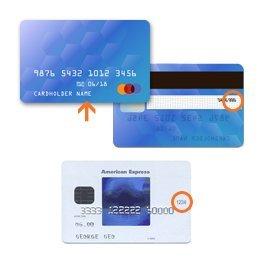
When you pay with a credit or debit card, you need the name printed on the card, the card number, the month and year the card expires, and the 3-digit or 4-digit security code.
This information, along with the billing address for the credit card, is entered during the purchase process. For more information, see Placing an Order.
These credit cards are accepted at all of our stores and websites.
These store credit cards are accepted at all of our stores and websites.
Debit cards issued by the financial services companies listed above are accepted at all of our stores and websites.
Credit cards and store credit cards are generally charged only at the time we ship the item or items to you.
However for both credit and debit cards we may “pre-authorize” your order amount with your card issuer at the time you place the order. This may trigger an “authorization hold” on your card. For debit cards, which draw on funds in a bank account, this means the amount of your purchase remains in your account but is no longer available to you. For credit cards, the charge is not processed but the amount may be deducted from your available line of credit.
Your credit or debit card will then be charged at the time we ship your items to you. If your order is sent out in multiple shipments the charges will process as each individual part of the order ships (you will see multiple, smaller amounts charged to your account).
It can typically take three to seven days for the purchase amount to clear your account. Your bank controls the timing of authorizations and payments from your account; for details please check with your bank.
To Pay with Rewards
As a member of the Gap Inc. Rewards Program, you earn points that can be redeemed for rewards in $1 increments. Rewards can be redeemed at our Family of Brands for the purchase of merchandise. Rewards cannot be used for the purchase of gift cards, for taxes or state fees, packaging fees, shipping & handling or delivery charges, charitable donations, and gift wrap charges.
- Log in to your account at checkout
- The “My Rewards” section will display your available points balance, as well as any valid rewards certificates
- Select the amount of points you want to redeem from the drop down
- Select “redeem” button to apply your rewards to your total
