Have you ever found yourself rushing to pay your Hathway bill at the last minute? Or maybe you’re confused about how to navigate through their payment system? Don’t worry, we’ve all been there! As a long-time Hathway user myself, I’ve gathered all the essential information about Hathway bill payment to make your life easier.
Understanding Your Hathway Bill
Before jumping into payment methods, let’s break down what your Hathway bill actually shows. This will help you understand exactly what you’re paying for!
Every Hathway bill contains these important elements
- Customer ID: This is a unique identification number assigned to you. Always keep this handy when interacting with Hathway customer service.
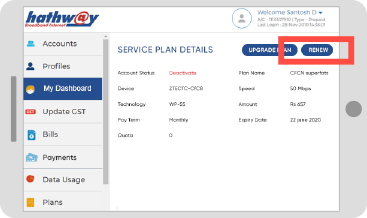
- Plan Details: Shows your current broadband plan including speed, FUP (Fair Usage Policy), and subscription charges for the predetermined period.
- Due Date: The deadline for paying your outstanding amount to avoid service disruption.
- Current Period: The billing cycle your current bill covers.
- Payment Details: History of your recent payments.
I remember being confused about my FUP limit when I first signed up. The customer service rep explained that it’s basically the data limit before your speed gets reduced – something clearly mentioned in the bill but easy to miss!
Ways to Pay Your Hathway Bill
Now that we understand the bill, let’s look at the different methods to pay it. Hathway offers multiple convenient options:
1. Online Payment through Official Website
This is my personal favorite method – quick and hassle-free!
- Visit Hathway’s official payment portal
- Enter your Customer ID or registered mobile number
- Select your outstanding bill
- Choose your preferred payment method (credit/debit card, net banking, UPI)
- Complete the transaction
- Save the confirmation receipt
2. Hathway Mobile App
For those who prefer doing everything on their phones (like me!), the Hathway app is perfect
- Download the Hathway Broadband App from:
- Google Play Store for Android
- App Store for iOS
- Login with your credentials
- Navigate to the “Pay Bill” section
- Follow the on-screen instructions to complete your payment
The app is super convenient because it also lets you track your data usage, which helped me realize I was hitting my FUP limit too quickly last month!
3. Quick Recharge Option
If you’re in a hurry, Hathway’s Quick Recharge feature is a lifesaver:
- Go to the Hathway website
- Click on “Quick Recharge” in the top navigation
- Enter your customer details
- Make the payment
I’ve used this method several times when I’m traveling and need to make a quick payment without logging in.
4. Self-Care Portal
The Self-Care portal gives you more control over your account:
- Visit Hathway’s website
- Click on “Selfcare” under the Broadband section
- Login to your account
- Select “Pay Bill now” option
- Complete your payment
5. Payment through Third-Party Apps
You can also use popular payment apps like:
- Paytm
- PhonePe
- Google Pay
- Amazon Pay
Just search for “Hathway” in the bill payment section, enter your Customer ID, and proceed with the payment.
Benefits of Online Hathway Bill Payment
Why should you prefer online methods? Here’s why I switched from paying at their office to online payments:
- 24/7 Availability: Pay anytime, anywhere – even at 2 AM when I suddenly remembered my due date!
- Instant Confirmation: Receive immediate payment confirmation
- Digital Records: Maintain a history of all your payments (super helpful during tax season)
- No Queue: Avoid waiting in long lines at payment centers
- Auto-Pay Options: Set up recurring payments to never miss a deadline
Common Issues and Solutions
Even with these convenient methods, sometimes things don’t go as planned. Here are common problems and their fixes:
Payment Failure
If your transaction fails:
- Check your internet connection
- Verify that your payment method has sufficient funds
- Try a different payment option
- Wait 30 minutes before attempting again
Payment Reflected but Service Not Restored
This happened to me once and was pretty annoying! Here’s what to do:
- Wait for at least 2 hours for system synchronization
- Keep your payment receipt handy
- Contact Hathway customer support at [email protected] if the issue persists
Incorrect Bill Amount
If your bill seems incorrect:
- Review your plan details on the bill
- Check for any additional services you might have subscribed to
- Contact Hathway’s helpline for clarification
Tips to Never Miss a Hathway Bill Payment
We’re all busy, and sometimes bills slip our mind. Here’s how I make sure I never miss a payment:
- Set Calendar Reminders: Create monthly alerts a few days before the due date
- Enable Auto-Pay: Set up automatic payments through your bank
- Keep Emergency Balance: Maintain sufficient funds in your primary payment method
- Subscribe to SMS Alerts: Opt for Hathway’s SMS reminder service
- Pay in Advance: Make payments before the generation of the next bill for peace of mind
Hathway Plans Across Cities
Hathway offers different broadband plans depending on your location. Here’s a quick overview of cities where Hathway provides services:
- Chennai
- Bangalore
- Hyderabad
- Mumbai
- Pune
- Delhi NCR
- Indore
- Kolkata
- Aurangabad
- Vellore
- Surat
Each city has customized plans to meet local needs. For instance, I noticed that the plans in Mumbai offer higher speeds compared to some other cities for the same price point.
FAQs About Hathway Bill Payment
How do I check my current outstanding bill?
You can check your outstanding amount by logging into the Self-Care portal or through the Hathway mobile app.
Is there a late fee if I miss my payment deadline?
Yes, Hathway typically charges a late fee for payments made after the due date. The exact amount may vary based on your plan and location.
How long does it take for my service to restore after payment?
Usually, services are restored within 2-4 hours after payment confirmation. In my experience, it’s usually much quicker – around 30 minutes.
Can I pay my Hathway bill in advance?
Absolutely! You can pay your bills in advance through any of the payment methods mentioned above.
What if I face issues with online payment?
If you encounter problems, you can contact Hathway’s dedicated support team:
- For Broadband issues: [email protected]
- For Digital TV issues: [email protected]
My Experience with Hathway Bill Payments
I’ve been a Hathway customer for over 3 years now, and I’ve tried pretty much all their payment methods. Initially, I used to visit their office, which was time-consuming. Then I switched to third-party apps like Paytm, which was convenient but sometimes had transaction failures.
Now, I primarily use their official website or app for payments. I’ve set up calendar reminders 3 days before my due date, and I haven’t missed a payment in the last year!
One time, I had an issue where my payment was deducted but the service wasn’t restored. I contacted their customer support with my transaction ID, and they resolved the issue within a few hours. Their response time has definitely improved over the years.
Why Timely Bill Payment Matters
Paying your Hathway bill on time isn’t just about avoiding late fees. It ensures:
- Uninterrupted Service: No more disruptions during important video calls or while streaming your favorite shows
- Good Payment Record: Maintains a positive payment history with Hathway
- Avoids Reconnection Charges: Save additional fees charged for reconnecting suspended services
- Peace of Mind: One less thing to worry about!
Conclusion
Hathway has definitely made bill payment much easier over the years with multiple convenient options. Whether you prefer using their official website, mobile app, or third-party payment platforms, there’s something for everyone.
My advice? Set up a system that works for you – whether it’s auto-pay or regular reminders. This ensures you never face service disruptions or late fees. And if you ever face any issues, don’t hesitate to reach out to their customer support.
Have you tried any of these payment methods? Which one works best for you? If you have any questions about Hathway bill payments that I haven’t covered, feel free to drop them in the comments below!
Remember, a few minutes spent paying your bill can save you hours of frustration from dealing with service disruptions. Happy surfing!
Get the best WiFi for your home backed by Fiber technology
- Stream and Download with ease
- In a matter of seconds, you can share photos and videos
- Enjoy Seamless Video Conferencing

Redefine Entertainment with Hathway Digital TV
- Weatherproof signal with no rain interruptions
- Easy and quick installation
- HD set-top box for exceptional picture quality and digital sound
