Hey there, folks! Ever found yourself stuck in a long-ass line just to pay a darn utility bill, wishing there was a quicker way? I’ve been there, tapping my foot, checking my watch, and just praying for a miracle Well, guess what? That miracle exists, and it’s called machine bill pay This whiz-bang technology is changing the game, making payments faster, easier, and way less of a headache. At our lil’ corner of the internet, we’re pumped to break it down for you in plain ol’ English. Let’s dive into what machine bill pay is, how it works, and why it’s a total lifesaver for so many of us.
What Exactly Is Machine Bill Pay?
So, let’s get straight to the point. Machine bill pay refers to using self-service devices—think kiosks or terminals—to settle your bills without needing a human cashier. These machines are like your personal payment buddy, letting you pay for stuff like electricity, water, phone bills, or even money transfers with just a few taps or swipes. You can use cash, debit cards, credit cards, or sometimes even checks, depending on the setup.
You’ll find these bad boys in places like grocery stores, malls, utility offices, or even standalone spots in your neighborhood. They’re designed to be super user-friendly, so even if you ain’t no tech wizard, you can figure ‘em out. The best part? They’re often available 24/7, meaning you can pay that overdue bill at midnight if you gotta. No more rushing before the office closes!
Now, why does this matter? Well, for a lotta people—especially those who don’t have a bank account or prefer cash—these machines are a godsend Imagine not having to deal with long lines or limited hours It’s all about convenience, and trust me, once you try it, there’s no going back.
Why Machine Bill Pay Is a Big Deal
Before we get into the nitty-gritty of how these gizmos work, let’s chat about why they’re such a game-changer. I mean, who doesn’t want life to be a tad bit easier? Here’s why machine bill pay is blowing up
- Accessibility for Everyone: Not everyone’s got a bank account. Some of us rely on cash for everything, and these machines cater to that crowd big time. Whether you’re unbanked or just prefer green bills, you’re covered.
- Saves Time Like Crazy: No more waiting forever at a counter. Walk up, punch in your details, pay, and boom—you’re done in minutes.
- Round-the-Clock Access: Many of these terminals are available all day, every day. Got a bill due on a holiday? No sweat, just hit up a kiosk.
- Less Hassle for Businesses: For companies, it means fewer staff needed to handle payments, letting them focus on other stuff like customer service or sales.
I’ve seen these machines pop up everywhere lately, and it’s no surprise. They’re solving real problems for real people, and that’s what tech should be about, right?
How Does Machine Bill Pay Work? The Tech Behind the Magic
Alright, let’s pop the hood on these contraptions and see what makes ‘em tick. Don’t worry, I’m keeping this simple—no need for a tech degree to follow along. At its core, a bill pay machine is a combo of hardware and software working together to process your payment securely and efficiently.
The Basic Components
Think of these machines as mini-computers with a specific job. Here’s what’s usually inside:
- Touchscreen Interface: This is where you interact with the machine. It’s like your phone screen—just tap to select options like “Pay Bill” or “Money Transfer.”
- Payment Slots: Got cash? There’s a slot for bills and sometimes coins. Using a card? There’s a reader for that too, often with a keypad for your PIN.
- Printer: Once you pay, it spits out a receipt as proof. Handy for keeping records!
- Scanner: Some machines let you scan barcodes or bill IDs to pull up your account instantly.
- Brainy Software: Behind the scenes, there’s a program running the show, connecting to payment processors and ensuring your transaction is safe.
The Power Source
These machines need juice to run, just like any gadget. Most are plugged into electrical outlets, using good ol’ AC power to keep things humming. Some fancier outdoor ones might even have backup batteries or solar options, though that’s less common.
How Your Payment Happens
Here’s the step-by-step of what goes down when you use one:
- Pick Your Service: You walk up, tap the screen, and choose what you’re paying for—maybe your electric bill or phone top-up.
- Enter Details: Type in your account number or scan a barcode from your bill. The machine pulls up what you owe.
- Choose Payment Method: Decide if you’re using cash, card, or another option. Insert cash or swipe your card, and follow the prompts.
- Confirm and Pay: Double-check the amount, hit confirm, and the machine processes it. If it’s cash, it counts your money; if it’s a card, it checks with your bank.
- Get Receipt: Once it’s done, you get a slip showing the transaction. Keep it just in case!
It’s all pretty slick, and the whole deal is locked down with encryption to keep your info safe. Ain’t no one sneaking a peek at your payment deets.
Who’s Using Machine Bill Pay?
Now, you might be wondering, “Who’s actually using these things?” Well, lemme tell ya, it’s a wide crowd. Me and my buddies have used ‘em for quick payments, but there’s more to it:
- Cash-Preferred Folks: A big chunk of people still pay bills with cash or money orders. These machines are perfect for them since they don’t need a bank account.
- Unbanked and Underbanked: In the US alone, millions of households don’t have full access to banking services. Machine bill pay gives ‘em a way to handle bills without needing a traditional account.
- Busy Bees: If you’re always on the go, stopping by a kiosk is way faster than mailing a check or visiting an office.
- Late-Night Payers: Some of us (guilty as charged) forget bills until the last minute. With 24/7 access, you can pay anytime, anywhere there’s a machine.
I remember the first time I used one—felt like a futuristic hero just tapping away and getting my bill sorted without talking to a soul. It’s empowering, especially if you’ve ever felt stuck without banking options.
The Benefits of Machine Bill Pay: Why We Love It
Alright, let’s break down why these machines are the bee’s knees. I could go on forever, but here’s the top perks that make ‘em stand out:
- Super Convenient: Pay whenever, wherever. No office hours, no lines—just walk up and get it done.
- Secure Transactions: These babies are built with top-notch security. Your data’s encrypted, so no worries about fraud or theft.
- Multiple Payment Options: Cash, card, sometimes even checks. You’ve got choices, which is awesome for flexibility.
- Saves Money for Businesses: Companies don’t need as many staff for payments, cutting costs and letting ‘em focus on bigger things.
- Boosts Retailer Profits: Stores hosting these kiosks often see more foot traffic, plus they can upsell while you’re there paying.
Here’s a quick table to show how machine bill pay stacks up against the old-school way:
| Aspect | Machine Bill Pay | Traditional Payment (In-Person) |
|---|---|---|
| Speed | Done in minutes | Takes longer with lines and processing |
| Availability | Often 24/7 | Limited to business hours |
| Accessibility | Great for cash users, unbanked | Often needs bank account or mail |
| Cost for Businesses | Lower (less staff needed) | Higher (staff and overhead) |
| User Effort | Minimal, self-service | More effort, travel, waiting |
See what I mean? It’s a no-brainer for so many situations.
Any Downsides? Let’s Be Real
Okay, I ain’t gonna sugarcoat it—nothing’s perfect. While machine bill pay is awesome, there’s a couple things to watch out for:
- Fees Might Apply: Some kiosks charge a small fee per transaction. It’s usually not much, but it adds up if you’re paying lotsa bills.
- Not Everywhere Yet: Depending on where you live, finding a machine nearby might be tricky. They’re growing, but rural areas might lag.
- Tech Glitches: Machines can break down or have software hiccups. Rare, but it sucks if you’re in a rush.
- No Human Help: If something goes wrong, there’s no clerk to ask. You might need to call a helpline, which can be a pain.
Still, for most of us, the pros far outweigh the cons. Just keep a lil’ patience in your pocket if you hit a snag.
Where Can You Find Machine Bill Pay Kiosks?
Wondering where to spot these handy devices? They’re popping up all over, and I’ve used a few myself at:
- Retail Stores: Big chains or local shops often host kiosks near the entrance or customer service area.
- Utility Offices: Power and water companies might have ‘em in their lobbies for quick payments.
- Malls and Public Spaces: High-traffic spots are prime real estate for bill pay machines.
- Banks and Post Offices: Some integrate these for money transfers alongside bill payments.
Next time you’re out and about, keep an eye peeled. You might be surprised how close one is to ya!
Step-by-Step: Using a Bill Pay Machine Like a Pro
If you’ve never used one, no worries—I’ve got your back. Here’s how me and my crew roll when we hit up a kiosk:
- Find a Machine: Look for one in a store or utility spot. Check for a sign saying “Bill Pay” or “Payments Here.”
- Start the Process: Tap the screen to wake it up. Pick your language if it asks (usually English or Spanish).
- Select Your Bill Type: Choose what you’re paying—electric, phone, water, whatever’s on the menu.
- Input Your Info: Enter your account number manually or scan the barcode on your bill. Double-check it’s right!
- Pick Payment: Decide on cash or card. For cash, feed the bills into the slot; for card, swipe or insert and enter your PIN.
- Review and Confirm: Make sure the amount matches what you owe. Hit “Pay” or “Confirm” when ready.
- Grab Your Receipt: Take the printed slip for your records. Snap a pic with your phone if you’re paranoid like me.
- Walk Away Happy: You’re done! No fuss, no muss.
It’s honestly easier than ordering fast food sometimes. Give it a whirl next time you’ve got a bill due.
The Bigger Picture: Why Businesses Are All In
From the other side of the coin, companies are jumping on the machine bill pay bandwagon hard. And I get why—when I ran a small shop, anything that saved time and money was gold. Here’s why they’re obsessed:
- Cuts Labor Costs: No need to have someone sitting at a desk all day taking payments. Staff can focus on sales or support instead.
- Handles High Volume: These machines can process tons of transactions without breaking a sweat, perfect for busy spots.
- Improves Customer Experience: Folks love the speed and ease, which keeps ‘em coming back to the store or service.
- Secure and Trackable: Payments are logged digitally with tight security, reducing errors or fraud risks.
I’ve chatted with store managers who swear by these kiosks. They say it’s like having an extra employee who never calls in sick!
What’s Next for Machine Bill Pay?
Peeking into the future, I reckon machine bill pay is only gonna get bigger and better. We’re talking more locations, slicker tech, and even tighter security. Imagine kiosks with voice commands or ones that chat with your phone via apps to pre-load your bill info. How cool would that be?
There’s also a push for connecting these machines to the internet of things—fancy term for devices talking to each other. That means real-time updates if a machine’s down or low on cash, so you’re never left hanging. Plus, with more people wanting self-service everything, I bet we’ll see these in smaller towns soon enough.
I’m excited to see where this goes. It’s like watching tech grow up right in front of us, making life a lil’ smoother every day.
Wrapping It Up: Why You Should Try Machine Bill Pay
So, there ya have it—machine bill pay in all its glory. It’s a simple, fast, and secure way to handle bills without the usual hassle. Whether you’re dodging long lines, paying after hours, or just don’t mess with banks, these kiosks are here to help. I’ve been using ‘em for a while now, and lemme tell ya, it’s a relief not stressing over payment deadlines or office hours.
Next time you’ve got a bill to settle, scout out a machine nearby. Give it a shot, and I bet you’ll be hooked. Got questions or a story about using one? Drop a comment below—I’m all ears! Let’s keep this convo going and share the love for tech that actually makes life better. Catch ya on the flip side!

BillPay Kiosk Hardware Options
We’ve got you covered with stylish, secure, and ruggedized hardware offerings. 123
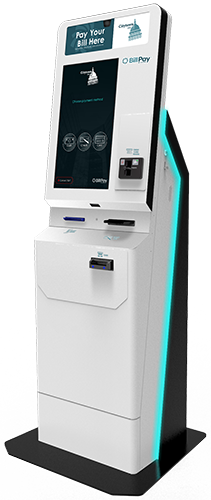
We offer multiple powdercoat colors and signage with your logo to personalize the kiosk for you. 2
Eye-catching LED lighting to lets your customers know to “Pay Your Bill Here.” 3
Peripherals include:
- Camera
- 22” Touchscreen
- Barcode Scanner
- Card Reader
- Check Reader
- Bill Acceptor
- Receipt Printer
12345
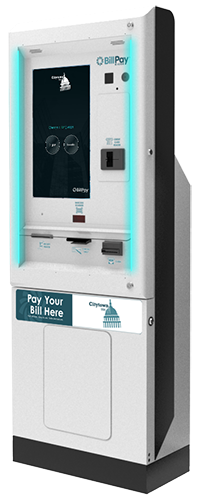
The outdoor model is specifically designed to be weather-resistant against hot and cold, ensuring a reliable and durable service for our customers all year round. 2
Eye-catching LED lights draw your customers to this easy-to-use kiosk. 3
Peripherals include:
- Camera
- 22” Touchscreen
- Barcode Scanner
- Card Reader
- Check Reader
- Bill Acceptor
- Receipt Printer
4
We’ll print your logo onto the kiosk signage. Select from multiple powdercoat colors for a custom look and feel. 5
Made from stainless steel, this model’s enclosure ensures a longer life in outdoor conditions. 1234
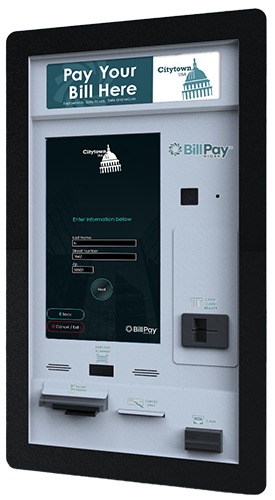
Your logo here! You can also customize the hardware color to match your branding. 2
Ideal for drive-through or walk-up service. 3
This model is made from stainless steel and built to last. 4
Peripherals include:
- Camera
- 22” Touchscreen
- Barcode scanner
- Card Reader
- Check Reader
- Bill Acceptor
- Receipt Printer
- Rear monitor for easy access
- Sliding printer mount
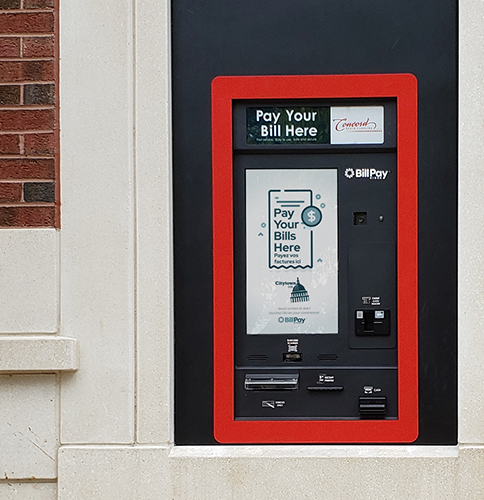
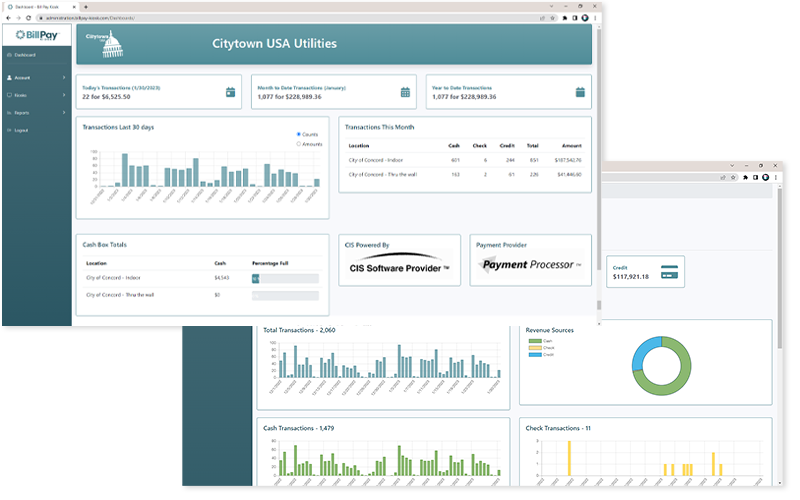
User Interface & Administration Portal
Learn more about our user interface and administration portal by downloading our full product brochure.
Dafox Eloading – How it works Kiosk E Loading and Bills Payment Machine
FAQ
What is the machine used to pay bills?
Multiple Payment Methods: A bill payment kiosk is a digital system which has ability to integrate multiple payment methods such as cash, coins, credit/debit cards, and digital payment modes, offering more ease, convenience and freedom to customers.
Is automatic bill pay a good idea?
What is kiosk payment?
A payment kiosk is a type of self-service kiosk that is able to receive a bill payment in exchange for a service or good rendered. An example of this is buying a ticket at a bus stop, where money is inserted, and a bus ticket is printed for you without having you interact with a bus station employee.
Is there a company that will pay my bills for me?
SilverBills Account Manager will schedule an enrollment session which will take place over the phone, email, or text based on your preference. After that, SilverBills will receive, review, store and ensure that your bills are paid on your behalf.
