North Delhi Power Limited (NDPL) is a privately owned electricity distribution company that operates in North and North-West areas of Delhi. The company was acquired by TATA Power in 2014, and since then, it has been a part of TATA Powers distribution business in India.
Hey there! If you’re reading this, I bet you’re looking to simplify your life with NDPL online bill payments. Well you’ve stumbled upon the right blog! Today we’re diving deep into everything you need to know about paying your Tata Power-DDL (formerly known as NDPL) electricity bills online. Trust me, once you go digital, you’ll wonder how you ever stood in those long queues before!
What Exactly is NDPL and Why the Name Change?
For those who might be confused, NDPL (North Delhi Power Limited) is now known as Tata Power-DDL (Tata Power Delhi Distribution Limited). The company underwent this rebranding a few years back, but many customers still refer to it as NDPL out of habit. No worries though – whether you call it NDPL or Tata Power-DDL, we’re talking about the same electricity distribution company serving North Delhi!
Why Should You Pay Your Electricity Bill Online?
Before we jump into the “how” let’s quickly talk about the “why”
- No more queues! Skip those long, frustrating lines at payment centers
- 24/7 convenience – pay at 3 AM in your pajamas if you want!
- Instant receipts sent directly to your email and mobile
- Track payment history easily for budgeting
- Set reminders to avoid late payment fees
- Multiple payment options from credit cards to UPI
I personally switched to online payments last year and haven’t looked back. The time I’ve saved not having to visit the payment center every month is worth its weight in gold!
Quick Guide to NDPL (Tata Power-DDL) Online Bill Payment
Method 1: Through Official Tata Power-DDL Website
- Visit the official website at https://www.tatapower-ddl.com/billpay/paybillonline.aspx
- Look for the “Pay Bill Online” section
- Enter your CA Number (Consumer Account Number)
- Provide your mobile number and email ID to receive the e-receipt
- Verify the captcha by entering the sum of two numbers
- Click on “Pay Now” after agreeing to the terms & conditions
- Choose your preferred payment method
- Complete the payment and save your receipt
Method 2: Using Quick Bill Pay
If you prefer a more streamlined approach
- Go to https://pgi.billdesk.com/pgidsk/pgmerc/tatapwr/TATAPWRDetails.jsp
- Enter your Consumer Number in the designated field
- Click “Proceed”
- Review your bill details
- Choose your payment method
- Complete the transaction
- Save your receipt for future reference
Where to Find Your CA Number?
One common roadblock I’ve seen is people not knowing their CA number. It’s actually printed on your electricity bill! Look for “CA No.” or “Consumer Account Number” on your physical or electronic bill. It’s usually displayed prominently on the top portion.
If you’ve misplaced your bill, don’t panic! You can:
- Call the Tata Power-DDL customer care at 19124 or 1800-208-9124
- Email them at [email protected]
- Visit your nearest Tata Power-DDL customer care center with valid ID proof
Payment Options Available
Tata Power-DDL offers a variety of payment options to suit everyone’s preferences:
| Payment Method | Convenience Fee | Transaction Limit |
|---|---|---|
| Credit Card | Free up to ₹5000 per billing cycle | As per card limit |
| Debit Card | Free up to ₹5000 per billing cycle | As per card limit |
| Net Banking | Free | No limits, part payments allowed |
| UPI | Free | As per UPI limits |
| Digital Wallets (PayTM, Google Pay, etc.) | As per wallet provider | As per wallet limits |
Important Security Tips for Online Payments
We all know online security is super important, especially when money’s involved. Here are some tips straight from Tata Power-DDL:
- Always check that the website URL starts with “https://”
- Never use public computers or public Wi-Fi for bill payments
- Don’t share your password, OTP, or card details with anyone
- Be wary of suspicious emails or messages requesting payment information
- Avoid clicking on unknown links from SMS/emails claiming to be from Tata Power-DDL
- Keep your device’s security software updated
I once nearly fell for a phishing attempt claiming to offer a “discount” on my bill payment. Remember, if something seems too good to be true, it probably is!
What About Commercial Consumers?
For my business readers out there, here’s something to note: If your monthly electricity bill exceeds ₹20,000 and you’re not in the domestic, agriculture, or mushroom cultivation category, digital payment is mandatory! Tata Power-DDL requires you to use digital platforms like NEFT, RTGS, IMPS, cards, or wallets for payments.
Helpful Features You Might Not Know About
Tata Power-DDL’s online platform offers more than just bill payment. Here are some cool features you can access:
1. Download Previous E-payment Receipts
Lost your receipt? No problem! You can download past payment receipts directly from the website.
2. Generate Online Prepaid Coupons
If you’re on a prepaid meter, you can generate recharge coupons online without visiting a center.
3. Payment Confirmation Slip
Need proof of payment? Access your last payment confirmation slip with just a few clicks.
4. Find Nearest Payment Center
For those times when you still prefer paying in person, you can locate the nearest payment center through the website.
Troubleshooting Common Issues
“My payment was deducted but I didn’t receive a confirmation”
This happens sometimes due to network glitches. Don’t panic and definitely don’t try paying again immediately! Wait for about 24 hours as the transaction might still be processing. If you still don’t receive confirmation, contact Tata Power-DDL customer care with your transaction details.
“The website is not accepting my CA number”
Double-check for typos. If you’re sure the number is correct, try clearing your browser cache or using a different browser. Still having issues? Reach out to customer support.
“I paid the wrong amount”
If you paid less than your bill amount, you can make another payment for the remaining balance. If you paid more, the excess amount will usually be adjusted in your next bill.
Beyond Basic Bill Payment: Value-Added Services
Did you know that Tata Power-DDL offers additional services through their online portal?
- Energy Saving Calculator: Find out how much power your appliances consume
- Scheduled Outage Information: Check if there’s planned maintenance in your area
- Real-Time Power Scenario: View current power supply status
- Virtual Connect: Meet online with a Tata Power-DDL executive to resolve issues
- Subsidy Eligibility Calculator: Determine if you qualify for electricity subsidies
My Personal Experience with NDPL Online Bill Pay
I’ve been using Tata Power-DDL’s online payment system for over a year now, and it’s been mostly smooth sailing. The interface is straightforward, though I wish the mobile version was a bit more responsive. The immediate payment confirmation via SMS and email gives me peace of mind.
The best part? I’ve set a calendar reminder on my phone for bill payments, and I haven’t paid a single late fee since switching to online payments. That’s a win in my book!
Future of Electricity Bill Payments
With the push toward Digital India, we’re seeing more innovations in utility payments. Some exciting developments on the horizon:
- AI-powered consumption predictions to help you budget better
- Voice-activated payments through smart home devices
- Integrated bill management apps that handle all your utilities in one place
- Rewards programs for consistent digital payments
Final Thoughts
Switching to NDPL online bill payment is one of those small changes that makes a big difference in your monthly routine. No more last-minute rushes to payment centers, no more standing in queues, and no more lost receipts!
If you haven’t made the switch yet, I strongly encourage you to give it a try this month. The convenience is truly worth it, and the security measures in place ensure your transactions are safe.
Have you already been paying your electricity bills online? What’s been your experience? Drop a comment below – I’d love to hear about it!
Quick FAQ Section
Q: Can I make partial payments online?
A: Yes, for net banking payments, partial payments are allowed. However, credit/debit card payments must be made in full.
Q: Will I be charged extra for paying online?
A: For payments up to ₹5000 per billing cycle, there are no processing fees. For larger amounts, charges may apply depending on your payment method.
Q: How quickly will my payment reflect in my account?
A: Most online payments are processed instantly or within a few hours. However, during system maintenance or high traffic periods, it may take up to 24 hours.
Q: Can I schedule automatic payments?
A: This depends on your bank’s services. Many banks allow you to set up standing instructions for utility bill payments.
Q: What if I forget my CA number?
A: You can find it on your electricity bill or contact Tata Power-DDL customer care for assistance.
Stay bright and bill-smart!
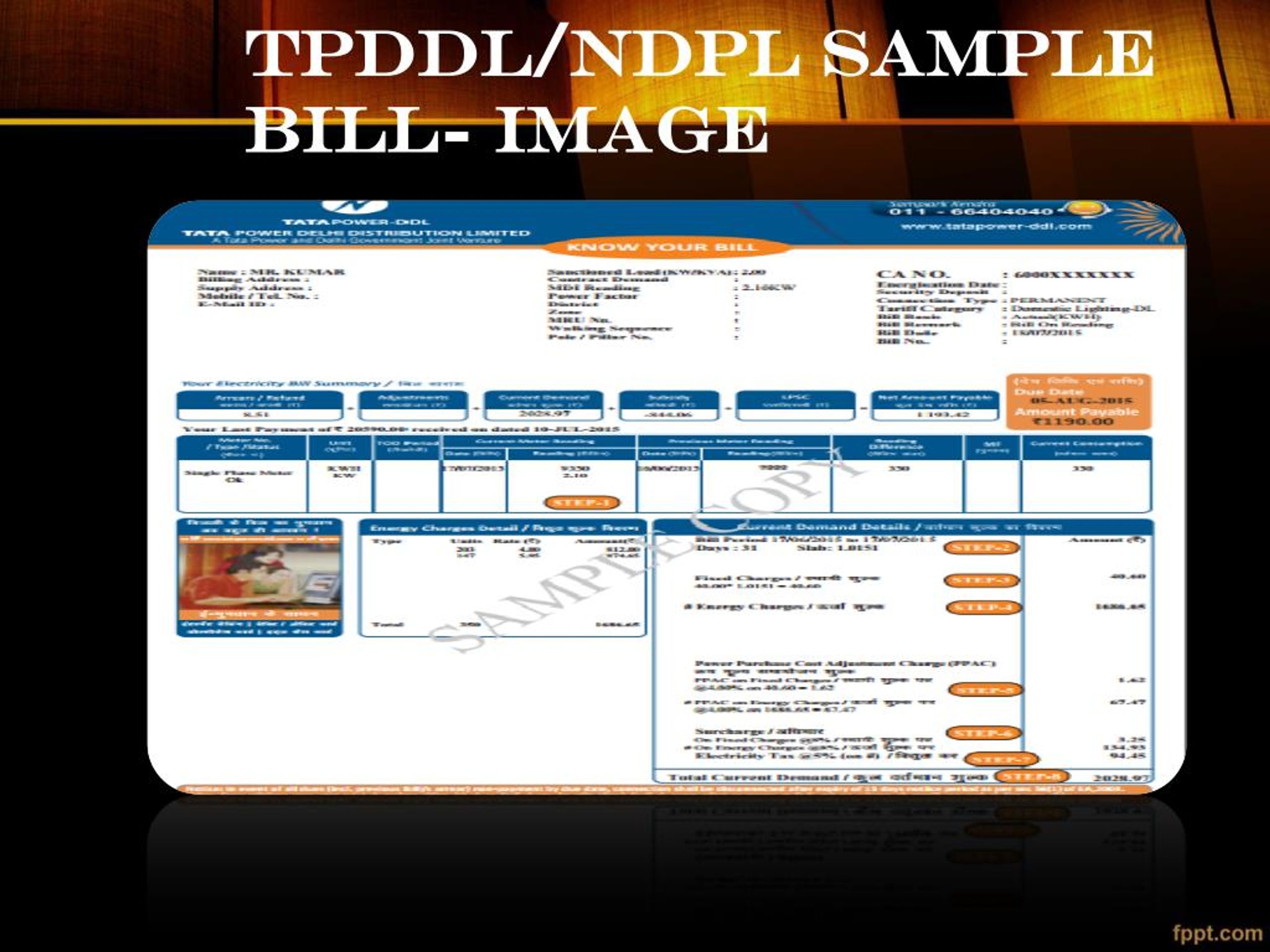
How to Calculate NDPL bill payment based on used units?
- Check the NDPL tariff rates and the unit-wise charges applicable to your electricity consumption slab on the NDPL website or bill.
- Note down the number of units consumed during the billing period mentioned in your NDPL bill.
- Multiply the number of units consumed by the applicable unit-wise charges to calculate the electricity charges for the billing period.
- Add any other charges such as fixed charges, regulatory charges, and taxes to the electricity charges to arrive at the total amount due.
How to download my NDPL bill payment receipt?
- ● Open the Freecharge app or website and log in to your account.
- ● Click on the Electricity option from the homepage.
- ● Select TATA Power Delhi Distribution Limited as the electricity provider.
- ● Click on the Transaction History option.
- ● Click on the transaction for which you want to download the receipt.
- ● Click on Download to download the receipt.
