New York State Electric & Gas (NYSEG) has electric and natural gas customers from upstate New York to Ithaca and Binghamton. The company has over 36,000 miles of power lines (distribution and transmission lines) and 7,800 miles of gas distribution lines. In total, NYSEG serves over 1.1 million New Yorkers.
Hey there! If you’re looking to pay your NYSEG bill and want to know the best way to do it, you’ve landed in the right spot. I’ve been managing utility payments for years, and I’m gonna break down everything you need to know about paying your NYSEG bill. Let’s dive right in!
What is NYSEG?
Before we jump into payment methods, let’s quickly talk about what NYSEG actually is. NYSEG (New York State Electric & Gas) provides electricity and natural gas services to customers across New York State. They’re part of the AVANGRID Networks family, and they’ve been keeping homes powered and heated for decades.
NYSEG Bill Payment Options
NYSEG offers several convenient ways to pay your bill Each has its own advantages, so you can pick whichever works best for your lifestyle
1. Pay by Phone
The quickest way to pay your NYSEG bill is by phone Here are your options
- Automated Service (Toll-Free): Call 800.600.2275, available 24/7
- Customer Care Representative: Call 800.572.1111, Monday through Friday, 7:00 a.m. to 7:00 p.m.
When calling, have your account number handy. The automated system walks you through the payment process step-by-step, making it super easy even if you’re not tech-savvy.
2. Pay Online
The NYSEG website (https://sso.nyseg.com/) offers a straightforward online payment portal. Here’s how to use it:
- Visit the NYSEG login page
- Sign in with your email/username and password
- Select the “Pay Online” option
- Follow the prompts to complete your payment
If you don’t have an online account yet, you can click the “Register now” button on the login page to create one. It takes just a few minutes, and you’ll be able to manage your account 24/7.
3. Pay by Mail
If you prefer the traditional route, you can mail your payment:
Mail Address: NYSEG, P.O. Box 847812, Boston, MA 02284-7812
When paying by mail. always
- Include your account number on your check
- Allow 5-7 days for processing
- Don’t send cash
4. AutoPay
If remembering to pay your bill each month is a hassle, AutoPay might be your best friend. With AutoPay, NYSEG automatically deducts your payment from your bank account or charges your credit card on the due date.
To set up AutoPay:
- Log into your NYSEG account
- Navigate to “Payment and Billing Options”
- Select “AutoPay”
- Follow the setup instructions
This option ensures you never miss a payment and don’t incur any late fees. It’s a real lifesaver for those of us with busy schedules!
Special Payment Programs and Options
Budget Billing
If you hate the surprise of varying bill amounts each month, Budget Billing might be for you. This program calculates your average annual energy usage and divides it into 12 equal monthly payments.
To enroll in Budget Billing:
- Log into your NYSEG account
- Go to “Payment and Billing Options”
- Select “Budget Billing”
- Review and confirm your enrollment
Help With Bill
Sometimes, energy bills can be challenging to pay, especially during extreme weather seasons. NYSEG offers assistance programs for customers experiencing financial hardship. Under the “Help With Bill” section of their website, you can find information about:
- Payment arrangements
- Financial assistance programs
- Energy assistance options
Understanding Your NYSEG Bill
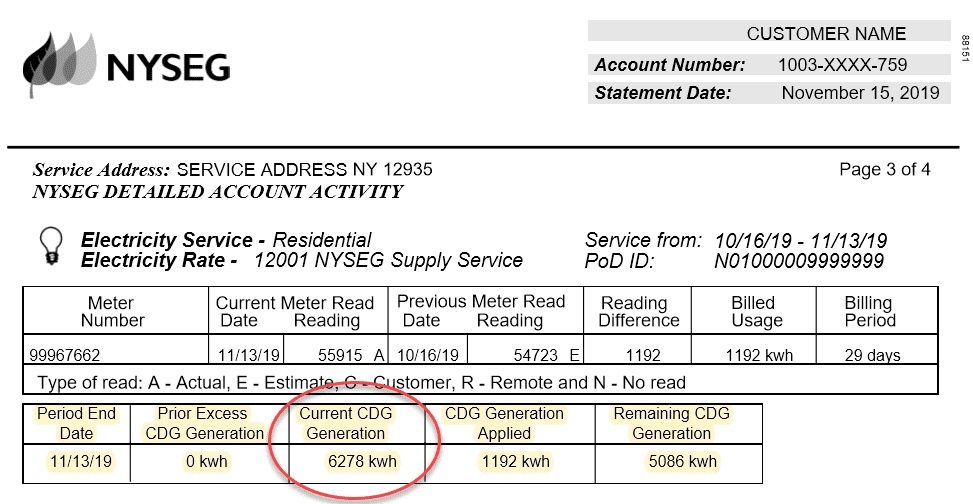
To make informed decisions about your energy usage and costs, it helps to understand your bill. Your NYSEG bill includes:
- Account Summary: Shows previous balance, payments, and current charges
- Usage Information: Displays your electricity and/or gas consumption
- Payment Due Date: The date by which payment must be received
- Account Number: Your unique identifier (you’ll need this for all payment methods)
NYSEG provides detailed information on their website under “Understand Your Bill” to help you make sense of all the charges and fees.
Energy Management Tools
Beyond just paying your bill, NYSEG offers several tools to help you manage your energy usage:
Energy Manager
The Energy Manager tool on the NYSEG website helps you track your energy consumption, compare usage over time, and identify opportunities to save money. This can be especially useful if you’re trying to reduce your utility costs.
Smart Meters
If you have a smart meter installed, you can access more detailed information about your energy usage. Smart meters provide real-time data, allowing you to make adjustments to your habits and potentially lower your bills.
What to Do During Power Outages
While we’re primarily focusing on bill payment here, it’s worth mentioning what to do if you experience a power outage:
-
Report the Outage: NYSEG provides multiple ways to report outages, including through their website, mobile app, or by phone.
-
Check Outage Status: You can view the outage map on their website to get updates on restoration times.
-
Stay Safe: Follow NYSEG’s safety guidelines during outages, particularly if you’re using generators or alternative heating sources.
The NYSEG Mobile App
For those who prefer managing utilities on the go, NYSEG offers a mobile app that allows you to:
- Pay your bill
- Report outages
- View outage maps
- Access account information
- Submit meter readings
The app is available for both iOS and Android devices and provides a user-friendly interface for all your NYSEG needs.
Setting Up New Service
If you’re moving to a new home within NYSEG’s service area, you’ll need to set up service. The website offers a “Start Service” option under the “Moving” section. You’ll need to provide:
- Your new address
- The date you want service to begin
- Personal information for account setup
- Possibly a security deposit (depending on credit history)
Safety Information from NYSEG
NYSEG prioritizes customer safety and provides extensive resources on both electrical and natural gas safety. Key safety topics covered include:
- Electrical safety guidelines
- Natural gas leak detection and response
- Generator safety
- Digging safety (always call before you dig!)
- Carbon monoxide awareness
This information is crucial for all customers, regardless of how you pay your bill.
Community Programs
NYSEG is committed to the communities they serve and offers various programs focused on:
- Environmental initiatives
- Educational resources for schools
- Economic development
- Community support and outreach
Energy Efficiency Programs and Rebates
Want to lower your bill permanently? NYSEG offers numerous rebates and incentives for energy-efficient upgrades:
For Homeowners
- NYS Clean Heat Rebate Program
- EmPower+
- Smart Savings Rewards
- Insulation & Air Sealing Rebates
For Businesses
- Commercial & Industrial Rebates
- Small Business Program
- Energy Management Partnership Program
Taking advantage of these programs not only reduces your environmental footprint but can significantly lower your monthly bills too.
Tips for Lowering Your NYSEG Bill
Here are some practical tips to help reduce your energy consumption and lower your monthly NYSEG bill:
- Adjust your thermostat: Lower it in winter and raise it in summer, even by just a few degrees
- Upgrade to LED lighting: Uses up to 75% less energy than incandescent bulbs
- Seal air leaks: Around doors, windows, and other openings
- Maintain your HVAC system: Regular maintenance improves efficiency
- Unplug electronics: Even when turned off, many devices continue drawing power
Common Questions About NYSEG Bill Payments
What happens if I miss a payment?
If you miss a payment, NYSEG typically applies a late fee to your account. Continued non-payment may lead to service disconnection, but NYSEG will send multiple notifications before taking this step.
Can I make partial payments?
Yes, NYSEG accepts partial payments, but your account will be considered current only when the full amount due is paid.
Is there a fee for online payments?
There’s typically no fee when paying directly through NYSEG’s website or using electronic checks. However, credit card payments might include a small processing fee.
What if I think my bill is incorrect?
If you believe there’s an error on your bill, contact NYSEG customer service immediately at 800.572.1111 to discuss the issue.
Final Thoughts
Managing your NYSEG payments doesn’t have to be complicated. With the various options available—from phone payments to AutoPay—you can choose what works best for your lifestyle.
Remember, the most important things to keep in mind are:
- Keep track of your account number
- Know your payment due date
- Choose a consistent payment method
- Consider AutoPay to avoid missing payments
I personally prefer using the NYSEG website for my payments because I can check my usage at the same time. But honestly, the phone payment system at 800.600.2275 is super quick when I’m in a rush.
No matter which method you choose, staying on top of your NYSEG bill ensures uninterrupted service and helps you avoid unnecessary fees. And don’t forget to explore those energy efficiency programs—they’ve saved me a ton on my own utility bills!
What’s your preferred way to pay your NYSEG bill? Have you tried any of their energy-saving programs? I’d love to hear about your experiences in the comments below!
What to Do if Thereâs a Power Outage
If youâre facing a power outage or any form of natural gas emergencies such as a gas leak, immediately report it here or call the outages phone number. If you notice a streetlight outage, you should report it here.
If youâre wondering what other areas are affected by outages, you can check out the list of electricity outages, or you can check out the outage map.
You can learn about the latest outage news here. If you want to go through outage resources, you can do so here.
NYSEG has several customer service options.
- Use the Contact Us page to make general inquiries.
- Go through the FAQs to find answers to common issues.
- Follow NYSEG on Twitter and Facebook for the latest updates.
- Visit the Outage Central if youâre facing any outages.
- Follow AVAnews for company-related news.
You can use the Emergency Contact section to send an email, submit a claim, report energy theft, or provide website feedback.
Does NYSEG Have Payment Plan Options?
PPL Electric has several payment plan options for different customers. Here are six payment programs they currently offer.
- Home Energy Assistance Program: HEAP helps low-income households pay for energy and weatherization costs. Keep in mind that HEAP is a federal program and has limited funding, so itâs best to apply as soon as possible. You can learn more here.
- Energy Assistance Program: EAP is an assistance program that helps customers gain control of their energy bills. You can get bill credits and forgiveness in some cases. You can learn more about it here.
- Project SHARE Heating Fund: The program is for low-income customers who have energy emergencies. If youâre a veteran or on active military duty, you can qualify regardless of income. You can learn more here.
- Budget Billing: Budget Billing helps make your energy bill predictable as your yearly bill is divided into 12 equal monthly payments. You can learn more about it here.
- One Less Worry: If you or any household member is hospitalized, you can put your bill on hold for 30 days with one call.
- NYSEG Smart Solutions: You can buy and install energy efficiency upgrades for your home. You can receive partial rebates on some upgrades. You can learn more here.
You can learn more about the payment programs here.
