Let me be straight with you – I’ve been researching bill payment apps for months, and Papaya Bill Pay keeps popping up. The promise sounds amazing: snap a photo of ANY bill and consider it paid. But is it actually that simple? And more importantly, is it reliable?
I’ve dug through dozens of Papaya reviews across multiple platforms to bring you this comprehensive breakdown. Whether you’re tired of juggling different payment portals or just want to know if Papaya deserves space on your phone this article will help you decide if it’s worth downloading.
What is Papaya Bill Pay?
Papaya is a mobile bill payment app that claims to let you pay virtually any bill by simply taking a photo of it. Founded in 2016 and based in Sherman Oaks, California, Papaya markets itself as the solution to complicated bill payments.
Here’s how it works:
- You snap a photo of your bill
- Confirm your payment method (bank account or credit card)
- Track the bill status
The company claims to handle everything from medical bills to utility payments, HOA fees, and even parking tickets. Their tagline “Literally pay any bill with Papaya” sets high expectations.
Papaya Bill Pay: The Good Stuff
1. Convenience That’s Hard to Beat
Many positive reviews highlight how Papaya simplifies bill payment. Instead of creating accounts on multiple websites or mailing checks users can process everything through one app.
As one reviewer stated: “I pay my bills standing at my mailbox with taking a picture of the bill with Papaya. I don’t know how they do it… Magic! This is a game changer!”
2. Wide Acceptance
Papaya claims to work with practically any biller even those that traditionally only accept paper checks. This flexibility is mentioned repeatedly in positive reviews
“When they say they will pay any bill, know they mean ANY bill. Even my HOA who only accepts paper checks still accepts payment from Papaya. I couldn’t be happier.” – Josh (via Papaya website)
3. Time-Saving
Many reviewers appreciate how Papaya eliminates the hassle of payment portals:
“I pay so many bills for our family and each one has different log-ins and some of the websites are so frustrating to use. This makes it so easy!” – Jenny (via Papaya website)
Another user commented: “It literally took me longer to write this review than to pay my bills…lol.”
Papaya Bill Pay: The Concerning Stuff
While there are plenty of satisfied customers, Papaya has received several complaints that reveal potential issues with the service.
1. Payment Processing Delays
Multiple users report that their payments took significantly longer to process than expected, sometimes resulting in late fees or service disconnections.
From ComplaintsBoard, one user stated: “I called the health provider and they said that Papaya is notoriously slow—taking 2-3 weeks to deliver payments.”
Another user experienced a distressing situation: “On 8/5/22, I paid $338.00 for my light bill using bill pay via papaya. It was deducted and I received a reference number. On 8/8/22, my power was cut during work.”
2. Double Charges and Billing Errors
Several complaints mention instances of double charges:
“I made a payment to pay my city for a utility bill and it was deducted from my bank account 2 times. One says from papaya and one says from the city but I only paid through papaya.”
In another case: “First month I used the app, no issues. Second month I used the app and instead of the $20 payment that I input, they simply paid the entire medical bill of $192.43.”
3. Customer Service Challenges
Many negative reviews highlight difficulties in contacting Papaya when issues arise:
“I’ve contacted papaya through email several times with no response. I cannot find a contact phone number for them.”
Another user complained: “I have sent an email requesting an explanation and to get my money reimbursed and heard nothing. Throughout the week, I sent 3 more emails and still no response.”
Is Papaya Bill Pay Safe to Use?
Papaya claims to use enterprise-level encryption and is PCI, SOC2, and HIPAA compliant according to their website. However, the security of your financial information depends not just on technical safeguards but also on the company’s ability to properly process transactions.
Some concerns to consider:
-
Unclear handling of payment information: Several complaints mention confusion about how Papaya processes payments, with some users seeing charges from unexpected sources.
-
Account access concerns: While the app itself may be secure, the simple photo-based process means that anyone with access to your phone and the app could potentially submit payments.
-
Resolution of payment issues: Multiple complaints indicate delays in resolving payment errors, which could affect your financial security.
Pricing: Are There Hidden Fees?
Papaya’s website doesn’t prominently display their fee structure, which has led to some surprises for users. Some complaints mention unexpected charges:
“They charged me a $38 fee on my dental bill and DID NOT notify me they were doing it!”
Another user found: “I paid a medical bill with my checking account using this app… I received a receipt from the hospital that showed it was charged to a credit card with additional fees added on as well.”
How Does Papaya Compare to Alternatives?
When considering Papaya, it’s worth comparing it to other bill payment options:
| Feature | Papaya | Bank Bill Pay | Direct to Biller |
|---|---|---|---|
| Convenience | High (photo-based) | Medium (setup required) | Low (multiple accounts) |
| Speed | Variable (sometimes delayed) | Usually reliable | Immediate confirmation |
| Fees | Some hidden charges reported | Often free | Usually free |
| Customer Service | Mixed reviews | Generally responsive | Varies by company |
| Payment Types | Almost any bill | Limited to electronic payments | Only that company’s bills |
Who Should Use Papaya Bill Pay?
Based on the reviews, Papaya might be a good fit if:
- You have lots of different bills with different payment systems
- You particularly hate dealing with paper bills that require checks
- You’re willing to submit payments a few weeks before due dates to account for potential delays
It might NOT be ideal if:
- You need guaranteed on-time payments
- You’re on a tight budget where unexpected fees would cause problems
- You prefer immediate payment confirmation
- You have bills that absolutely must be paid on time to avoid service interruptions
Tips for Using Papaya More Safely
If you decide to try Papaya despite the mixed reviews, here are some suggestions to minimize potential issues:
- Submit payments well in advance of due dates to account for potential processing delays
- Monitor your accounts closely after submitting payments
- Keep confirmation emails and payment reference numbers
- Check with billers to confirm receipt for important payments
- Start with smaller, less critical bills to test the service before trusting it with major payments
My Final Thoughts on Papaya Bill Pay
The idea behind Papaya is brilliant – who wouldn’t want to simplify bill payments into a quick photo snap? For many users, it works exactly as advertised and makes their lives easier.
However, the concerning pattern of complaints about delayed payments, unexpected charges, and customer service challenges suggests that Papaya might not be reliable enough for critical bills where timely payment is essential.
I think Papaya could be useful as a supplementary tool for certain bills, particularly those annoying paper bills that are a hassle to pay. But I wouldn’t recommend making it your only bill payment method, and I definitely wouldn’t use it for bills with strict due dates or severe late penalties.
As one reviewer wisely put it: “When it works, it’s easy.” The question is whether you’re willing to accept the risk for those times when it doesn’t work as expected.
Have you tried Papaya Bill Pay? I’d love to hear about your experience in the comments below!
FAQs About Papaya Bill Pay
Q: How long does it take for Papaya to process payments?
A: While Papaya doesn’t specify exact timeframes on their website, user reviews suggest processing can take anywhere from a few days to several weeks. It’s best to submit payments well before due dates.
Q: Does Papaya charge fees for its service?
A: Some users report unexpected fees on their transactions. The fee structure isn’t clearly outlined on their website, so be sure to check payment confirmations carefully.
Q: What if my payment doesn’t go through?
A: If you experience issues, you can contact Papaya through their website. However, several users report delays in customer service responses, so it’s advisable to follow up with your biller directly.
Q: Can Papaya really pay any type of bill?
A: While Papaya claims to pay any bill, some users have reported that certain billers don’t accept payments from Papaya. It’s best to confirm with important billers before relying on the service.
Q: Is my information secure with Papaya?
A: Papaya states they use enterprise-level encryption and are PCI, SOC2, and HIPAA compliant. However, as with any financial app, use strong passwords and monitor your accounts regularly.
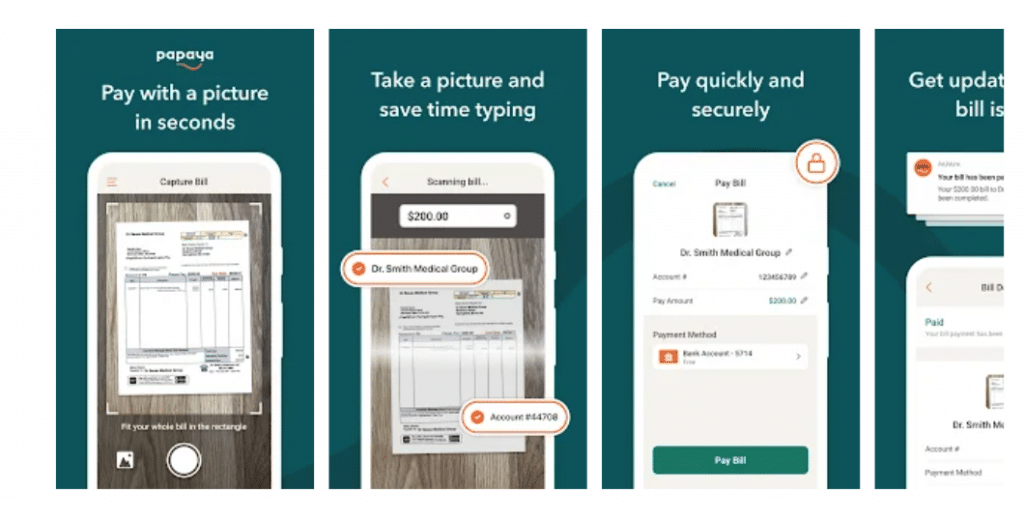
About this appPapaya is the quickest way to pay your bills. Just snap a photo of your bill and Papaya takes care of the rest! It’s free, secure, and unbelievably easy. That’s right. No more mailing checks, making phone calls, or logging into twelve different accounts to make payments. And the best part? Papaya is FREE to use! The Papaya app makes bill pay fast, easy and pain-free. In fact, we use the same game-changing technology that you use to deposit a check on your banking app. Simply take a picture of your bill and your payment is sent. HOW IT WORKS Download the Papaya app (it’s free!) 2. Snap a picture of your bill 3. Choose a payment method And presto, Papaya sends the payment for you! PAY ANY BILL Papaya works for all bills – medical, dental, utilities, rent, insurance, loans, parking tickets, DMV, plumbing services, business bills, your dog’s training lessons, your kids’ daycare bills and more. PAY SECURELY Your security is our priority. Papaya is HIPAA and PCI compliant, and bank-level secure. PAY QUICKLY It takes only seconds to make payments, and most are settled within 24 hours. PAY HOW YOU’D LIKE You can pay with any payment method: bank account, credit card, debit card or FSA/HSA card, as long as your merchant accepts it. MORE ABOUT PAPAYA We are a fast growing FinTech startup backed by the same investors behind Uber, Facebook, Google and YouTube and the winner of the PayAwards “Most Innovative Technology”. You can learn more about us at https://PapayaPay.com. Our Terms of Service are here: https://PapayaPay.com/tos.htmlUpdated on9 Jun 2025


- Flag inappropriate
- Show review history
