Managing your Portland General Electric (PGE) bill doesn’t have to be a headache. As a Portland resident myself, I’ve tried several different payment methods over the years, and I’m happy to share what I’ve learned about the most convenient ways to handle your electricity payments.
Whether you prefer managing everything online or sticking with traditional payment methods, PGE offers several options to fit your lifestyle. Let’s dive into the various ways you can pay your Portland General Electric bill and some helpful billing programs that might make your life easier.
Online Payment Options
PGE Website and Mobile App
The quickest and most convenient way to pay your PGE bill is through their website or mobile app. I’ve been using the app for the past year, and it’s been a real time-saver.
To pay online you’ll need to
- Sign in to your account or register if you haven’t already
- Have your PGE account number handy
- Set up your preferred payment method (bank account or card)
The PGE mobile app is available for both Android and iPhone devices Beyond just paying your bill, the app lets you
- Report outages
- Track your energy usage
- Set up customized alerts
- Access your account on the go
What I really like about the online payment system is the Quick Pay feature that comes with paperless billing. Once you save your bank information, future payments just take a few clicks – no need to re-enter your details each time.
Other Payment Methods
Not everyone prefers digital payments, and PGE understands this. They offer several alternative payment options:
Pay by Phone
If you prefer speaking with someone or using an automated system, you can pay by phone at:
- 503-228-6322 (Portland area)
- 800-542-8818 (toll-free)
You’ll need your PGE account number and banking information ready. The automated system is available 24/7, making it convenient regardless of your schedule.
Pay in Person
Sometimes I prefer paying bills in person, especially when I’m already out running errands. PGE partners with Western Union and CheckFreePay locations, which can be found in many major retailers around Portland.
The good news? There are no fees when paying with cash or debit card at these locations. Just remember to:
- Bring your PGE account number
- Allow 2 business days for your payment to post
- Get a confirmation number (especially important if your bill is past due)
Pay by Mail
The traditional mail-in option is still available. Simply send your payment to:
Portland General Electric
P.O. Box 4438
Portland, OR 97208-4438
Remember to include your payment stub or account number with your check!
Helpful Billing Programs
PGE offers several programs that can make managing your electricity bills easier. I enrolled in Auto Pay last year, and it’s been one less thing to worry about each month.
Paperless Billing
Going paperless is both convenient and environmentally friendly. When you sign up, you’ll:
- Receive email notifications when your bill is ready
- Be able to view your complete bill online anytime
- Have access to bills going back 36 months
- Reduce paper waste (something we Portlanders care about!)
The added “Quick Pay” benefit means you can pay with just a few clicks once your banking info is saved.
Auto Pay
This has been my personal favorite. With Auto Pay:
- Your bill is automatically paid through your bank account
- Payments are always on time (even during those hectic months)
- You’ll still receive your monthly statement to review
- Your payment is securely processed on the due date
When you first sign up, continue paying your bills manually until you receive a statement marked “Do Not Pay” – that’s when you know the automatic system has kicked in.
Equal Pay
Portland weather can be unpredictable, which means your electricity usage (and bill amount) might vary significantly from month to month. The Equal Pay program evens this out by:
- Calculating your average annual usage
- Dividing that amount into 11 equal monthly payments
- Giving you one “catch-up” month each year to reconcile differences
PGE reviews your account every four months to make adjustments as needed, which helps avoid major surprises during the catch-up month.
Choose Your Due Date
This program is particularly helpful if you’re on a fixed income or have specific paycheck dates. You can request a billing due date that aligns better with your cash flow.
Just note that when you first switch, your initial bill might be a bit higher or lower than usual as the system adjusts to your new schedule. The new due date takes effect the following month.
Help With Paying Your Bill
We all go through tough times. If you’re struggling to pay your PGE bill, don’t ignore it – there are resources available:
Bill Payment Assistance
PGE can connect you with federal, state, and charitable resources based on your last 30 days of income. Simply call 503-228-6322 to discuss your options.
Income-Qualified Bill Discount Program
This program provides ongoing monthly assistance with your PGE bill. Depending on your household size and annual income, you may qualify to pay less for your energy. This assistance is in addition to any other help you might receive from PGE or other agencies.
Tips for Managing Your PGE Account
After years of managing my own PGE account, I’ve picked up some helpful strategies:
-
Set reminders: Even with auto-pay, I like to review my bill when it arrives to check for unusual usage patterns.
-
Monitor your usage: PGE’s online tools let you track energy consumption, which can help identify ways to reduce your bill.
-
Consider budget billing: If you prefer predictable payments, the Equal Pay program might be right for you.
-
Be aware of scams: Remember that PGE employees will never ask for payment information over the phone. If someone calls claiming to be from PGE and requests payment, it’s likely a scam.
-
Download the app: The mobile app makes managing your account significantly easier, especially for quick payments or reporting outages.
What to Watch Out For
A few things to keep in mind when dealing with your PGE bill:
-
Late payments: If you’re having trouble paying on time, contact PGE before your due date to discuss options.
-
Browser settings: To access your online account, make sure your browser accepts cookies and has JavaScript enabled.
-
Account security: PGE uses cookies to enhance security and will automatically sign you out after 20 minutes of inactivity.
-
Payment processing time: Different payment methods have different processing times. In-person payments take about 2 business days to post to your account.
Final Thoughts
Managing your PGE bill doesn’t have to be complicated. Whether you prefer the convenience of digital payments or traditional methods like mail or in-person payments, Portland General Electric offers options to suit different preferences.
I’ve found the combination of paperless billing and auto-pay to be the most convenient setup – it saves time, paper, and ensures I never miss a payment. But what works best for you might be different depending on your specific situation.
Remember that if you ever have questions or concerns about your bill, PGE’s customer service team is available Monday through Friday from 7 a.m. to 7 p.m. at 503-228-6322 or 800-542-8818.
Stay on budget with bill forecast
Receive an alert when your bill is forecast to exceed a specified amount.
On the SmartRate plan, you pay a reduced rate in exchange for using less electricity on as many as 15 days a year.
Receive text, email or phone updates about outages in PG&Es service area.
Get help paying your bill
Find payment assistance programs like CARE, FERA and Medical Baseline. Set up payment arrangements.
PGE offers first income-based energy bill discount program in Oregon
FAQ
Can you pay PGE bill without logging in?
Pge.com users can pay their bill without signing in. However, if you pay by phone or use the guest bill pay option without signing into your account, the following transaction fees below will apply: Effective June 9, 2025: Residential customers using a consumer/personal credit card or debit card: $1.50.
How do I view my PG&E bill online?
- Sign into your account.
- Go to your My Account dashboard.
- Under Billing, click “All billing tasks.”
- Scroll down to “Billing & Payment History.”
- Find the bill by date in the list of bills and payments.
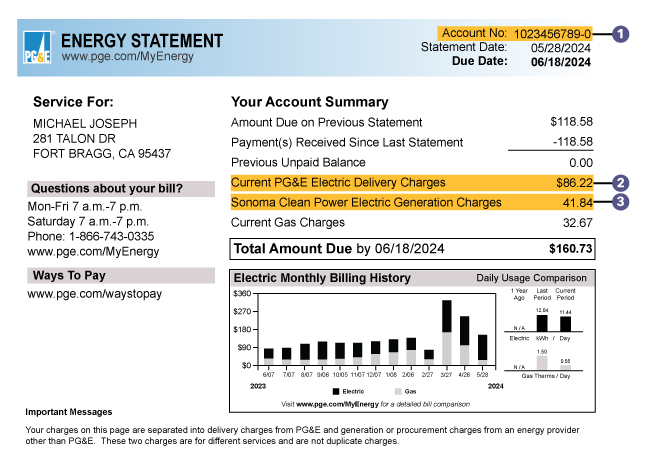
- To download the bill, click the “View Bill PDF” link.
How can I pay my bill on my phone?
Pay a bill
On your mobile device, open the Google Pay app . Tap Pay Bills. Type in the name of a biller. Make payment.
How do I pay someone else’s PGE bill?
If a third party wants to make a payment by phone, they should call 1-877-704-8470.Jun 18, 2024
