Tired of standing in long lines just to pay your Poquoson utility bills? Or maybe you’re new to the area and wondering about the best way to handle those monthly payments? Either way, I’ve got you covered with this comprehensive guide to everything you need to know about paying your utility bills in Poquoson, Virginia.
As a resident myself, I’ve navigated the various payment systems and want to share what I’ve learned to make your life easier. Whether you prefer paying online setting up automatic payments, or sticking with traditional methods this guide will walk you through all your options.
Quick Overview of Poquoson Utility Bill Payment Options
Before diving into details. here’s a quick look at your main options
- Online payments through the City of Poquoson e-Treasurer portal
- MyUtilityAccount services for enhanced features
- E-check payments (no additional fees!)
- Credit card payments (2.5% convenience fee applies)
- In-person payments at City Hall
- Mail-in payments to the Treasurer’s Office
The City of Poquoson’s Online Payment System
The City of Poquoson offers a convenient online payment system designed to help residents take care of their utility bills quickly and securely. I’ve used this system multiple times, and it’s definitely improved over the years.
Accessing the e-Treasurer Portal
To pay your utility bill online, visit the City of Poquoson’s e-Treasurer Applications at https://treasurer.poquoson-va.gov/applications/cpage/Default.aspx?ctid=1.
The website welcomes you with: “The City of Poquoson Treasurer’s Office is pleased to offer online payment and inquiry services. This site can be used to make online payments to the City of Poquoson Treasurer’s Office and inquire into tax ticket information from the comfort of your home or office.”
Step-by-Step Guide to Paying Utilities Online
- Visit the e-Treasurer portal
- Look for the “Payment Options” menu on the left side
- Click on “Utilities” under Payment Options
- Enter your account information as requested
- Follow the prompts to complete your payment
- Save or print your confirmation for your records
I recommend bookmarking the page for future reference. It’ll save you time hunting for it later!
Security of Online Payments
If you’re concerned about online security (and who isn’t these days?), you’ll be pleased to know that the City of Poquoson takes this seriously. According to the city website, “All payments made on this site are secure. We use 128 bit encryption.” This means your personal and financial information is protected during transmission.
MyUtilityAccount: Enhanced Features for Poquoson Residents
For more payment options and account management features, Poquoson residents can register for MyUtilityAccount. This service offers additional benefits beyond basic bill payment.
Benefits of Registration
When you register for MyUtilityAccount, you gain access to:
- Text-to-Pay services
- Auto-pay enrollment options
- Paperless billing
- Monthly usage monitoring
- Outage notification alerts
- And more!
How to Register
To register for MyUtilityAccount:
- Visit https://account.myutility.us/Account/One-TimePayment.aspx
- Look for the “Register for myutilityaccount” option
- Have your account number and service zip code ready
- Follow the registration instructions
- Create a secure password that meets the requirements:
- 8-15 characters long
- At least one lowercase letter
- At least one uppercase letter
- At least one number
- At least one special character (@#$%*!_-&+)
- No whitespace allowed
Payment Methods and Fees
Credit Card Payments
You can pay your utility bill using a credit card, but be aware of the fees involved. According to the city website, “There is a nominal fee associated with using credit cards (2.5% of the amount of the transaction).” This fee is pretty standard for municipal payments, but it’s worth considering, especially for larger bills.
The system accepts Visa, MasterCard, and Discover cards. Just be sure to check that your card’s expiration date hasn’t passed before attempting payment.
E-Check Payments (The Money-Saving Option!)
If you want to avoid fees completely, e-check is your best bet. The city explicitly states, “There is no fee associated with e-check.” I’ve used this option several times and it works great – just have your checking account and routing numbers handy.
Understanding Your Utility Bill
Before paying your utility bill, it’s helpful to understand what you’re being charged for. The City of Poquoson’s utility services typically include:
- Water
- Sewer
- Garbage collection
- Other municipal services
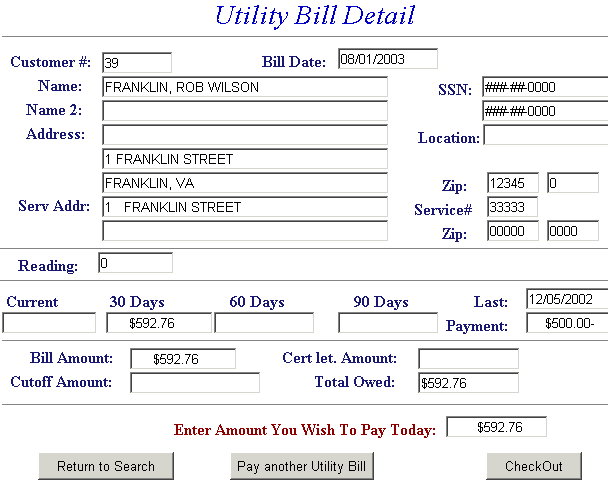
If you have questions about specific charges on your bill, you can use the “Utilities Public Inquiry” option on the e-Treasurer portal to view your payment history and billing details.
Other Bill Payment Services in Poquoson
Beyond utilities, the City of Poquoson’s online payment system allows residents to pay for various other services:
Real Estate and Personal Property Taxes
The same portal lets you pay real estate and personal property taxes. When paying these taxes, remember:
- All tax bills are listed when taxes are assessed
- Bills for both halves (June 5 and December 5) appear in the system
- Make sure you’re paying the bill for the correct half
- You can’t pay current taxes if prior taxes are outstanding
Additional Services Available for Online Payment
The City of Poquoson also offers online payment options for:
- Pet tags
- Bulky item pickup services
- Landscaping pickup
- Employee health (for city employees)
- Prepayment options for real estate and personal property taxes
Inquiry Options and Payment History
Need to check your payment history? The e-Treasurer portal offers several inquiry options:
- Real Estate Public Inquiry
- Personal Property Inquiry
- Utility Inquiry
- Yearly Real Estate Taxes Paid
- Yearly Personal Property Taxes Paid
These options allow you to view your payment history and verify that your payments have been processed correctly.
Traditional Payment Methods
Not everyone wants to pay online, and Poquoson recognizes this. If you prefer traditional payment methods, you still have options:
In-Person Payments
You can pay your utility bill in person at:
Poquoson City Hall
500 City Hall Avenue
Poquoson, VA 23662
Hours are typically Monday through Friday during regular business hours, but I’d recommend calling ahead (757-868-3000) to confirm current hours.
Mail-In Payments
If you prefer to mail your payment, send your check or money order to:
City of Poquoson Treasurer’s Office
500 City Hall Avenue
Poquoson, VA 23662
Be sure to include your account number on your check and allow sufficient time for delivery and processing before the due date.
Tips for Trouble-Free Bill Payments
Based on my experience with Poquoson’s billing systems, here are some tips to help ensure smooth sailing:
Set Calendar Reminders
Utility bills in Poquoson typically follow a regular schedule. Set up calendar reminders a few days before your bill is due to avoid late payments.
Consider Auto-Pay
If you register for MyUtilityAccount, you can set up automatic payments so you never have to worry about forgetting a bill again. This has been a game-changer for me!
Keep Confirmation Numbers
Whenever you make an online payment, save or print your confirmation information. The system typically provides a confirmation number and sends an email to the address you provide.
Use the Tutorial if Needed
If you’re having trouble with the online payment system, check out the “Treasurer Online Payments Tutorial” mentioned on the city website. It provides step-by-step guidance for navigating the payment system.
What to Do If Your Utility Service Is Disconnected
If your utility service has been disconnected due to non-payment, online payment alone might not immediately restore service. According to the MyUtilityAccount portal: “If your utility service has been disconnected, please contact us with your payment information to resume service.”
In this case, it’s best to call the City of Poquoson directly at 757-868-3000 to arrange for service restoration.
Special Considerations for New Poquoson Residents
If you’re new to Poquoson, welcome! Here are some things you should know about setting up and paying for utilities:
Setting Up Utility Service
To establish new utility service, you’ll typically need to:
- Visit City Hall in person
- Provide identification and proof of residency
- Pay any required deposits
- Complete the necessary paperwork
First-Time Bill Payment
For your first utility bill payment, I recommend using the website to familiarize yourself with the system. Have your account number handy, which should be listed on your first bill.
Staying Informed About Changes
The City of Poquoson occasionally updates its payment systems and options. To stay informed about any changes:
- Check the city website regularly
- Sign up for notifications through the city’s notification system
- Follow the City of Poquoson on social media platforms
- Watch for notices included with your utility bills
Contact Information for Questions or Issues
If you have questions about your utility bill or payment options, contact:
City of Poquoson
Phone: 757-868-3000
Fax: 757-868-3101
For specific billing questions, you might be directed to the appropriate department depending on the nature of your inquiry.
Common Questions About Poquoson Utility Bill Payments
What happens if I miss a payment?
If you miss a payment, you may incur late fees and, eventually, risk service disconnection. Contact the City Treasurer’s office as soon as possible to discuss your situation.
Can I make partial payments?
Yes, partial payments are possible, but it’s best to contact the Treasurer’s office to discuss your situation and make arrangements.
What if I disagree with my bill?
If you believe there’s an error on your bill, contact the City of Poquoson promptly to discuss the discrepancy.
Is there a way to lower my utility bills?
While payment options don’t affect your total bill, conservation measures can help reduce usage and lower your costs. The city occasionally provides tips for reducing utility consumption.
Final Thoughts
Paying your Poquoson utility bills doesn’t have to be complicated or time-consuming. With multiple payment options available, you can choose the method that works best for your lifestyle and preferences.
I personally find the online payment system to be the most convenient option, especially the e-check payment method that avoids additional fees. Setting up auto-pay through MyUtilityAccount has saved me from ever worrying about missed deadlines.
Remember, staying on top of your utility payments not only avoids late fees and potential service disruptions but also contributes to the overall financial health of our community. The revenue from utility bills helps maintain and improve the infrastructure that serves all Poquoson residents.
So next time that utility bill arrives, you’ll know exactly what to do and how to do it in the way that works best for you. Happy bill paying, neighbors!
Authorization to Bill Tenants Form
As a courtesy to owners, utility bills for residential property only can be sent to a renter if the property owner completes an Authorization to Bill Tenants form and returns the form to the City Finance Department.
Utility charges are applied on the first day of the bimonthly assessment and payment is due in the Treasurers Office by the due date stated on the bill. The first days of the bimonthly assessment are:
- February 1
- April 1
- June 1
- August 1
- October 1
- December 1
Utility bills are mailed out during the first week of the bimonthly assessment.
Accounts with unpaid balances after the bill due date are charged a $5 penalty fee. Interest is assessed on the unpaid sewer balance at a rate of 1% per month.
