Find the easiest way to contact customer service, pay your bill and troubleshoot common Spectrum problems. Spectrum customer service is available if you want to move or change your internet service, have a billing question or need tech support.
Need to contact Spectrum to pay your bill or get technical support? You’ll find ways to contact customer service and tech support below.
Are you tired of hunting down places to pay your Spectrum bill? Trust me, I’ve been there! It’s 2025, and Spectrum has actually made it pretty easy to handle your monthly payments, whether you’re tech-savvy or prefer the good ol’ traditional payment methods. In this guide, I’ll walk you through ALL the ways you can pay your Spectrum bill, from online options to in-person locations.
Why Finding the Right Payment Method Matters
Before we dive in, let’s get real about why this matters. Missing payment due dates sucks – late fees, service interruptions and that annoying feeling of “ugh I forgot to pay again!” Nobody wants that stress. The good news is Spectrum offers tons of convenient ways to make payments so you can choose what works best for your lifestyle.
Online Payment Methods for Spectrum Bills
Let’s start with the easiest options – paying your Spectrum bill online.
1. Spectrum.net Web Portal
The most convenient way to pay your Spectrum bill is through their official website:
- Visit Spectrum.net
- Log in to your account
- Navigate to “Account Summary”
- Select “Make a Payment”
- Follow the prompts to complete your payment
The web portal lets you see all your current and previous invoices. You can choose to make a one-time payment or set up Auto Pay for hassle-free future payments.
2. My Spectrum Mobile App
If you’re like me and do everything on your phone, this option is perfect:
- Download the My Spectrum app (available for iOS and Android)
- Sign in to your account
- Tap on the “Billing” tab in the bottom menu
- Select “Make a Payment”
- Adjust your amount, date, and payment method
- Tap on “Make Payment” to complete
The app interface is actually easier to use than the website, in my opinion. Plus, you can manage your network equipment and even change your Wi-Fi name and password directly from the app!
Pay by Phone (Calling Spectrum)
Not a fan of apps or websites? No problem! Spectrum offers two options for paying by phone:
- Automated System: Call (833) 267-6094 from your registered phone number and follow the prompts.
- Live Representative: Speak with a customer service rep who will process your payment (note: this option includes a $5 processing fee).
In-Person Spectrum Bill Pay Locations
Some folks just prefer paying bills in person, and Spectrum has plenty of options for that too.
Spectrum Store Locations
Spectrum has stores across the country where you can pay your bill in cash, by check, or with a debit/credit card. Here’s how to find them:
- Visit Spectrum.com/stores
- Enter your ZIP code to find nearby locations
- You can even make a reservation to avoid waiting in line!
What can you do at Spectrum stores besides paying bills?
- Shop for new services or upgrade existing ones
- Exchange or pick up equipment
- Get technical support
- Browse the latest phones and accessories (if they offer Spectrum Mobile)
Other In-Person Payment Locations
Don’t have a Spectrum store nearby? No worries! You can also pay at:
- Walmart MoneyCenter: Bring your account info and make a payment
- Western Union locations
- MoneyGram locations
Sending Payment by Mail
Some people still prefer the traditional way of mailing a check or money order. If that’s your style:
- Make out your check or money order to Spectrum
- Include your account number on the check
- Include the remittance portion of your bill if possible
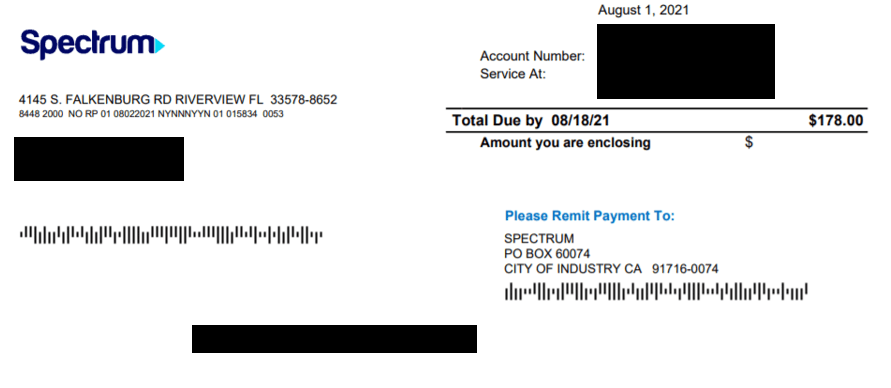
- Mail to the address on your bill statement
The general mailing address is:
PO Box 60074
City of Industry, CA 91716-0074
Important note: Addresses may vary by location, so always check your bill for the correct mailing address. And please, don’t send cash through the mail!
Setting Up Auto Pay for Spectrum
This is honestly my favorite option because it means I never have to think about it again. Here’s how to set it up:
- Log in to your account via the My Spectrum app or Spectrum.net
- Go to the “Billing” section
- Select “Enroll in Auto Pay”
- Enter your payment details (credit/debit card or bank account)
- Click “Enroll in Auto Pay”
Once enrolled, you’ll get a confirmation message. Your bill will automatically be paid before the due date every month – no more late fees!
Paying as a Guest (Without an Account)
Need to pay a bill for someone else? While there’s no specific “Guest Pay” option on Spectrum’s website, you can still help out by:
- Paying in person at a Spectrum store or authorized payment location (bring the account number)
- Calling Spectrum’s customer service to make a payment over the phone
Just make sure you have the correct account number before attempting to make a payment.
Spectrum Business and Enterprise Bill Payments
If you’ve got a business account with Spectrum, the payment methods are similar, but you’ll use:
- SpectrumBusiness.net for business accounts
- SpectrumEnterprise.net for enterprise accounts
Business customers can also call (888) 314-7195, while Enterprise customers should use (888) 812-2591.
Spectrum Mobile Bill Payments
For Spectrum Mobile bills, payment options are slightly more limited. The company only accepts debit/credit cards with Auto Pay enabled on your account. No cash payments are accepted for mobile billing.
Handy Tips for Hassle-Free Spectrum Payments
Here are some tips I’ve learned from personal experience:
- Set reminders: If you don’t use Auto Pay, set calendar reminders a few days before your due date
- Keep receipts: Always keep payment confirmations, especially for in-person payments
- Know the grace period: Spectrum offers a 30-day grace period past the payment due date, but you’ll get hit with an $8.95 late fee if you’re late
- Avoid service interruptions: After 32 days of non-payment, your service will be interrupted; after 62 days, your subscription may be suspended
Common Questions About Paying Your Spectrum Bill
Will Spectrum charge a fee if I use my credit card?
Nope! Spectrum doesn’t charge any processing fees for online debit or credit card payments. The only fee ($5) applies if you pay by phone with a customer representative.
Can I pay with PayPal or other digital wallets?
Unfortunately, Spectrum doesn’t directly accept PayPal payments for bills. They primarily accept credit/debit cards and bank account payments.
What happens if I don’t pay my Spectrum bill on time?
If your bill remains unpaid after 30 days, Spectrum will charge an $8.95 late fee. After 32 days, your service will be interrupted. If the invoice remains unpaid, your subscription will be suspended after 62 days.
Can I pay with cash?
Absolutely! You can pay with cash at any Spectrum store location or authorized payment centers like Walmart, Western Union, or MoneyGram.
Final Thoughts
Finding convenient Spectrum bill pay locations and methods doesn’t have to be complicated. Whether you prefer paying online, through the app, over the phone, or in person, there’s an option that fits your lifestyle.
I personally recommend setting up Auto Pay if you can – it’s saved me from so many forgotten bills and late fees! But if you’re someone who likes to review each bill before paying, the app or web portal makes it super easy to stay on top of your payments.
Remember, the most important thing is finding a payment method that you’ll actually use consistently. That way, you’ll never have to worry about interruptions to your internet, TV, or phone service.
Now go forth and pay those bills with confidence!
This guide was last updated in October 2025 to reflect the most current Spectrum payment options and locations.
Spectrum tech support number: (83 949-0036
Available 24/7
Call to speak with a Spectrum tech support specialist about issues with your internet, TV or home phone service such as:
- Loss of signal/service
- Self-installation of new or replacement Spectrum equipment
- Faulty or broken equipment
- Scheduling a service appointment
- Missing TV channels or recordings
- To transfer service to a new address, call (888) 692-8635
- For Spectrum Mobile customer service, call (833) 224-6603
Troubleshooting Spectrum service issues
There are a number of potential problems that can disrupt your Spectrum internet or TV service. To troubleshoot and narrow down the issue, visit spectrum.net/support/internet for internet troubleshooting, or spectrum.net/support/tv/tv-troubleshooting to troubleshoot TV issues.
For further assistance, select Ask Spectrum at the bottom of the spectrum.net page, enter your ZIP code and type a brief description of the problem you are having.
