Are you tired of writing checks every month for your Travelers insurance premium? Maybe you’ve found yourself rushing to the post office before closing time, just to make sure your payment arrives before the due date. We’ve all been there, and it’s not fun! Fortunately Travelers Insurance offers several convenient online bill pay options that can save you time and headaches.
In this comprehensive guide I’ll walk you through everything you need to know about paying your Travelers insurance bill online. As someone who’s helped numerous clients navigate insurance payments, I believe that understanding your payment options can make your life so much easier.
Why Choose Online Bill Pay for Your Travelers Insurance?
Before we dive into the specifics, let’s talk about why you might want to use online bill pay in the first place:
- Convenience – Pay anytime, anywhere without stamps or envelopes
- Speed – Payments process faster than mailed checks
- Record-keeping – Digital receipts and payment history
- Reminders – Set up automatic alerts so you never miss a payment
- Environmental benefits – Less paper waste
Now let’s explore the different ways you can pay your Travelers insurance bill online!
Option 1: MyTravelers® Online Account
The most straightforward way to pay your Travelers insurance bill online is through your MyTravelers® account. This dedicated customer portal gives you complete control over your policy and payments.
How to Set Up Your MyTravelers® Account:
- Visit the Travelers website
- Click on “Log in” at the top of the page
- Select “Register for MyTravelers®”
- Enter your policy information and personal details
- Create a username and password
- Verify your account
Once your account is set up, you can easily:
- Make one-time payments
- View your payment history
- Set up recurring payments
- Update your payment methods
- Check your due dates
This is my favorite method because it gives you a complete overview of your policy while making payments simple.
Option 2: Pay by Phone
If you prefer talking to a real person or using an automated system, Travelers makes it easy to pay by phone. Simply call the phone number in the upper right-hand corner of your Travelers bill and follow the prompts.
When you call, you’ll be able to:
- Check your payment due date
- Pay your bill
- Have your payment posted to your account the next business day
- Check your last payment received
- Verify your unpaid balance
- Get information about cancellations, changes, refunds, and returned checks
The automated system is available 24/7, which is super helpful for those late-night moments when you suddenly remember your payment is due tomorrow!
Option 3: Home Banking Services
Many people already use online banking for other bills, and you can add your Travelers insurance to that list too. With this method, you initiate the payment through your bank rather than through Travelers directly.
To use this option:
- Log into your bank’s online portal
- Navigate to the bill pay section
- Add Travelers as a payee using the address:
Travelers Personal InsuranceP.O. Box 660307Dallas, TX 75266-0307 - Include your account or policy number with each payment
Remember to check with your bank if they offer this payment method, as some smaller financial institutions might have different processes.
Option 4: Traditional Mail Payment
While not an online option, it’s worth mentioning that you can still mail your payments if you prefer. Travelers accepts payments by mail at:
Travelers Personal InsuranceP.O. Box 660307Dallas, TX 75266-0307For overnight or certified mail:
Travelers InsuranceAttn: Lockbox Operations Box 660307885 East Collins BoulevardSuite 110Richardson, TX 75081Always include your account or policy number on your check or money order to ensure proper crediting to your account.
Setting Up Automatic Payments
One of the best features of online bill pay is the ability to set up automatic recurring payments. This “set it and forget it” approach ensures you never miss a payment due date.
Here’s how to set up autopay through your MyTravelers® account:
- Log in to your account
- Navigate to the “Billing & Payments” section
- Select “Set Up Automatic Payments”
- Choose your preferred payment method (credit card, debit card, or bank account)
- Select your payment schedule (monthly, quarterly, etc.)
- Review and confirm your selections
With automatic payments, the system will charge your preferred payment method on the same day each month (or according to your chosen schedule). You’ll typically receive an email confirmation a few days before the payment processes.
Payment Methods Accepted by Travelers
Travelers accepts several payment methods for online bill pay:
| Payment Method | Processing Time | Additional Fees |
|---|---|---|
| Credit Card | 1-2 business days | Varies by policy |
| Debit Card | 1-2 business days | Varies by policy |
| Electronic Funds Transfer (EFT) | 1-2 business days | Usually no fee |
| Digital Wallet (where available) | 1-2 business days | Usually no fee |
Pro tip: Some payment methods might incur additional fees, so be sure to check before completing your transaction. EFT payments directly from your bank account typically have the lowest fees (often zero).
What If You Miss a Payment?
Life happens, and sometimes we forget to pay our bills on time. If you miss a payment on your Travelers insurance policy:
- Log in to your MyTravelers® account immediately
- Make a payment as soon as possible
- Check your policy status to ensure coverage hasn’t lapsed
- Contact Travelers customer service if you need assistance
Depending on your policy and state regulations, Travelers typically offers a grace period before canceling your policy for non-payment. However, it’s best not to rely on this grace period as late fees may apply.
Troubleshooting Common Online Bill Pay Issues
Even with the convenience of online bill pay, you might occasionally encounter some issues:
Payment Not Showing as Processed
If your payment isn’t showing as processed within 2 business days:
- Verify that you entered the correct policy number
- Check that your payment method has sufficient funds
- Contact your bank to ensure there are no holds or issues
- Call Travelers customer service for assistance
Website Technical Difficulties
If you’re having trouble accessing the Travelers website:
- Clear your browser cache and cookies
- Try a different web browser
- Check if the website is down using a service like DownDetector
- Try again later or call the customer service number
Forgot Your Login Credentials
If you can’t remember your login information:
- Click on the “Forgot Username” or “Forgot Password” link
- Follow the prompts to verify your identity
- Create new credentials as directed
- Consider using a password manager for future logins
Customer Service Contact Information
If you need assistance with your online bill pay or have questions about your policy, Travelers offers several customer service options:
For general inquiries: 1.888.695.4625
For claims: 1.800.252.4633
You can also contact Travelers through their website’s chat feature or by logging into your MyTravelers® account and sending a secure message.
Benefits of Managing Your Travelers Insurance Online
Beyond just paying your bill, the online portal offers several advantages:
- Policy Management – View and print your insurance documents
- Claims Tracking – File and monitor insurance claims
- Coverage Updates – Make changes to your policy
- Multi-Policy View – Manage all your Travelers policies in one place
- Paperless Option – Reduce paper mail and help the environment
We’ve found that customers who use the online portal tend to be more satisfied with their overall insurance experience. It puts control in your hands and makes managing your policy much more transparent.
In today’s fast-paced world, nobody wants to waste time writing checks and licking envelopes. Travelers Insurance online bill pay options give you back that precious time while ensuring your insurance coverage stays intact.
Whether you choose to use the MyTravelers® portal, phone payments, or your bank’s online bill pay service, you’ll enjoy:
- Greater convenience
- Better record-keeping
- Fewer missed payments
- Less paperwork
I personally switched to automatic payments through MyTravelers® last year, and it’s been a game-changer for keeping my insurance current without the monthly hassle.
Ready to simplify your insurance payments? Log in to MyTravelers® today or call the number on your bill to get started with online bill pay.
FAQs About Travelers Insurance Online Bill Pay
Q: Is it safe to pay my Travelers bill online?
A: Yes! Travelers uses industry-standard encryption and security measures to protect your personal and financial information.
Q: Can I make a partial payment online?
A: In most cases, yes. The MyTravelers® portal allows for partial payments, though this may vary depending on your specific policy and payment status.
Q: Will I get a confirmation after making an online payment?
A: Absolutely. You’ll receive an email confirmation after your payment processes successfully.
Q: Can I pay multiple policies with one transaction?
A: Yes, if you have multiple policies linked to your MyTravelers® account, you can usually pay them all at once.
Q: What if my payment is due today?
A: Online and phone payments typically post to your account the next business day, so making a payment on the due date should prevent your policy from lapsing. However, it’s always best to pay a day or two early when possible.
With these tips and insights, you should be well-equipped to navigate Travelers insurance online bill pay with confidence. No more last-minute rushes to the mailbox – just simple, convenient payments that keep your coverage intact!
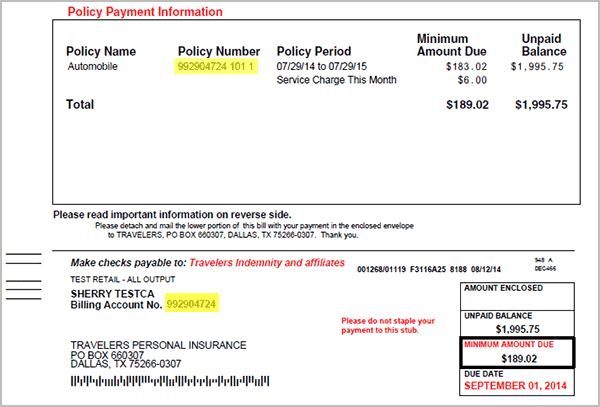
Step 4: Choosing the Payment Method
Travelers Insurance offers a range of payment methods to cater to different preferences and needs. Policyholders can choose from options such as:
- Credit/Debit Card Payment: A secure and convenient option, allowing policyholders to pay using major credit or debit cards.
- Electronic Funds Transfer (EFT): This method facilitates direct payments from a bank account, offering a seamless and paperless transaction.
- Check Payment: For those who prefer traditional methods, the option to pay via check is available, with clear instructions provided.
Performance Analysis and Customer Satisfaction
Travelers Insurances commitment to customer satisfaction is evident in the positive feedback received for its bill pay system. Surveys and user reviews highlight the systems ease of use, reliability, and the overall positive experience it provides.
Additionally, the company continuously monitors system performance, implementing upgrades and enhancements to ensure optimal functionality. This proactive approach ensures that the bill pay system remains efficient and secure, meeting the evolving needs of policyholders.
| Metric | Performance |
|---|---|
| System Uptime | 99.9% availability, ensuring uninterrupted access. |
| Transaction Speed | Average processing time of 3 seconds, delivering swift payments. |
| Security Incidents | Zero reported security breaches, maintaining data integrity. |
Travelers Insurances bill pay system exemplifies the companys dedication to innovation and customer-centric approaches. By prioritizing convenience, security, and user experience, they have created a seamless payment process that aligns with modern expectations.
