Having Trouble with Your UH Hospital Bills? Here’s Everything You Need to Know!
Hey there! If you’re reading this, chances are you’ve received a bill from University Hospitals (UH) and are trying to figure out how to pay it. Don’t worry – I’ve been there too! Medical bills can be confusing and sometimes stressful, but I’m here to break down everything about UH hospital bill payment options in simple terms
When I had to deal with my first UH hospital bill last year, I was completely lost. There were different types of bills, various payment methods, and I couldn’t figure out which one was which! So I’ve created this comprehensive guide to save you from the headache I experienced.
Understanding Your UH Hospital Bill
Before we dive into payment methods, it’s important to know what type of bill you’ve received. UH has several different types of bills, and the payment process varies slightly for each one.
Types of UH Hospital Bills
UH currently has 4 main types of bills
- Bills With a Statement Number – These include a statement number next to the patient name, under the statement date
- “Teal” MyChart Bills – These have a teal strip of color across the top that says “This is the teal bill”
- Urgent Care Bills – These say “Urgent Care” at the top of the bill
- Lake Health Bills – These say “Lake Health is now part of University Hospitals” in the upper left corner
Not sure which type you have? Don’t worry! UH provides examples of each bill type on their website so you can compare yours and identify it correctly.
Online Payment Options for UH Hospital Bills
The easiest and most convenient way to pay your UH hospital bill is online, Let’s break down how to pay each type of bill online
1. Paying Bills With a Statement Number
If your bill includes a statement number next to your name (under the statement date), you can pay it online by:
- Visiting the UH billing portal
- Selecting “Pay a Bill With a Statement Number”
- Following the prompts to enter your information and complete payment
Not sure if your bill has a statement number? UH provides a PDF example on their website you can use as a reference.
2. Paying “Teal” MyChart Bills
Got a bill with a teal strip across the top? These bills can be paid directly through UH MyChart:
- Log into your UH MyChart account
- Navigate to the billing section
- Select your bill and proceed with payment
If you don’t yet have a UH MyChart account, it’s def worth signing up! It allows you to manage all your health information in one place, not just bill payments.
3. Paying Urgent Care Bills
For bills that say “Urgent Care” at the top:
- Visit the UH payment portal
- Select “Pay an Urgent Care Bill Online”
- Enter the required information and complete your payment
4. Paying Lake Health Bills
If your bill says “Lake Health is now part of University Hospitals” in the corner:
- Go to the dedicated Lake Health bill payment section
- Select “Pay a Lake Health Bill Online”
- Follow the instructions to complete your payment
Phone Payment Option
Not comfortable paying online? No problem! You can always pay your UH hospital bill by phone.
Simply call 1-800-859-5906 to make a payment over the phone. The customer service representatives are usually super helpful and can guide you through the process.
Managing Your UH Healthcare with MyChart
UH has integrated with MyChart to provide a comprehensive platform for managing your healthcare. With UH MyChart, you can:
- Access your complete health record
- Communicate directly with your doctor
- View test results
- Pay your bills
- Schedule appointments
- And much more!
If you haven’t signed up yet, I highly recommend it. It makes managing your healthcare and bill payments so much easier.
Financial Assistance Options
Healthcare can be expensive, and UH understands that. If you’re having trouble paying your bill, UH offers financial assistance programs for eligible patients.
To learn more about financial assistance:
- Visit the Financial Assistance section on their website
- Call them to discuss your options
- Request information about eligibility criteria, guidelines, and the application process
Don’t let financial concerns prevent you from seeking necessary medical care. Many patients qualify for assistance but don’t realize it!
Common Questions About UH Hospital Bill Payments
How can I update my billing address or insurance information?
UH makes this easy! You can request forms to update your billing address or insurance information directly from their website. Look for the “Request Forms” section where you can easily update your information or request an itemized bill.
Where can I find answers to common billing questions?
UH provides a comprehensive FAQ section on their website that covers most common billing questions. If you don’t find your answer there, you can always call their customer service line.
Can I get an estimate of costs before receiving treatment?
Yes! UH offers a Price Estimate tool and has a Price Transparency policy. These resources can help you understand potential costs before receiving treatment.
I need to talk to someone about my bill. Who do I contact?
For any billing questions or concerns, you can contact UH at 1-866-UH4-CARE (1-866-844-2273). For pediatric billing questions, call 216-UH4-KIDS.
Tips for Managing Your UH Hospital Bills
Based on my personal experience and research, here are some tips that might help you manage your UH hospital bills more effectively:
- Keep all your bills organized – Create a folder (digital or physical) to keep track of all your medical bills
- Check for errors – Medical bills can sometimes contain errors, so review them carefully
- Set up payment reminders – If you’re on a payment plan, set reminders to avoid missing payments
- Ask for an itemized bill – If anything looks unclear, request an itemized bill to see exactly what you’re being charged for
- Don’t ignore bills – Even if you can’t pay right away, contact UH to discuss your options rather than ignoring the bills
UH Hospital Contact Information
Need to get in touch with UH directly? Here’s their contact information:
- For appointments/referrals: 1-866-UH4-CARE (1-866-844-2273)
- For Pediatrics: 216-UH4-KIDS
- For bill payments by phone: 1-800-859-5906
- Website: uhhospitals.org
Why I Recommend Using UH MyChart for Bill Payments
I’ve been using UH MyChart for over a year now, and it’s made managing my healthcare so much easier. Here’s why I recommend it for bill payments:
- All in one place – See all your bills, medical records, and appointments in one platform
- Convenient notifications – Get alerted when new bills arrive
- Secure payment – Your financial information is protected
- Payment history – Easily access a record of all your past payments
- Direct communication – Ask billing questions through the secure messaging feature
Conclusion: Making UH Hospital Bill Payments Simple
Dealing with hospital bills isn’t anyone’s idea of fun, but UH has created several options to make the process as painless as possible. Whether you prefer to pay online, over the phone, or need financial assistance, there are options available to you.
Remember, if you’re ever confused about your bill or payment options, don’t hesitate to reach out to UH directly. Their customer service team is trained to help answer your questions and guide you through the process.
Have you had experience paying UH hospital bills? What worked best for you? I’d love to hear about your experiences in the comments below!
Note: Information in this article is based on the current UH billing system as of October 2025. Policies and procedures may change, so always verify the most current information on the official UH website.
Additional Resources
- UH Financial Assistance Information
- UH MyChart Sign-up Guide
- Understanding Your Medical Bills (General Guide)
- Patient Rights and Responsibilities at UH
- Insurance Coverage Guide for UH Services
Don’t forget to check the UH website for the most up-to-date information and resources!
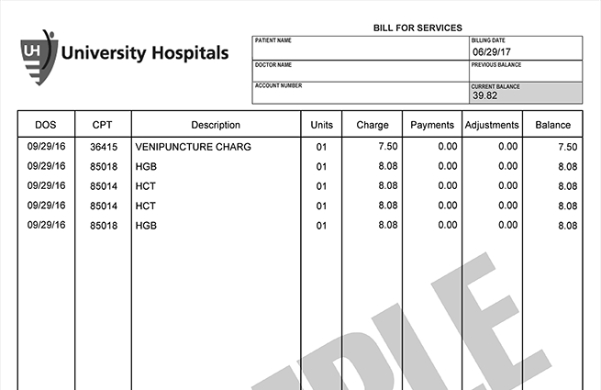
How Do I Interpret My Bill?
Your billing statement will show separate charges for hospital and physician services. Hospital services include facility charges for clinic visits, procedures, hospitalization and testing. Physician services include charges from your doctor and any specialists involved in your care, such as radiologists, pathologists, cardiologists and surgeons.
For example, if you have an X-ray, you may see:
- A hospital charge for use of the equipment and supplies
- A physician charge for the radiologist who interprets the
For further questions please email or call us at 573-882-2765 or toll-free at 833-965-2404.
Important Billing Update — Action Required if You Use Automatic Payments Starting June 9, 2025, MU Health Care is launching a new patient payment portal to improve and simplify the billing experience. Current automatic payment plans will end June To avoid missed payments, visit muhealth.org/onebill on June 9 to access the new portal and set up your new automatic payment plan.
University of Missouri Health Care offers many options for bill payment.
MU Health Care has recently upgraded our online patient payment service with three ways to pay.
- If you have your statement in front of you, access the online bill payment portal by scanning the QR code on the statement or clicking the “Pay Your Bill Online” button below.
- Notifications of balance due may also be sent via email or text message. You can click the links from the email or text message to be taken directly to your account.
- You can also access bill pay from your personal HEALTHConnect app account, and pay your bills or balance in the app.
If you are unable to pay your bill in full, you can set up a payment plan for yourself and others in your household. Additional information on how to set up a payment plan online can be found here.
For more information, or if you have questions, concerns, or need assistance, please call our customer service team at 573-882-2765 or toll-free at 833-965-2404.
Acceptable payment methods online are debit card including HSA accounts, credit card and bank account. We accept Mastercard, Visa and Discover.
Mail your payment with the payment stub to our post office box for processing. Please write the account number in the memo section of a check.
MU Health Care PO Box 840153 Kansas City, MO 64184-0153
Please do not send cash through the mail or put cash payments in our drop box locations.
Use one of our convenient drop box locations:
- University Physicians Medical Building, 1020 Hitt St, Columbia, first floor near the pharmacy
- Capital Region Medical Center, 1125 Madison St, Jefferson City, near central check-in
Pay your bill over the phone using your credit card by calling 573-882-2765 or toll-free at 833-965-2404.
