Hey there, folks! If you’re scrambling to find the right Verizon Wireless address for bill pay, you ain’t alone. I’ve been down that road, wondering where the heck to send my check without it getting lost in some black hole of corporate mailrooms. Good news—we’re gonna sort this out together, step by step, no fluff. Verizon doesn’t make this super obvious, but once you know the trick, it’s easy peasy. Let’s dive right in with the most important bit: how to find that dang address.
Where to Find Your Verizon Wireless Billing Address
Straight up, Verizon Wireless doesn’t have just one universal address for bill payments. It’s kinda personalized based on where you live. Annoying? Yup. But here’s the deal—your specific mailing address for payments is right there on your bill. Here’s how to nab it:
- Log into My Verizon: Head over to the Verizon website or app and sign into your account. If you ain’t got an account yet, set one up. Takes two minutes.
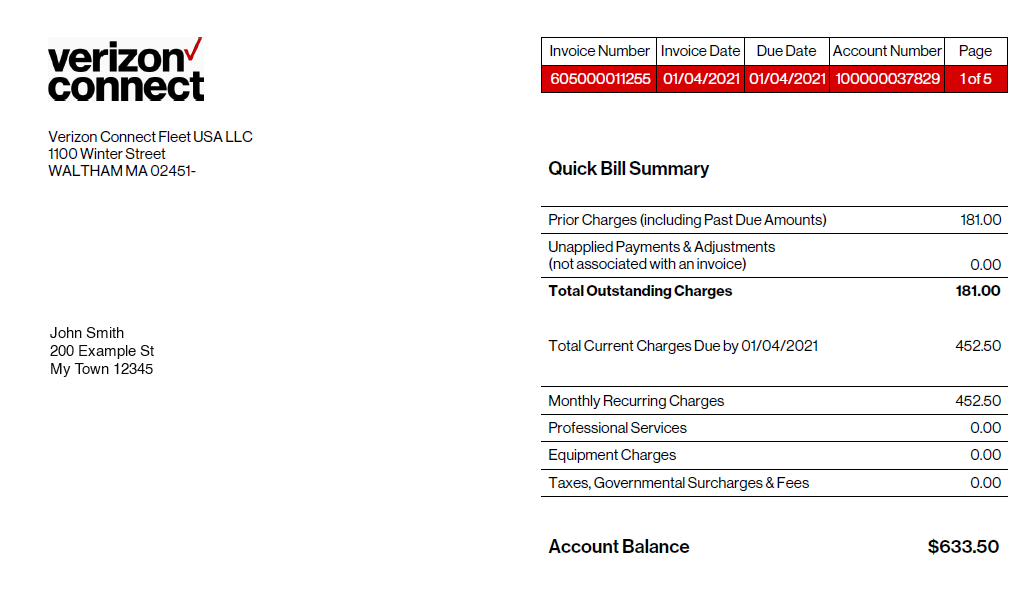
- Check Your Bill PDF: Go to the “Bill Overview” section, and click on “View Bill PDF.” That digital copy of your bill has the magic info, usually at the bottom of the first page or with a payment slip at the end.
- Look for the Payment Slip: That slip ain’t just for show—it’s got the exact PO Box or address you need to send your payment to. Make sure you include this slip with your check so Verizon knows it’s yours and applies it right.
Why’s it different for everyone? Well Verizon’s got a bunch of regional spots to handle payments, so they route your mail to the closest one or somethin’ like that. Point is don’t guess—check your bill. If you’ve got a paper bill, same thing applies; flip to the end or look for that tear-off slip with the address.
What If You Can’t Find Your Bill or Access Your Account?
I hear ya—sometimes tech ain’t your friend, or maybe you tossed that paper bill in a fit of “I’ll deal with it later.” No worries, we got options:
- Call Verizon Support: Dial up their customer service at 800-922-0204. Tell ‘em you need the billing address for your payment. Be ready to verify your account details, ‘cause they ain’t handing out info to just anybody. Fair warning, though—some folks find their chat bots or phone reps a bit like talkin’ to a brick wall. Hang in there.
- Visit a Verizon Store: If you’re old-school and wanna chat face-to-face, pop into a local store. They can pull up your account and print out the deets or tell ya where to send that payment.
- Check Your Email: If you’ve gone paperless, Verizon might’ve emailed ya a bill notification. Open it up, click the link to view your bill, and bam, there’s your address.
Worst case, if you’re totally locked out, ask a buddy or family member on the same account to log in for ya. Just don’t let ‘em see how much data you been burnin’ through, haha!
Why Mailing a Payment Ain’t Always the Best Idea (And What to Do Instead)
Real talk—mailing a check feels like somethin’ my grandpa would do. It’s slow, there’s a chance it gets lost and you gotta buy stamps. Who’s got time for that? Here’s why I reckon you should consider other ways to pay your Verizon bill and trust me, I’ve tried ‘em all after one too many late fees.
- Pay Online Through My Verizon: Log in, hit “Pay Bill,” and set it up with your bank or card. It’s instant, no waiting for the mailman, and you get a confirmation right away. Plus, you can set up auto-pay if you’re forgetful like me.
- Use Your Bank’s Bill Pay: Lots of banks let ya send payments directly to companies like Verizon through their online portal. You might still need that billing address for setup, which you’ll find on your bill PDF like I mentioned. Once it’s in, though, it’s smooth sailin’. I use this ‘cause I don’t trust auto-pay givin’ every company access to my account willy-nilly.
- Pay by Phone: Call Verizon and pay over the phone with a card. There might be a small fee for this, so check first. It’s quick if you’re in a pinch.
I switched to online payments a couple years back after a check I mailed got “lost” for three weeks. Verizon hit me with a late fee, and I was fumin’. Learned my lesson—digital is the way to go unless you got no other choice.
Setting Up Online Banking for Verizon Payments
If you’re sold on using your bank’s bill pay system but need that address to get started, let’s walk through it. I’ve been usin’ this method for ages ‘cause it keeps all my bills in one spot, and I don’t gotta log into a million websites every month
- Grab the Address: Like I said, check your Verizon bill PDF or paper copy for the exact mailing address. It’s usually a PO Box tied to your area.
- Log into Your Bank Account: Head to the “Bill Pay” or “Payments” section. Every bank’s a lil’ different, but it’s usually pretty obvious.
- Add Verizon as a Payee: Search for “Verizon Wireless” or manually enter it. If they ask for an address, punch in the one from your bill. Some banks don’t even need it if Verizon’s in their system.
- Set the Amount and Date: Pick how much you’re payin’ and when to send it. I always schedule mine a few days early just in case.
- Double-Check: Make sure the account number (from your bill) is right so the payment don’t go to some random dude’s phone plan.
Pro tip: Take a screenshot or write down that confirmation number once it’s sent. If anything goes sideways, you’ve got proof you paid. I learned that the hard way when a payment didn’t show up on Verizon’s end for a hot minute.
Things to Watch Out for When Mailing Your Payment
If you’re dead set on mailing your Verizon bill, cool, no judgment. But lemme share some pitfalls I’ve stumbled into or heard about from pals. Gotta keep your money safe, ya know?
- Always Include the Payment Slip: That lil’ piece of paper tells Verizon whose account to credit. Without it, your check might sit in limbo while they figure it out. Ain’t nobody got time for that.
- Don’t Send Cash: Seems obvious, but I’ve heard of folks stuffin’ envelopes with bills. Mail gets stolen sometimes—don’t risk it. Use a check or money order.
- Allow Enough Time: Mail ain’t instant. Give it at least 5-7 business days, more if there’s holidays or you’re in a rural spot. I once mailed a payment thinkin’ two days was enough. Spoiler: it wasn’t. Late fee city.
- Track It If You Can: If you’re paranoid like me, spring for certified mail or tracking at the post office. Costs a couple bucks, but you’ll know it got there.
One time, I forgot the payment slip, and Verizon took forever to apply my payment. Had to call ‘em up and explain, which was a whole headache. Don’t be me—double-check before you seal that envelope.
What Happens If Your Payment Gets Lost or Delayed?
Ugh, the worst-case scenario. You mailed your Verizon bill, but it’s crickets—no confirmation, and maybe a nasty “past due” notice shows up. Been there, and it sucks. Here’s how to handle it:
- Check Your Bank: See if the check cleared. If it did, note the date and transaction ID. If not, maybe it’s still in transit.
- Call Verizon ASAP: Hit up customer service with any proof you got—tracking number, bank statement, whatever. They can look into it and sometimes waive a late fee if you’re polite about it.
- Stop Payment on the Check: If it’s truly lost and you’re worried about fraud, ask your bank to stop payment on that check. Then send a new one or pay online to cover your bases.
- Document Everything: Write down who you talked to at Verizon, when, and what they said. I keep a lil’ notebook for stuff like this ‘cause my memory’s trash.
I had a payment vanish once, and it turned out the post office delivered it to the wrong place. Took weeks to sort out, but Verizon was decent about not chargin’ me extra once I proved I sent it. Still, what a pain in the rear!
Extra Tips for Managing Your Verizon Bill Like a Pro
Since we’re deep in the weeds on Verizon bill pay, lemme toss out some bonus nuggets I’ve picked up over the years. These ain’t just about the address but about makin’ the whole process less of a drag.
- Go Paperless: Sign up for digital bills through My Verizon. Saves trees, and you can pull up that PDF anytime without diggin’ through a pile of mail. I did this and never looked back.
- Set Reminders: Use your phone or calendar to ping ya a few days before the bill’s due. I got a recurring alarm labeled “Pay Verizon, Dummy” ‘cause otherwise, I’d forget.
- Check for Discounts: Sometimes Verizon’s got deals if you bundle services or set up auto-pay. Peek at your account or ask support. Saved me a few bucks last year just by askin’.
- Keep Records: Hang onto payment confirmations, whether it’s a mailed check stub or an online receipt. You never know when you’ll need to prove somethin’.
I used to be a hot mess with bills, missin’ due dates left and right. But after settin’ up reminders and goin’ digital, I’m on top of it. Feels good not to stress every month.
Why Verizon Makes This So Complicated (My Two Cents)
I gotta vent for a sec—why can’t Verizon just slap one big address on their website and call it a day? I reckon it’s ‘cause they’re processin’ millions of payments, and regional centers keep things movin’ faster. Or maybe it’s just big company nonsense. Either way, it’s a hassle for us regular folks who just wanna pay up and move on with life.
I remember spendin’ an hour searchin’ their site for an address before realizin’ it was on my bill the whole time. Felt like a dummy, but also like Verizon coulda made it clearer. If you’ve had the same frustration, drop a comment below—I’m curious if I’m the only one who’s been bamboozled by this.
Wrapping Up: You’ve Got This!
Alright, let’s tie this up with a bow. Findin’ the Verizon Wireless address for bill pay ain’t rocket science, even if it feels like a scavenger hunt sometimes. Check your bill PDF or paper copy for the right address, include that payment slip if you’re mailin’ it, and give yourself plenty of time. Better yet, skip the snail mail and pay online or through your bank for less stress. If things go wonky, Verizon’s support is there, even if ya gotta be patient with ‘em.
I’ve thrown everything I know at ya, from personal screw-ups to handy tricks, so you don’t gotta figure this out the hard way. Got questions or a wild story about payin’ your bill? Hit me up in the comments—I’m all ears. And hey, if this helped, share it with a friend who’s as clueless about this as I used to be. We’re all in this together, tryna keep our phones on and our wallets happy!
Pay by Mail
- 1 Obtain a check or money order for the bill payment amount.
- 2 Write your Verizon account number at the top of your check or money order.
- 3 Send your payment and the remittance bill stub to: Verizon Remittance Processing Center, P.O. Box 9688, Mission Hills, California 91346-9688.
- Your payment will be posted to your account as soon as Verizon receives your check in the mail.
Advertisement Method
StepsMethod
- 1 Visit the Verizon website provided in the Sources section of this article.
- 2 Click on “Paying Your Verizon Bill in Person” and select the “online” link. This process will take you to a page that allows you to find the nearest Verizon payment location.
- If you do not have Internet access, call Verizons customer service at 1-800-922-0204 between the hours of 6 a.m. and 11 p.m. daily to find the nearest payment center.
Advertisement
- 3 Bring payment for your bill and a page from your residential phone bill that displays your Verizon account number.
- You can bring payment in the form of cash, checks, or money orders.
- Some Verizon payment centers may charge convenience fees for making a payment in person.
- Your bill payment will be posted to your Verizon account within 3 business days.
Advertisement Method
How to Pay Verizon Bill Online? Verizon Bill Pay
FAQ
What is the address for Verizon Wireless payment?
What is the difference between Verizon billing address and service address?
The billing address and service address for your mobile account are most often the same address: Billing address – Where you want us to send your Verizon bill. Service address – Where you use your Verizon service (i.e., the address where you live. For business customers the address where you work).
Can you pay Verizon by mail?
You can mail payment to Verizon by check or money order. Find your nearest payment mailing address for your ZIP code from the More options link at the bottom of the Contact Us page.
How do I make a payment on Verizon Wireless?
From a web browser, sign in to My Verizon as an Account Owner or Account Manager. To make the payment without signing in, select Make a one-time payment from the sign in page then follow the onscreen instructions. to select or add a new method. Select ‘Full balance’ or ‘Other amount’ then confirm the amount to pay.
