Have you ever been sitting at home and suddenly remembered, “Oh no! Where can I pay my national grid bill?” We’ve all been there. And honestly, it’s super frustrating when you can’t figure out how to pay your utilities! I’ve put together this comprehensive guide to save you the headache and show you EXACTLY where and how to pay your National Grid bill in 2025.
The Complete Guide to National Grid Bill Payment Options
National Grid knows that customers like us have different preferences when it comes to paying our bills. That’s why they’ve created several convenient options for bill payment. Let me break down all the methods available to you right now.
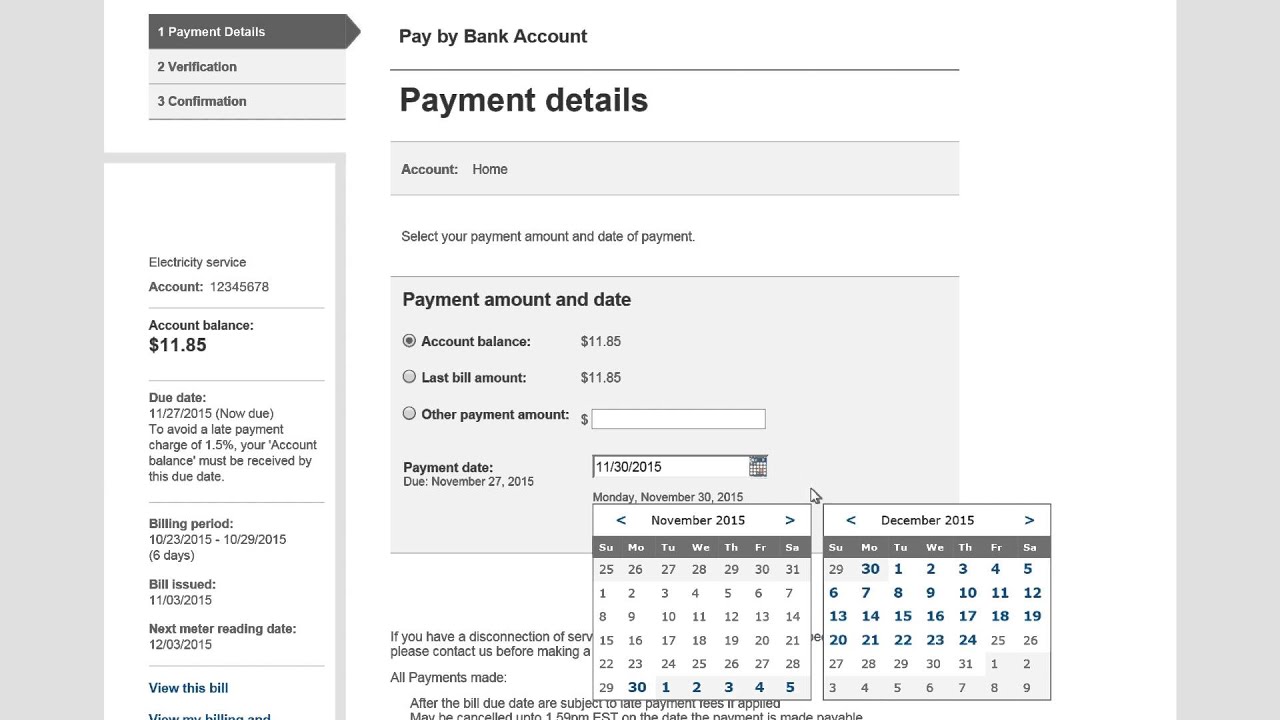
1. Pay By Bank Account (Online)
This is probably the easiest method if you’re comfy with online payments, To pay using your bank account
- Visit the National Grid website at nationalgridus.com/pay-bill
- Sign in to your online account (you need to have an account set up)
- Choose the “Pay By Bank Account” option
- Enter your checking or savings account information
- Submit your payment
The great thing about this method is that there’s no fee! But remember, you MUST have an online account with National Grid to use this option.
2. Automated Payments (Set It and Forget It!)
If your like me and tend to forget bills sometimes, automated payments are a lifesaver! With this option, National Grid automatically withdraws your payment amount from your bank account on the due date each month
To set up automated payments:
- Go to the National Grid website
- Select “Automated Payments” under the Ways to Pay section
- Follow the prompts to link your bank account
- Choose your payment preferences
Once you’ve set this up, you’ll never have to worry about missing a payment again! I’ve been using this for years and it’s SO convenient.
3. Credit/Debit Card Payments through Speedpay
Want to rack up those credit card points? You can pay your National Grid bill with your credit or debit card through Speedpay. However, keep in mind that fees may apply for this convenience.
To pay by card:
- Click on the “Speedpay” option on National Grid’s payment page
- Enter your card information
- Complete the payment process
The downside? Those pesky fees can add up over time. But if you’re in a pinch or want those reward points, this option works great!
4. Digital Payment Methods
In 2025, National Grid has expanded their digital payment options. You can now use popular digital wallets to pay your bill, though fees may apply here too.
They accept:
- Apple Pay
- Google Pay
- Samsung Pay
- PayPal
To use these methods, select “Go to Speedpay” on the National Grid payment page and choose your preferred digital payment method.
5. Other Payment Options
Not comfortable with online payments? No problem! National Grid offers several other ways to pay:
By Phone
Call the National Grid customer service number to pay by phone. You can usually pay using your bank account or credit/debit card.
By Mail
You can mail a check or money order to National Grid’s payment processing center. Just be sure to include your account number on your payment!
In Person
National Grid accepts payments at designated payment locations. These might include:
- Certain retail stores
- Payment centers
- Authorized payment agents
The advantage of paying in person is that you get a receipt immediately and know your payment has been processed.
Region-Specific Payment Options
National Grid serves different regions, and payment options may vary slightly depending on where you live. The website specifically mentions:
- Massachusetts
- New York
If you’re unsure which region you belong to, you can select your region on their website to see payment options specific to your area.
Setting Up an Online Account: A Game-Changer
I cannot stress enough how much easier life becomes when you create an online account with National Grid. With an account, you can:
- View your bills and payment history
- Track your energy usage
- Adjust account settings
- Pay your bills easily
- Set up automated payments
To register for an online account:
- Visit the National Grid website
- Click on “Sign In / Register”
- Select “Register” and follow the prompts
- You’ll need your account number from a recent bill
Tips for Hassle-Free National Grid Payments
After years of paying National Grid bills, I’ve learned a few tricks:
-
Set reminders if you’re not using automated payments. Calendar alerts can save you from late fees!
-
Keep your account number handy. You’ll need it for almost any payment method.
-
Consider paperless billing. It’s better for the environment and makes it easier to track your bills online.
-
Check for promotions. Sometimes National Grid offers incentives for choosing certain payment methods.
-
Contact customer service if you need more time. Under “Help Making Payments,” National Grid offers a “More Time to Pay” option if you’re experiencing financial difficulties.
What to Do If You’re Moving
If you’re relocating, don’t forget to take care of your National Grid account! The website offers options to:
- Start/Stop Service
- Leave on for Landlord
Make sure to notify National Grid before your move to avoid being charged for energy used after you’ve left.
Need Extra Help with Your National Grid Bill?
Sometimes we all go through rough financial patches. If your struggling to pay your bill, National Grid offers assistance:
- More Time to Pay: Request an extension on your payment deadline
- Payment Plans: Set up manageable payment arrangements
- Third Party Notifications: Allow a trusted friend or family member to be notified if your bill is overdue
Don’t hesitate to reach out to their customer service if you’re having trouble making payments. They can often work with you to find a solution.
Understanding Your Bill Better
Confused by all those charges on your bill? National Grid offers resources to help you understand:
- Help Reading Your Bill
- Manage Bill Variations
- Bill Inserts with important information
Taking time to understand these components can help you manage your energy costs better.
Special Accommodations
National Grid also offers special accommodations for customers with specific needs:
- Vision or Hearing Impaired? – Special bill formats are available
- Life Sustaining Equipment – Priority service for those who rely on medical equipment
Saving Money on Your National Grid Bill
While we’re on the topic of paying your bill, why not reduce it? National Grid offers several ways to save on energy costs:
- Browse All Rebates
- Convert to Natural Gas
- Energy Saving Tips
- EPA Portfolio Manager for energy efficiency
Taking advantage of these programs could significantly reduce your monthly bill!
Safety and Outage Information
In addition to billing info, the National Grid website provides important safety resources:
- Report/Check an Outage
- Outage Alerts
- Gas Emergency reporting
- Electric and Natural Gas safety tips
Keep these resources bookmarked for emergencies.
Final Thoughts
Paying your National Grid bill doesn’t have to be complicated. With so many options available, you can choose the method that works best for your lifestyle and preferences.
I personally recommend setting up an online account and enrolling in automated payments – it’s been a huge time-saver for me! No more panicking about forgotten due dates or wondering “where can I pay my national grid bill?”
Whether you prefer the convenience of online payments or the security of paying in person, National Grid has made sure there’s a payment method for everyone. Just pick the one that suits you best, and you’ll never stress about your utility payments again!
Have questions about paying your National Grid bill? Leave a comment below and I’ll try to help!
This guide was last updated in October 2025 to reflect the most current payment options available from National Grid. For the most up-to-date information, always check the official National Grid website.
Welcome to our Upstate NY Home site.
Were not sure if this is right. If you confirm where you use our services most, we can tailor our site to your needs. Note: If youve told us more than once your browser could be blocking cookies. Click to learn more about cookies
Where can we help you today?
Pay By Bank Account
Use your checking or savings account to make a payment.
You must have an online profile to pay your bill online.
Pay By Credit/Debit Card
Pay your bill with a credit/debit card through Speedpay.
Fees apply, starting at $1.85 for residential customers and $5.95 for business customers.
Schedule automatic payments from your bank account.
Make a digital payment using
 ,
,  ,
,  , or
, or 
Fees may apply ($1.85 residential, $5.95 business).
Pay your Nationalgrid US Bill through – Www.Nationalgrid.com/Myaccount
FAQ
Can I pay my national grid bill online?
You can pay your Electric and Gas bills at doxo. View and pay your National Grid bill online, manage your National Grid account, and go paperless with doxo. What payment options does National Grid offer in Massachusetts?
Where can I find a national grid payment location?
These are typically grocery stores, pharmacies, or check cashing locations. To find an authorized payment location near you, use the Payment Location Finder on the National Grid website.
What payment arrangements does National Grid offer?
National Grid offers two payment arrangement options. These are free services available to all customers. Collection arrangement: if you need a little extra time to pay the past due amount on your bill, National Grid can postpone the due date.
How do I avoid a late National Grid payment?
Locate nearby retailers that process National Grid payments. The easiest way to avoid late National Grid bills is to enroll in auto-pay or paperless billing. Your payment will be automatically deducted from your bank account each month.
How do I contact National Grid?
To reach credit/collections, call 1-800-443-1837. You can find more information about payment arrangements on National Grid’s website. If you care about the environment, you can apply for paperless billing. Instead of receiving your bill through the postal service, you will receive it by email.
Where can I pay my bill with a check?
Authorized Walk-In Payment Locations National Grid has over 200 authorized walk-in payment locations across Massachusetts, New York, and Rhode Island where you can pay your bill in person with cash or check. These are typically grocery stores, pharmacies, or check cashing locations.
Can I pay my National Grid at Walmart?
Call 1-800-322-3223 with your account number to make a payment securely. Send a check to National Grid using the envelope provided or mail it to the specified address. Use at Walmart for in-person payments or call the insurance company for processing.
Where can I pay my UI bill in person?
Can I pay my electric bill at Walmart?
Customers can now visit a Walmart store to pay a bill from Pacific Gas & Electric Co., San Diego Gas & Electric and Southern California Gas Co. Walmart is an authorized payment center for PG&E, SDG&E and SoCalGas meaning customers can pay bills from these companies without incurring a convenience fee.
Where can I pay my bills with cash?
Scan-to-Pay offers in-person cash bill payments at more than 41,000 participating locations including CVS, Walgreens, Dollar General, Kroger grocery stores and more.
