Paying Your City Utilities Bill in Springfield Has Never Been Easier!
Hey there, Springfield folks! If you’re like me, juggling monthly bills can be a real headache One day you’re relaxing with your morning coffee, and suddenly you remember – “Oh shoot! I forgot to pay my utility bill!” Well, I’ve been there too, and that’s why I wanted to create this comprehensive guide for paying your City Utilities of Springfield bills without the stress
As someone who’s lived in Springfield for years, I’ve tried all the different ways to pay my CU bill. Sometimes the easiest methods aren’t always obvious, so I’m sharing everything I’ve learned to make your life a little easier.
What is City Utilities of Springfield?
Before diving into payment methods, let’s get to know our service provider better. City Utilities of Springfield (often called CU) is our local municipal utility provider that delivers essential services to Springfield residents and businesses:
- Electricity service
- Natural gas
- Water and sewer services
- Public transportation options
CU is headquartered right here in Springfield, Missouri at 301 E Central St, Springfield, MO 65802. They’re truly a local organization committed to serving our community with reliable utility services.
Ways to Pay Your City Utilities Springfield Bill
I’ve tried pretty much every payment method available over the years, and each has its pros and cons. Here are all your options for taking care of that monthly utility bill:
1. Online Payment through City Utilities Website
The most straightforward method is paying directly through the official CU website:
Website: https://www.cityutilities.net/myaccount/online-pay/
This is my personal favorite because
- No third-party fees
- You can set up autopay to never miss a payment
- Access to your complete billing history
- Ability to see your usage patterns and manage your account
To use this method, you’ll need to create an online account using your account number from a recent bill. The system is pretty user-friendly, but sometimes it can be a bit slow during peak hours.
2. Pay via Doxo
Doxo is a third-party bill payment service that lets you manage multiple bills in one place
Website: https://www.doxo.com/u/biller/city-utilities-of-springfield-mo-C835A3
What’s nice about Doxo:
- All-in-one bill management (pay multiple bills in one place)
- Track payment history across different providers
- Available on both iPhone and Android
- Secure payment processing
When using Doxo, remember:
- Free payments with linked bank accounts
- Fees may apply for credit/debit card payments
- It’s not affiliated with or endorsed by City Utilities
3. Phone Payment
Sometimes the old ways are still good! You can pay your bill by calling:
Customer Support: 417-863-9000
Main Phone: 417-864-1000
I’ve used this method when my internet was down, and it works great. The automated system walks you through the process, or you can speak with a representative if you have questions.
4. In-Person Payment
If you prefer face-to-face interactions or need to pay with cash, you can visit:
CU Main Office:
301 E Central St
Springfield, MO 65802
The staff there is always friendly, and sometimes I enjoy the short trip downtown when the weather’s nice. Plus, payments post immediately to your account.
5. Mail-In Payment
Old school but reliable! You can mail your payment to City Utilities at their headquarters address. Just remember to:
- Allow 5-7 days for mail delivery and processing
- Include your account number on your check
- Send your payment stub with your check
6. Pay at Authorized Payment Locations
Various locations around Springfield accept CU payments, including some grocery stores and check cashing services. This option is handy if you’re already running errands and want to knock out your bill payment at the same time.
Payment Methods Accepted
City Utilities accepts multiple forms of payment, which is super convenient:
| Payment Method | Online | Phone | In-Person | Doxo | |
|---|---|---|---|---|---|
| Bank Account | ✓ | ✓ | ✓ | ✓ | ✓ |
| Credit Card | ✓ | ✓ | ✓ | ✓ | |
| Debit Card | ✓ | ✓ | ✓ | ✓ | |
| Cash | ✓ | ||||
| Check | ✓ | ✓ | ✓ | ||
| Apple Pay | ✓ |
Setting Up AutoPay (My Personal Recommendation)
Listen, I used to forget my CU bill ALL THE TIME until I set up autopay. It’s been a game-changer! Here’s how to do it:
- Visit the City Utilities website: https://www.cityutilities.net/myaccount/online-pay/
- Log into your account (or create one if you haven’t already)
- Look for the “AutoPay” or “Recurring Payments” option
- Enter your preferred payment method
- Choose whether you want to pay the full balance or a set amount
- Select your preferred payment date (usually due date or a few days before)
- Confirm and save your settings
Now you can relax knowing your bill will be paid automatically each month. I still get email notifications when my bill is ready and when payment has been made, which gives me peace of mind.
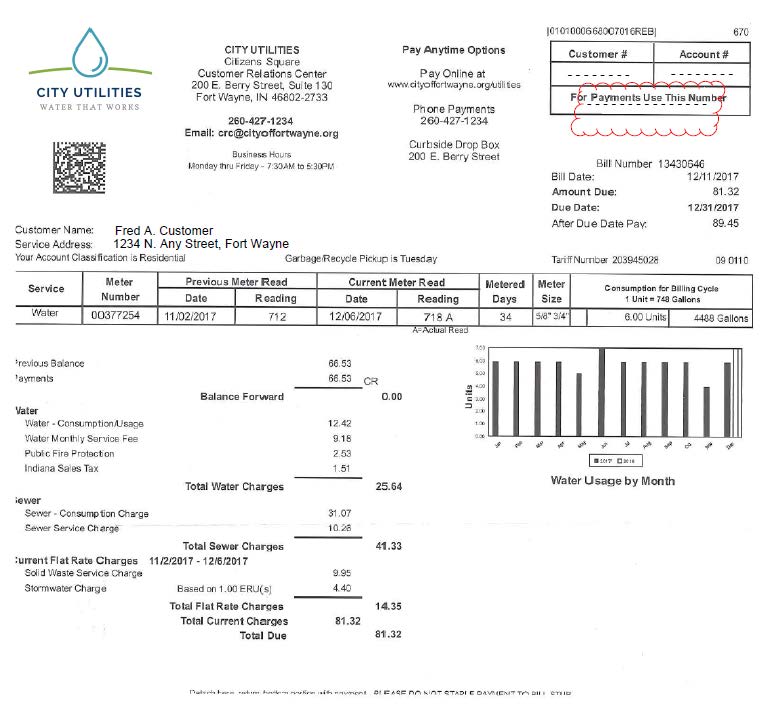
Understanding Your City Utilities Bill
I remember how confused I was when I got my first CU bill. Let me break down what you’re looking at:
- Account Information: Your account number, service address, and billing period
- Usage Summary: Shows how much electricity, gas, and water you’ve used compared to previous months
- Charges Breakdown: Itemized charges for each service, plus any taxes or fees
- Due Date: The date by which payment must be received to avoid late fees
- Total Amount Due: The bottom line—what you need to pay
Pro tip: Pay attention to the usage graphs! They can help you identify unusually high usage that might indicate leaks or inefficiencies in your home.
What to Do If You’re Having Trouble Paying
We all go through tough times. If you’re struggling to pay your CU bill, don’t panic! City Utilities offers several assistance programs:
- Payment Arrangements: Call 417-863-9000 to set up a payment plan
- Project SHARE: A program that provides assistance to qualifying customers facing financial hardship
- Budget Billing: Evens out your payments throughout the year so winter bills aren’t as shocking
- Energy Efficiency Programs: Get help making your home more efficient to lower your bills
The key is to contact them BEFORE your bill is overdue. In my experience, they’re much more willing to work with you if you reach out proactively.
Frequently Asked Questions About CU Bill Pay
How can I check if my payment was received?
You can verify payment status through:
- Your online account at cityutilities.net
- Calling customer service at 417-863-9000
- Checking your bank or credit card statement for the processed payment
What happens if I miss a payment?
If you miss a payment:
- You’ll typically get a late notice
- A late fee may be applied to your next bill
- After multiple missed payments, service disconnection may occur
- To restore service, you’ll need to pay the past due amount plus a reconnection fee
Is there a fee for paying online?
When paying through the official City Utilities website, there are typically no fees for electronic payments from your bank account. Credit card payments may incur a small convenience fee. If using third-party services like Doxo, additional fees may apply depending on your payment method.
How long does it take for my payment to post?
In my experience:
- Online payments through CU’s website: 1-2 business days
- Doxo payments: 2-4 business days
- Phone payments: 1-2 business days
- In-person payments: Immediate
- Mail payments: 5-7 business days
Can I pay for someone else’s utility bill?
Yes! If you’re helping out family or friends, you can pay someone else’s bill by knowing their account number. This has been super helpful when I’ve needed to help my parents with their bills.
Managing Your City Utilities Account Beyond Bill Pay
While paying your bill is important, City Utilities offers several other helpful services:
- Report Outages: Through the website or by calling 417-863-9000
- Start/Stop Service: When moving, arrange services online or by phone
- Usage Monitoring: Track your consumption patterns to identify savings opportunities
- Paperless Billing: Sign up for e-billing to reduce paper waste
- Customer Alerts: Get notifications about outages, bill reminders, and more
I’ve found their usage monitoring tools particularly helpful in reducing my electric bill during hot summers.
My Personal Experience with City Utilities Bill Pay
I’ve been a CU customer for over 8 years now, and I’ve tried just about every payment method they offer. In the beginning, I was mailing checks (and occasionally forgetting, leading to late fees—not my proudest moments).
When I switched to online payments, things got easier, but I still had to remember to make the payment each month. The game-changer was setting up autopay about three years ago. Now my bill gets paid automatically five days before the due date, which gives me time to address any issues if the payment doesn’t go through for some reason.
One time, my credit card expired and I forgot to update it in the system. CU sent me an email notification that my payment couldn’t be processed, which saved me from a late fee. Their communication was prompt and helpful.
Final Thoughts
Paying your City Utilities bill doesn’t have to be complicated or stressful. With so many convenient options available, you can choose the method that works best for your lifestyle. Whether you’re tech-savvy and prefer managing everything online or you like the personal touch of paying in person, CU has you covered.
My biggest recommendation? Set up autopay if you can! It’s saved me countless hours of worry and helped me avoid late fees.
Stay cozy and keep those utilities flowing, Springfield friends!
Contact City Utilities
Phone: 417-863-9000
Email: [email protected]
Website: springfieldmo.gov
Location: 301 E Central St, Springfield, MO 65802
Online (Xpress Bill Pay) Using Credit Card, Debit Card, or E-Check
- All commercial and residential customers will be eligible.
- It’s free to sign up for online bill payment at www.xpressbillpay.com.
- If you have an Internet connection and an email address or phone number, you can now pay your bill online. You are also able to “opt in” to paperless billing and receive an email or text notification when your bill is ready to view. It’s fast, it’s easy, and you no longer have to write a check each month or find a stamp when it’s time to send in your payment.
Options for Utility Payment Methods:
- Payment is automatically withdrawn on the due date from a checking or savings account.
- There is no fee for this service.
- To be eligible for automatic withdrawal (ACH), the customer must be the account holder listed on the utility billing and on the checking/saving account.
- Automatic bank drafts returned for non-sufficient funds or other reason will be subject to a $20.00 penalty. Three returned drafts will result in removal from the Automatic Withdrawal Program for a twelve-month period.
- To sign up for Automatic Withdrawal, click here ACH Authorization Form.
- ACH customers are also eligible to sign up for Equal Pay Program (Level Pay); for more information, click here Equal Pay Form.
