This article will provide an overview of Baltimore Gas and Electric Company (BGE) – a utility provider serving the Baltimore area. We will discuss different services that BGE offers, such as paying your bill, checking outages, and customer service. We will also provide you with the contact number for BGE so you can get in touch with their customer service team. This article is important to those looking for information about BGE and its services, as well as those who need help with their bills or outages.
Have you ever scrambled at the last minute trying to figure out where to send your BGE payment? I know I have! It’s frustrating to search through old emails or dig through stacks of mail just to find the right address. That’s why I’ve created this comprehensive guide to BGE bill payments – to make your life easier and help you avoid those pesky late fees.
The BGE Bill Payment Address You Need
Let’s cut to the chase! Here’s the official mailing address for BGE bill payments:
BGE Bill Payment Address PO Box 13070Philadelphia, PA 19101-3070
For general inquiries that aren’t related to payments, you can use this address PO Box 1475Baltimore, MD 21203
I recommend saving this information somewhere handy – maybe in your phone contacts or on a note stuck to your refrigerator. Trust me, you’ll thank yourself later!
Multiple Ways to Pay Your BGE Bill
While knowing the mailing address is important, BGE offers several convenient payment methods to fit your lifestyle. Here’s a breakdown of all your options:
1. Pay by Mail
If you prefer the traditional route, you can mail your payment to the address mentioned above Here’s what you need to do
- Write a check or money order payable to “BGE”
- Include your account number on the memo line
- Mail it to: P.O. Box 13070, Philadelphia, PA 19101-3070
- Allow 3-5 business days for delivery and processing
Pro tip: I always mail my payment at least a week before the due date to avoid any delays!
2. Pay Online
This is personally my favorite method because it’s quick and available 24/7. To pay online:
- Visit the BGE website at www.bge.com
- Log in to your account (or pay as a guest)
- Select the “Pay My Bill” option
- Enter your payment information
- Submit your payment
The best part? You can set up AutoPay so you never forget a payment again. The system will automatically deduct the amount from your bank account on the due date.
3. Pay by Phone
In a rush? The phone payment option is perfect for last-minute payments:
- Call BGE at 833-209-5245
- Follow the automated prompts
- Have your account number and payment method ready
- Complete your payment
I’ve used this option a few times when I’ve been traveling, and it works great in a pinch!
4. Pay in Person
If you prefer face-to-face interactions or need to pay with cash, you can visit:
- Authorized payment locations
- BGE service centers
To find the nearest location, check the BGE website or call customer service.
Understanding Your BGE Bill
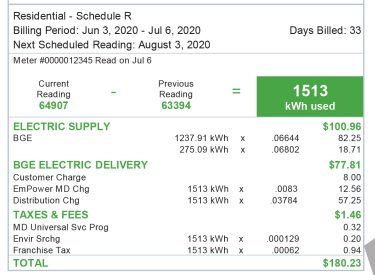
Before you make a payment, it’s helpful to understand what you’re actually paying for. Your BGE bill typically includes:
- Electricity supply charges: Currently at a rate of $0.680 per kWh
- Natural gas charges: Currently at $0.320 per therm
- Delivery charges: Fees for maintaining the infrastructure
- Taxes and surcharges: Various government fees
One thing I’ve noticed is that the “Price to Compare” rate is an important number to know, especially if you’re considering switching to a competitive energy supplier.
Payment Assistance Programs
We all go through tough times. If you’re struggling to pay your BGE bill, don’t panic! BGE offers several assistance programs:
- Budget Billing: Spreads your annual energy costs evenly throughout the year
- Payment Plans: Extends your due dates based on your financial situation
- CARES Program: Customer Assistance and Referral Evaluation Service
- LIHEAP: Low Income Home Energy Assistance Program
- Maryland Energy Assistance Program: State-specific help for residents
Don’t be shy about reaching out if you need help. I’ve had friends who’ve benefited greatly from these programs during financial hardships.
How to Lower Your BGE Bill
Nobody wants to pay more than necessary for utilities! Here are some ways to reduce your BGE bill:
Compare Rates with Competitive Suppliers
Thanks to deregulation, you can shop around for better rates. Arbor’s TrueRate Protection is a free service that:
- Scans the market for better rates than BGE’s default
- Switches you automatically to save money
- Continues monitoring to ensure you always have the best rate
Energy Conservation Tips
- Seal windows and doors to prevent drafts
- Use a programmable thermostat
- Switch to LED light bulbs
- Unplug electronics when not in use
- Wash clothes in cold water
I implemented these changes in my home and saw my bill drop by almost 15%!
Setting Up Your BGE Online Account
Having an online account makes managing your BGE service much easier. Here’s how to set one up:
- Visit the BGE website
- Click on “Register” or “Sign Up”
- Enter your account number (found on your bill)
- Provide either:
- Last 4 digits of your Social Security number
- BGE PIN
- Business ID
- Create login credentials
- Accept the terms and conditions
- Verify and submit
Once your account is set up, you can view bills, make payments, report outages, and much more!
What to Do During Emergencies
If you experience a power outage or see a downed power line:
- Move away from the area immediately
- Call 1-877-778-2222
If you smell gas or spot a damaged gas line:
- Leave the area right away
- Call 1-877-778-7798
For other emergencies, contact BGE’s emergency line at 1-800-685-0123.
I had a gas leak scare last winter, and the BGE emergency team responded within 20 minutes. They’re really good at handling these situations quickly!
BGE Customer Service Contact Information
For any questions or concerns, here’s how to reach BGE:
- Phone: 1-800-685-0123
- Moving Service: 1-800-220-7326
- Website: www.bge.com
- Mobile App: Available for iOS and Android
When calling, always use your registered phone number to speed up the verification process.
Tips for New BGE Customers
Just moved to the BGE service area? Here’s what you need to know:
- Set up service ASAP: Call 1-800-220-7326 to establish service
- Create an online account: Makes managing your service much easier
- Consider budget billing: Helps avoid seasonal bill spikes
- Sign up for outage alerts: Get notified about power issues
- Check for energy rebates: BGE offers rebates for energy-efficient upgrades
When I moved to Baltimore last year, setting up my BGE service was actually pretty painless. The customer service rep was super helpful in explaining my options.
FAQs About BGE Bill Payments
How long does it take for my mailed payment to process?
Typically 3-5 business days after BGE receives it. I recommend mailing it at least a week before the due date.
Can I pay my BGE bill with a credit card?
Yes! You can use a credit card online or by phone.
Is there a fee for paying with a credit card?
There may be a small convenience fee for certain payment methods. Check the BGE website for current fee information.
What happens if I miss a payment?
Late payments may result in late fees and potentially affect your credit score if repeatedly missed. If you’re having trouble paying, contact BGE to discuss assistance options.
Can I make partial payments?
Yes, but you’ll need to pay the full amount by the due date to avoid late fees unless you’ve arranged a payment plan.
Conclusion: Managing Your BGE Bill Payments Made Simple
Paying your BGE bill doesn’t have to be complicated. Whether you prefer the traditional method of mailing a check to P.O. Box 13070, Philadelphia, PA 19101-3070, or using one of the modern digital options, BGE makes it relatively easy to stay current on your utility payments.
Remember that staying on top of your payments not only helps you avoid late fees but also maintains your good credit standing. And if you ever find yourself in a financial bind, don’t hesitate to explore BGE’s various assistance programs.
Last updated: November 2025
BGE(Baltimore Gas and Electric Company) Bill Pay
BGE customers now have the convenience of paying their bills online.Checking your bill pay is now easier than ever with BGEs online services. BGE customers can easily use their online portal to view current and past bills, or make a one-time payment or set up a recurring payment plan.
BGE offers customers a variety of ways to pay their bills. Customers can pay their bills by check, money order, online banking, online with credit card, Paypal, or by phone with a credit card or check. BGE also offers customers the option of enrolling in BGEs paperless billing program, which eliminates the need for paper bills.
The process of paying a BGE bill is very simple. To begin, a customer should log in to their account online or create an account. Once logged in, the customer needs to select the “Make a Payment” option from the menu. The customer will then be prompted to enter the amount they wish to pay, as well as which payment method they intend to use. Once the payment information is filled out, the customer needs to confirm the details and agree to any additional terms and conditions. After this is done, the customers payment will be processed and a payment confirmation will be sent.
Paying a BGE bill is now more convenient than ever. Customers can now easily pay their bills online or by phone. With the various payment methods and the paperless billing program, BGE customers have the added convenience and security of being able to manage their bills from the comfort of their home.
BGE(Baltimore Gas and Electric Company) Electric rate plans
BGE offers a variety of electric rate plans to meet the needs of residential and business customers. Residential customers can choose from Standard Offer Service (SOS), Time-of-Use (TOU), and E-TOU. These rate plans are based on the time of day electricity is used, peak and off-peak hours, and season. For example, E-TOU offers lower electricity rates during off-peak hours (nights, weekends, and holidays), while TOU is designed to incentivize customers to shift electricity usage away from peak hours. Business customers can choose from General Service Demand Rate or Time-of-Use Demand Rate, which are designed to make business customers more aware of when they use electricity and how that affects their bill. SOS is the default rate plan for residential customers and is based on a customers individual energy use. This rate plan charges one rate all day, every day. Customers who use more electricity than the average customer may find that SOS is the most cost-effective rate plan for them. TOU is the default rate plan for business customers and is based on when electricity is used. This rate plan charges different rates depending on the time of day electricity is used. For example, customers may see higher rates during peak hours (weekdays from 2 pm to 6 pm) and lower rates during off-peak hours (nights, weekends, and holidays). E-TOU is a more flexible rate plan for residential customers. This rate plan offers lower rates during off-peak hours, making it a great choice for customers who can shift their electricity usage away from peak hours. It also offers peak and off-peak rates for electricity used during the summer months, when electricity demand is highest. BGE also offers special rate plans for low-income customers who qualify. These rate plans allow customers to pay a lower rate than the standard rate and can help customers save money on their electricity bill. To learn more about rate plans and how to save money on your electricity bill, customers should contact BGE directly.
