Ever found yourself scrambling at the last minute to pay your Blue Shield Covered California premium? You’re definitely not alone! I’ve been there too frantically searching for my account number or trying to remember if I’ve already set up AutoPay. It can be a real headache if you don’t know your options.
Good news though – Blue Shield of California offers several convenient ways to pay your Covered California health insurance bill Whether you prefer doing everything online, over the phone, or the old-school way with checks in the mail, they’ve got you covered
In this article, I’ll walk you through everything you need to know about paying your Blue Shield Covered California bill – from setting up automatic payments to what to do if you’ve lost your invoice Let’s jump right in!
Online Payment Options: Quick and Convenient
The fastest way to pay your Blue Shield Covered California premium is online. Here’s how:
Making One-Time Payments Online
- Go to blueshieldca.com/login
- Log into your account
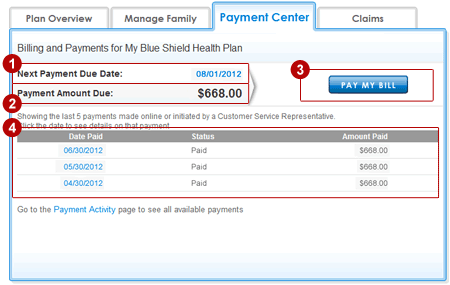
- From the dashboard, look for the Current Bill tab
- Select “Pay premium”
- Choose whether to use a saved payment method or add a new one
- Decide if you want to pay the current balance or specify another amount
- Review your payment details and click “Make payment”
Pro tip: Payments submitted before 8 PM Pacific Time will be posted to your account the same day!
If you prefer, you can also make a payment by:
- Selecting “billing & payments” from the blue navigation bar
- Clicking the “Pay premium” button
- Following the prompts to submit your payment
Setting Up AutoPay (Never Miss a Payment Again!)
AutoPay is a lifesaver if you’re forgetful like me. Here’s how to enroll:
- Log in at blueshieldca.com/login
- On your dashboard, scroll to the Current Bill tab
- Click the AutoPay: OFF (set up) link
- Choose to use a new payment method or one saved in your wallet
- Complete the payment details
- Click the “Set up” button
Once complete, your AutoPay status will change to AutoPay: ON.
Important timing note: If you enroll in AutoPay within 4 days of your due date and have a current balance due, make a one-time payment for this month. AutoPay will kick in the following month.
For example, if you enroll in AutoPay on or before January 27, your payment will be automatically deducted on January 31. But if you enroll on January 28, your first automatic payment won’t happen until February 28.
Changing or Canceling AutoPay
Need to update your payment method or turn off AutoPay? Here’s how:
To change payment method:
- Log in and go to the Current Bill tab
- Click the AutoPay: ON link
- Select “Change” at the bottom of the page
- Choose another payment method or add a new one
- Click “Set up” to process your change
To turn off AutoPay:
- Log in and go to the Current Bill tab
- Click the AutoPay: ON link
- Select “Turn off”
- Confirm by clicking “Yes, turn off”
Traditional Payment Methods
Not everyone likes paying bills online, and that’s totally fine! Blue Shield offers several other ways to pay your Covered California premium.
Pay by Phone
Want to pay your bill over the phone? Just call:
- The number on the back of your Blue Shield member ID card
- The number on your billing statement
- The automated system at (800) 393-6130
If you need help, customer service representatives are available to assist.
Pay by Mail
If you prefer sending a check, here’s what to do:
- Use the remit slip attached to your monthly bill
- Write your account number on your check or money order
- Send to:
Blue Shield of CaliforniaP.O. Box 4700Whittier, CA 90607-4700
Account number tip: To get your account number, combine the group number and subscriber number from your payment stub.
For example:
- If your group number is: A12345
- And your subscriber number is: B6789
- Your account number would be: A12345B6789
Pay Through Your Bank
Many folks like using their bank’s Bill Pay service to send payments. To set this up:
- Follow your bank’s online instructions for setting up Bill Pay
- Enter the correct Blue Shield account number from your bill
- Use the mailing address found on your bill (same as the mail-in address above)
Important note: Check with your bank about processing times. There can be delays between when your bank sends the payment and when Blue Shield receives it. If Blue Shield doesn’t receive your payment by the due date, you might get a past-due notice (Notice of Start of Grace Period).
New Members: Special Payment Instructions
If you’re new to Blue Shield Covered California, there are a few things to know:
- Your online billing experience will be available when your first billing statement is generated (about 2 weeks before your coverage starts)
- If you want an email notification when your first bill is ready, register for an online account at blueshieldca.com/login
- If your application requires a binder payment (first payment) to complete enrollment, you may not be able to register for an online account yet
- Binder payments can be made online at blueshieldca.com/paymentbsc
Viewing Your Bills Online
Want to check your current or past bills? Here’s how:
- Log in at blueshieldca.com/login
- On the dashboard, go to the Current Bill tab
- Click “view bill details”
- To download the bill as a PDF, select “download bill”
- To see past bills, select “view past bills”
You can also view bills by selecting “billing & payments” from the top navigation bar.
Common Questions About Blue Shield Covered California Payments
What if my balance shows a negative amount?
If your balance shows something like -$20.00, it means you have a credit or overpayment on your account. No payment is needed!
Can I make a payment before my next bill is available?
Yes! If you don’t have an amount due, select the “No payment necessary” button and confirm you’d like to make an extra payment. Then follow the normal payment process.
I want to use my bank account for AutoPay, but only see credit card options. What should I do?
Click the down arrow next to “Debit/credit card” and you’ll see options for checking or savings accounts.
Do I have to register for an account or log in to make a payment?
No, you can make a one-time payment without an online account. Visit blueshieldca.com and select “Pay my premium” in the upper right corner. You’ll need your Subscriber Number, the zip code for the policy, and an email address.
Is there a fee for paying online or using a credit card?
No! Blue Shield does not charge any payment processing fees. However, your bank or credit card might have their own fees, so check with them.
When is my payment due?
Payments are due by the “Bill due date” on your statement. If paying on the due date, use the immediate one-time payment option before 8 PM PST. Payments completed after that time may be considered late.
What if my payment cleared my bank but isn’t showing up in Blue Shield’s records?
If this happens, get a copy of your cashed check or bank statement showing proof of payment, then call the Customer Service number on your ID card or bill.
The automatic payment for my plan hasn’t been withdrawn. Is my plan cancelled?
If you enrolled in AutoPay but the payment hasn’t been withdrawn, call the Customer Service number on your ID card or bill to check on your status.
Covered California vs. Direct Blue Shield Plans
It’s important to know that while this article focuses on Blue Shield Covered California plans, the payment processes are similar for direct Blue Shield plans too. The main difference is that with Covered California plans, you might qualify for subsidies to lower your premium costs.
If you’re not sure whether you have a Covered California plan or a direct Blue Shield plan, check your ID card or bill. Covered California plans will typically indicate this on your documentation.
Final Thoughts
Paying your Blue Shield Covered California premium shouldn’t be a source of stress. With so many payment options available, you can choose what works best for your lifestyle and preferences.
I personally recommend setting up AutoPay if you can – it’s saved me from late payments more times than I’d like to admit! But whatever method you choose, the important thing is keeping your coverage active so you have access to healthcare when you need it.
Still have questions about paying your bill? Call the number on your Blue Shield ID card or billing statement. Their customer service team is ready to help!
Remember, staying on top of your premium payments ensures your health coverage remains active, giving you one less thing to worry about. And in today’s crazy world, that’s definitely worth something!
Never miss a deadline.
Sign up for email updates to get deadline reminders and other important information
| Language | ||
|---|---|---|
| Arabic | اÙعربÙØ© | (800) 826-6317 |
| Cantonese | ç²µèª | (800) 339-8938 |
| Mandarin | æ®éè¯ | (800) 300-1533 |
| Hmong | Hmoob | (800) 771-2156 |
| Korean | íêµì´ | (800) 738-9116 |
| Russian | ÑÑÑÑкий | (800) 778-7695 |
| Filipino | Tagalog | (800) 983-8816 |
| Armenian | Õ°Õ¡ÕµÕ¥ÖÕ¥Õ¶ | (800) 996-1009 |
| Farsi | ÙØ§Ø±Ø³Û | (800) 921-8879 |
| Khmer | Khmer | (800) 906-8528 |
| Lao | Lao | (800) 357-7976 |
| Spanish | Español | (800) 300-0213 |
| Vietnamese | Tiếng Viá»t | (800) 652-9528 |
Contact Your Insurance Company
Questions about premium bills, payment due dates and costs for doctor visits or other services should be sent directly to your health, dental or vision plan.
Follow the prompts. Â Billing and Payment Options
Have your Exchange ID and System ID numbers ready. These numbers can be found on your payment coupon.
Make checks payable to: Aetna Health of California Inc.
Include the bottom portion of your invoice with payment.
For first-time payment: log in to your CoveredCA.com account and follow the payment instructions.
If you are a current member, go to www.aetnacvshealth.com to register your account and login
No invoice received? (866) 901-2922 Associated Dental Insurance
Call (855) 634-3381 Associated Dental Insurance
For your first premium payment, go to https://balancebycchp.com/how-to-pay/. Have your invoice ready. Your subscriber ID is required.
Contact Customer Services at (888) 775-7888 for assistance. Associated Dental Insurance
For your first premium payment only, go to www.blueshieldca.com/PaymentBSC. Have your invoice ready. Your application ID is required.
If you are a current member, go to www.blueshieldca.com and log in as a member, and select âPay my billâ under the Billing & Payments section.
Contact Customer Care at (855) 836-9705 for assistance with making your first premium payment. Associated Dental Insurance
Pay Online
Go to https://ifp.healthnetcalifornia.com/resources/paying-my-bill.html.
Click the “For Members” button on the top of the page. Then click “Pay My Bill.”
Find a MoneyGram location near you on its website or call (800) 926-9400. Remember to bring:
- Cash for your premium payment. Health Net will pay your MoneyGram transaction fee.
- Your Health Net member ID number.
- The Receive Code: 16375.
Fill out the blue MoneyGram ExpressPayment® form and use the MoneyGram phone or kiosk to complete your payment.
View your invoice on the Health Net website. Register, then log in to view your invoice or call (888) 926-4988 (TTY 711) between 8 a.m. and 5 p.m. Pacific Time. Associated Dental Insurance
No invoice received? (855) 433-4347 Associated Dental Insurance
No invoice received? (888) 236-4490 Associated Dental Insurance
Register or log in to your member account at L.A. Care Connect. Have your member ID or the subscriberâs member ID available.
(855) 270-2327 TTY: 711
Have your member ID or subscriberâs member ID or case number available. Associated Dental Insurance
For overnight delivery: Molina Healthcare Dept. #75159 350 N. Orleans St., Ste 800 Chicago, IL 60654-1529
Please write your subscriber/account number on your check or money order.
For first-time payment: sign in to your CoveredCA.com account and follow the payment instructions.
To make your monthly payment online, visit http://MolinaPayment.com.
(800) 772-5327 Have your Covered California ID or Social Security number available. Associated Dental Insurance
For first-time payment, visit https://www.sharphealthplanpayment.com/PP.
To make your monthly payments, log in or create an account at https://www.sharphealthplan.com/login.
(800) 359-2002 Associated Dental Insurance
For first-time payment: sign in to your CoveredCA.com account and follow the payment instructions.
If you are a current member, visit https://www.valleyhealthplan.org/members/pay-your-monthly-health-coverage-bill.
(888) 421-8444 Associated Dental Insurance
For first-time payment: log into your CoveredCA.com account and follow the payment instructions.
Available toll free, 24 hours a day
Have your WHA ID number or Social Security number available. Associated Dental Insurance
Go to www.anthem.com/ca and create a user ID and password in order to log in as a member. Then you can follow the prompts for “pay my bill.”
For your first premium payment only, go to www.blueshieldca.com/PaymentBSC. Have your invoice ready. Your application ID is required.
If you are a current member, go to www.blueshieldca.com and log in as a member, and select âPay my billâ under the Billing & Payments section.
Contact Customer Care at (855) 836-9705 for assistance with making your first premium payment.
https://deltadentalins.com or DHMO (888) 282-8528 DPPO (888) 282-8978
article Text messaging service is not available at this time. Billing and Payment Options
Make checks payable to Humana Insurance Company
Include the bottom portion of your invoice with payment.
Note: This is not the PayNow link that CoveredCA will present to the member upon enrollment.
Recurring Invoices: www.humana.com.
No invoice received? Call (866) 822-6275 (TTY: 711), Monday â Friday, 8 a.m. â 6 p.m
article Text messaging service is not available at this time.
The hours for benefits and provider questions are: 4:30 a.m. to 8 p.m. Monday through Saturday. 8 a.m. to 5 p.m. Sunday
The hours for billing and policy change questions are: 5 a.m. to 6 p.m. Monday through Friday.
article Text messaging service is not available at this time.
Help is available by phone during the following hours: Monday through Thursday: 5 a.m. to 7 p.m. Friday: 5 a.m. to 5 p.m. Saturday: 7:30 a.m. to 2 p.m. Sunday: Closed
article Text messaging service is not available at this time.
Help is available by phone during the following hours: Monday through Friday: 5 a.m. to 6 p.m. Saturday: 5 a.m. to 1:30 p.m.
Follow the prompts. Â Billing and Payment Options
Have your Exchange ID and System ID numbers ready. These numbers can be found on your payment coupon.
Make checks payable to: Aetna Health of California Inc.
Include the bottom portion of your invoice with payment.
For first-time payment: log in to your CoveredCA.com account and follow the payment instructions.
If you are a current member, go to www.aetnacvshealth.com to register your account and login
No invoice received? (866) 901-2922 Associated Dental Insurance
Call (855) 634-3381 Associated Dental Insurance
For your first premium payment, go to https://balancebycchp.com/how-to-pay/. Have your invoice ready. Your subscriber ID is required.
Contact Customer Services at (888) 775-7888 for assistance. Associated Dental Insurance
For your first premium payment only, go to www.blueshieldca.com/PaymentBSC. Have your invoice ready. Your application ID is required.
If you are a current member, go to www.blueshieldca.com and log in as a member, and select âPay my billâ under the Billing & Payments section.
Contact Customer Care at (855) 836-9705 for assistance with making your first premium payment. Associated Dental Insurance
Pay Online
Go to https://ifp.healthnetcalifornia.com/resources/paying-my-bill.html.
Click the “For Members” button on the top of the page. Then click “Pay My Bill.”
Find a MoneyGram location near you on its website or call (800) 926-9400. Remember to bring:
- Cash for your premium payment. Health Net will pay your MoneyGram transaction fee.
- Your Health Net member ID number.
- The Receive Code: 16375.
Fill out the blue MoneyGram ExpressPayment® form and use the MoneyGram phone or kiosk to complete your payment.
View your invoice on the Health Net website. Register, then log in to view your invoice or call (888) 926-4988 (TTY 711) between 8 a.m. and 5 p.m. Pacific Time. Associated Dental Insurance
No invoice received? (855) 433-4347 Associated Dental Insurance
No invoice received? (888) 236-4490 Associated Dental Insurance
Register or log in to your member account at L.A. Care Connect. Have your member ID or the subscriberâs member ID available.
(855) 270-2327 TTY: 711
Have your member ID or subscriberâs member ID or case number available. Associated Dental Insurance
For overnight delivery: Molina Healthcare Dept. #75159 350 N. Orleans St., Ste 800 Chicago, IL 60654-1529
Please write your subscriber/account number on your check or money order.
For first-time payment: sign in to your CoveredCA.com account and follow the payment instructions.
To make your monthly payment online, visit http://MolinaPayment.com.
(800) 772-5327 Have your Covered California ID or Social Security number available. Associated Dental Insurance
For first-time payment, visit https://www.sharphealthplanpayment.com/PP.
To make your monthly payments, log in or create an account at https://www.sharphealthplan.com/login.
(800) 359-2002 Associated Dental Insurance
For first-time payment: sign in to your CoveredCA.com account and follow the payment instructions.
If you are a current member, visit https://www.valleyhealthplan.org/members/pay-your-monthly-health-coverage-bill.
(888) 421-8444 Associated Dental Insurance
For first-time payment: log into your CoveredCA.com account and follow the payment instructions.
Available toll free, 24 hours a day
Have your WHA ID number or Social Security number available. Associated Dental Insurance
Go to www.anthem.com/ca and create a user ID and password in order to log in as a member. Then you can follow the prompts for “pay my bill.”
Call (855) 634-3381. Associated Health Insurance
For your first premium payment only, go to www.blueshieldca.com/PaymentBSC. Have your invoice ready. Your application ID is required.
If you are a current member, go to www.blueshieldca.com and log in as a member, and select âPay my billâ under the Billing & Payments section.
Contact Customer Care at (855) 836-9705 for assistance with making your first premium payment. Associated Health Insurance
(855) 425-4164 Associated Health Insurance
https://deltadentalins.com or DHMO (888) 282-8528 DPPO (888) 282-8978 Associated Health Insurance
article Text messaging service is not available at this time. Billing and Payment Options
Make checks payable to Humana Insurance Company
Include the bottom portion of your invoice with payment.
Note: This is not the PayNow link that CoveredCA will present to the member upon enrollment.
Recurring Invoices: www.humana.com.
No invoice received? Call (866) 822-6275 (TTY: 711), Monday â Friday, 8 a.m. â 6 p.m
article Text messaging service is not available at this time.
The hours for benefits and provider questions are: 4:30 a.m. to 8 p.m. Monday through Saturday. 8 a.m. to 5 p.m. Sunday
The hours for billing and policy change questions are: 5 a.m. to 6 p.m. Monday through Friday.
article Text messaging service is not available at this time.
Help is available by phone during the following hours: Monday through Thursday: 5 a.m. to 7 p.m. Friday: 5 a.m. to 5 p.m. Saturday: 7:30 a.m. to 2 p.m. Sunday: Closed
article Text messaging service is not available at this time.
Help is available by phone during the following hours: Monday through Friday: 5 a.m. to 6 p.m. Saturday: 5 a.m. to 1:30 p.m.
You can get help from a certified enrollment counselor right away. Itâs always free and confidential. Talk to someone about your options and have them guide you through the process. You can enroll in person, by phone or online.
Help is available in more than a dozen languages.
