Yes, you absolutely can pay your T-Mobile bill at Walmart! As someone who’s constantly looking for convenient ways to handle monthly bills, I’ve found Walmart’s bill payment services to be a real lifesaver. Whether you prefer paying in-person with cash or handling transactions online Walmart offers multiple options for T-Mobile customers.
Why Choose Walmart for T-Mobile Payments?
Walmart’s Bill Pay service has some pretty compelling advantages
- Convenience – With over 4,700 stores across the US, chances are there’s a Walmart near you
- Quick processing – Many payments post to your account same-day
- Low fees – Fees start at just $1 (varies by biller and delivery speed)
- Multiple payment methods – Pay with cash or debit card
- Extended hours – Most Supercenters are open from 6am to 11pm
I personally love that I can take care of my T-Mobile bill while picking up groceries or other essentials. It’s one less separate errand to run!
How to Pay Your T-Mobile Bill at Walmart In-Store
Making an in-person payment at Walmart is straightforward and quick. Here’s what you’ll need to do:
-
Gather necessary information
- Your T-Mobile account number
- The amount you want to pay
- Cash or debit card for payment
-
Visit any Walmart location
- Head to the MoneyCenter or Customer Service desk
- Tell the associate you want to pay a T-Mobile bill
-
Complete the transaction
- Provide your T-Mobile account details
- Pay your chosen amount
- Keep the receipt as proof of payment
The best part? In-store payments process almost instantly in most cases. Your T-Mobile account should reflect your payment very quickly, helping you avoid any potential late fees.
Paying T-Mobile Bills Through Walmart Online
If you prefer the digital approach, Walmart also allows you to pay T-Mobile bills through their website:
- Go to Walmart.com
- Navigate to the Bill Payment section
- Select T-Mobile as your biller
- Enter your T-Mobile number and zip code
- Choose to pay full balance or a custom amount
- Provide payment information
- Submit and complete your payment
Online payments through Walmart typically include a small service fee of around $1.25. While not free, many customers find this a small price to pay for the convenience of handling bills from home.
Understanding T-Mobile Billing Before Payment
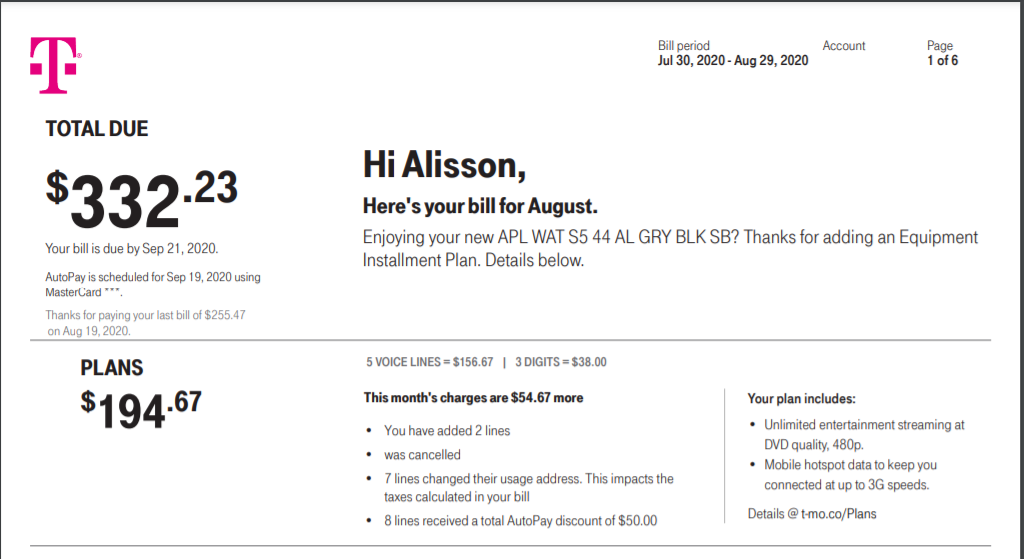
Before paying your bill at Walmart, it’s helpful to understand what you’re paying for. T-Mobile bills typically include:
- Monthly plan charges
- Device installment payments (if applicable)
- Data usage overages (for non-unlimited plans)
- Taxes and fees
- Additional purchased services
T-Mobile usually gives you about 23 days to pay after issuing your bill. Missing the due date can result in a late fee of up to $5, so it’s important to pay on time.
Timing Your T-Mobile Bill Payment
To avoid service interruption or late fees, consider these timing tips:
- Check your statement for the exact due date (typically 20-23 days after billing cycle)
- Make in-store payments at least 1-2 days before due date to allow processing time
- Online payments may need 1-3 business days to post to your account
- Set calendar reminders to avoid forgetting payment deadlines
I’ve found that paying a few days early gives me peace of mind and eliminates any worry about potential processing delays.
Additional Payment Methods Available at Walmart
Walmart offers several money services that can help with bill payments:
- MoneyGram – Available at Walmart locations for bill payments
- Western Union – Another option for sending bill payments
- Check Cashing – Cash a check first if you need funds to pay your bill
- Walmart Bill Pay – Powered by CheckFreePay and other partners
These options provide flexibility based on your needs and preferences. The service fees vary depending on which method you choose and how quickly you need the payment to process.
Other Ways to Pay Your T-Mobile Bill
While Walmart is convenient, T-Mobile offers several other payment options:
- Auto-pay – Set up recurring payments from your bank account
- T-Mobile app – Pay directly through your mobile device
- T-Mobile website – Make one-time payments online
- Phone payment – Call 611 from your T-Mobile phone or 1-800-937-8997
- Mail – Send check or money order to T-Mobile’s payment address
- T-Mobile store – Visit a retail location in person
Each method has its advantages, and you can switch between them month to month based on your situation. I sometimes use the Walmart option when I’m already shopping there, but use the T-Mobile app when I’m at home.
Tips to Avoid Service Interruption
Nobody wants their phone service cut off due to payment issues. Here are some practical tips:
- Pay at least the minimum amount due by the deadline
- Set up payment reminders on your phone or calendar
- Consider auto-pay for the most reliable payment method
- Keep your receipt when paying at Walmart as proof of payment
- Contact T-Mobile immediately if you’re having trouble making a payment
I’ve found that communicating with T-Mobile before missing a payment can sometimes lead to helpful payment arrangements or extensions.
What to Bring When Paying at Walmart
To ensure a smooth payment experience at Walmart, bring:
- Your T-Mobile account number (found on your bill)
- Photo ID (required for payments over $900)
- Cash or debit card
- Knowledge of how much you want to pay
Having all this information ready will make the process quick and efficient, letting you get on with your day.
How Walmart Bill Pay Works Behind the Scenes
Walmart’s bill payment service is powered by several partners:
- CheckFreePay
- MoneyGram
- Western Union
- Walmart Bill Pay (WMBP, through GreenDot/Paymentus)
These partnerships allow Walmart to connect with over 15,000 billers, including T-Mobile. The specific partner handling your payment will determine the exact fees and processing times.
Comparing Walmart Bill Pay Fees to Other Options
Here’s how Walmart’s payment fees generally compare to alternatives:
| Payment Method | Typical Fee | Processing Time |
|---|---|---|
| Walmart in-store | $1+ (varies) | Same day/next day |
| Walmart online | ~$1.25 | 1-3 business days |
| T-Mobile app/website | Free | Immediate to 48 hours |
| Auto-pay through T-Mobile | Free | Automatic on due date |
| T-Mobile store | Free | Immediate |
| Mailed payment | Cost of stamp | 7-10 days |
While some options are free, they might not be as convenient as Walmart if you’re already shopping there or need to pay with cash.
Frequently Asked Questions
Can I pay someone else’s T-Mobile bill at Walmart?
Yes, you can pay for any T-Mobile account as long as you have their account number. This is helpful for family members who might need assistance with their bills.
How long does it take for my Walmart payment to post to my T-Mobile account?
In-store payments typically post the same day or next business day. Online payments through Walmart may take 1-3 business days to reflect on your T-Mobile account.
Is there a limit to how much I can pay on my T-Mobile account at Walmart?
There’s no specific limit, but payments over $900 require a photo ID for security purposes.
Can I pay my T-Mobile bill partially at Walmart?
Absolutely! You can choose to pay any amount toward your T-Mobile bill, whether it’s the minimum payment due or a partial payment.
What if I lost my receipt from Walmart?
If you lose your receipt, Walmart can often look up your transaction with the debit card you used or by checking their transaction records for that day. It’s always best to keep your receipt until the payment appears on your T-Mobile account.
My Personal Experience Using Walmart for T-Mobile Payments
I’ve been using Walmart to pay my T-Mobile bill for over a year now, and its been mostly positive. Once, I was running late on my payment and rushed to Walmart at 10pm – being able to pay so late in the evening saved me from a late fee!
The process is usually quick – I’ve rarely had to wait more than 5-10 minutes in line at the Money Center. The associates are generally familiar with the process, though occasionally I’ve encountered a new employee who needed help from a manager.
The small service fee is worth it to me for the convenience, especially since I can combine the trip with my regular shopping. I’ve found the payments typically post to my T-Mobile account within 24 hours, which is fast enough for my needs.
Final Thoughts
Paying your T-Mobile bill at Walmart is definitely a convenient option, especially if you:
- Prefer to pay bills in cash
- Already shop at Walmart regularly
- Need to make a last-minute payment
- Want the security of an immediate receipt
The small service fee is the trade-off for convenience, but many customers (myself included) find it worthwhile. With thousands of locations nationwide and extended hours, Walmart has made bill payment accessible and simple.
Next time your T-Mobile bill comes due, consider stopping by your local Walmart – you might find it’s the easiest payment option for your lifestyle!
Lisa Cahill , Credit Cards Moderator
You can pay a wide variety of bills at Walmart, as they have connections with over 15,000 billers. Some of the bills you can pay include auto, cable, credit cards, electric, gas, insurance, loans, mortgages, phones, rent, utilities, and others.
You can search for a biller in the Walmart app on the Money Services app. This answer was first published on 05/22/20. For the most current information about a financial product, you should always check and confirm accuracy with the offering financial institution. Editorial and user-generated content is not provided, reviewed or endorsed by any company.
Did we answer your question?
Sorry! How can we improve this answer?
Ad Disclosure: Certain offers that appear on this site originate from paying advertisers. For full transparency, here is a list of our current advertisers.
Advertising impacts how and where offers appear on this site (including, for example, the order in which they appear and their prevalence). At WalletHub we try to present a wide array of offers, but our offers do not represent all financial services companies or products.
Advertising enables WalletHub to provide you proprietary tools, services, and content at no charge. Advertising does not impact WalletHubs editorial content including our best picks, reviews, ratings and opinions. Those are completely independent and not provided, commissioned, or endorsed by any company, as our editors follow a strict editorial policy. WalletHub is not a financial advisor. Our goal is to provide you with top-notch content, data, and tools. You are responsible for deciding what financial products and providers are best for your needs. WalletHub members have a wealth of knowledge to share, and we encourage everyone to do so while respecting our
